Creating a bug report/issue
Required Information
DietPi version
VERSION_CORE=6
VERSION_SUB=30
VERSION_RC=0

Distro version: buster
When I run systemctl suspend I get this message: "Failed to connect to bus: No such file or Directory".
How can i suspend DietPi?
 tifDev
All 31 comments
Hi,
many thanks for your report. What kind of SBC/device you are running?
 Joulinar
on 9 Jun 2020
Joulinar
on 9 Jun 2020
You require dbus and systemd-logind for that:
systemctl unmask systemd-logind
apt install dbus
systemctl start systemd-logind
 MichaIng
on 9 Jun 2020
MichaIng
on 9 Jun 2020
@MichaIng
pls correct me if I'm wrong but SBC like Raspberry Pi doesn't support any form of power management. isn't it?
Joulinar
on 10 Jun 2020
My device is a Raspberry Pi 4
tifDev
on 10 Jun 2020
systemd start systemd-logind
When i run that i get this message: "Excess arguments."
@MichaIng
Note: I'm using Raspberry Pi 4
tifDev
on 10 Jun 2020
When i run that i get this message: "Excess arguments."
Whoopsie, the command must be systemctl, please try:
systemctl unmask systemd-logind
apt install dbus
systemctl start systemd-logind
@Joulinar
I have no idea honestly, since I never actively used them as desktop system where a suspend to RAM would be reasonable, but as server only. But as long as systemctl suspend pauses all running processes, turns off video signal and all such, the ~1W additional hardware power consumption on top of RAM only is probably not an issue?
MichaIng
on 11 Jun 2020
systemctl unmask systemd-logind
Failed to connect to bus: No such file or directory
Running just systemctl outputs the same message.
@MichaIng Still not working...
I'm also using this as a server but i don't use it during the day so i don't want my RPI to be running during the day.
tifDev
on 11 Jun 2020
Still I don't believe it's possible on RPi devices
https://raspberrypi.stackexchange.com/questions/104221/how-to-hibernate-suspend-rapberry-pi
Joulinar
on 11 Jun 2020
@tifDev
Did you install dbus as well? In case start it manually (although should be done on install automatically): systemctl start dbus
However for your use-case it seems that a simple shutdown/poweroff makes more sense? Probably the missing simple power button is an issue in case of RPi?
MichaIng
on 11 Jun 2020
personally I'm using power supply with power on/off button. So quite simple to switch on/off
Joulinar
on 11 Jun 2020
Indeed, a socket strip with power switch, why didn't I think about this 😄.
MichaIng
on 11 Jun 2020
Still outputting the same error: Failed to connect to bus: No such file or directory
I believe there is no systemctl available.
Probably the missing simple power button is an issue in case of RPi?
Yes, that button would be really useful
personally I'm using power supply with power on/off button. So quite simple to switch on/off
I didn't thought about this too :smiley:
The problem is that when i shutdown the RPI via CLI the fan still keeps working but that would fix this.
tifDev
on 12 Jun 2020
Personally I'm using this case. Got it on Amazon including the power supply
https://www.amazon.de/dp/B07TYW63M8/ref=cm_sw_r_cp_apa_i_gM84EbNANWETD
Joulinar
on 12 Jun 2020
You also get USB cable extensions with power switches. I saw that some of these power lines have a too high resistance so that the voltage drop is too high and the PI hardware does not run stable. I have tested several different ones of them with my different PIs. This could be kept in mind if choosing this option.
I assume that power supplies with built in switch should be aware of this, but cheap (asian) power cable extensions...
 StephanStS
on 13 Jun 2020
StephanStS
on 13 Jun 2020
Personally I'm using this case. Got it on Amazon including the power supply
https://www.amazon.de/dp/B07TYW63M8/ref=cm_sw_r_cp_apa_i_gM84EbNANWETD
@Joulinar That's nice, i'm going to buy one. Thanks for referring that.
tifDev
on 13 Jun 2020
For my several PIs etc. at one place I use this power tower (also works with RPI4, headless operation, although the RPI4 power supply should officially be stronger).
As far as I read the technical data sheet, it has a quite good surge protection built in (so called Type 3 SPD, Surge protection device). See there or there.
Hope it helps in case of lightning... :-)
StephanStS
on 14 Jun 2020
Failed to connect to bus: No such file or directory
I'm wondering that you still see this error. Could you please paste the output of:
systemctl status dbus
@MichaIng Same output
$ systemctl status dbus
Failed to connect to bus: No such file or directory
I believe there is no systemctl installed.
tifDev
on 19 Jun 2020
I believe there is no systemctl installed.
Then you would see "bash: systemctl: command not found" and your system would not boot 😉.
Please try the following:
mkdir /run/dbus
apt install --reinstall dbus # Carefully watch output for any error
systemctl restart dbus
systemctl status dbus
I've installed another DietPi from the same image of my previous installation (just to test with no worries :p )
Apparently everything ran well.
This was the output:
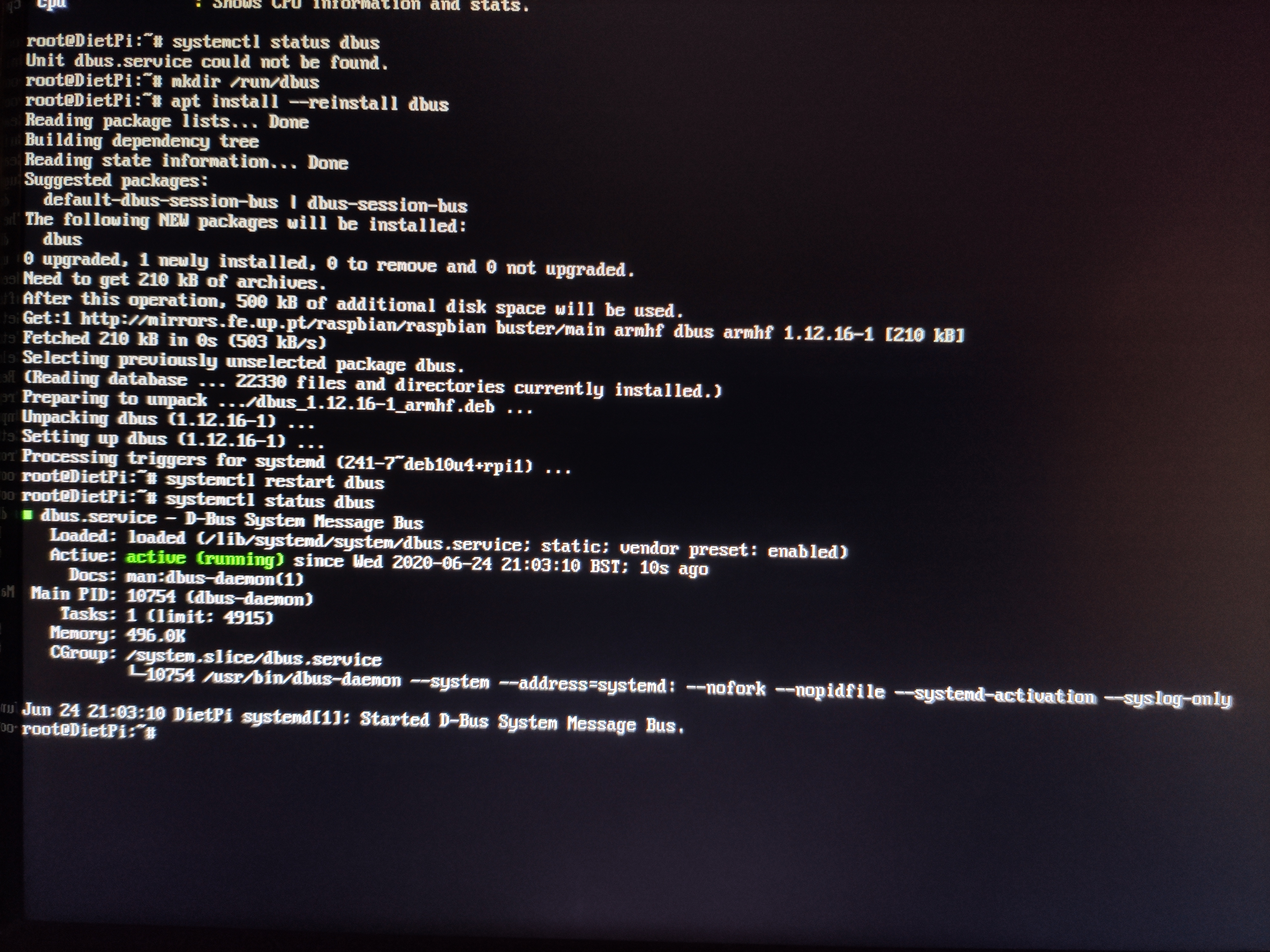
What are the steps from here?
tifDev
on 24 Jun 2020
Okay and the "bus not found" error still persists? To test without actual suspend:
systemctl --dry-run suspend
I ran that and it showed nothing, it was like if just hited enter in an empty terminal line...
tifDev
on 24 Jun 2020
That is expected, it's just a dry run to check if the dbus error still appears. Since it does not, systemctl suspend should now work as far as the SBC supports it 😉.
MichaIng
on 24 Jun 2020
Without dry-run:
Failed to set wall message: Unit systemd-login.service is masked.
Failed to suspend system via logind: Unit systemd-logind.service is masked.
So it looks like it's not possible with RPI :)
Thanks for your time!
tifDev
on 24 Jun 2020
did you run systemctl unmask systemd-logind before?
Joulinar
on 24 Jun 2020
Jep + systemctl start systemd-logind as mentioned above: https://github.com/MichaIng/DietPi/issues/3596#issuecomment-642709775
MichaIng
on 25 Jun 2020
@Joulinar Nop.
Now i ran:
systemctl unmask systemd-logind
systemctl start systemd-logind
systemctl restart dbus
systemctl suspend
Got this message:
Failed to suspend system via logind: Sleep verb "suspend" not supported
tifDev
on 29 Jun 2020
still I don't think this is working on Raspberry Pi devices. You just can run poweroff
Joulinar
on 29 Jun 2020
To shutdown? For that i run sudo shutdown -h now
Yes for what I see it's not possible. I did some searches but I always see that RPI it's not made for that.
Thanks btw.
tifDev
on 29 Jun 2020
shutdown now
shutdown -h now
poweroff
systemctl poweroff
- The above do all exactly the same on a systemd init system 😉.
Failed to suspend system via logind: Sleep verb "suspend" not supported
That makes it clear: "not supported"
MichaIng
on 30 Jun 2020
Closing this... Thanks guys
tifDev
on 30 Jun 2020
Related issues
 Invictaz
·
3Comments
Invictaz
·
3Comments
 and09
·
3Comments
and09
·
3Comments
 Kapot
·
3Comments
Kapot
·
3Comments
 pgferr
·
3Comments
pgferr
·
3Comments
 1021683053
·
3Comments
1021683053
·
3Comments