Dietpi: External Drive Permissions issue | "Folder is not writeable by user sonarr"
Creating a bug report/issue
Required Information
- DietPi version |
G_DIETPI_VERSION_CORE=6
G_DIETPI_VERSION_SUB=28
G_DIETPI_VERSION_RC=0
G_GITBRANCH='master'
G_GITOWNER='MichaIng'
- Distro version | buster
- Kernel version |
Linux alxepi 4.19.75-v7l+ #1270 SMP Tue Sep 24 18:51:41 BST 2019 armv7l GNU/Linux - SBC device |
RPi 4 Model B (armv7l)or (EG: RPi3) - Power supply used | The one in the labists starter kit
- SDcard used | SanDisk
Additional Information (if applicable)
- Software title | Sonarr
- Freshly installed
- Can this issue be replicated on a fresh installation of DietPi? Yes, probably
- Bug report ID |
sed -n 5p /DietPi/dietpi/.hw_model
Steps to reproduce
- Install Sonarr, Jackett and Deluge through
dietpi-software->Software: optimized - Set up an indexer in Jackett
- Hook up the indexer to Sonarr
- Hook Deluge downloader to Sonarr
- Mount external drive to
/mnt/external(what I did) - Search for a series in Sonarr
- Select
/mnt/externalas download path for the series
And here you get the error "Folder is not writable by user sonarr"
Expected behaviour
- Should be able to select this as a download path easily and flawlessly.
Actual behaviour
- Cannot select
/mnt/externalas download path
Extra details
- I have tried changing the permissions of the directory to 775, which works but didn't fix the issue
- I have tried changing the ownership of the directory to user "sonarr" but get an error:
chown: changing ownership of '/mnt/external': Operation not permitted
I'm quite literally new to DietPi and Linux in general so yeah.
 acryllect
All 11 comments
can you try to create a new folder /mnt/external/<NEW DIR>/. For testing purposes you could try to give 777 permission to that folder just to check if it's working.
BTW: you could use dietpi-drive_manager to manage your mounts 😃
 Joulinar
on 6 Jan 2020
Joulinar
on 6 Jan 2020
Already tried creating a new directory, didn't think it was important, but that didn't work.
Yeah I used dietpi-drive_manager to mount it :smile:
acryllect
on 6 Jan 2020
I remember running these to make things work:
chown -R dietpi:dietpi /mnt/external
chmod -R 775 /mnt/external
I take it you're logged in as root.
 bbsixzz
on 7 Jan 2020
bbsixzz
on 7 Jan 2020
@acryllect
where do you facing this issue exactly? Is it already right after searching the movie and trying to change the patch? Like this?
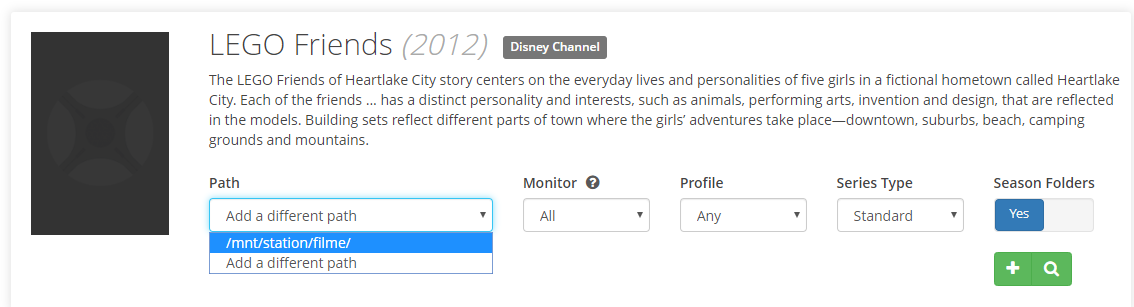
Joulinar
on 7 Jan 2020
@Joulinar Exactly
After selecting "add a different path" and browsing to it, that's when the issue comes in
acryllect
on 7 Jan 2020
@acryllect
can you go to /mnt and check who is ownig the external directory. For me the mount is owned by user dietpi. As well directories are created by this user.
root@DietPiVM1:/mnt# ls -l
insgesamt 12
drwxrwxr-x 8 dietpi dietpi 4096 Jan 7 00:52 dietpi_userdata
drwxr-xr-x 2 root root 4096 Jul 9 17:24 ftp_client
drwxr-xr-x 2 root root 4096 Jul 9 17:24 nfs_client
drwxrwx--- 2 dietpi dietpi 0 Jan 7 02:02 station
root@DietPiVM1:/mnt#
As well you can login as user dietpi on OS layer and try to do something on that mount
btw is this a network drive or an external hdd?
Joulinar
on 7 Jan 2020
@Joulinar
The ownerships of /mnt are as follows - keep in mind, I know very little of what this means:
root@alxepi:/mnt# ls -l
total 16
drwxrwxr-x 10 dietpi dietpi 4096 Jan 6 10:55 dietpi_userdata
drwxr-xr-x 2 root root 0 Feb 14 2019 external
drwxr-xr-x 2 root root 4096 Jul 14 19:24 ftp_client
drwxr-xr-x 2 root root 4096 Jul 14 19:24 nfs_client
drwxr-xr-x 2 root root 4096 Jul 14 19:24 samba
I might a have changed the ownership to the root user (from dietpi), for some reason, but nothing changed.
This is an external drive, plugged into one of the USB3 ports.
Edit: I also found that multiple users have posted about similar issues in the past on the dietpi.com forum - here's one that I found just now:
https://dietpi.com/phpbb/viewtopic.php?f=11&t=4595
acryllect
on 7 Jan 2020
@bbsixzz
I am unable to change the ownership of the directory, even though I am logged in as root (after running su -).
I get the following error:
chown: changing ownership of '/mnt/external': Operation not permitted
acryllect
on 7 Jan 2020
May the fact that the drive is partitioned as FAT be the reason it's not allowing me to change the ownership? I read, after a lot of searching, that FAT doesn't allow me to change ownership of files. Is this true?
acryllect
on 7 Jan 2020
This was exactly the issue! I re-formatted the drive using dietpi-drive_manager selecting mode drive instead of partition (since nothing was on the drive) and selected the type as the Default, recommended type (instead of FAT).
I then created a new group and added sonarr to it:
root@alxepi:~# addgroup media
Adding group `media' (GID 1001) ...
Done.
root@alxepi:~# sudo usermod -aG media sonarr
Then, I created the Shows directory and changed the ownership of that directory to the user sonarr and the group media (for future use with radarr and lidarr):
mkdir /mnt/external/Shows
sudo chown -R sonarr:media /mnt/external/Shows
Thanks so much for your help @Joulinar and @bbsixzz , always great to have active people helping out idiots like me. For users who stumble upon this post in the future, here are some links that helped me figure stuff:
https://forum.manjaro.org/t/folder-permission-for-sonarr-and-other-apps/47719/3 - where I finally started wondering if the format type was a proble,
https://dietpi.com/phpbb/viewtopic.php?f=11&t=4595 - a user posted about a similar issue
acryllect
on 7 Jan 2020
yep I guess you would need to format your stick into ext4. Do the following
- run
dietpi-drive_manager Unmountyour device- go to
Format - Start the format process with selected options (EXT4)
- once done you will be ask to specify the mount point
/mnt/external - exit drive manager
chown -R dietpi:dietpi /mnt/externalchmod -R 775 /mnt/externalcd /mntls -lashould now displaydietpiuser as owner of the mounted directory
EDIT:
damn I'm to slow 😃
Joulinar
on 7 Jan 2020
Related issues
 k-plan
·
3Comments
k-plan
·
3Comments
 mok-liee
·
3Comments
mok-liee
·
3Comments
 Fourdee
·
3Comments
Fourdee
·
3Comments
 oshank
·
3Comments
Fourdee
·
3Comments
oshank
·
3Comments
Fourdee
·
3Comments
Most helpful comment
This was exactly the issue! I re-formatted the drive using
dietpi-drive_managerselecting modedriveinstead ofpartition(since nothing was on the drive) and selected the type as the Default, recommended type (instead of FAT).I then created a new group and added
sonarrto it:Then, I created the
Showsdirectory and changed the ownership of that directory to the usersonarrand the groupmedia(for future use withradarrandlidarr):Thanks so much for your help @Joulinar and @bbsixzz , always great to have active people helping out idiots like me. For users who stumble upon this post in the future, here are some links that helped me figure stuff:
https://forum.manjaro.org/t/folder-permission-for-sonarr-and-other-apps/47719/3 - where I finally started wondering if the format type was a proble,
https://dietpi.com/phpbb/viewtopic.php?f=11&t=4595 - a user posted about a similar issue