DietPi-Software is already running on another terminal - after update to v6.20.5 RaspberryPi
I just logged in and performed the update via dietpi-update to upgrade to v6.20.5.
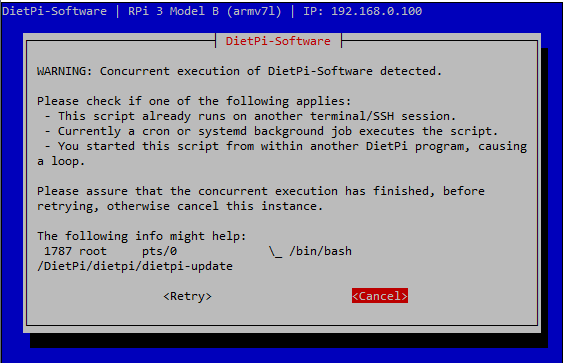
It rebooted and now sits in a loop with the message "DietPi-Software is already running on another terminal/screen. Please complete or exit, before continuing"
I am only logged in via SSH. A reboot has not helped, and I am unable to access things like Pihole.
I am also unable to perform the update again as it says I'm already up-to-date.
 dakers1980
All 10 comments
@dakers1980
I just pushed v6.20.6 hotfix. There was an issue where DietPi-RAMdisk did not successfully synced the updated files to disk on shutdown which lead to several issues, I believe yours as well.
Since I raised the RC version to v6.20.6 you should be able to apply the update again. It will be done as if you were still on v6.19.7 which is fine, since we are not 100% sure which steps might have missed due to the issue.
Please retry with this.
 MichaIng
on 29 Jan 2019
MichaIng
on 29 Jan 2019
Thanks. I just tried dietpi-update and it now just goes round in a loop...
Either option doesn't work.
dakers1980
on 29 Jan 2019
@dakers1980
Please cancel, open htop and verify that no instance of dietpi-software is running (perhaps on local terminal or such).
Also to prevent any first run loop:
echo 1 > /DietPi/dietpi/.install_stage
echo 1 > /boot/dietpi/.install_stage
Then retry.
MichaIng
on 29 Jan 2019
@dakers1980 run Even then no HDMI is connected a terminal is running at the hdmi
try dietpi-config -> display opt -> disable hdmi
or connect the pi to moinitor and keybord
That helped me
 docgalaxyblock
on 29 Jan 2019
docgalaxyblock
on 29 Jan 2019
@potter-91
Jep exactly. This was due to the RAMdisk issue no syncing the install stage correctly, so on reboot dietpi-software autostarts, as if it was first run setup.
Either your solution or above convincing the system that no first run setup needs to be done should work.
MichaIng
on 29 Jan 2019
In my case the update worked
At the moment no probs ^^
docgalaxyblock
on 29 Jan 2019
@potter-91
That is great. Yeah it was a nasty combination of the unexpected too late stopping RAMdisk service and the new install stage system, which removes .update_stage flag and instead lifts .install_stage to 2 to reflect first run update has finished.
The old code loaded after reboot (due to RAMdisk issue) expected the non-existent .update_stage file, otherwise starting dietpi-update on reboot automatically as if it was first boot, including dietpi-software reinstalls. and such...
However now some users might have mixed code and update stage flags now. The update to v6.20.6 should resolve this, but one needs to take care the possibly running dietpi-update/dietpi-software instances first.
This proves one thing: We need more beta testers 😅. We made so much tests on different machines and never ran into this.
MichaIng
on 29 Jan 2019
Okay will mark as closed, but if anyone still faces issues with the update, feel free to ask here and we will quickly re-investigate.
MichaIng
on 30 Jan 2019
Ok, managed to find a keyboard and attempted the upgrade from the Pi itself, not over SSH
It went through, and then on reboot I get these messages:
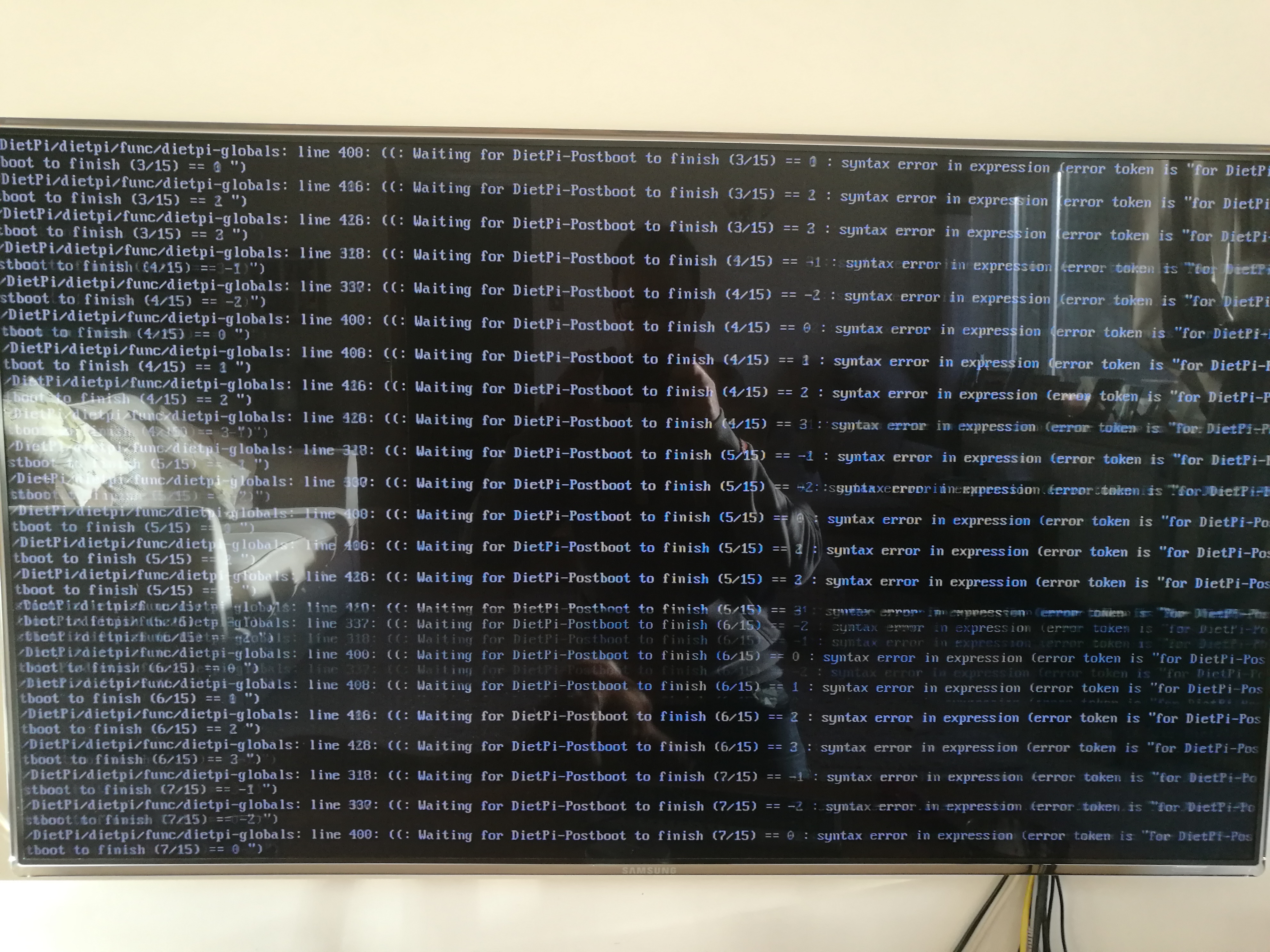
I'm still unable to access my Pihole instance on the box, and it's saying I'm at v6.20.6 now

dakers1980
on 30 Jan 2019
@dakers1980
Okay, found little syntax error: https://github.com/Fourdee/DietPi/commit/91d65d6c981f4ac1014aeb399547e6fd716d0c5a
To fix for next login: sed -i 's/G_DIETPI-NOTIFY "Waiting for DietPi-Postboot/G_DIETPI-NOTIFY 2 "Waiting for DietPi-Postboot/' /DietPi/dietpi/login
However the actual "info" inside stays the same, DietPi-Postboot did not finish.
After 15 seconds it should just ignore (if until then not successfully started). Which dietpi-autostart did you select? Simply autologin to console?
DietPi-Postboot itself should not take long, it only starts the services (webserver and such).
When having console access please check the following:
systemctl status dietpi-postbootif it finally shows exited successfully. If not...systemctl status dietpi-bootif this exited successfully. If not...systemctl status dietpi-prebootif exited successfully. If not...systemctl status dietpi-ramdiskif exited successfully. Also checkcat /var/tmp/dietpi/logs/dietpi-ramdisk.logif it successfully stopped on last shutdown start started on boot.- And just to verify the update applied the new install stage system:
cat /DietPi/dietpi/.install_stage /DietPi/dietpi/.update_stageIt should show2and an error that the second file does not exist (wanted).
MichaIng
on 30 Jan 2019
Related issues
 oshank
·
3Comments
oshank
·
3Comments
 and09
·
3Comments
and09
·
3Comments
 pgferr
·
3Comments
pgferr
·
3Comments
 Fourdee
·
3Comments
Fourdee
·
3Comments
Fourdee
·
3Comments
Fourdee
·
3Comments