DietPi-Software | PiHole: Does not finish installing after setting new password.
Creating a bug report/issue:
Required Information:
DietPi version |
cat /DietPi/dietpi/.version
G_DIETPI_VERSION_CORE=6
G_DIETPI_VERSION_SUB=18
G_DIETPI_VERSION_RC=14Distro version |
echo $G_DISTRO_NAMEorcat /etc/debian_versionstretch- Kernel version |
uname -a - SBC device |
echo $G_HW_MODEL_DESCRIPTIONor (EG: RPi3) - Power supply used | (EG: 5V 1A RAVpower) Official power supply
- SDcard used | (EG: SanDisk ultra)
Additional Information (if applicable):
- Software title | (EG: Nextcloud) PiHole
- Was the software title installed freshly or updated/migrated? Updated
- Can this issue be replicated on a fresh installation of DietPi? Unknown
Steps to reproduce:
- ... Install pihole
Expected behaviour:
- ... after accepting the new password the installer should continue
Actual behaviour:
[i] Nothing to whitelist!
[i] Number of regex filters: 0
[✓] Parsing domains into hosts format
[✓] Cleaning up stray matter
[✓] Force-reloading DNS service
[✓] DNS service is running
[✓] Pi-hole blocking is Enabled
[✓] New password set <- despite an hour of waiting
 LexiconCode
All 10 comments
I was able to reset password using a much shorter less complex password. I'm guessing there something wrong with long computer passwords.
LexiconCode
on 27 Nov 2018
@LexiconCode
Thanks for the report 👍
Please can you provide a rough example of the password used?
 Fourdee
on 28 Nov 2018
Fourdee
on 28 Nov 2018
@LexiconCode
Thanks for the report 👍
Please can you provide a rough example of the password used?
I5#l@qQUT&G7@Om5M8aGZ1pH#^u8qsfof6KdPz0yZzrZ9pisyCHfxX@I*fXrGn^a2
LexiconCode
on 29 Nov 2018
@LexiconCode
I5#l@qQUT&G7@Om5M8aGZ1pH#^u8qsfof6KdPz0yZzrZ9pisyCHfxX@I*fXrGn^a2
Epic, thanks. Will run some tests 👍
Our end 🈯️ https://www.diffchecker.com/XX67Ysyl
root@DietPi:~# cat /var/lib/dietpi/dietpi-software/.GLOBAL_PW.bin | openssl enc -base64 -d -aes-256-cbc -nosalt -pass pass:'DietPiRocks!'
I5#l@qQUT&G7@Om5M8aGZ1pH#^u8qsfof6KdPz0yZzrZ9pisyCHfxX@I*fXrGn^a2
Hmm, seems fine in v6.18:
- UI login 🈯️
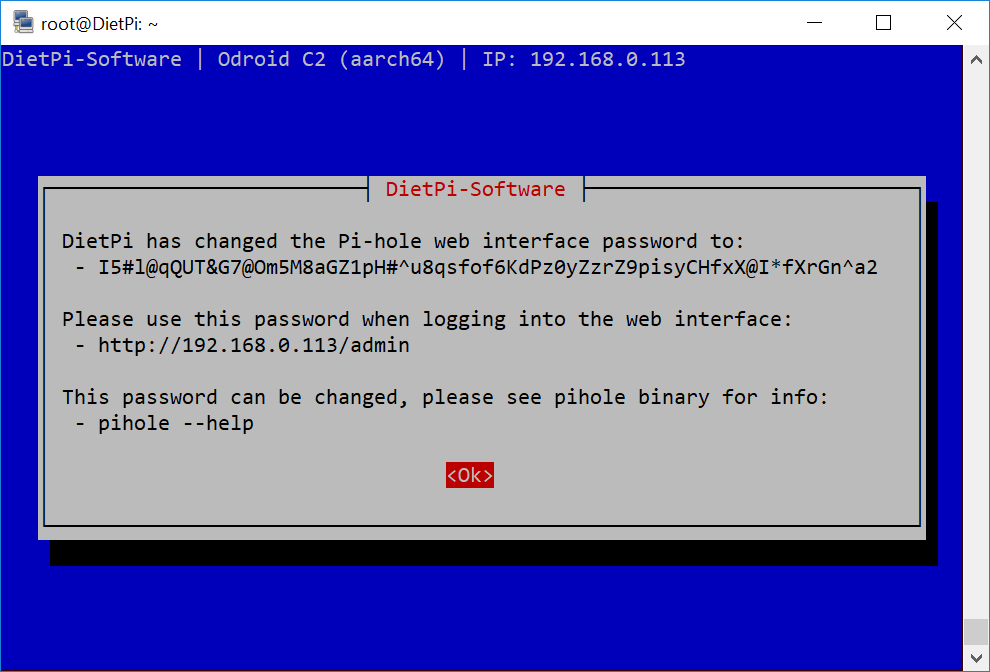
@LexiconCode
Password appears fine in our tests, maybe github is converting some chars, please could you place the password you originally used (with some minor changes), on https://pastebin.com?
Fourdee
on 30 Nov 2018
I'll get back to you as soon as I have access to the system
LexiconCode
on 4 Dec 2018
2Qs55DRYwH1J5q1LttY778DyY3PaetKSxzAMNu4kX7OCFnQhYboh2Toi95EHVx9FHDJyhrS6D64iUGAUDo4H7nb0DqRi8NK7uNVrZxAe4SB5fhrKcEg0TuFiR2Ad5mRj
LexiconCode
on 12 Dec 2018
Checked our encryption system with this password as well:
2019-03-03 17:56:57 root@micha:/tmp# echo '2Qs55DRYwH1J5q1LttY778DyY3PaetKSxzAMNu4kX7OCFnQhYboh2Toi95EHVx9FHDJyhrS6D64iUGAUDo4H7nb0DqRi8NK7uNVrZxAe4SB5fhrKcEg0TuFiR2Ad5mRj' | openssl enc -a -e -aes-256-cbc -nosalt -pass pass:'DietPiRocks!'
Uq6GpgM7gwZdaV9Nnxs9dKTz7ty+gDAfHmXVxGgytOGQK4JTLuPgRVH4cOJBW5L5
e5ShXE1MiOTfQ3oryAUSarRCwWI3SUKwjVb3ovLzY5ZBQv4lnLm4KQkivW+XEss/
GDr7zlqAUd2axEWzQU3b6KutvMrp4KkKJsInfEIh5VEwDnK/eEdDqMG1fnwf787r

2019-03-03 21:52:55 root@micha:/tmp# echo 'Uq6GpgM7gwZdaV9Nnxs9dKTz7ty+gDAfHmXVxGgytOGQK4JTLuPgRVH4cOJBW5L5e5ShXE1MiOTfQ3oryAUSarRCwWI3SUKwjVb3ovLzY5ZBQv4lnLm4KQkivW+XEss/GDr7zlqAUd2axEWzQU3b6KutvMrp4KkKJsInfEIh5VEwDnK/eEdDqMG1fnwf787r' | openssl enc -a -d -aes-256-cbc -nosalt -pass pass:'DietPiRocks!'
2Qs55DRYwH1J5q1LttY778DyY3PaetKSxzAMNu4kX7OCFnQhYboh2Toi95EHVx9FHDJyhrS6D64iUGAUDo4H7nb0DqRi8NK7uNVrZxAe4SB5fhrKcEg0TuFiR2Ad5mRj
According to Fourdees test also Pi-hole threats special characters correctly.
@LexiconCode
Sorry that this issue was forgotten btw,
Are you still running into this issue with current version?
In case we need to replicate step-by-step:
- Apply the global password via dietpi-config.
- Check if
cat /var/lib/dietpi/dietpi-software/.GLOBAL_PW.bin | openssl enc -base64 -d -aes-256-cbc -nosalt -pass pass:'DietPiRocks!'correctly decrypts this password. - (Re)install Pi-hole and check if the password changed prompt as well shows the correctly decrypted password.
- Check if Pi-hole web UI accepts the password.
 MichaIng
on 3 Mar 2019
MichaIng
on 3 Mar 2019
I will be able to get to test this some time this coming Tuesday or Wednesday this week. I'll let you know then.
LexiconCode
on 3 Mar 2019
@LexiconCode
Could you solve the issue?
MichaIng
on 27 May 2019
I mark issue as closed for now. Feel free to reopen if required.
MichaIng
on 8 Jun 2019
Related issues
Fourdee
·
3Comments
 oshank
·
3Comments
oshank
·
3Comments
 pfeerick
·
3Comments
Fourdee
·
3Comments
pfeerick
·
3Comments
Fourdee
·
3Comments
 k-plan
·
3Comments
k-plan
·
3Comments