Dietpi: Prep-Script on Orange Pi Zero (H2+) WIFI not working
Creating a bug report/issue:
Required Information:
DietPi version |
cat /DietPi/dietpi/.version
G_DIETPI_VERSION_CORE=6
G_DIETPI_VERSION_SUB=17
G_DIETPI_VERSION_RC=12
G_GITBRANCH=master
G_GITOWNER=FourdeeDistro version |
echo $G_DISTRO_NAMEorcat /etc/debian_version
stretch 9.6- Kernel version |
uname -a
Linux DietPi-test-OPI0 4.14.78-sunxi #412 SMP Fri Oct 26 11:37:04 CEST 2018 armv7l GNU/Linux - SBC device |
echo $G_HW_MODEL_DESCRIPTIONor (EG: RPi3)
OrangePi Zero (armv7l) - Power supply used | (EG: 5V 1A RAVpower)
5 volt 3 amp Buck converter - SDcard used | (EG: SanDisk ultra)
SanDisk Edge 8GB
Additional Information (if applicable):
- Software title | (EG: Nextcloud)
N/A - Was the software title installed freshly or updated/migrated?
N/A - Can this issue be replicated on a fresh installation of DietPi?
Yes, see below dietpi-bugreportID
N/A
Steps to reproduce:
- Install "Armbian_5.65_Orangepizero_Debian_stretch_next_4.14.78.img" to SD Card
- Boot SD card on OPI0, log in, change root password. Connect to wifi network using nmtui, verify that wifi is working.
- Run DietPi prep script as per this link: https://github.com/Fourdee/DietPi/issues/1285#issue-280771944
- Wifi is now not working anymore, no way to connect to wireless network?
Expected behaviour:
- Wifi should work after dietPi Prep script, as it was working before....
Actual behaviour:
- Wifi is not working, impossible to connect to wireless network after running DietPi prep script
Extra details:
- Are there any special steps needed to enable Wifi on Dietpi OPI0? Wifi is verified to be working with fresh armbian install with good connectivity, and as soon as I run DietPi prep script I am unable to connect to WIFI.....
 aaro668
All 19 comments
@aaro668
Thanks for your report.
Jep it's a known issue when running DietPi-PREP with WiFi connection (SSH) and NetworkManager was installed previously. For this reason currently Ethernet connection is required to have the install done reliable.
However to verify this is really your issue:
- Was the WiFi (SSH) connection dropped during DietPi-PREP running?
- Check whether the
network-manageris installed on ARMbian image. - In case, connect via SSH over Ethernet or direct attached HDMI + keyboard.
- Purge the
network-managerpackage - Configure WiFi via
/etc/network/interfacesand/etc/wpa_supplicant/wpa_supplicant.conf. - Then run DietPi-PREP, which should be then as well work via WiFi SSH connection.
Fourdee also posted some more detailed instructions here: https://github.com/Fourdee/DietPi/issues/2210#issuecomment-435687637
The problem is that when purging network-manager, all WiFi related settings are removed and WiFi connection dropped. See related issue: https://github.com/Fourdee/DietPi/issues/2054
 MichaIng
on 26 Nov 2018
MichaIng
on 26 Nov 2018
The issue is not with ssh being dropped....I was ssh through Ethernet, but after running prep script I couldn't set up and use Wi-Fi.....
Aaron Martin
aaro668
on 26 Nov 2018
Same here, I prepared image on Orange Pi Zero H2+ two days ago and wifi is "Not Found". I had run the PREP script with ethernet.
 Twilight0
on 26 Nov 2018
Twilight0
on 26 Nov 2018
A bit more detail here.....
With the Armbian install the Wifi IS working fine, I believe it has Network Manager, as I can configure wireless network using nmtui command.
The SSH connection was not dropped during DietPi-PREP, as I was connected over ethernet/serial.
After DietPi-PREP is finished and first boot setup is done I cannot get WIFI set up and working.....
Maybe I need to do it manually some way?
aaro668
on 26 Nov 2018
Another thing that I noticed was that htop interface changes.....
This is how htop looks with fresh install of Armbian:

And this is how htop looks after I run DietPi-PREP:
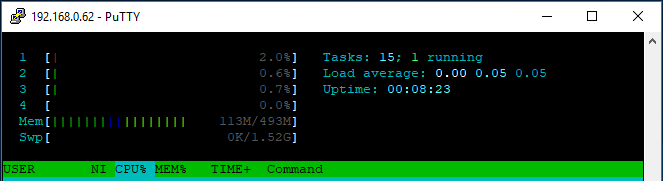
Maybe this is built into the design of Dietpi to minimize processing?
aaro668
on 27 Nov 2018
@aaro668
The default htop does not support CPU temps and frequencies. This seems to be a custom version, e.g.:
- https://github.com/avafinger/htop (amd64+arm64 only)
- https://github.com/wbenny/htop (armhf only)
I forwarded this request (was already done earlier) to the developer of the official htop. Of course the request did already exist 😉: https://github.com/hishamhm/htop/issues/163
- The problem is, that there are many different interfaces to read out the CPU temperature and even if you identify fitting files, sometimes the ones show static degrees only (not real CPU temp) and you need to know which different one you need to read out. Already for our limited amount of supported devices and on Debian-only, it is a mess: https://github.com/Fourdee/DietPi/blob/master/dietpi/func/dietpi-globals#L1945
But in case of a platform independent tool that should work reliable on all platforms/distros, this is somehow a deal breaker.
Open request for CPU frequencies: https://github.com/hishamhm/htop/issues/129
- ~I guess it is similar then with the temps.~
€: Nope, CPU freq readout seems to be consistent: https://github.com/Fourdee/DietPi/blob/master/dietpi/dietpi-cpuinfo#L56-L72
Perhaps we can push this feature request on officialhtop?
I would also love to have everything in one place, but the current 3rd party solutions are either outdated (base htop version), or work only on limited architectures and then temps/freqs will not be correct on all devices. Also often implementations are crappy or rely on heavy dependencies and additional services running in background.
So I would definitely stick with the official version, also since on DietPi cpu provides CPU temp/freq information already.
Perhaps ARMbian customizes their pre-installed htop for each device, since it goes hand in hand with kernel development 🤔.
MichaIng
on 27 Nov 2018
@MichaIng
Thanks for the htop info, this is not a deal breaker for me, I just thought I would mention it here as I noticed it at the same time as I found the Wifi problem.
Have you checked in about the Wifi yet? Maybe I need to enable Wifi another way?
aaro668
on 27 Nov 2018
NB: There is already on open PR for CPU freq, but no progress for a while 😢: https://github.com/hishamhm/htop/pull/592
About WiFi:
- How did you try to configure WiFi?
dietpi-config? - Please check if the interface is up and connected to the AP:
ip a/ip r - If not, check available network cards:
ls -Al /sys/class/net/orcat /proc/net/dev - Then check which one is configured in
cat /etc/network/interfaces, if this is the expected network card. - Check that WiFi credential are correct:
cat /etc/wpa_supplicant/wpa_supplicant.conf(of course do not paste this or remove SSID + key here 😉)
And did you try to switch from DHCP to static IP or the other way round? Perhaps also DHCP fails somehow.
MichaIng
on 27 Nov 2018
I tried to manually modprobe its module today:
sudo modprobe xradio_wlan
Then I read these things in the dmesg:
[ 12.736501] xradio_wlan mmc1:0001:1: Direct firmware load for xr819/sdd_xr819 .bin failed with error -2
[ 12.736514] xradio_wlan mmc1:0001:1: Falling back to user helper
[ 12.906360] Generic PHY 0.1:01: attached PHY driver [Generic PHY] (mii_bus:phy_addr=0.1:01, irq=POLL)
[ 12.909229] dwmac-sun8i 1c30000.ethernet eth0: No MAC Management Counters available
[ 12.909245] dwmac-sun8i 1c30000.ethernet eth0: PTP not supported by HW
[ 12.909705] IPv6: ADDRCONF(NETDEV_UP): eth0: link is not ready
[ 13.370984] thermal thermal_zone0: failed to read out thermal zone (-110)
[ 14.410902] thermal thermal_zone0: failed to read out thermal zone (-110)
[ 14.972280] dwmac-sun8i 1c30000.ethernet eth0: Link is Up - 100Mbps/Full - flow control off
[ 14.972356] IPv6: ADDRCONF(NETDEV_CHANGE): eth0: link becomes ready
[ 16.533948] random: crng init done
[ 16.533966] random: 7 urandom warning(s) missed due to ratelimiting
[ 74.731564] xradio_wlan mmc1:0001:1: bh thread exiting
Also these:
dietpi@DietPi:~$ cat /proc/net/dev
Inter- | Receive | Transmit
face | bytes packets errs drop fifo frame compressed multicast|bytes packets errs drop fifo colls
carrier compressed
eth0: 32022 268 0 0 0 0 0 0 78478 234 0 0 0 0 0 0
lo: 0 0 0 0 0 0 0 0 0 0 0 0 0 0 0 0
`
Twilight0
on 27 Nov 2018
@MichaIng
I use dietpi-config, then "Network Options: Adapters"
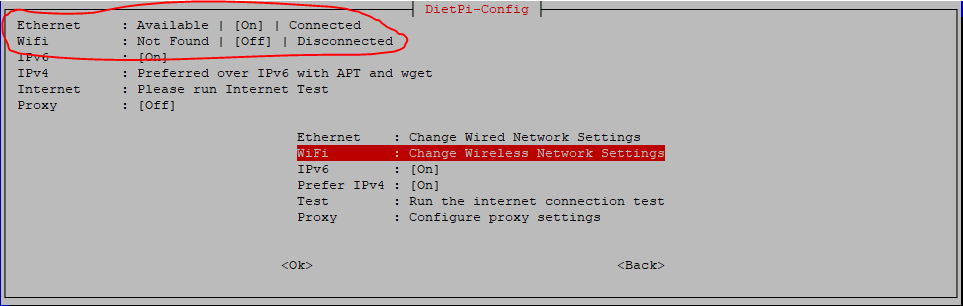
Then I select "Change Wireless Network Settings"

Then I select OK

After I exit from dietpi-config now, this is the terminal history:

Maybe this can help you determine what I am doing wrong?
Here is output of ip a after I made above settings:
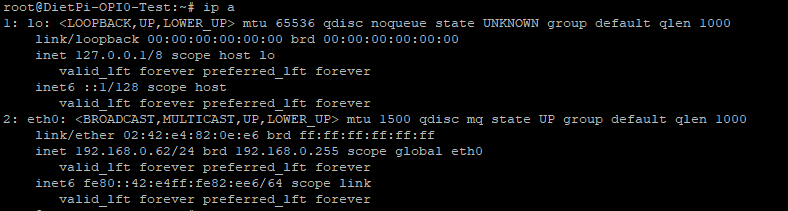
And here is out of ip r :

Here is output of ls -Al /sys/class/net/ and cat /proc/net/dev :

Here is output of cat /etc/network/interfaces :
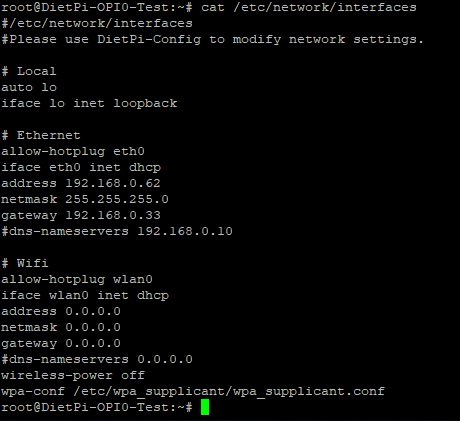
And here is output from cat /etc/wpa_supplicant/wpa_supplicant.conf :

And from dmesg:
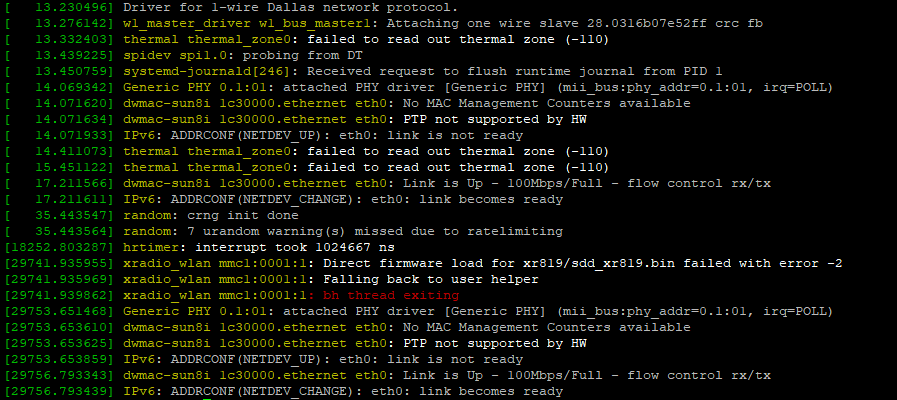
I also found this further up:
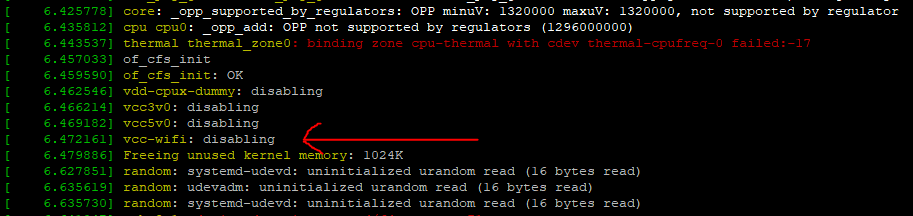
aaro668
on 27 Nov 2018
Here is output from ls /lib/firmware with fresh Armbian install:

And here is the output after running DietPi-PREP :

It looks like there were a lot added, but the xr819 is missing.....
aaro668
on 27 Nov 2018
So......I copied the xr819 directory from here: https://github.com/armbian/firmware
Into the local /lib/firmware/ directory, restarted the system, and now I have this:
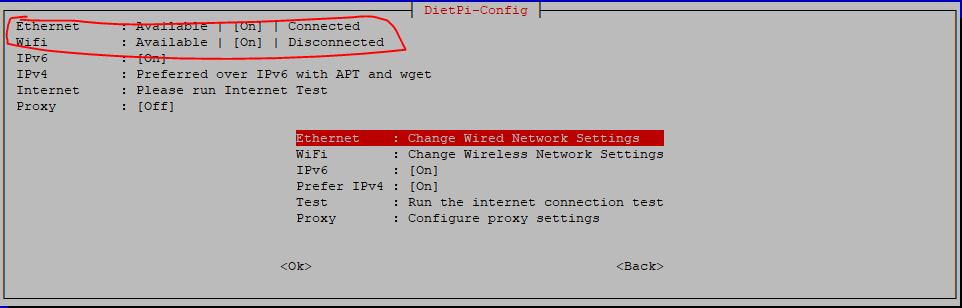
aaro668
on 27 Nov 2018
So, copying the xr819 directory into /lib/firmware/ directory I am now able to connect to an SSID.
Is this a bug in DietPi-PREP?
aaro668
on 27 Nov 2018
@aaro668
Is this a bug in DietPi-PREP?
Custom firmware provided by the armbian-firmware package conflicts with default Debian packages, and, Debian packages lacks the custom firmware.
I'll fix PREP to detect ARMbian and prevent firmware removal/changes.
 Fourdee
on 28 Nov 2018
Fourdee
on 28 Nov 2018
@Fourdee
Thanks, let me know when fix is ready to test, then I will go through and make sure it is working here.
aaro668
on 28 Nov 2018
@aaro668
Thanks 👍
Ok code done, available via dev branch, use below PREP:
wget https://raw.githubusercontent.com/Fourdee/DietPi/dev/PREP_SYSTEM_FOR_DIETPI.sh -O PREP_SYSTEM_FOR_DIETPI.sh
chmod +x PREP_SYSTEM_FOR_DIETPI.sh
./PREP_SYSTEM_FOR_DIETPI.sh
@Fourdee
Which of these 3 options should I select?
I usually use the top one, but your reference to dev branch makes me think I should maybe select the 3rd item?
aaro668
on 28 Nov 2018
@aaro668
Which of these 3 options should I select?
Master should be fine, updated PREP script is already loaded.
Fourdee
on 28 Nov 2018
Firmware issues resolved in PREP dev and by selecting install branch dev only. Due to master branch pre-req firmware during wifi set.
Completed, passed local testing.
Fourdee
on 30 Nov 2018
Related issues
 k-plan
·
3Comments
k-plan
·
3Comments
 and09
·
3Comments
and09
·
3Comments
 pfeerick
·
3Comments
pfeerick
·
3Comments
 bhaveshgohel
·
3Comments
bhaveshgohel
·
3Comments
 Invictaz
·
3Comments
Invictaz
·
3Comments