Dietpi: on uninstall of netdata.. is delete my etc file folder.!
Creating a bug report/issue:
sory for my bad english :/
want to delete netdata thru my dietpi software uninstaller just to install it again but after starting my uninstall of netdata sudenly it stop and made a erorr of some sort made a reboot not thinking more about it and then i cant boot up it says im missing some files
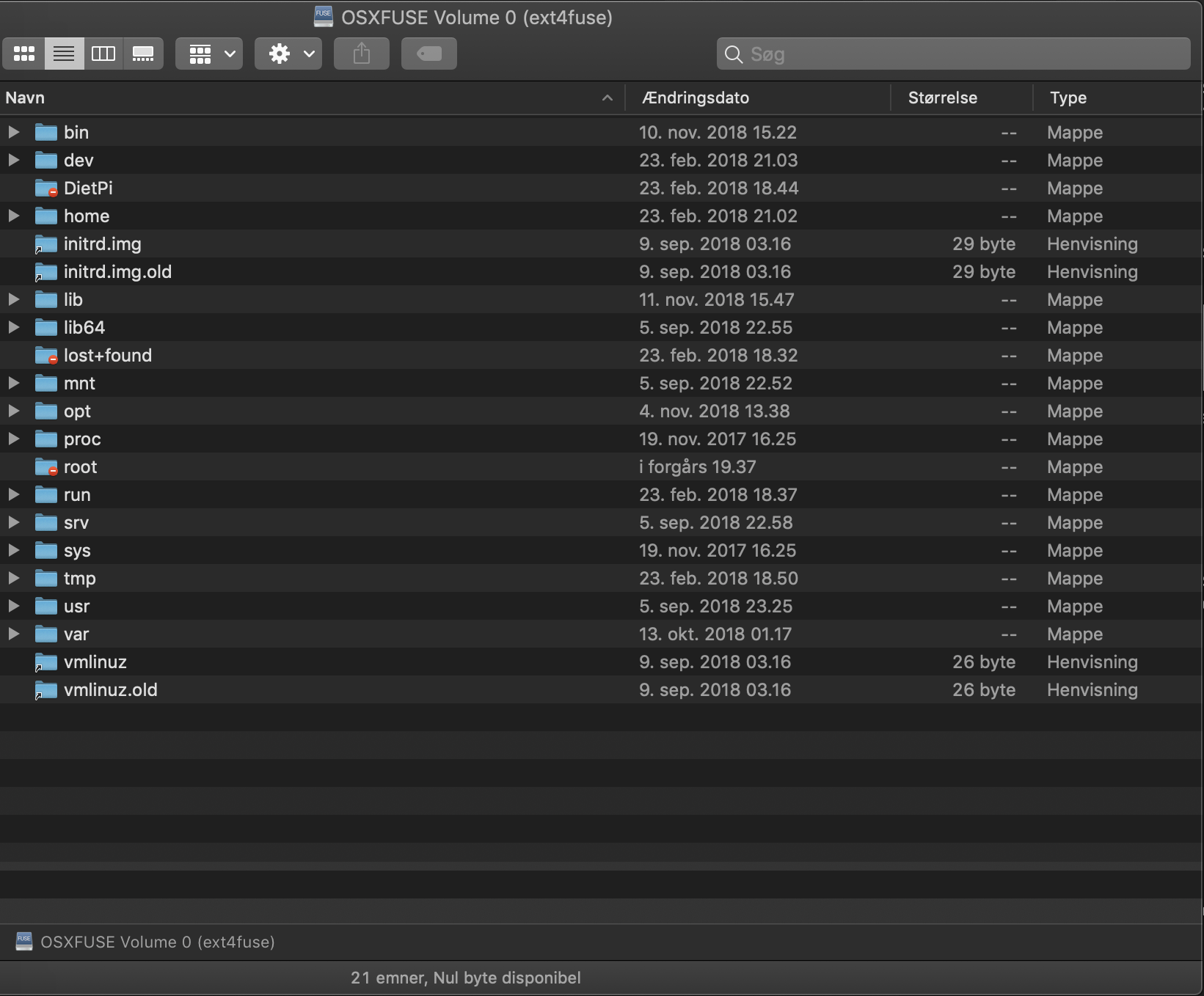
but the disk to my mac and can se that im missing my etc file folder now..??
some place to fine any log files to se what happen..?
Required Information:
- DietPi version | 6.17.12
- Distro version |
- Kernel version |
- SBC device | pc
- Power supply used |
- SDcard used | SSD
Additional Information (if applicable):
- Software title | netdata
- Was the software title installed freshly or updated/migrated?
hade it install for a wile - Can this issue be replicated on a fresh installation of DietPi?
dietpi-bugreportID
dont know..
Steps to reproduce:
- ...
- ...
Expected behaviour:
- ...
Actual behaviour:
all is says no is :
error: file '/grub/i386-pc/normal.mod' not found
entering rescue mode...
grub rescue>
- ...
Extra details:
- ...
 janbildsoehansen
All 11 comments
@janbildsoehansen
Many thanks for the report 👍
We'll need some more details to assist.
Please can you confirm:
- DietPi image used (eg: NativePC)?
- Hardware used (eg: Raspberry Pi 3)?
- Additional software installed on the system?
- Any manual changes to system, outside of DietPi scripts?
The current uninstall script, would not remove /etc from the system:
        software_id=65
        if (( aSOFTWARE_INSTALL_STATE[$software_id] == -1 )); then

            Banner_Uninstalling
            #apt-mark auto zlib1g-dev &> /dev/null

            #all
            rm /etc/systemd/system/netdata.service

            userdel -rf netdata
            groupdel netdata

            #1.2.0+
            G_AGP netdata

            #1.0.0
            rm /usr/sbin/netdata

            rm -R /etc/netdata
            rm -R /usr/share/netdata
            rm -R /usr/libexec/netdata
            rm -R /var/cache/netdata
            rm -R /var/log/netdata

        fi
I suspect a filesystem issue/corruption. However, we need the additional info on your setup.
 Fourdee
on 17 Nov 2018
Fourdee
on 17 Nov 2018
yaa i can understand it wound. but after put the disk to my mac i can see that im missing my etc folder :(
im using dietpi 6.17.12 on a PC
and hade some software installed not sure what exactly..
but i have the "dead" disk still in hop i can bring it back..
have a con job running for one of my website thats it..
janbildsoehansen
on 18 Nov 2018
@janbildsoehansen
Did you use your mac to check for disk corruption? Not sure if it can on ext4 file system?
Perhaps on reboot (which then failed), related file inodes were unlinked. They are usually placed into /lost+found then. So if you find many files (with moreless random number names) inside this folder, the file system got corrupted and those files got unlinked from their place within the file/folder structure. It would be possible to check content of each file, and if identified, move it back into related /etc/.. location, but I doubt this being practically possible for all required files.
 MichaIng
on 18 Nov 2018
MichaIng
on 18 Nov 2018
no just install fuse on my mac to open the disk like a usb and get some of my hosted website files.
cant access the lost+found folder
im just gonna redo the work on a new install :(
janbildsoehansen
on 18 Nov 2018
@janbildsoehansen
Ah okay no full root access to the drive it seems 🤔. No idea how to solve this on mac, on another Linux system you can access those directories and as well do a file system check for error.
But since /etc indeed is completely missing, I am pretty sure it is due to disk corruption and will be hard or impossible to fix without an available dietpi-backup.
On SBCs with SDcard you are never really save from this. SDcards often have corruption issues and break fast. Take care to move your userdata to an external drive and regularly do a dietpi-backup, so you can recover your system. If it does not boot any more, you can use another Linux system, e.g. Knoppix live system to do related recovery steps (via rsync) and fsck to fix disk corruption, in case.
MichaIng
on 18 Nov 2018
okay i have a new install of dietpi i can run on a new ssd if it is..
is on a ssd the dietpi is installed...
im just gonna make alle the work again on a new install..
janbildsoehansen
on 18 Nov 2018
@janbildsoehansen
I will mark this issue as closed. Feel free to reopen, in case it reappears.
As said, take care to regularly do dietpi-backup, especially before doing deeper system changes.
In case the issue was really related to file system corruption, for a while have a regular look at dmesg output, where file system errors are reported. For example:
[1211960.933399] EXT4-fs (mmcblk0p2): error count since last fsck: 6
[1211960.933436] EXT4-fs (mmcblk0p2): initial error at time 1529665909: ext4_ext_check_inode:510: inode 255402
[1211960.933468] EXT4-fs (mmcblk0p2): last error at time 1542557951: ext4_lookup:1586: inode 255310
[1224219.148925] EXT4-fs (sdb): mounted filesystem with ordered data mode. Opts: (null)
If such errors appear you can usually let them be fixed on reboot by: > /forcefsck, then reboot.
But if errors reappear very often (or high amount), even after all was fixed, then most likely there are bad blocks on the SSD and you should take a new one to prevent system/data loss.
MichaIng
on 24 Nov 2018
thanks will remember in the future :) thanks for the respons
janbildsoehansen
on 25 Nov 2018
High likely the issue is related to: https://github.com/Fourdee/DietPi/issues/2336
Very critical, perhaps we have to patch this with another hotfix v6.19.7, since it destroys the system!
MichaIng
on 9 Dec 2018
I'm not sure if its related have again idea :/
was because netdata would not really update when I pressed the button. so
just wanted to uninstall it through the dietpi software program as i have
done with other programs.
I did not know what happened but there was an error under the uninstall
without thinking about it and I just restarted it.
and my system wound start up.
and efter setting the harddisk to another computer the I could see that the
etc folder was gone.
Network data was installed from the start through dietpi installer.
Den søn. 9. dec. 2018 kl. 17.04 skrev MichaIng notifications@github.com:
High likely the issue is related to: #2336
https://github.com/Fourdee/DietPi/issues/2336Very critical, perhaps we have to patch this with another hotfix v6.19.7,
since it destroys the system!—
You are receiving this because you were mentioned.
Reply to this email directly, view it on GitHub
https://github.com/Fourdee/DietPi/issues/2254#issuecomment-445549428,
or mute the thread
https://github.com/notifications/unsubscribe-auth/AeKJznwJPl2xIdsN3c2XZ9MKpmothfKqks5u3TSSgaJpZM4YnXyA
.
--
janbildsoehansen
on 9 Dec 2018
@janbildsoehansen
Jep, this exactly is the linked issue. dietpi-software uninstall netdata currently attempts to remove the whole file system... This stops, when if fails due to some file currently in use. In case of the linked issue, /usr was removed until it stopped, in your case /etc and perhaps already some other subdirs. Both are system critical and removing it will lead to system being unusable and won't boot.
To prevent further users from destroying their systems, I will release a quick hotfix update, which does nothing but fixing netdata uninstall from attempting to remove root dir.
MichaIng
on 9 Dec 2018
Related issues
 pgferr
·
3Comments
pgferr
·
3Comments
 Invictaz
·
3Comments
Invictaz
·
3Comments
Fourdee
·
3Comments
Invictaz
·
3Comments
Invictaz
·
3Comments
Fourdee
·
3Comments
 1021683053
·
3Comments
1021683053
·
3Comments