I'm having a problem with my raspberry pi running dietpi. It freezes so al my services don't react and I have to unplug the power to restart. Can someone help me finding the cause?
 roelfoubert
All 26 comments
@roelfoubert
Thanks for your report.
My first assumption would be insufficient PSU, too power consuming USB devices (e.g. SSDs) attached and such.
- Does the freeze occur after a certain time or when doing some special CPU intense task?
- Did another OS (e.g. Raspbian) run well without those issues and with same hardware/periphery attached?
Also please full the full bug report template, add the software titles you installed and at best create a bug report.
As long as the Pi still runs, please show result of the dmesg command, as it might contain some related voltage or disk I/O errors.
 MichaIng
on 12 Oct 2018
MichaIng
on 12 Oct 2018
The freeze doesn't occur after a certain time but randomly.
I've installed the following software:
Netatalk
homebridge
plexmediaserver
sonarr
radarr
jackett
transmission
aria2
proftp
rpi-monitor
home-assistant
yesterdag I stopped a couple of services like sonarr and radarr and the pi stays online without any freeze. I think it's just a bit to much for 1 pi to handle.
roelfoubert
on 13 Oct 2018
@roelfoubert
I think it's just a bit to much for 1 pi to handle.
Depends on the hang. If its a soft hang (eg: delay due to CPU/IO overheads), that recovers over time, its fine and a limit of the device.
If the hang does not recover, could be due to faulty hardware.
Please state power supply used and SD card used.
 Fourdee
on 13 Oct 2018
Fourdee
on 13 Oct 2018
when it hangs it does not recover.
I use a original raspberry pi 2.5A power supply and use a usb as boot device
roelfoubert
on 13 Oct 2018
@roelfoubert
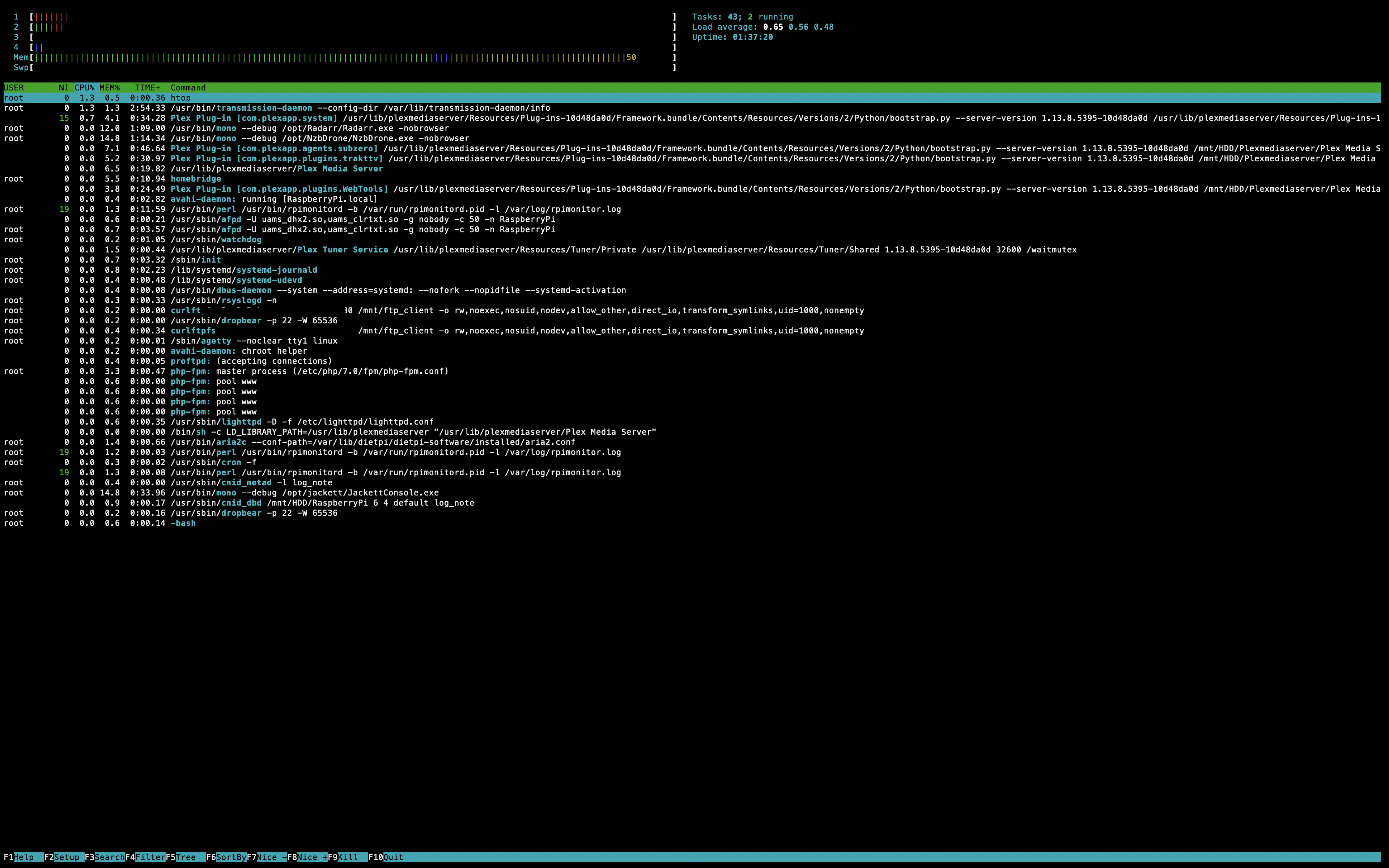
When the system has run for a bit, check htop for memory usage (take a screenshot).
May need to increase the swapfile size.
Which USB pen drive used?
Fourdee
on 13 Oct 2018
now running for 1,5 hours
i'm using this usb drive :https://www.integralmemory.com/product/fusion-usb-3-superspeed-small-metal-flash-drive
roelfoubert
on 13 Oct 2018
There's a PDF on the USB drive page:
Max Operating Temperature 70°c
Maybe you reached it?
 Atavic
on 13 Oct 2018
Atavic
on 13 Oct 2018
@Atavic
Max Operating Temperature 70°c
Yep, if this is an RPi 3, CPU thermals do leak to USB ports + devices, could be overheating the USB drive which looks prone to overheating.
@roelfoubert
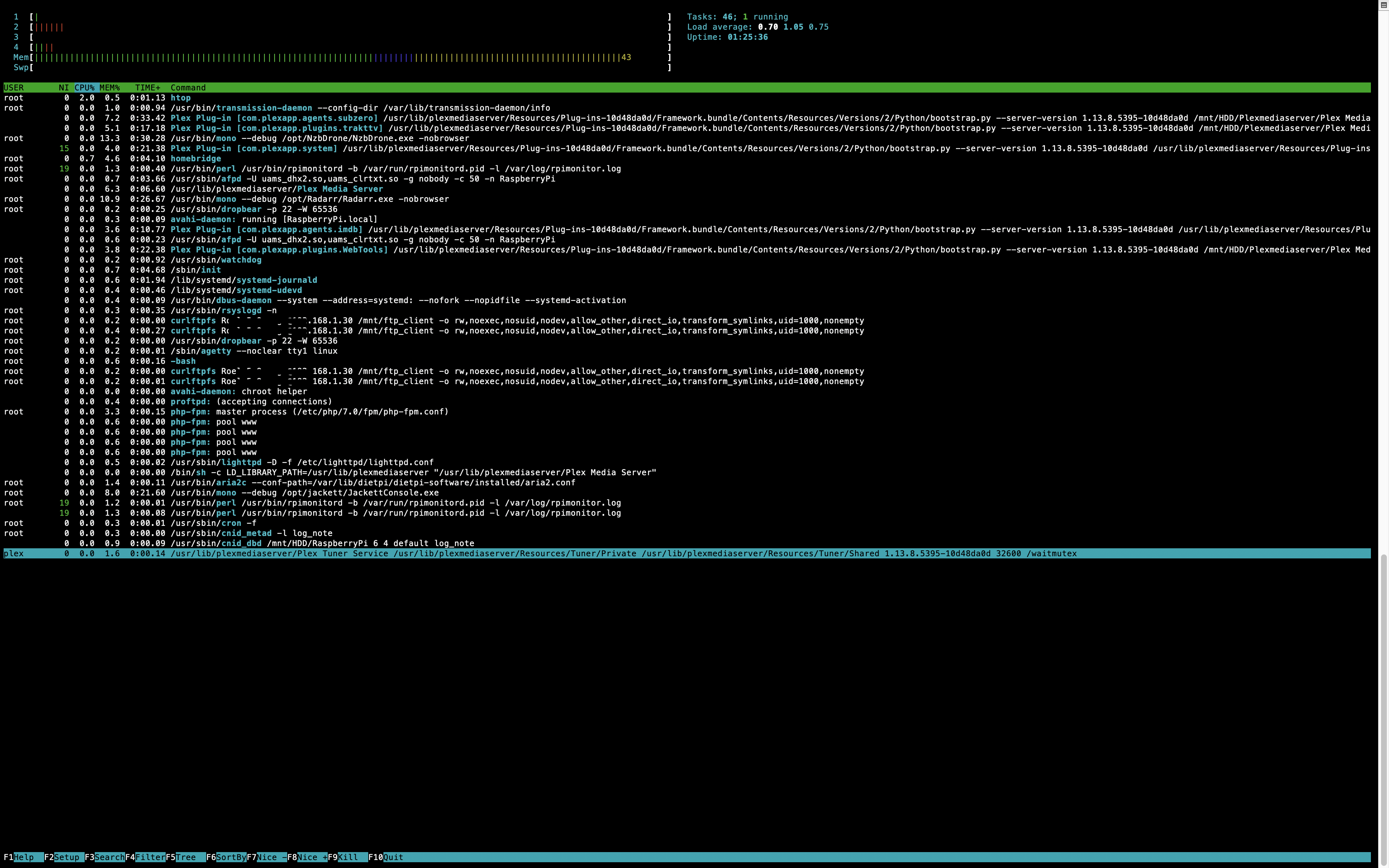
Ok, everything looks fine, no swapfile usage currently. However, RAM is nearly fully utilised due to Mono (Sonarr/Radarr) + Plex.
We could try running without debug mode, however I believe this makes more Sonarr/Radarr unstable.
Try increasing the swapfile size to 2GB~:
dietpi-services stop
/DietPi/dietpi/func/dietpi-set_dphys-swapfile 2048
dietpi-services start
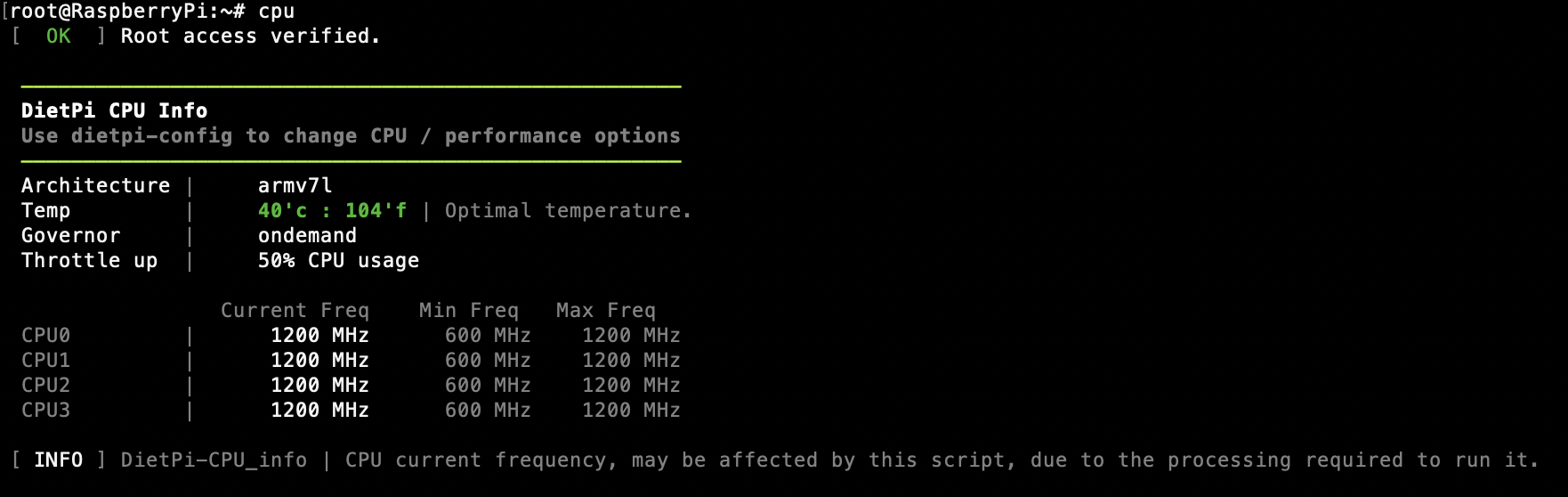
Also check CPU temps as per @Atavic,
cpu
It is a RPi 3.
I increased the swapfile.
a screenshot of cpu
roelfoubert
on 15 Oct 2018
With the swapfile edited, the system is slower and the memory usage full.
roelfoubert
on 15 Oct 2018
@roelfoubert
With the swapfile edited, the system is slower and the memory usage full.
System will run slower if its hitting the swap file due to full memory. However, it should not "freeze". Is the system running for a longer period of time without freezing?
Fourdee
on 16 Oct 2018
I see two mono -debug instances. Which version of Mono is currently installed? I see this issue.
Atavic
on 16 Oct 2018
mono version 5.16.0.179
roelfoubert
on 16 Oct 2018
So it ìs current version.
Atavic
on 16 Oct 2018
yes I think its just all too much for the pi.
roelfoubert
on 16 Oct 2018
Radarr, sonarr and torrents: maybe trying to stop one of them may help finding the culprit?
Atavic
on 16 Oct 2018
So since DietPi uses the official mono APT repo, an APT upgrade, triggered by dietpi update and software installs should resolv related memory leaks and we do not need to fix something about it.
@roelfoubert
I can't see the actual memory used numbers in your htop screen, no nor used swap values or grafical indicator that it is used. Can you check via: cat /proc/swaps
A swapfile should not show down your system, especially with DietPi default swappiness=1 but simply avoid services/processes being killed by kernel due to reached memory limit. However this process emergency killing should and freezes actually.
But the need to use the swapfile can indeed slow down your system, especially if swapfile is placed on slow SDcard. You could try to place it onto an external faster drive.
But if the command above indicates an existing swapfile that is also in use with that high RAM usage, are the freezes gone then?
Could only imagine that kernel killed SSH client and/or network due to full memory and if you access via SSH that looks like a freeze?
MichaIng
on 16 Oct 2018
I use rpi-monitor to monitor my pi and there is no use of the swap file.
@MichaIng this is a screenshot of cat /proc/swaps

roelfoubert
on 16 Oct 2018
with the swapfile 2gb, the pi hangs for 15 minutes and then get back. Is this normal?
roelfoubert
on 17 Oct 2018
@roelfoubert
What you mean by get back? The swap file reverts?
Is your SDcard full? To check: df
MichaIng
on 17 Oct 2018
no after 15 minutes my pi works as normal. but I couldn't access my pi for 15 minutes. I'm using a usb and it has 20gb free
roelfoubert
on 17 Oct 2018
Do you think there is a solution or is the best way to buy another pi and divide my services?
roelfoubert
on 17 Oct 2018
@roelfoubert
I'm using a usb
Ah jep, you wrote that above already, sorry forgot.
Could you please paste/take a picture of the output of command: dmesg? It has much lines, the last ones that fit on the screen/terminal should be sufficient.
Fourdee and Atavic mentioned that a too high USB flash temperature could be an issue. Did you check with hands, if it is hot? I/O performance of your flash should be no problem (is faster than mmc on the Pi can be, AFAIK), but temperature on 24/7 I/O might be.
Finally I am not sure if the Pi is the issue. Of course a SBC with more RAM needs less swap, will act faster, but the freezes, that somehow the swap seems to not be used as it should, might be due to the USB flash not serving reliable on 24/7 rootfs (+swap) typical I/O. Either you could see, if its due to high operation temperature, or it is simple by design not made for fast/high frequency I/O over longer time.
If you have an alternative USB flash or drive (e.g. external drive + case with dedicated PSU) available, or even an SDcard (at least just to check, whether this changes something to better), I would try that first. Maybe a new flash/drive for rootfs will be anyway needed (even with larger SBC) and might be sufficient.
Also try to reduce the amount of software that runs concurrent, so ongoing RAM usage stays around max 500M or such, disable swap, and see if this then works stable. If the freezes then still happen, it might be not due to performance limitations, but hardware instability/faulty on a lower level.
MichaIng
on 17 Oct 2018
Is there a script to test the actual transfer rate of USB drives? I always see tiny USB devices as problematic.
Atavic
on 17 Oct 2018
@Atavic
Is there a script to test the actual transfer rate of USB drives? I always see tiny USB devices as problematic.
Yep, dietpi-config > Tools > Benchmark
Fourdee
on 18 Oct 2018
Will mark this as closed.
Issue appears related to pushing hardware/software to the limits. In terms of software, we have done everything our end to allow this, however, at a basic level, we are still limited by the raw performance and quality of software titles users choose to install.
Please reopen if required.
Fourdee
on 23 Oct 2018
Related issues
 and09
·
3Comments
and09
·
3Comments
 bhaveshgohel
·
3Comments
Fourdee
·
3Comments
bhaveshgohel
·
3Comments
Fourdee
·
3Comments
 mok-liee
·
3Comments
bhaveshgohel
·
3Comments
mok-liee
·
3Comments
bhaveshgohel
·
3Comments