Dietpi: 5Ghz hotspot on RPi 3B+ | Improved performance with wme + dietpi-process_tool
Creating a bug report/issue:
Required Information:
- DietPi version |
v6.16 - Distro version |
9.4 - Kernel version |
Linux DietPi 4.14.70-v7+ - SBC device |
RPi3b+
Additional Information (if applicable):
- Can this issue be replicated on a fresh installation of DietPi? yes
Steps to reproduce:
- Install WIFI Hotspot
- Configure it for 5Ghz
- Start the Hotspot
Expected behaviour:
- Stable 100Mbit/s WIFI Speed
Actual behaviour:
- When using the 3b+ as Hotpsot the speed drops to 20Mbit/s.
Extra details:
- My hostapd file:
ssid=censored
wpa_passphrase=censored
country_code=US
interface=wlan0
driver=nl80211
wpa=2
wpa_key_mgmt=WPA-PSK
rsn_pairwise=CCMP
macaddr_acl=0
logger_syslog=0
logger_syslog_level=4
logger_stdout=-1
logger_stdout_level=0
hw_mode=a
wmm_enabled=1
ieee80211n=1
require_ht=1
ht_capab=[MAX-AMSDU-3839][HT40+][SHORT-GI-20][SHORT-GI-40][DSSS_CCK-40]
ieee80211ac=1
require_vht=1
ieee80211d=0
ieee80211h=0
vht_capab=[MAX-AMSDU-3839][SHORT-GI-80]
vht_oper_chwidth=1
channel=36
vht_oper_centr_freq_seg0_idx=42
Edit:
The speed drops when this message appears (hostapd -d):
wlan0: nl80211: Scan trigger
nl80211: Drv Event 34 (NL80211_CMD_NEW_SCAN_RESULTS) received for wlan0
 ghost
ghost
All 6 comments
Test:
- Internet = 100Mbit down 10Mbit up
- Client device = Redmi Note 4X
- 2.4GHz | 10-20Mbit down, 6Mbit up
- 5GHz | 30-55Mbit down, 6Mbit up
- Command to debug hostpad =
/usr/sbin/hostapd -P /run/hostapd.pid /etc/hostapd/hostapd.conf -d| no errors found
Edit:
The speed drops when this message appears (hostapd -d):
I was unable to notice this having any effect on my tests.
I did notice that some tests were half the speed of above, however, next speed test run its fine.
Aside from that, it appears to be a hardware limitation with the RPi. Network shares the USB bandwidth and is inefficient.
Also range, interference and general networking performance comes into play.
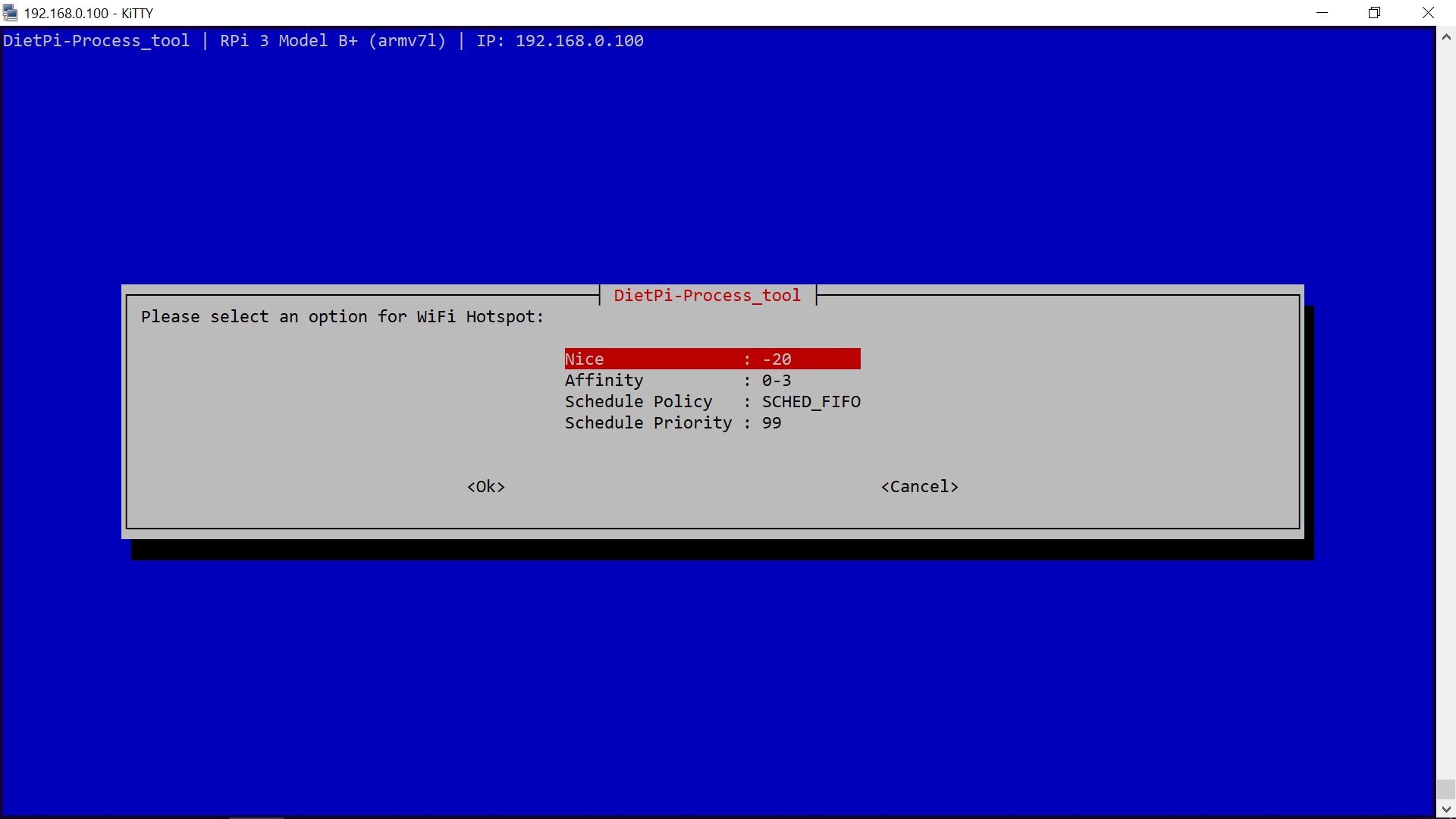
Try also setting the following for hostapd in dietpi-process_tool, see if it improves:
 Fourdee
on 9 Oct 2018
Fourdee
on 9 Oct 2018
Fixed with wme + dietpi-process_tool settings! Thx
ghost
on 9 Oct 2018
@piekay
Great it works!
wme
What you mean by wme?
Note that your hostapd has now absolute max priority over every other task. Keep an eye on htop by times, how much CPU time is used by hostapd, especially, if you face performance decrease of other software.
 MichaIng
on 9 Oct 2018
MichaIng
on 9 Oct 2018
@piekay
Great it works!wme
What you mean by
wme?Note that your hostapd has now absolute max priority over every other task. Keep an eye on
htopby times, how much CPU time is used by hostapd, especially, if you face performance decrease of other software.
Wireless Multimedia Extensions
Add this to /etc/hostapd/hostapd.conf:
wme_enabled=1
wme_ac_bk_cwmin=4
wme_ac_bk_cwmax=10
wme_ac_bk_aifs=7
wme_ac_bk_txop_limit=0
wme_ac_bk_acm=0
wme_ac_be_aifs=3
wme_ac_be_cwmin=4
wme_ac_be_cwmax=10
wme_ac_be_txop_limit=0
wme_ac_be_acm=0
wme_ac_vi_aifs=2
wme_ac_vi_cwmin=3
wme_ac_vi_cwmax=4
wme_ac_vi_txop_limit=94
wme_ac_vi_acm=0
wme_ac_vo_aifs=2
wme_ac_vo_cwmin=2
wme_ac_vo_cwmax=3
wme_ac_vo_txop_limit=47
wme_ac_vo_acm=0
ghost
on 9 Oct 2018
@piekay
wme_enabled=1
This should be fine for us to add by default (i'll run some tests on g/n), as for the others, needs further research and understanding before we implement.
Ok, appears wme_enabled=1 only works with hw_mode=a, g/n causes service to fail. I get between 45-60Mbps with wme_enabled=1 enabled.
I'll mark this as info/workaround.
Fourdee
on 12 Oct 2018
I'll mark this as closed/info. Please reopen if required.
Fourdee
on 12 Oct 2018
Related issues
 k-plan
·
3Comments
k-plan
·
3Comments
 pfeerick
·
3Comments
Fourdee
·
3Comments
Fourdee
·
3Comments
Fourdee
·
3Comments
pfeerick
·
3Comments
Fourdee
·
3Comments
Fourdee
·
3Comments
Fourdee
·
3Comments
Most helpful comment
Fixed with wme + dietpi-process_tool settings! Thx