Hi Fourdee
Like the last Bugreport id: f356d26d-a01a-4490-98d9-24eed509a7b0
A List of found Bugs:
I have now Dietpi installed at my CS and CS2
Sometime like once a week the backlight works. Linke tonightYou can only install a webserver by use the search function?! I couldn't find the pure nginx/apache/lighttpd at Software Optimized?!
If dietpi-cloudhell is running on LCD, I could only kill the task and then use dietpi-cloudshell for editing
And the I could not start it again, the lcd goes blank and shows [G notify command not found] (or something else^^)The CPU Freq of the A15s are stuck at 2Ghz.
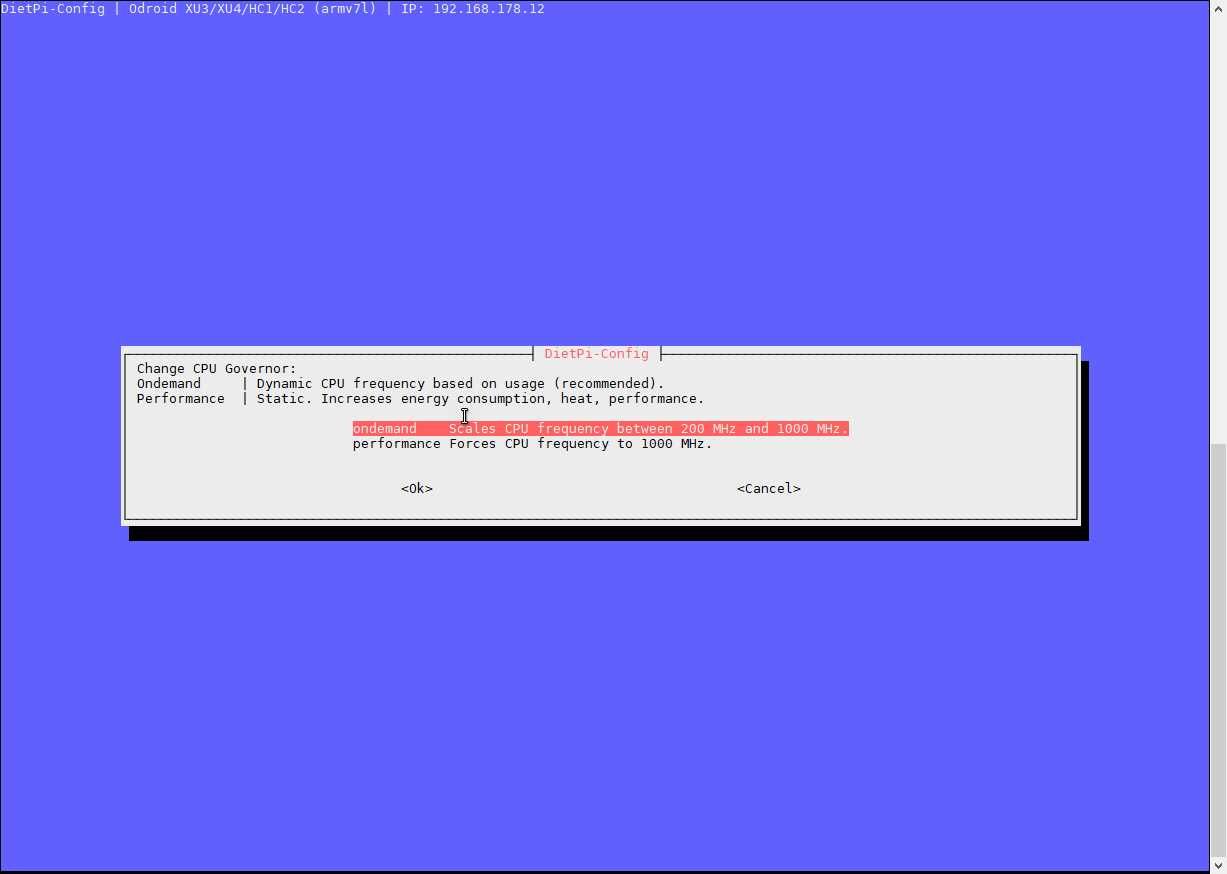
I have only ondemand and performace for choice?
The Idle Spindown resets after reboot
Greetings from Germany ^^
 docgalaxyblock
All 17 comments
@potter-91
Thanks for your report(s).
You can only install a webserver by use the search function?! I couldn't find the pure nginx/apache/lighttpd at Software Optimized?!
Yeah, you can only select a full webstack via dietpi-software menu. Do you require install the webserver (+PHP) only and not database?
You can do it like that:
dietpi-software list | grep <webserverOfYourChoice>(apache, nginx or lighttpd)- You will get the software ID of the wanted webserver, take that and:
dietpi-software install <ID>- This way not reboot will be performed, so you could do that manually afterwards, although it should not be needed.
[G notify command not found]
Sounds like G_DIETPI-NOTIFY command not found, which would indicate that dietpi-globals were not successfully loaded.
€: Ah wait, do you use WiFi monitor (dietpi-config > Network Adapter > WiFi > Auto Reconnect? At least this service file accidentally contains G_DIETPI-NOTIFY calls, even that needed dietpi-globals are not loaded. However should break nothing, just produces spam.
About LCD/cloudshell however I can barely help you, as I have non here 😉. But will check your bugreport for obvious problems.
 MichaIng
on 3 Oct 2018
MichaIng
on 3 Oct 2018
Hi MichaIng
The searchfunktion is easier ^^
Year this is the error
I use lan connections, except the PI0W
I made a new report, the last ist 3 weeks old
34ec6e9d-b85b-4be8-b36c-267adc14cf88
docgalaxyblock
on 3 Oct 2018
@potter-91
I made a new report, the last ist 3 weeks old
- Ah great, will recheck.
The searchfunktion is easier ^^
- Ah you mean to install webserver? Yeah might work as well, I am not yet too familiar with it 😆.
Year this is the error
I use lan connections, except the PI0W
- Hmm can you see which script throws the error?
Bug report:
● dietpi-ramdisk.service - DietPi-RAMdisk
   Loaded: loaded (/etc/systemd/system/dietpi-ramdisk.service; enabled; vendor preset: enabled)
   Active: active (exited) since Mon 2018-10-01 20:54:38 CEST; 1 day 21h ago
   CGroup: /system.slice/dietpi-ramdisk.service
Mon  1 Oct 20:54:38 CEST 2018 | DietPi-Ramdisk: Starting
Mon  1 Oct 20:54:38 CEST 2018 | DietPi-Ramdisk: Completed
- RAMdisk looks fine. Also this would have lead to much more issues 😉.
MichaIng
on 3 Oct 2018
@potter-91
If dietpi-cloudhell is running on LCD, I could only kill the task and then use dietpi-cloudshell for editing
And the I could not start it again, the lcd goes blank and shows [G notify command not found] (or something else^^)
Apologies for the delay.
- 🈴 Test
dietpi-cloudshellover SSH to start/stop on LCD panel:G_DIETPI-NOTIFY command not found - 🈯️ Test
dietpi-cloudshelllocally to start/stop on LCD panel:ctrl+cto exit.
Issue due to
[FAILED] DietPi-Cloudshell | Canceled DietPi-Cloudshell due to concurrent execution
And removal of /tmp/$G_PROGRAM_NAME
 Fourdee
on 25 Oct 2018
Fourdee
on 25 Oct 2018
- 🈯️ Cloudshell issues resolved for v6.17.
@potter-91 Many thanks for reporting this 👍
OK you have shairport-sync, but i'm a android guy. Also I couldn't connect shairport to my CS2 with MPD ...
I'am also an android guy 😄. Anything that supports AirPlay casting, will work, eg:
https://play.google.com/store/apps/details?id=com.tuxera.streambels&hl=en_GB
The CPU Freq of the A15s are stuck at 2Ghz.
I have only ondemand and performace for choice?
If using the cpu script, this can and will bump up the current CPU frequencies, due to the processing required to run the script.
Outside of that, you can try changing the ondemand throttle up value, to say 80%. Also check htop for programs using CPU in background which will bump up the current frequency.
@potter-91 Are any issues outstanding that we have missed? If not, we can mark this as completed.
Fourdee
on 25 Oct 2018
I'am also an android guy 😄. Anything that supports AirPlay casting, will work, eg:
https://play.google.com/store/apps/details?id=com.tuxera.streambels&hl=en_GB
I know, I use AirAudio. But I give the argument "android guy" a try.
But I couldn't connect shairport to my mpd, this feature has snapcast...(and I need this ^^)
Are any issues outstanding that we have missed?
Yes, the A15 bug and the backlight bug
My throttle up is 85%
I use cpufrequtils to get the current A15 freq and they are stuck at 2Ghz, even at powersafe gov.
I tried this at fresh and clean dietpi 1.16 at two XU4s...A15 stuck at 2Ghz
The backlight bug is still there...
but interestingly my CS1 and CS2 are every time "sync". Both backlights are working the one day or both aren't working. Could be this bug depending at the time?!
docgalaxyblock
on 25 Oct 2018
@potter-91
My throttle up is 85%
I use cpufrequtils to get the current A15 freq and they are stuck at 2Ghz, even at powersafe gov.
I tried this at fresh and clean dietpi 1.16 at two XU4s...A15 stuck at 2Ghz
Thanks, will check on my system 👍
The backlight bug is still there...
but interestingly my CS1 and CS2 are every time "sync". Both backlights are working the one day or both aren't working. Could be this bug depending at the time?!
Ok, i'll check code and run some tests. Leave it with us.
Fourdee
on 27 Oct 2018
CPU scaling appears to be functional (Hz), does seem a little trigger happy at the high end frequencies, could be a kernel bug/issue:
root@DietPi:~# cat /sys/devices/system/cpu/cpu7/cpufreq/cpuinfo_cur_freq
2000000
root@DietPi:~# cat /sys/devices/system/cpu/cpu7/cpufreq/cpuinfo_cur_freq
200000
The only issue might be "consoleblank=0 missing from boot.ini kernel options, however, we apply following during run, which should have same effect:
    Disable_Screen_Blanking(){

        setterm --blank poke &> /dev/tty1
        setterm --reset &> /dev/tty1
        setterm --blank 0 --powersave off &> /dev/tty1
        BLANK_SCREEN_ACTIVE=0
Regardless, will leave XU4 + CS1 running for 24 hour to check for blanking.
Fourdee
on 4 Nov 2018
OK
I could check it on CS1 and CS2
- The Idle Spindown resets after reboot
Did you mentioned this? It still exists
docgalaxyblock
on 4 Nov 2018
@potter-91
Hi,
Local testing, my CS1 has been running for 1 day 19 hours, screen is still on. If you can confirm not the case on your devices, we can investigate.
The Idle Spindown resets after reboot
Not sure what you mean by this? If you reboot and the HDD spins back up again, this is expected due to device init/access from kernel boot.
Should I open a new Feature request ticket?
Please, new tickets for all feature requests. Else they will get lost in this ticket 😃
Fourdee
on 6 Nov 2018
Hi
Disable_Screen_Blanking(){
setterm --blank poke &> /dev/tty1
setterm --reset &> /dev/tty1
setterm --blank 0 --powersave off &> /dev/tty1
BLANK_SCREEN_ACTIVE=0
I never touched a kernel, what should i do with the code? or switch to beta branch?
I can confirm at v6.17.12 it isn't working. But interessting, yesterday my CS1 was off and CS2 was still on. It seems that this
interestingly my CS1 and CS2 are every time "sync". Both backlights are working the one day or both aren't working. Could be this bug depending at the time?!
seems to be not true
I mean the Idle Spindown setting at your drive manager after reboot this resets to 30mins
docgalaxyblock
on 6 Nov 2018
@potter-91
I never touched a kernel, what should i do with the code? or switch to beta branch?
Hi, no changes are required, the code already exists in current version v6.17.
yesterday my CS1 was off and CS2 was still on
Ok, so we need to debug this and find out if the screen is blanked, or, something else has occurred.
When the blank screen occurs:
- Please send a new bug report (if the original bug report was sent when the issue occurred, please let me know)
- Try pressing ENTER, see if the display comes back on.
- Try pressing CTRL+C on a local system with keyboard to terminate the program.
- Hit ENTER a few times and see if any text is displayed on the CS1.
I mean the Idle Spindown setting at your drive manager after reboot this resets to 30mins
Idle spindown is set to 10 minutes by default (see bottom of this file /etc/hdparm.conf). However, this feature may not work with all HDD's + SATA converters. Mileage will vary.
Fourdee
on 9 Nov 2018
I just get a blank screen this evening
power my CS off, connect hdmi and keyboard...
Power back on...wait...just blank screen, no backlight
run dietpi-cs, start and stop/restart it some times:
- time (after boot): Backlight on, just blank
2.3.4.5. : Backlight off
Pressing ENTER: lcd and hdmi came back on
It's the same with every other key
A few ENTER show the root CLI
A little bug:
When setting off time to 23:00
Afer 23:59 dietpi-cs does not go to "powersafe mode"
HD Parm
At config there is spindown set to 5mins
Drive powers off after 30mins
hdparm -S60 /dev/sda works
I know that the drive works with hdparm, the drive was before connected to a cubietruck with armbian, ther it worked?!
New report 34ec6e9d-b85b-4be8-b36c-267adc14cf88
docgalaxyblock
on 12 Nov 2018
@potter-91
Sorry that we lost track of this topic. The three issues are still current?
I have it in mind now but I think it would be best to open a separate issue for each of them so things do not get mixed up.
MichaIng
on 24 Feb 2019
I will mark this as closed for now. Feel free to reopen, if required.
MichaIng
on 2 Mar 2019
@MichaIng
Year the issues are still there...
I will open seperate issues, youre right it is a bit mixed up.
docgalaxyblock
on 4 Mar 2019
Related issues
 aesirteam
·
3Comments
aesirteam
·
3Comments
 Invictaz
·
3Comments
Invictaz
·
3Comments
 k-plan
·
3Comments
k-plan
·
3Comments
 and09
·
3Comments
and09
·
3Comments
 pfeerick
·
3Comments
pfeerick
·
3Comments
Most helpful comment
Hi MichaIng
The searchfunktion is easier ^^
Year this is the error
I use lan connections, except the PI0W
I made a new report, the last ist 3 weeks old
34ec6e9d-b85b-4be8-b36c-267adc14cf88