Dietpi: Fresh installation with subsonic on RPi 3 results in 503 error
Creating a bug report/issue:
Required Information:
- DietPi Version |
cat /DietPi/dietpi/.version?
"6
7"
using DietPi_v6.6_RPi-ARMv6-Stretch.img image - SBC Device (EG: RPi 3)?
RaspberryPi 3 B+ - Power supply used (EG: 5v 1A RAVpower)?
- SD card used (EG: Sandisk ultra)?
dane-elec, 16gb - Distro (EG: Jessie) |
uname -a?
Linux DietPi 4.14.34-v7+
Additional Information (if applicable):
- Software title?
Subsonic - Can this issue be replicated on a fresh installation of DietPi?
Yes
Expected behaviour:
It should work after first install
Actual behaviour:

Steps to reproduce:
Followed guide here https://dietpi.com/phpbb/viewtopic.php?f=8&t=9#p9
Address set to 192.168.1.200
Used DietPi-Software to install subsonic
Waited until finished.
Attempted to visit 192.168.1.200:4040 for subsonic
503 Error.
Did you submit a dietpi-bugreport?
f2fe16e9-e1bf-41db-a744-662b763712e7-0
Extra details:
subsonic_sh.log;
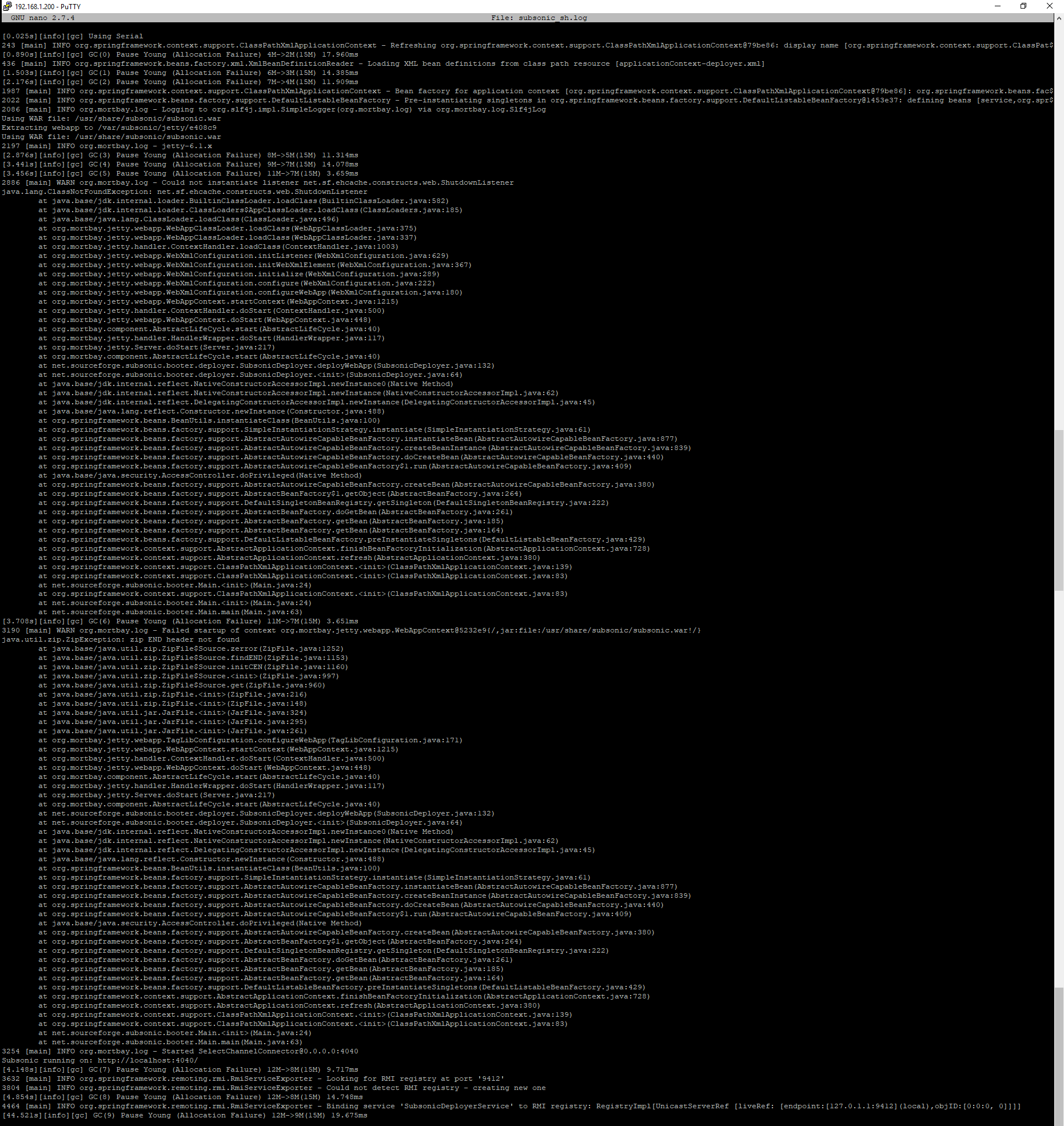
 SevronCarl
All 10 comments
@SevronCarl
Many thanks for the report 👍
We'll try to replicate and resolve.
 Fourdee
on 12 May 2018
Fourdee
on 12 May 2018
Have since switched the cards, to a class 10 samsung 32gb just incase the dane-elec is funky.
Installed everything again, but ended up with a similar error.
Due to something with the applicationContext-sonos.xml file,
Java xml errors but I looked into the files it had errors with and there's no invalid xml as the errors reported.
Uninstalled subsonic and java via dietpi-software, then installed 'default-jre' and 'default-jdk' manually.
Reinstalled subsonic, which put java back again too with it in that process, and all seems to be well apart from subsonic_sh.log being full of messages like [GC (Allocation Failure) 10070K->5924K(15872K), 0.0052970 secs] and no media displaying despite media scanning being successful.
But I don't know what process subsonic goes through, if it may still be indexing or building info and will show up later or not.
SevronCarl
on 12 May 2018
And now I've restarted it and can't connect to subsonic at all, think I'm gonna put it to bed for a while...
Try something else.
SevronCarl
on 12 May 2018
Confirmed bug with all systems.
Java issue?
Online doc states Java7: http://www.subsonic.org/pages/installation.jsp#debian
Try with Oracle JRE?
Fourdee
on 12 May 2018
Interesting AirSonic is also failing with the same Java errors, looks like a Java specific issue, recent Java update breaking these programs?
Confirmed java 8 gets installed.
reading:
http://www.baeldung.com/spring-beandefinitionstoreexception
Fourdee
on 12 May 2018
@Fourdee
Requirements: Java 7 or later
Should work with java 8, since java 10 is already released...
Will also do some tests here. I would prefer to stay with OpenJDK, if possible...
€: AirSonic install instructions contain installation of OpenJDK-JRE 8 on Stretch: https://airsonic.github.io/docs/install/prerequisites/#on-debian-9
- Check if by default correct $JAVA_HOME is set/used
 MichaIng
on 12 May 2018
MichaIng
on 12 May 2018
Got it running after manually installing the Buster version of openjdk-8-jre-headless over the Stretch version, even that both share nearly the same version numbers: https://packages.debian.org/de/buster/openjdk-8-jre-headless
On my Stretch VM, after installing AirSonic via dietpi-software, including OpenJDK 8 etc:
systemctl stop airsonic
wget http://ftp.de.debian.org/debian/pool/main/o/openjdk-8/openjdk-8-jre-headless_8u171-b11-1_amd64.deb
dpkg -i openjdk-8-jre-headless_8u171-b11-1_amd64.deb
systemctl start airsonic
Wait for a while until everything is leaded, takes a while, can be watched via htop Java initiates airsonic.war with 100% CPU usage, filling RAM up to around 300M, then CPU usage goes down. Only after this, http://<localIP>:8080/airsonic can be accessed... Puuh Java is crazy overhead, vote against using it for smaller otherwise independent software... 300M RAM, are you sure?? Or is this not normal and might be still case of an issue here?
€: Hah, downgraded again to Stretch OpenJDK and voilà, just need to wait for ~4 minutes again until everything is loaded, and web ui opens up. Perhaps during your tests @SevronCarl @Fourdee you just underestimated the size of Java? On RPi I guess you need to wait much longer than 4 minutes... Also the error messages we face are no real errors, all just warnings and info messages, perhaps stuff that just shows up on first JDK/JRE initiation. I didn't see them after up- and downgrading JRE again.
Also I vote for differentiating between JDK and JRE. SubSonic and AirSonic just need JRE, thus JDK is a huge overhead. Also in both cases consider using the headless packages: https://packages.debian.org/de/stretch/openjdk-8-jre-headless
- Although
openjdk-8-jreseems to be needed for gui and web ui software, checking right now if just headless JRE is enough...
€: Web UI seems to work with justopenjdk-8-jre-headless, but I didn't test real music playback etc. Just navigating around a bid. Very slow here, not sure if this is normal?
€€: Okay @Fourdee was already faster about headless JDK/JRE 👍. Hmm, doesn't openjdk-8-jdk-headless depend on openjdk-8-jre-headless depend on ca-certifacates-java, thus just the first need to be installed? https://packages.debian.org/de/buster/openjdk-8-jdk-headless => Just verified on RPi as well... Ah might be different on Raspbian Buster, which I use 😉.
Successfully accessed SubSonic web ui as well with just openjdk-8-jre-headless installed. Seems a bid smaller, just ~200M RAM usage, thus loaded also slightly faster.
MichaIng
on 12 May 2018
@MichaIng
Great work and research 👍
Yep, JRE/JDK we could split, but we'd need to verify/test all software that depends on them. Could take a while.
I'll move this to v6.9, will focus on final testing for v6.8 and release today.
Fourdee
on 13 May 2018
Re-tests:
SubSonic:
- RPi 3 🈯️
- VM 🈯️
AirSonic:
- RPi 3 🈯️ took 3 minutes before web interface was accessable (long init/startup time)
- VM 🈯️
Fourdee
on 21 May 2018
Completed. Patched reinstall for v6.9.
Fourdee
on 21 May 2018
Related issues
 k-plan
·
3Comments
k-plan
·
3Comments
 bhaveshgohel
·
3Comments
bhaveshgohel
·
3Comments
 Invictaz
·
3Comments
bhaveshgohel
·
3Comments
Invictaz
·
3Comments
bhaveshgohel
·
3Comments
 aesirteam
·
3Comments
aesirteam
·
3Comments
Most helpful comment
Got it running after manually installing the Buster version of
openjdk-8-jre-headlessover the Stretch version, even that both share nearly the same version numbers: https://packages.debian.org/de/buster/openjdk-8-jre-headlessOn my Stretch VM, after installing AirSonic via dietpi-software, including OpenJDK 8 etc:
Wait for a while until everything is leaded, takes a while, can be watched via
htopJava initiatesairsonic.warwith 100% CPU usage, filling RAM up to around 300M, then CPU usage goes down. Only after this,http://<localIP>:8080/airsoniccan be accessed... Puuh Java is crazy overhead, vote against using it for smaller otherwise independent software... 300M RAM, are you sure?? Or is this not normal and might be still case of an issue here?€: Hah, downgraded again to Stretch OpenJDK and voilà, just need to wait for ~4 minutes again until everything is loaded, and web ui opens up. Perhaps during your tests @SevronCarl @Fourdee you just underestimated the size of Java? On RPi I guess you need to wait much longer than 4 minutes... Also the error messages we face are no real errors, all just warnings and info messages, perhaps stuff that just shows up on first JDK/JRE initiation. I didn't see them after up- and downgrading JRE again.
Also I vote for differentiating between JDK and JRE. SubSonic and AirSonic just need JRE, thus JDK is a huge overhead. Also in both cases consider using the headless packages: https://packages.debian.org/de/stretch/openjdk-8-jre-headless
openjdk-8-jreseems to be needed for gui and web ui software, checking right now if just headless JRE is enough...€: Web UI seems to work with just
openjdk-8-jre-headless, but I didn't test real music playback etc. Just navigating around a bid. Very slow here, not sure if this is normal?€€: Okay @Fourdee was already faster about headless JDK/JRE 👍. Hmm, doesn't
openjdk-8-jdk-headlessdepend onopenjdk-8-jre-headlessdepend onca-certifacates-java, thus just the first need to be installed? https://packages.debian.org/de/buster/openjdk-8-jdk-headless => Just verified on RPi as well... Ah might be different on Raspbian Buster, which I use 😉.Successfully accessed SubSonic web ui as well with just
openjdk-8-jre-headlessinstalled. Seems a bid smaller, just ~200M RAM usage, thus loaded also slightly faster.