I'm on last version 6.6 on raspberry pi 3.
last week i reported this issue.
https://github.com/Fourdee/DietPi/issues/1658
This issue is fixed, but now, in latest version i noticed when i restart raspberry pi, or if i'm not using deluge to often, and when i go to deluge web server, it says that deluge is offline, i can't connect.. when i click on start daemon, i can than connect to it..
my problem is when i want to download something in radarr, it says problem connecting to Deluge..
 bokiroki
All 11 comments
@bokiroki
Thanks for the report 👍
As we are unable to replicate in local testing, we'll need to debug the logs
When the issue occurs (eg: offline) please paste the results of these commands:
cat /var/log/deluged.log
dietpi-services status
 Fourdee
on 5 Apr 2018
Fourdee
on 5 Apr 2018
When i entered cat /var/log/deluged.log nothing happened
when i entered those commands, deluge was running and downloading files..
do you want to enter those commands when i restart dietpi and see that daemon is not running?
root@DietPi:~# cat /var/log/deluged.log
root@DietPi:~# dietpi-services status
[ OK ] Root access verified.
DietPi-Services
─────────────────────────────────────────────────────
Mode: status
[ OK ] DietPi-Services | nmbd active (running) since Thu 2018-04-05 19:03:40 C EST; 26min ago
[ OK ] DietPi-Services | smbd active (running) since Thu 2018-04-05 19:03:41 C EST; 26min ago
[ INFO ] DietPi-Services | deluged inactive (dead)
[ OK ] DietPi-Services | plexmediaserver active (running) since Thu 2018- 04-05 19:03:50 CEST; 26min ago
[ OK ] DietPi-Services | jackett active (running) since Thu 2018-04-05 19 :03:50 CEST; 26min ago
[ OK ] DietPi-Services | sonarr active (running) since Thu 2018-04-05 19 :03:50 CEST; 26min ago
[ OK ] DietPi-Services | radarr active (running) since Thu 2018-04-05 19 :03:50 CEST; 26min ago
[ OK ] DietPi-Services | deluge-web active (running) since Thu 2018-04-05 19 :03:50 CEST; 26min ago
[ OK ] DietPi-Services | cron active (running) since Thu 2018-04-05 19:03:51 C EST; 26min ago
[ OK ] DietPi-Services | dropbear active (running) since Thu 2018-04-05 19 :03:32 CEST; 26min ago
[ OK ] DietPi-Services | dietpi-boot active (exited) since Thu 2018-04-05 19: 03:39 CEST; 26min ago
[ OK ] DietPi-Services | dietpi-postboot active (exited) since Thu 2018-0 4-05 19:03:39 CEST; 26min ago
bokiroki
on 5 Apr 2018
@bokiroki
when i entered those commands, deluge was running and downloading files..
Strange, service reports inactive.
do you want to enter those commands when i restart dietpi and see that daemon is not running?
Yes please 👍
Fourdee
on 5 Apr 2018
I restarted twice and didn't had any problems (entered deluge web without issues)..i will try again after few hours, and when i see that daemon is not running, i will run those commands and report..
bokiroki
on 5 Apr 2018
@bokiroki
I've managed to replicate the issue here. Seems there are two issues we need to resolve:
- enable
ENABLE_DELUGED=1in/etc/default/deluged, else sometimes it will fail to run. - Set service to run non-daemonized and re-use simple service type again.
Apply the above: Copy and paste all
dietpi-services stop
sed -i '/^ENABLE_DELUGED=/c\ENABLE_DELUGED=1/' /etc/default/deluged
cat << _EOF_ > /etc/systemd/system/deluged.service
[Unit]
Description=DietPi Deluged Service

[Service]
Type=simple
ExecStart=$(which deluged) -d -l /var/log/deluged.log -L warning

[Install]
WantedBy=multi-user.target
_EOF_

cat << _EOF_ > /etc/systemd/system/deluge-web.service
[Unit]
Description=DietPi Deluge-web Service

[Service]
Type=simple #forking causes systemd-tty-ask-password-agent hang
ExecStart=$(which deluge-web) -l /var/log/deluge-web.log -L warning

[Install]
WantedBy=multi-user.target
_EOF_
systemctl daemon-reload
dietpi-services start
This resolves the issue locally for me, however, if you could test this and verify i'd be grateful. Then we can apply this fix to v6.7.
Fourdee
on 5 Apr 2018
Sorry but i dont know how to do this?
i entered in terminal ENABLE_DELUGED=1
what then, in what file i paste this text?
Also can you tell me for when is planned release off version 6.7?
Thanks
Edit: my mistake, so deluged is file..
I changed ENABLE_DELUGED=0 to ENABLE_DELUGED=1 in file
than i did paste all of that text beneath that
Is this correct?
bokiroki
on 5 Apr 2018
@bokiroki
Simply select/highlight all the commands, copy, then paste directly into SSH window.
Also can you tell me for when is planned release off version 6.7?
Few days hopefully.
Fourdee
on 5 Apr 2018
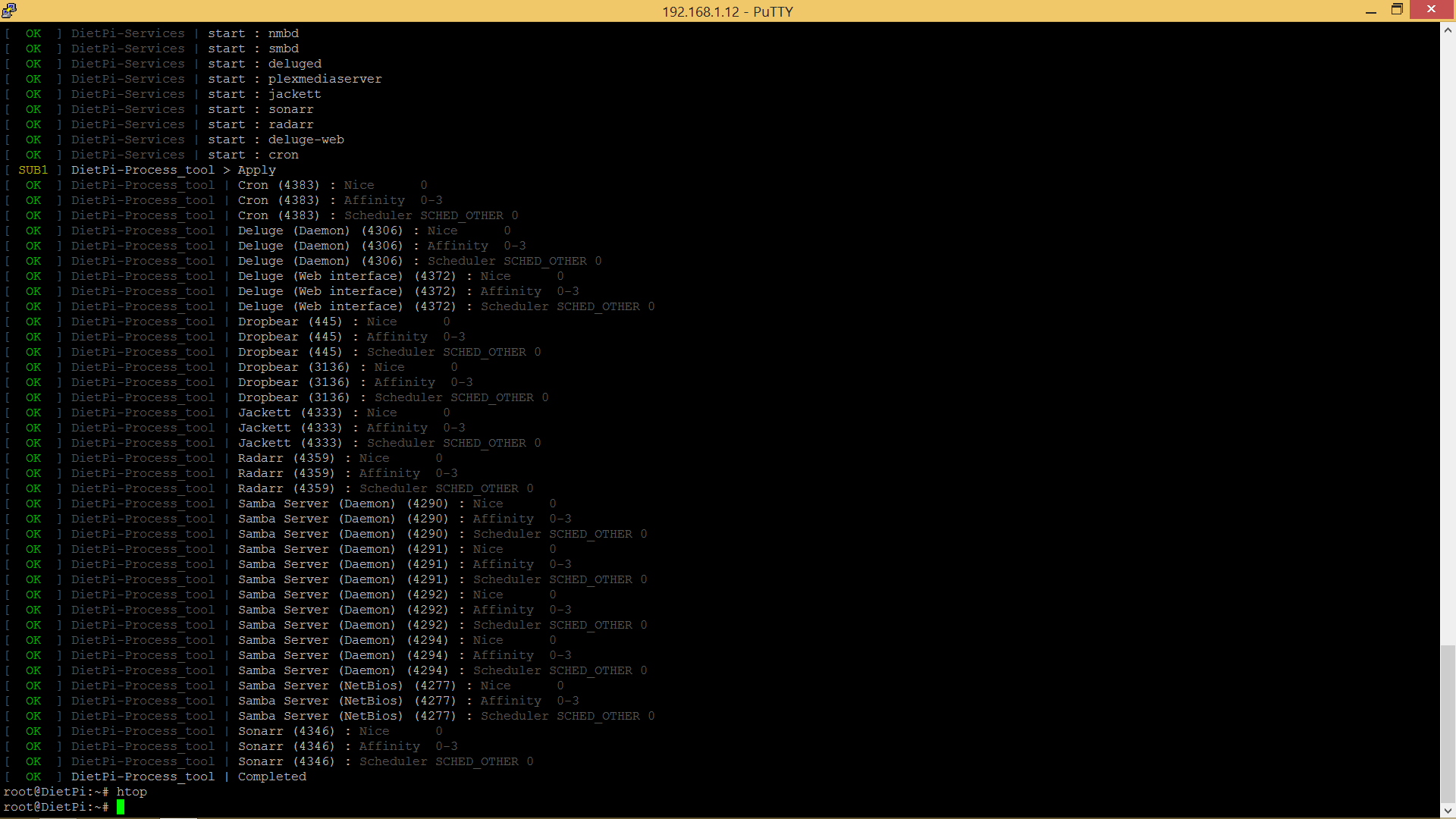
sorry, one more question. Is it normal for samba to have that many daemons?
bokiroki
on 5 Apr 2018
@bokiroki
one more question. Is it normal for samba to have that many daemons?
Interesting, I tried to limit this with the following in /etc/samba/smb.conf, however, it has no effect, still 4 processes :
https://www.samba.org/samba/docs/current/man-html/smb.conf.5.html
max smbd processes (G)
This parameter limits the maximum number of smbd(8) processes concurrently running on a system and is intended as a stopgap to prevent degrading service to clients in the event that the server has insufficient resources to handle more than this number of connections. Remember that under normal operating conditions, each user will have an smbd(8) associated with him or her to handle connections to all shares from a given host.
Default: max smbd processes = 0
Example: max smbd processes = 1000
Seems printers are not fully disabled, adding the following removes one additional smbd process:
printcap name = /dev/null
disable spoolss = yes
@bokiroki
We do not load local printers in our smb.conf by default, so you can apply the following to remove 1 additional process and fully disable printing:
printcap name = /dev/null
disable spoolss = yes
I've applied the above to DietPi v6.7 by default.
Fourdee
on 5 Apr 2018
Marking as resolved for v6.7, https://github.com/Fourdee/DietPi/issues/1689#issuecomment-379024795 passed local testing.
@bokiroki
If you try the above, and/or have any issues, please reopen this ticket and let us know.
Fourdee
on 5 Apr 2018
Related issues
 Invictaz
·
3Comments
Invictaz
·
3Comments
 and09
·
3Comments
Fourdee
·
3Comments
and09
·
3Comments
Fourdee
·
3Comments
 k-plan
·
3Comments
k-plan
·
3Comments
 bhaveshgohel
·
3Comments
bhaveshgohel
·
3Comments