DietPi-Backup/Sync | Check for sufficient free space before rsync
Due to this issue http://dietpi.com/phpbb/viewtopic.php?f=11&t=2999 and also thoughts I already had, we can maybe implement some (rough?) free space check on dietpi-backup/sync destination before executing. 0 free disc space can lead to quite a lot of following errors/issues besides leaving user with a broken unrecoverable backup.
I started with:
                       #Check for sufficient disk space
                       local space_needed=$(df / | sed -n '2p' | awk '{print $3}')

                       #       - Count dietpi_userdata, if chosen for backup as well
                       if (( $BACKUP_MODE == 1 )); then

                               local root_device="$(df / | sed -n '2p' | awk '{print $1}')"
                               local userdata_device="$(df $G_FP_DIETPI_USERDATA_ACTUAL | sed -n '2p' | awk '{print $1}')"

                               # Count userdata size only, if it's located on different disk device
                               if [ "$root_device" != "$userdata_device" ]; then

                                       local userdata_size=$(df "$userdata_device" | sed -n '2p' | awk '{print $3}')
                                       (( $space_needed += $userdata_size ))

                               fi

                       fi
...
Wanted to add include/exclude list then, finally check (( $target_free_space + $current_backup_size > $space_needed [ * $security_factor ] + [ $security_free_space ] )), but I realized that it is quite a lot of device/file/folder size checks and it would be easier to just do a rsync --dry-run with exactly same settings than actual sync/backup and gather final backup size from it's output. But actually the estimated size differs from du result afterwards. The following is done as actual backup, not --dry-run, but both show same results:
...
2018/03/30 16:20:44 [9410] sent 810,054 bytes  received 4,787 bytes  1,629,682.00 bytes/sec
2018/03/30 16:20:44 [9410] total size is 1,081,723,315  speedup is 1,327.53
...
2018/03/30 16:20:45 [9428] sent 130,393,876 bytes  received 2,390 bytes  86,930,844.00 bytes/sec
2018/03/30 16:20:45 [9428] total size is 354,724,506  speedup is 2.72
So I count 1436447821byte total size = 1402781k, but:
root@DietPi:~# du -s /mnt/dietpi-backup/
1529572 /mnt/dietpi-backup/
root@DietPi:~# du -s /mnt/dietpi-backup/dietpi-backup_system/
1140784 /mnt/dietpi-backup/dietpi-backup_system/
root@DietPi:~# du -s /mnt/dietpi-backup/dietpi-backup_userdata/
388776  /mnt/dietpi-backup/dietpi-backup_userdata/
du shows 1529572k. Anyone an idea where this difference comes from? Theoretical file size vs. size on disk due to min block size or something?
 MichaIng
All 15 comments
@MichaIng
You may want to check out G_CHECK_FREESPACE in globals, could be useful here?
root@DietPi:~# G_CHECK_FREESPACE /boot 10;echo $?
[  OK  ] Free space check: path=/boot | available=19 MB | required=10 MB
1
root@DietPi:~# G_CHECK_FREESPACE /boot 20;echo $?
[FAILED] Free space check: path=/boot | available=19 MB | required=20 MB
0
EG:
if (( $(G_CHECK_FREESPACE /path 100) )); then

echo 'good to go'

fi
Theoretical file size vs. size on disk due to min block size or something?
Yep, physical size on disk is always larger than total file size, due to block size (4K steps)
 Fourdee
on 30 Mar 2018
Fourdee
on 30 Mar 2018
@Fourdee
G_CHECK_FREESPACE 👍, ah but in this case the old backup size has to be added to free space.
Yep, physical size on disk is always larger than total file size, due to block size (4K steps)
Okay so this will be the reason. Hmm so I have currently no idea how to precisely check the resulting backup size, especially since block size could be different on different devices...
On the other hand, if it is that close, anyway some cleanup should be done. So I guess easiest would be indeed to just apply some secure factor, e.g. 1.2, onto the --dry-run total size result, e.g.:
if (( $(G_CHECK_FREESPACE "$FP_TARGET_BACKUP" $(($new_backup_size * $security_factor - $old_backup_size))))); then

G_WHIP_YESNO "The free space on your backup target might be not sufficient for a successful backup, leaving you with broken backup and no free drive space left. Are you sure that you want to continue?"

fi
On my VM the rsync --dry-run was very fast, just a few seconds compared to >1 minute for actual backup. But I read that on some systems both are quite the same similar, which would be of course an agrument against this implementation.
I will create PR these days and then we can test if it is fast enough and worth it or not.
MichaIng
on 30 Mar 2018
DietPi-Sync freespace check completed:
https://github.com/Fourdee/DietPi/commit/01136a836de20cc56eadf6feabf4eb56f4086b3a
Tested locally, should be good to go.
Fourdee
on 13 Apr 2018
Completed.
Fourdee
on 13 Apr 2018
@Fourdee @MichaIng I did not check (because i'm not an unix cmd line expert) how you do the rought check, but on my hardware the result is incorrect.
I have a Tinker Board S (with roughtly 16Go of eMMC) and a 16Go Sandisk micro sd card inserted (formatted by DietPi-DriveManager in ext4).
I try to backup my eMMC installation to SD card. Here the screenshots :
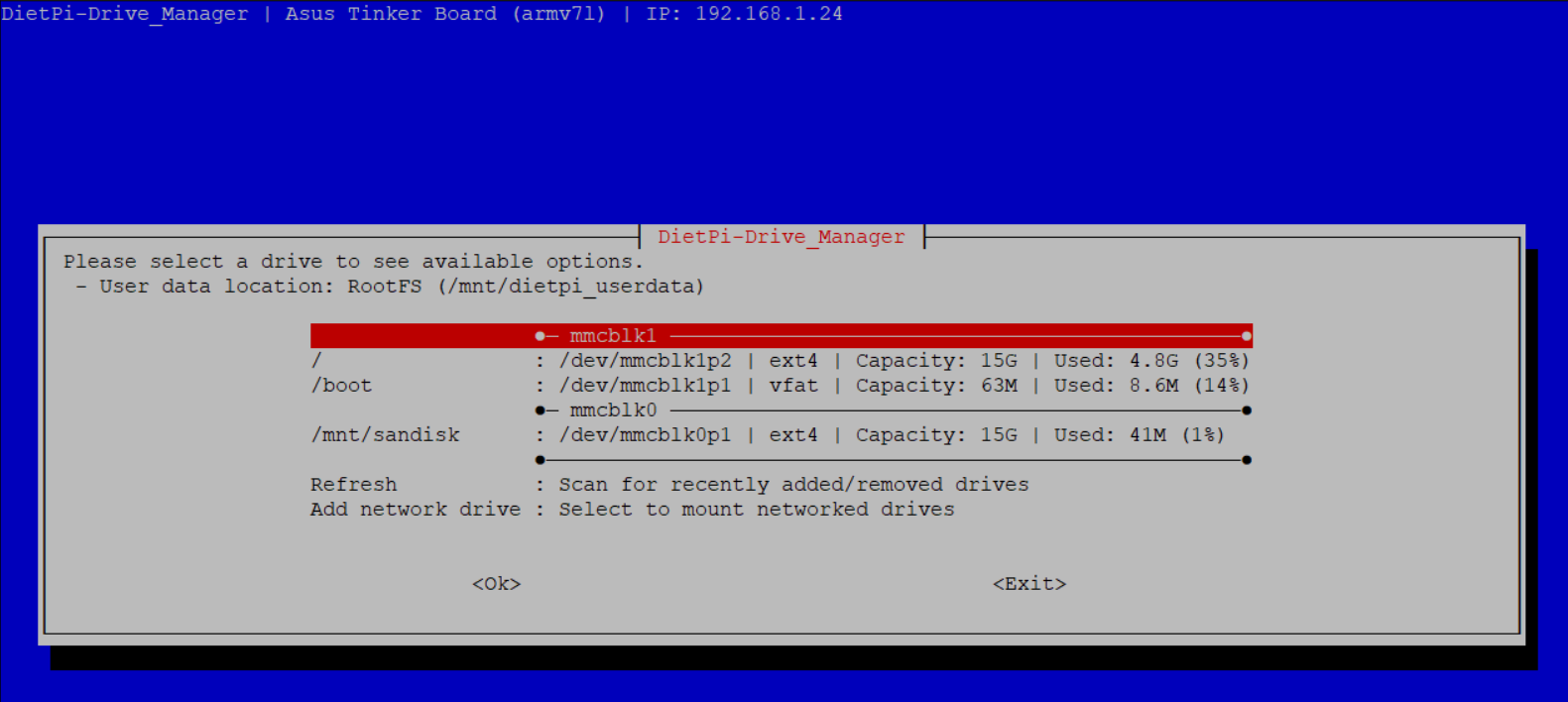
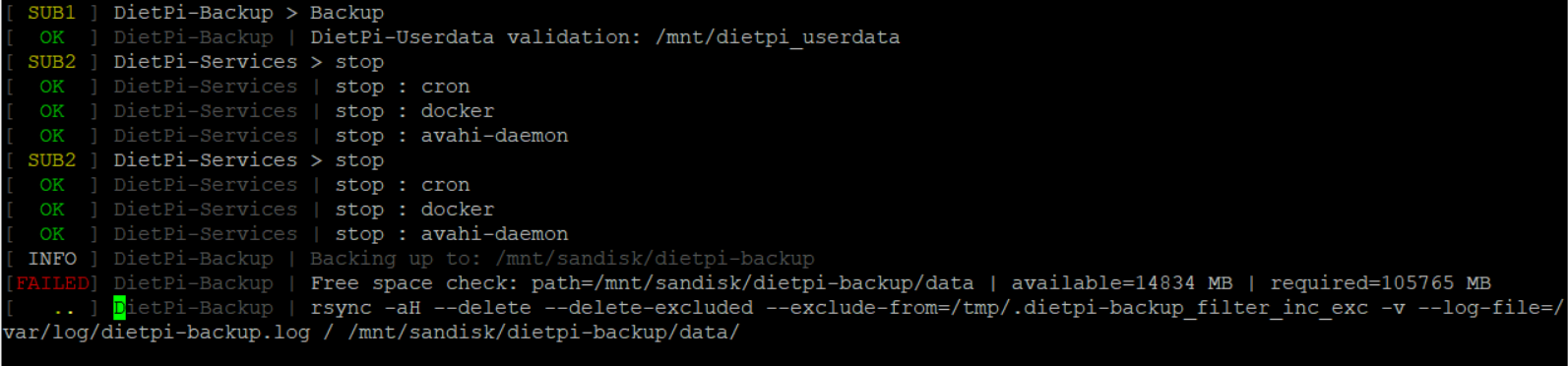
 adamotte
on 29 Aug 2018
adamotte
on 29 Aug 2018
@adamotte
I try to backup my eMMC installation to SD card. Here the screenshots :
Interesting.
Whats the results of:
G_TREESIZE /
root@DietHA:~# G_TREESIZE /
[  OK  ] Root access verified.
du: impossible d'accéder à '/proc/1091/task/1091/fd/3': Aucun fichier ou dossier de ce type
du: impossible d'accéder à '/proc/1091/task/1091/fdinfo/3': Aucun fichier ou dossier de ce type
du: impossible d'accéder à '/proc/1091/fd/4': Aucun fichier ou dossier de ce type
du: impossible d'accéder à '/proc/1091/fdinfo/4': Aucun fichier ou dossier de ce type
4.8 GB /
3.7 GB /var
914.7 MB /usr
113.1 MB /lib
17.2 MB /system
8.6 MB /boot
8.5 MB /run
5.6 MB /sbin
5.3 MB /bin
4.3 MB /etc
2.1 MB /root
1.4 MB /DietPi
672.0 KB /scratchgpio7
68.0 KB /mnt
20.0 KB /home
16.0 KB /lost+found
12.0 KB /tmp
12.0 KB /opt
4.0 KB /srv
0.0 KB /sys
0.0 KB /proc
0.0 KB /dev
@adamotte
Thanks 👍
Ok, lets try these commands, please paste results:
df -mP /mnt/sandisk
df -mP /mnt/sandisk/dietpi-backup
df -mP /mnt/sandisk/dietpi-backup/data
@adamotte
Also, please do the following to obtain the rsync data we use to check total size. Paste results of last command please:
cp /DietPi/dietpi/dietpi-backup /DietPi/dietpi/dietpi-backup.bak
sed -i 's#rm /tmp/dietpi-backup_result#exit#g' /DietPi/dietpi/dietpi-backup
dietpi-backup 1
cp /DietPi/dietpi/dietpi-backup.bak /DietPi/dietpi/dietpi-backup
cat /tmp/dietpi-backup_result
Locale is fr_FR but you will understand easily i think :
root@DietHA:~# df -mP /mnt/sandisk
Sys. de fichiers blocs de 1048576 Utilisé Disponible Capacité Monté sur
/dev/mmcblk0p1              14890      41      14834       1% /mnt/sandisk

root@DietHA:~# df -mP /mnt/sandisk/dietpi-backup
df: /mnt/sandisk/dietpi-backup: Aucun fichier ou dossier de ce type

root@DietHA:~# df -mP /mnt/sandisk/dietpi-backup/data
df: /mnt/sandisk/dietpi-backup/data: Aucun fichier ou dossier de ce type
root@DietHA:~# cat /tmp/dietpi-backup_result

Number of files: 39,825 (reg: 33,479, dir: 3,437, link: 2,909)
Number of created files: 39,824 (reg: 33,479, dir: 3,436, link: 2,909)
Number of deleted files: 0
Number of regular files transferred: 33,474
Total file size: 110,785,387,364 bytes
Total transferred file size: 110,780,588,666 bytes
Literal data: 0 bytes
Matched data: 0 bytes
File list size: 0
File list generation time: 0.001 seconds
File list transfer time: 0.000 seconds
Total bytes sent: 1,115,961
Total bytes received: 123,310

sent 1,115,961 bytes  received 123,310 bytes  495,708.40 bytes/sec
total size is 110,785,387,364  speedup is 89,395.61 (DRY RUN)
@adamotte
Total file size: 110,785,387,364 bytes
Total transferred file size: 110,780,588,666 bytes
Thanks 👍
Interesting, that's claiming 110GB~.
Ok, do you have any manual symlinks setup on the system?
Fourdee
on 30 Aug 2018
No manual symlinks.
My setup is dedicated to home automation so i had installed :
- via dietpi-software : DietPi-Ramlog, Dropbear, avahi-deamon
- via dietpi-config : bluetooth enabled
Then a manual Docker CE install following these steps
And finally add lastest home assistant (hass.io to be precise)
```bash
curl -sL https://raw.githubusercontent.com/home-assistant/hassio-build/master/install/hassio_install | bash -s -- -m tinker
````
adamotte
on 31 Aug 2018
@adamotte
Thanks 👍
Ok, lets see if rsync is the issue, try du, please paste the total at the end:
du -ahcP /
And just to make sure, lets do one with symlinks included:
du -ahcL /
Note to self:
🈯️ fixed with commit below, stick with byte output
root@DietPi:~# rm -R /mnt/dietpi-backup/
[  OK  ] DietPi-Backup | Free space check: path=/mnt/dietpi-backup/data | available=116401 MB | required=41 MB
[ INFO ] DietPi-Backup | Rsync Backup | /mnt/dietpi-backup: in progress, please wait...
sending incremental file list
        484.95M  99%   22.84MB/s    0:00:20 (xfr#9327, to-chk=0/12631)
@adamotte
As we are unable to replicate the issue you are experiencing, and, rsync is providing us with the correct value (we can only assume), i'll mark this as closed.
I believe a possible filesystem issue/corruption may be the cause here, causing rsync to provide an unreasonable figure.
If problems persist, please reopen as required, and we'll try to investigate further once you are able to reply to https://github.com/Fourdee/DietPi/issues/1664#issuecomment-417768448
Fourdee
on 6 Sep 2018
Related issues
 pfeerick
·
3Comments
pfeerick
·
3Comments
 Kapot
·
3Comments
Kapot
·
3Comments
 Invictaz
·
3Comments
MichaIng
·
3Comments
Fourdee
·
3Comments
Invictaz
·
3Comments
MichaIng
·
3Comments
Fourdee
·
3Comments
Most helpful comment
DietPi-Sync freespace check completed:
https://github.com/Fourdee/DietPi/commit/01136a836de20cc56eadf6feabf4eb56f4086b3a
Tested locally, should be good to go.