Dietpi: Difference in disk space through programs and folder ownership
Solution: https://github.com/Fourdee/DietPi/issues/1662#issuecomment-379075710
Latest v6.5, raspberry pi 3, user data on external 2.5 hard disk (1 tb)
Hi, sorrry can i ask two more questions..
first one is: i saw difference in disk space displaying from different programs..
user data is on external hard drive and hard drive is empty
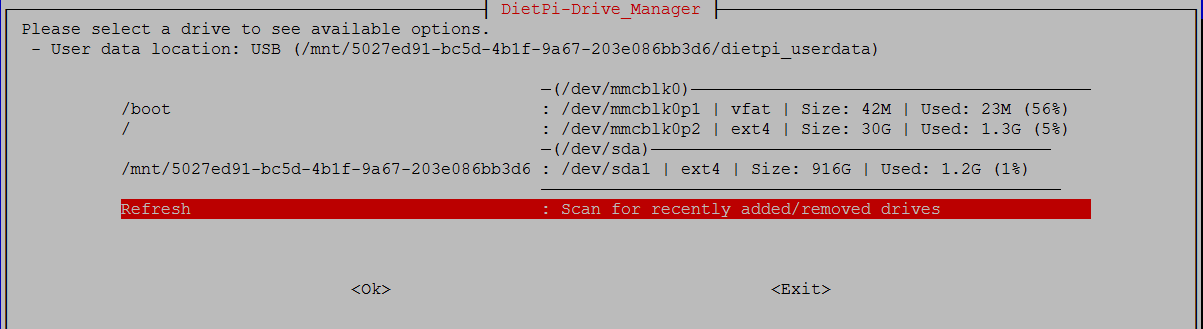
Drive manager says that i have 916 GB total space and 1.2 GB used, i guess swap file is on external now?

Radarr says that i have 916 GB total space and 868 GB free space? That is 48 GB of used space..
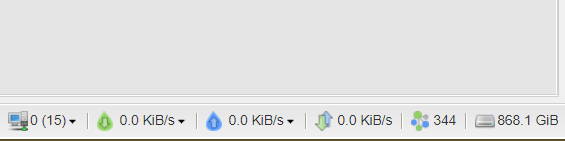
And Deluge says i have 868 GiB of free space, when i convert Gib to GB i get 932 GB, that's not correct?
Second question is: i created folder /mnt/dietpi_userdata/Plex/Movies.. in that folder radarr will download movies and Plex library is set to scan that folder.. and that's ok.. but when i activate sub-zero plugin/agent to download subtitles i get permission denied.. So from this issue
https://github.com/pannal/Sub-Zero.bundle/issues/173 i learned that i need to change folder ownership.. and i did with:
"chown -R plex /mnt/dietpi_userdata/Plex" ant everything went ok again, but when i download new movie in that folder again i see with: "ls -als /mnt/dietpi_userdata/Plex/" that ownership of that new folder and movie file is not plex but root.. What can i do so every new folder and file in that folder get automatically owned by new user plex?
Edit: i fixed permissions.. radarr have option to set ownership of new movie files, so i set it
owner: plex
group: root
 bokiroki
All 14 comments
@bokiroki
We scrape our values from df -Ph, could you check and verify Size/Used within DietPi-Drive_Manager is identical to this commands output?
df -h output uses GiB/MiB and I am pretty sure that Radarr does as well, as the numbers fit perfectly (df rounds up).
As the values for Radarr and Deluge are exactly the same, this seems not to be wrong, but they seem to calculate different, perhaps leave some reasonable free space or unwriteable/system areas or something?
Quick search about it was not too successful, but you could try to remount the affected drive and see if df (thus dietpi-drive_manager) output shows a different value then: https://serverfault.com/a/836520
 MichaIng
on 30 Mar 2018
MichaIng
on 30 Mar 2018
i just check it and results for df -Ph and df -h are the same..
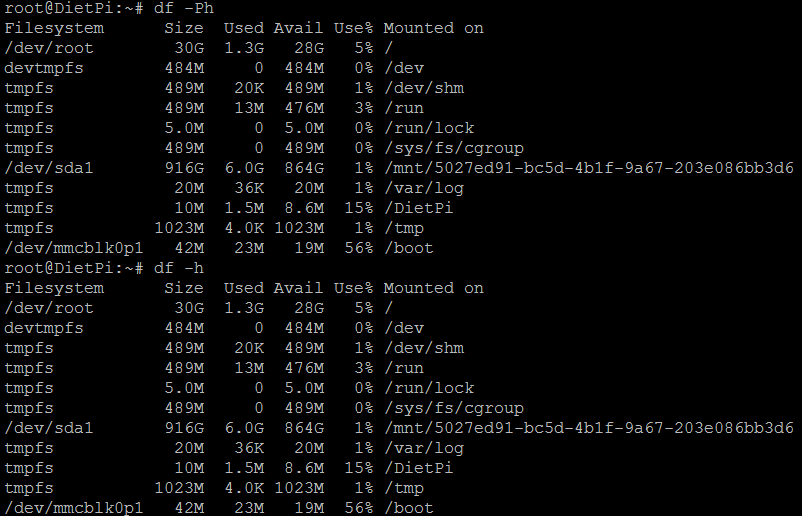
DietPi-Drive_Manager show the same total size and used size..

And Deluge is showing me the same (almost) available size like df -Ph and h output

Why with total size (916 GB) minus used space (6 GB) i have 864 GB of available space.. is that how Linux work or?
bokiroki
on 30 Mar 2018
@bokiroki
Just checked on my server: I also always have some discrepancy between Size minus Used and Avail. It seems that depending on drive (type etc.) some needed / system used free space is reserved. Indeed in your case this seems to be quite much. As said after remounting the drive this might change.
The -P option of df just assures output in some POSIX format, I also see no difference here. Might be relevant if you use very special locale.
MichaIng
on 30 Mar 2018
So i moved user data from external hdd to sd card and unmounted than mounted - nothing changed
then unmounted and mounted and restarted rpi - nothing changed
followed this steps few times - nothing changed
than i tried to Mount Method : Change from UUID to /dev/sd and unmount, mount - nothing again..
So this didn't fixed my issue :neutral_face:
Also, this is my 5th or 6th install of dietpi on rpi and every time if i remember correctly i saw in deluge that i have 860 and something after clean install..
bokiroki
on 30 Mar 2018
@bokiroki
I would not see it as issue. It is quite normal that not all theoretical free space can be used.
As df, Deluge and Radarr all show the same values, this seems to be totally correct and fine.
MichaIng
on 30 Mar 2018
@MichaIng i investigated a little and found that ext4 filesystem reserve 5% of space..
https://askubuntu.com/questions/249387/df-h-used-space-avail-free-space-is-less-than-the-total-size-of-home
someone found comment from ext4 maker https://askubuntu.com/questions/19504/reasonable-size-for-filesystem-reserved-blocks-for-non-os-disks
and here is how to reduce reserved size https://viewsby.wordpress.com/2012/12/17/reduce-amount-reserved-free-disk-space-with-tune2fs/
so they are saying if system is not on that partition there is no need for reserved space on hdd..and /user_data/ on dietpi dont have anything to do with system?
What do you think about that?
bokiroki
on 30 Mar 2018
@bokiroki
Ah yeah that is true, totally forgot about this. The 5% also helps to avoid disk fragmentation, but on 1+ TB drives this is probably a bid much reserved.
tune2fs -m 0 /dev/sdc1 sets this to 0%. We could add this feature to DietPi-Drive_Manager for non root/boot devices.
MichaIng
on 31 Mar 2018
@Fourdee
What you think? When formatting dives via DietPi-Drive_Manager to ext4, which are then obviously non root and non boot, reduce reserved 5% to e.g. 1% or based on partition size (reduce fragmentation) to something between 1 and 5 percent? Could do some investigation which value makes sense here.
Also feature to reduce/adjust this afterwards for non root/boot would then be nice.
Ref: https://forums.fedoraforum.org/showthread.php?310095-ext3-4-reserving-5-for-reserve-space-for-root-even-on-big-disks
https://www.elpauer.org/2011/01/request-to-linux-distributions/
MichaIng
on 5 Apr 2018
@MichaIng
When formatting dives via DietPi-Drive_Manager to ext4, which are then obviously non root and non boot, reduce reserved 5% to e.g. 1%
Agree 👍
I'd even go as far to say 0% for formatting. As rootFS can never be formatted, should be fine, to apply to all formats on ext4:
root@DietPi:~# tune2fs -l /dev/sda | grep 'Reserved block count'

Reserved block count:     1562935
root@DietPi:~# umount /dev/sda

root@DietPi:~# mkfs.ext4 -F /dev/sda -m 0
mke2fs 1.43.4 (31-Jan-2017)
/dev/sda contains a ext4 file system
        last mounted on Tue Apr  3 18:17:23 2018
Discarding device blocks: done
Creating filesystem with 31258710 4k blocks and 7815168 inodes
Filesystem UUID: 6f65ef9c-35f8-442a-8ec0-e7fde839ee8e
Superblock backups stored on blocks:
        32768, 98304, 163840, 229376, 294912, 819200, 884736, 1605632, 2654208,
        4096000, 7962624, 11239424, 20480000, 23887872

Allocating group tables: done
Writing inode tables: done
Creating journal (131072 blocks): done
Writing superblocks and filesystem accounting information: done

root@DietPi:~# tune2fs -l /dev/sda | grep 'Reserved block count'
Reserved block count:     0
 Fourdee
on 5 Apr 2018
Fourdee
on 5 Apr 2018
@MichaIng
Quick commit sent for 0% ext4 formatting, feel free to tweak/change as needed https://github.com/Fourdee/DietPi/commit/43a97fc1d206121304d5bdb928f2ae6038f8d3f0
Fourdee
on 5 Apr 2018
@Fourdee
Jep simple but effective. Also /boot cannot be formatted as I can see, and even if, /boot is in most cases (always?) fat, not ext4 and also a moreless static partition with no need for reserved blocks as well.
We could add an additional drive menu entry/toggle to release reserved blocks on existing (formatted + used) drives. Add it, if file system is ext4 and format is possible (thus no root/boot) and reserved blocks are not yet 0.
Or add a text field entry to adjust manually? Hmm but love simplicity in this case. I would even automatically release reserved blocks for all non root/boot drives on drive_manager startup, the only issue would be, if you attach a root device from another machine/backup or chroot into another partition or something. Thus yeah leave it as as active choice to user.
MichaIng
on 5 Apr 2018
@MichaIng
Hmm but love simplicity in this case.
👍 😃
the only issue would be, if you attach a root device from another machine/backup or chroot into another partition or something. Thus yeah leave it as as active choice to user.
Yep agree 👍
~I've lost track of where we are in this ticket is, but this should now resolve the original issue (https://github.com/Fourdee/DietPi/issues/1662#issue-309933014), once drive is formatted again? Can we mark as closed?~
I'll run a test.
Looks good, nice one @MichaIng 👍 :


Fourdee
on 5 Apr 2018
Resolved for v6.7. Future EXT4 formats in dietpi-drive_manager is now defaulted to disable reserve blocks.
@bokiroki
As per @MichaIng solution, for existing disks, you can disabled the reserve blocks to unlock full capacity of disk:
dietpi-services stop
tune2fs -m 0 /dev/sda1
dietpi-services start
@bokiroki
For reference: We further implemented the ability to adjust the the reserved blocks on ext4 via DietPi-Drive_Manager, which also shows the reserved percentage behind drive capacity then.
This will be tested now and released with v6.8: https://github.com/Fourdee/DietPi/pull/1713
Thanks again for sharing this with us, I think it's quite an interesting topic and showing this can lead to more clarification on how the total/used/free space values are estimated/why they differ with non-root applications.
MichaIng
on 19 Apr 2018
Related issues
 pfeerick
·
3Comments
pfeerick
·
3Comments
 Invictaz
·
3Comments
Fourdee
·
3Comments
Invictaz
·
3Comments
Fourdee
·
3Comments
 k-plan
·
3Comments
MichaIng
·
3Comments
k-plan
·
3Comments
MichaIng
·
3Comments