Dietpi: MOPIDY: Gstreamer warning - NO sound
Creating a bug report/issue:
Required Information:
- DietPi Version 6.4
- SBC Device RPi 3
Additional Information (if applicable):
- Mopidy
- Can this issue be replicated on a fresh installation of DietPi? Yes
Expected behaviour:
- Hearing sound
- Actually playing the song
Actual behaviour:
I'm no techie at all, so I took a screenshot with the error and copy paste the log.
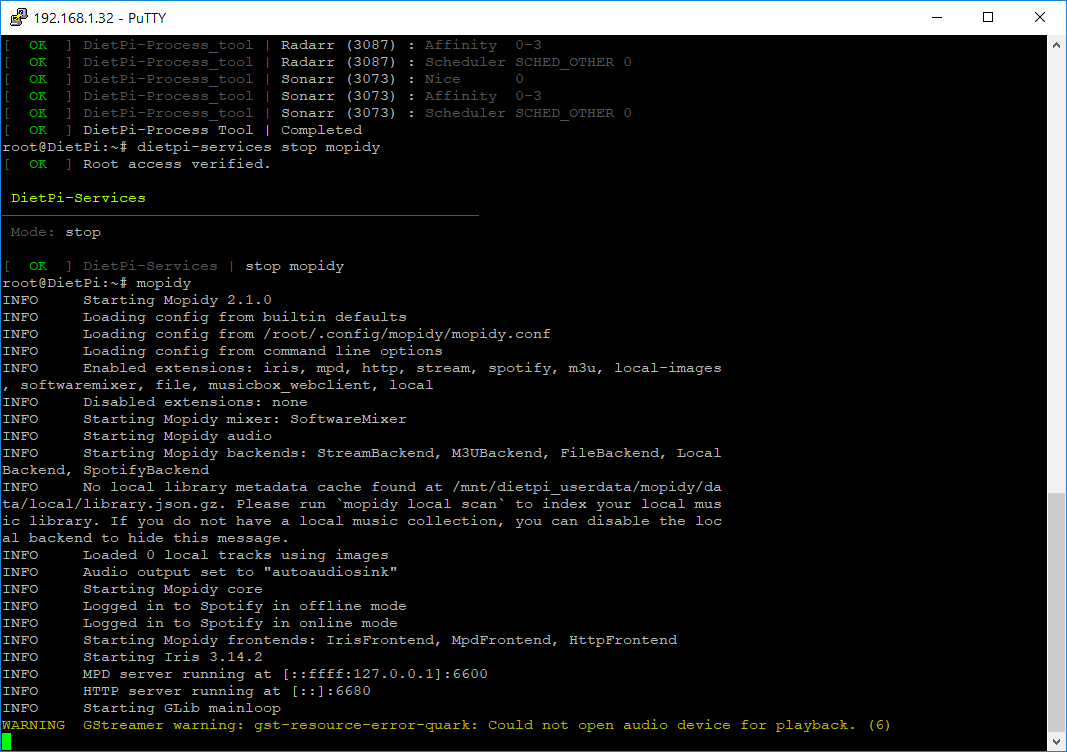
Error line:
2018-03-16 17:23:29,353 WARNING [4835:MainThread] mopidy.audio.gst: GStreamer warning: gst-resource-error-quark: Could not open audio device for playback. (6)
Complete Log
2018-03-16 17:20:30,134 INFO [4835:MainThread] mopidy.__main__: Starting Mopidy 2.1.0
2018-03-16 17:20:31,306 INFO [4835:MainThread] mopidy.config: Loading config from builtin defaults
2018-03-16 17:20:31,317 INFO [4835:MainThread] mopidy.config: Loading config from /etc/mopidy/mopidy.conf
2018-03-16 17:20:31,323 INFO [4835:MainThread] mopidy.config: Loading config from command line options
2018-03-16 17:20:31,726 INFO [4835:MainThread] mopidy.__main__: Enabled extensions: iris, mpd, http, stream, spotify, m3u, local-images, softwaremixer, file, musicbox_webclient, local
2018-03-16 17:20:31,728 INFO [4835:MainThread] mopidy.__main__: Disabled extensions: none
2018-03-16 17:20:31,969 INFO [4835:MainThread] mopidy.commands: Starting Mopidy mixer: SoftwareMixer
2018-03-16 17:20:31,977 INFO [4835:MainThread] mopidy.commands: Starting Mopidy audio
2018-03-16 17:20:31,983 INFO [4835:MainThread] mopidy.commands: Starting Mopidy backends: StreamBackend, M3UBackend, FileBackend, LocalBackend, SpotifyBackend
2018-03-16 17:20:32,009 INFO [4835:Audio-2] mopidy.audio.actor: Audio output set to "autoaudiosink"
2018-03-16 17:20:32,043 INFO [4835:MainThread] mopidy.local.json: No local library metadata cache found at /mnt/dietpi_userdata/mopidy/data/local/library.json.gz. Please run
mopidy local scanto index your local music library. If you do not have a local music collection, you can disable the local backend to hide this message.
2018-03-16 17:20:32,045 INFO [4835:MainThread] mopidy.local.library: Loaded 0 local tracks using images
2018-03-16 17:20:32,331 INFO [4835:MainThread] mopidy.commands: Starting Mopidy core
2018-03-16 17:20:32,357 INFO [4835:SpotifyEventLoop] spotify.session: Spotify logged in
2018-03-16 17:20:32,359 INFO [4835:SpotifyEventLoop] mopidy_spotify.backend: Logged in to Spotify in offline mode
2018-03-16 17:20:32,841 INFO [4835:SpotifyEventLoop] mopidy_spotify.backend: Logged in to Spotify in online mode
2018-03-16 17:20:35,106 INFO [4835:MainThread] mopidy.commands: Starting Mopidy frontends: IrisFrontend, MpdFrontend, HttpFrontend
2018-03-16 17:20:35,111 INFO [4835:IrisFrontend-12] mopidy_iris.frontend: Starting Iris 3.14.2
2018-03-16 17:20:35,116 INFO [4835:MainThread] mopidy.mpd.actor: MPD server running at [::ffff:127.0.0.1]:6600
2018-03-16 17:20:35,125 INFO [4835:HttpFrontend-15] mopidy.http.actor: HTTP server running at [::]:6680
2018-03-16 17:20:35,126 INFO [4835:MainThread] mopidy.commands: Starting GLib mainloop
2018-03-16 17:23:20,874 INFO [4835:HttpServer] tornado.access: 301 GET /iris (192.168.1.128) 1.32ms
2018-03-16 17:23:20,893 INFO [4835:HttpServer] tornado.access: 304 GET /iris/ (192.168.1.128) 3.53ms
2018-03-16 17:23:21,094 INFO [4835:HttpServer] tornado.access: 200 GET /iris/assets/icons/play.svg (192.168.1.128) 2.87ms
2018-03-16 17:23:21,104 INFO [4835:HttpServer] tornado.access: 200 GET /iris/assets/icons/search.svg (192.168.1.128) 2.93ms
2018-03-16 17:23:21,112 INFO [4835:HttpServer] tornado.access: 200 GET /iris/assets/icons/mic.svg (192.168.1.128) 3.01ms
2018-03-16 17:23:21,118 INFO [4835:HttpServer] tornado.access: 200 GET /iris/assets/icons/music.svg (192.168.1.128) 2.84ms
2018-03-16 17:23:21,123 INFO [4835:HttpServer] tornado.access: 200 GET /iris/assets/icons/cd.svg (192.168.1.128) 2.86ms
2018-03-16 17:23:21,128 INFO [4835:HttpServer] tornado.access: 200 GET /iris/assets/icons/folder.svg (192.168.1.128) 2.74ms
2018-03-16 17:23:21,133 INFO [4835:HttpServer] tornado.access: 200 GET /iris/assets/icons/cog.svg (192.168.1.128) 2.79ms
2018-03-16 17:23:21,140 INFO [4835:HttpServer] tornado.access: 200 GET /iris/assets/icons/back.svg (192.168.1.128) 3.58ms
2018-03-16 17:23:21,145 INFO [4835:HttpServer] tornado.access: 200 GET /iris/assets/icons/play.svg (192.168.1.128) 2.61ms
2018-03-16 17:23:21,153 INFO [4835:HttpServer] tornado.access: 200 GET /iris/assets/icons/stop.svg (192.168.1.128) 5.73ms
2018-03-16 17:23:21,159 INFO [4835:HttpServer] tornado.access: 200 GET /iris/assets/icons/skip.svg (192.168.1.128) 3.51ms
2018-03-16 17:23:21,164 INFO [4835:HttpServer] tornado.access: 200 GET /iris/assets/icons/play.svg (192.168.1.128) 2.68ms
2018-03-16 17:23:21,168 INFO [4835:HttpServer] tornado.access: 200 GET /iris/assets/icons/playlist.svg (192.168.1.128) 2.80ms
2018-03-16 17:23:21,360 INFO [4835:HttpServer] tornado.access: 200 GET /iris/assets/icons/compass.svg (192.168.1.128) 4.81ms
2018-03-16 17:23:21,365 INFO [4835:HttpServer] tornado.access: 200 GET /iris/assets/icons/grid.svg (192.168.1.128) 2.83ms
2018-03-16 17:23:21,369 INFO [4835:HttpServer] tornado.access: 200 GET /iris/assets/icons/star.svg (192.168.1.128) 2.76ms
2018-03-16 17:23:21,376 INFO [4835:HttpServer] tornado.access: 200 GET /iris/assets/icons/leaf.svg (192.168.1.128) 2.75ms
2018-03-16 17:23:21,380 INFO [4835:HttpServer] tornado.access: 200 GET /iris/assets/icons/broadcast.svg (192.168.1.128) 2.84ms
2018-03-16 17:23:21,495 INFO [4835:HttpServer] tornado.access: 200 GET /iris/assets/favicon.ico (192.168.1.128) 3.59ms
2018-03-16 17:23:29,353 WARNING [4835:MainThread] mopidy.audio.gst: GStreamer warning: gst-resource-error-quark: Could not open audio device for playback. (6)
2018-03-16 17:23:29,505 INFO [4835:HttpServer] tornado.access: 304 GET /iris/assets/icons/pause.svg (192.168.1.128) 2.56ms
Steps to reproduce:
- Fresh install of DietPi, Kodi, Mopidy, Sonarr, Radarr and Deluge
- Autostart Kodi when booting
- Launch Mopidy Iris frontend
- Play any song from Spotify
Did you submit a dietpi-bugreport?
- NO
Extra details:
 tacocowboy
All 8 comments
@tacocowboy
Autostart Kodi when booting
Launch Mopidy Iris frontend
Play any song from Spotify
Please exit Kodi before playing audio in other software (to release the ALSA stream and free up device), allowing other audio software to function.
 Fourdee
on 16 Mar 2018
Fourdee
on 16 Mar 2018
But before version 6.4 (I came from last v159 I think, and I had to fresh install to update) it was working together. Kodi and Mopidy.
Same configuration, same apps, no issues.
tacocowboy
on 17 Mar 2018
Could any of these work?
https://discourse.mopidy.com/t/cant-get-mopidy-output-sound-kodibuntu-mopidy/631/2
tacocowboy
on 17 Mar 2018
Confirmed bug, due to missing package gstreamer1.0-alsa
Fourdee
on 23 Mar 2018
Resolved for v6.5.
Workaround for v6.4, install the following package:
G_AGI gstreamer1.0-alsa- Restart services
dietpi-services restart
Fourdee
on 23 Mar 2018
Resolved for v6.5.
Workaround for v6.4, install the following package:
* `G_AGI gstreamer1.0-alsa`

* Restart services `dietpi-services restart`
Hi, I've installed Mopidy but I can't play all files I have some errors even after install gstreamer1.0-alsa
mai 09 18:27:17 DietPi mopidy[898]: ERROR    [MainThread] mopidy.audio.gst GStreamer error: Resource not found.
mai 09 18:27:17 DietPi mopidy[898]: WARNING  [Audio-2] mopidy.audio.actor Setting GStreamer state to GST_STATE_PLAYING failed
mai 09 18:27:17 DietPi mopidy[898]: WARNING  [Core-7] mopidy.core.tracklist Track is not playable: local:track:
My config
root@DietPi:~# cat /etc/asound.conf
pcm.!default {
    type asym
    playback.pcm "boom"
}

ctl.!default {
    interface "hci0"
    device "88:C6:26:C2:76:35"
    profile "a2dp"
}

pcm.boom {
        type plug
        slave.pcm {
                type bluealsa
                device "88:C6:26:E9:08:A7"
                profile "a2dp"
        }
        hint {
                show on
                description "UE BOOM 2"
        }
}
root@DietPi:~# cat /lib/systemd/system/bluealsa.service
[Unit]
Description=BluezALSA proxy
Requires=bluetooth.service
After=bluetooth.service

[Service]
Type=simple
User=root
ExecStart=/usr/bin/bluealsa -p a2dp-source -p a2dp-sink
root@DietPi:~# cat /etc/mopidy/mopidy.conf
...
[audio]
mixer = software
mixer_volume =
output = alsasink
buffer_time =
...
do you have any idea what's wrong ?
Thanks
 reeslo
on 9 May 2020
reeslo
on 9 May 2020
@reeslo
Could you please open a new issue about this, as the original issue has been fixed a long time ago, hence installing gstreamer1.0-alsa is done already within our installer 😉.
 MichaIng
on 10 May 2020
MichaIng
on 10 May 2020
Sorry I doesn't see your reply notification, that was a mistake, everything it's ok, I moved the directory containing some files :x
Thanks :p
reeslo
on 18 May 2020
Related issues
 and09
·
3Comments
Fourdee
·
3Comments
Fourdee
·
3Comments
Fourdee
·
3Comments
and09
·
3Comments
Fourdee
·
3Comments
Fourdee
·
3Comments
Fourdee
·
3Comments
 k-plan
·
3Comments
k-plan
·
3Comments