DietPi-Automation | Installs Google AIY voice kit (ASUS Tinker Board)
Required Information:
- DietPi Version | v6.1
- SBC Device | Asus Tinker Board (armv7l) (index=52)
- Distro | stretch (index=4)
- Command | Connection test: 1
- Error Handler | G_ERROR_HANDLER
Additional Information (if applicable):
DietPi-Software
─────────────────────────────────────────────────────
 Mode: Installing Google AIY: voice kit

[    ..] Failed connection attempt (5/5), retrying....
[FAILED] DietPi-Software: Connection test: 1
[ INFO ] exit_code = 4
[ INFO ] VERSION:v6.1 | HW_MODEL:52 | HW_ARCH:2 | DISTRO:4
[ INFO ] Log file contents:
Spider mode enabled. Check if remote file exists.
--2018-02-15 16:27:19--  http://1/
Resolving 1 (1)... 0.0.0.1
Connecting to 1 (1)|0.0.0.1|:80... failed: Invalid argument.
[ INFO ] If problems persist, please report this to DietPi for investigation, including a screenshot of this error! (https://github.com/Fourdee/DietPi/issues).
Expected behaviour:
Complete installation automation without installing "Google AIY voice kit" because it was not selected.
Actual behaviour:
Software installation automation script tries to install "Google AIY voice kit".
Steps to reproduce:
Use ASUS Tinker Board Hardware and enable DietPi Automated setup AND Custom Install Script.
This seems to happen only when AUTO_SETUP_CUSTOM_SCRIPT_EXEC is enabled.
edit dietpi.txt
AUTO_SETUP_AUTOMATED=1
AUTO_SETUP_CUSTOM_SCRIPT_EXEC=1
Place script at boot/Automation_Custom_Script.sh
Additional logs:
Log file contents:
Spider mode enabled. Check if remote file exists.
--2018-02-15 16:23:38--  http://1/
Resolving 1 (1)... 0.0.0.1
Connecting to 1 (1)|0.0.0.1|:80... failed: Invalid argument.
Related issue https://github.com/Fourdee/DietPi/issues/1429
 kapdap
All 4 comments
@kapdap
Many thanks for the report 👍
We'll open for investigations.
 Fourdee
on 15 Feb 2018
Fourdee
on 15 Feb 2018
Confirmed replication.
Notes:
- Mentioned software is not actually installed, or the pre-reqs.
This is simply a banner issue, has no effect on installed software.
Left over code from 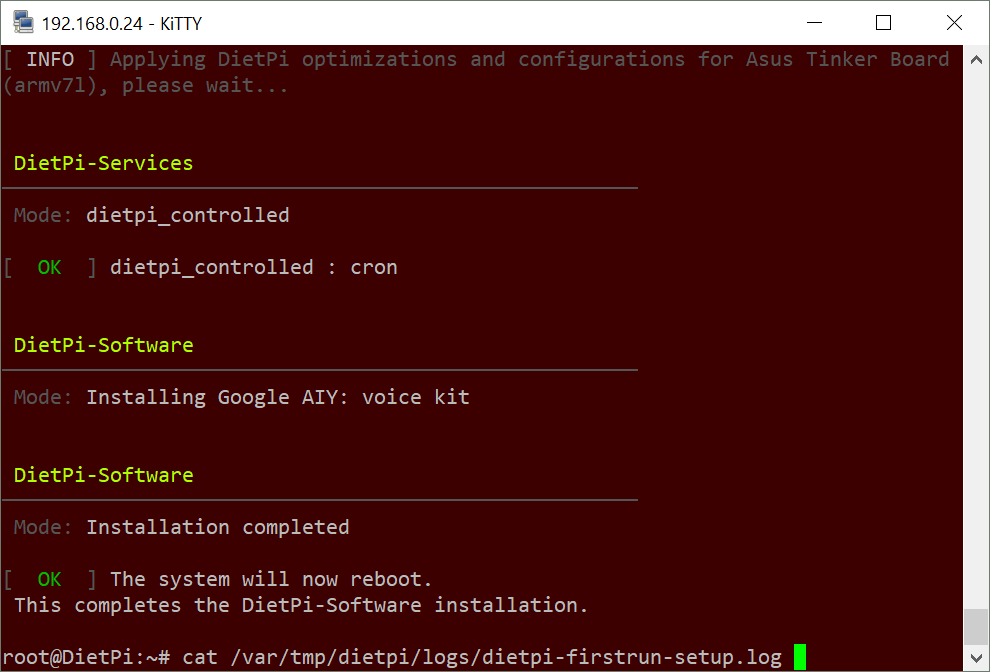
Fourdee
on 16 Feb 2018
@kapdap
Great find on this, thanks for letting us know 👍
Resolved for v6.2.
Fourdee
on 16 Feb 2018
@Fourdee
No worries. Thanks for all the hard work 👍. Looking forward to the next release.
kapdap
on 17 Feb 2018
Related issues
Fourdee
·
3Comments
 Invictaz
·
3Comments
Fourdee
·
3Comments
Invictaz
·
3Comments
Fourdee
·
3Comments
 k-plan
·
3Comments
k-plan
·
3Comments
 pfeerick
·
3Comments
pfeerick
·
3Comments