DietPi-Software | Pi-Hole: not updating blocked count
Required Information:
DietPi: 159
SBC: VirtualBox image
Power Supply: na
SD: na
Distro: Debian 4.9.65-3+deb9u1
Additional Information (if applicable):
Software: PiHole
Can be replicated: yes
Expected behaviour:
Blocked DNS requests should be showing, instead just number of queries is populated.
I have configured DietPi to use RAM Logs, and PiHole to log (expecting to have the logs last until reboot)
Actual behaviour:
Just DNS requests show up (screenshot here)
Steps to reproduce:
Download latest VirtualBox image (seems to be 158). Dowload latest (5.2.4) Virtualbox.
Install Virtualbox, import appliance with default settings
Start the VM, let it update fully (to 159)
Install just PiHole, let it reboot when requested.
Open PiHole admin page
http://
login (DietPi has changed the password to dietpi)
configure one machine to use DietPi/Pihole machine to serve DNS requests.
The number of requests gets updated in real time. Blocked requests do not show up.
Did you submit a dietpi-bugreport?
yes: 0891e541-8e79-4993-b173-219aa89c7eae-0
Extra details:
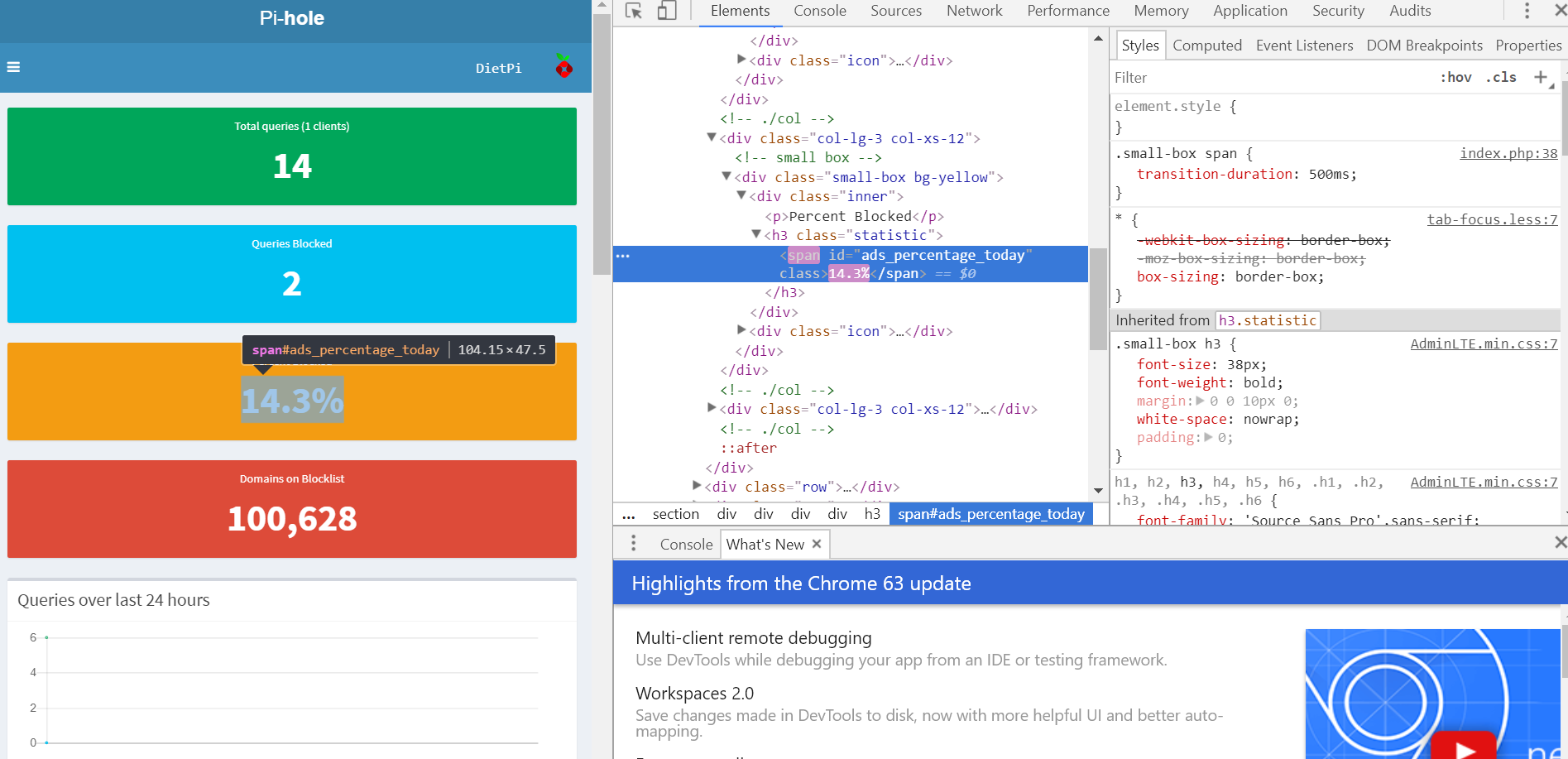
the page source DOES hold the data (screenshot here) it just doesn't get displayed
Tested with Crome 63 and Firefox 57, same behaviour.
 ilgrank
All 11 comments
@ilgrank
Thanks for the report 👍
We'll try to replicate.
 Fourdee
on 29 Dec 2017
Fourdee
on 29 Dec 2017
Unable to replicate on devices I have available currently for testing:
- RPi 3 Stretch
- VMware Stretch
- Chromium 63.0.3239.84
@ilgrank
Might be a one off issue with Pi-Hole, can you try flushing the logs and seeing if the issue reoccurs?
- Pi-Hole web UI
- Settings
- Flush Logs
Fourdee
on 29 Dec 2017
Hi
Sorry for the late reply
Flushed the logs ->no change (besides resetting the visibile count)
Rebooted the system (since the logs should be stored in ram, should produce the same result) ->no change (besides resetting the visibile count)
ilgrank
on 29 Dec 2017
@ilgrank
Thanks for testing.
We'll need to test on the Virtual box image to exclude it. If we can't replicate on that, the only thing I can suggest is a reinstall of PiHole on the system through dietpi-software.
Fourdee
on 30 Dec 2017
- 🈯️ Virtual Box
Unable to replicate. @ilgrank As above, I can only suggest trying a uninstall/install of PiHole through dietpi-software.
Fourdee
on 30 Dec 2017
Just to be sure, I have re-downloaded the appliance, imported it on another installation of Virtualbox and got the same issue.
To replicate:
Install VirtualBox (5.2.4), download DietPi_VirtualBox-x86_64-(Stretch).ova.
Run it
It will update to 159 and reboot.
Log in, use the interface to install just SW 93 (Pi Hole)
(installation of dependancies, warnings and reboot)
New installation->same issue.
UPDATE: Further analyzing the CSS, it seems completely broken to me, as it shows lots of domains in the CSS : Check screenshot here
Also, please note display is set to NONE. Changing it to Block, yelds the correct result
ilgrank
on 30 Dec 2017
@ilgrank
To replicate:
Strange, same process I used here.
Thinking possible networking/browser/host client issue.
Can you replicate the web issue on another client (eg: another PC/tablet/phone)?
Fourdee
on 30 Dec 2017
I have just updated the post above, with my findings about the issue. The culprit is the CSS, which seems borked to me (dozens of domains where Styles should be, and also an override (display:none))
ilgrank
on 30 Dec 2017
The problem is, the edit is just in-place, it does not have a permanent effect.. the issue is still there. I have just used the embedded Dev Tools to alter the CSS code in-place to check what was the cuprit.
I also wrote to the Pi-Hole team but I'm waiting for an answer on their side too...
ilgrank
on 30 Dec 2017
'my' fault: I'm using a software, called AdGuard, that does a similar function to PiHole: It had been injecting that "Display:None" as it had erroneously identified PiHole as adware (!!)
I've reported the issue to the developer of AdGuard.. sorry for this loss of time :/
Many thanks for your help, keep up the excellent work and happy new year!
ilgrank
on 30 Dec 2017
@ilgrank
Many thanks for your help, keep up the excellent work and happy new year!
No worries, have a good one aswell 👍
Fourdee
on 30 Dec 2017
Related issues
Fourdee
·
3Comments
 1021683053
·
3Comments
1021683053
·
3Comments
 MichaIng
·
3Comments
Fourdee
·
3Comments
MichaIng
·
3Comments
Fourdee
·
3Comments
 Invictaz
·
3Comments
Invictaz
·
3Comments