Dietpi: Dietpi hangs at boot after first-run upgrade | XU4
If you are effected by failure to boot XU4 after apt-get upgrade kernel upgrade, please see:
- https://github.com/Fourdee/DietPi/issues/1105#issuecomment-321542109
After flashing the image DietPi_v151_OdroidXU4-armv7-(Jessie), during first time boot, the Dietpi updates itself from 151 to 154 and reboots. Next, it asks for softwares to be installed, and without selecting any, I click Go, what leads to an "apt upgrade".
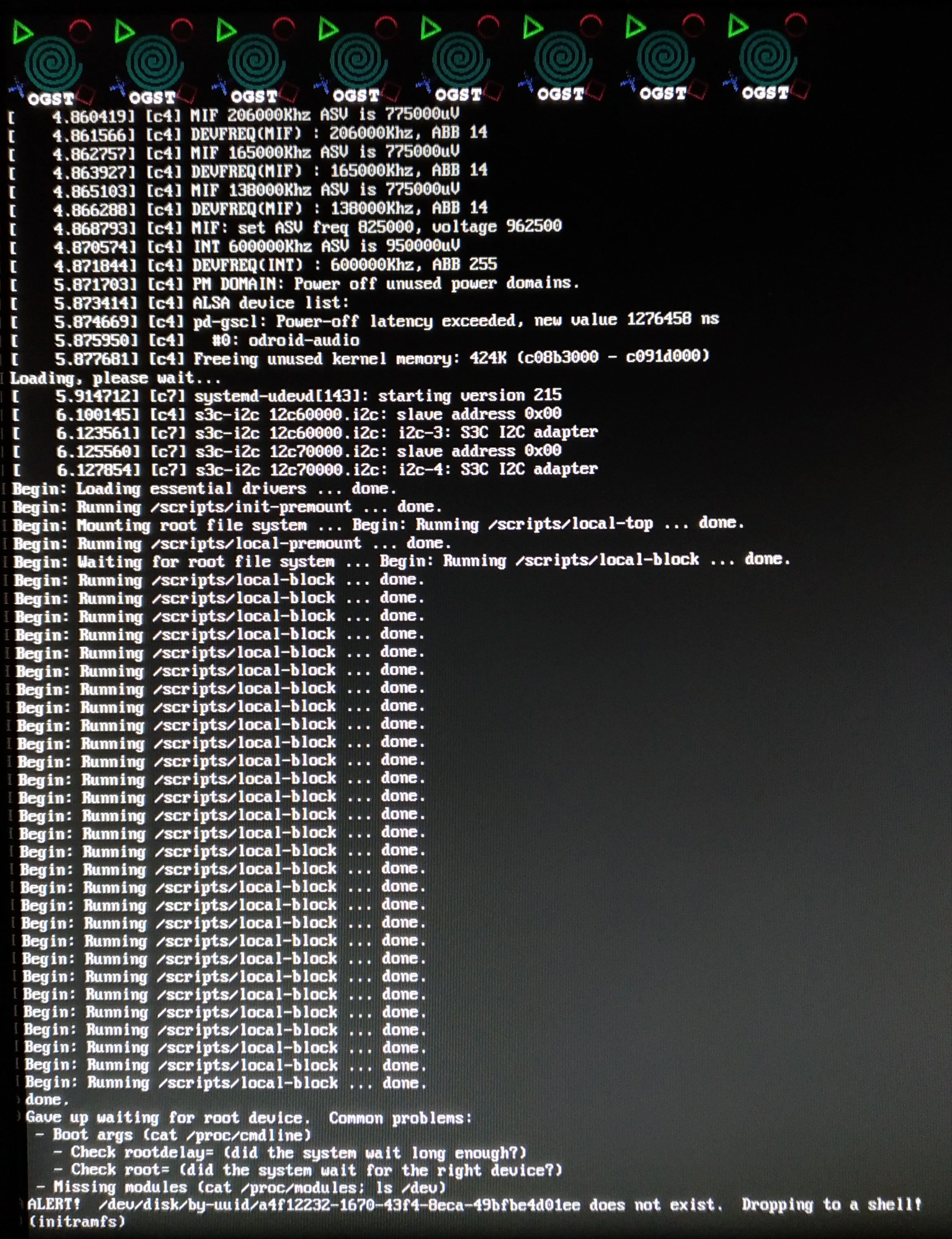
The first upgrade takes some 20 min, and after it, it reboots automatically, but hangs during boot as on the picture below.
If I unplug it, and plug again, it does not boot anymore.
Happened 3 times in a row, with different SD cards, and with/without external USB drives plugged into the USB.
** the same does not happen with the image containing the kernel 4.9
 joaofl
All 6 comments
@joaofl
Thanks for the report 👍 I'll take a look.
 Fourdee
on 10 Aug 2017
Fourdee
on 10 Aug 2017
- 🈴 initramfs: No drives/partitions listed in
blkid
Kernel date 7th Aug
- 🈺 Changes to the
/boot/boot.iniboot up code required, due to new support for eMMC 5.1 AFAIK
https://github.com/Fourdee/DietPi/commit/6a7bed1e87bc96d9bdc2e459f03e35676205bcd5#diff-8c4a8f176043d56dac80fbbdf318e3f7
- 🈺 Changes to the
- 🈯️ XU4 image updated: http://dietpi.com/downloads/images/DietPi_OdroidXU4-armv7-(Jessie).7z
Existing installations, if you experience failure to boot, after the kernel upgrade (apt-get upgrade):
- You will need to replace
/boot/boot.iniwith the following file: https://github.com/Fourdee/DietPi/blob/testing/boot_xu4.ini - System will now boot
Fourdee
on 10 Aug 2017
@joaofl
Image updated: https://github.com/Fourdee/DietPi/issues/1105#issuecomment-321542109
Thanks for reporting this 👍
Fourdee
on 10 Aug 2017
Completed, however existing installations will need to manually update their boot.ini after kernel upgrade:
https://github.com/Fourdee/DietPi/issues/1105#issuecomment-321542109
Fourdee
on 10 Aug 2017
I tried the following:
First, I used this image here: http://dietpi.com/downloads/images/DietPi_OdroidXU4-armv7-(Jessie).7z , and then I replaced the boot.ini file before and after "apt-get upgrade". But in both cases it is still not working.
I used a workaround until this is working again:
I typed "apt-mark hold uboot" to prevent uboot from upgrading, this solves my problem, but I hope I can update it again in the future.
 kevinhaendel
on 28 Aug 2017
kevinhaendel
on 28 Aug 2017
At some point the new image provided by @Fourdee worked out. But yesterday it seems that upgrading the uboot caused some issue (again). Again it hanged during boot. Not even the hearbeat LED blinks.
Not sure what to do.
joaofl
on 28 Aug 2017
Related issues
 k-plan
·
3Comments
k-plan
·
3Comments
Fourdee
·
3Comments
Fourdee
·
3Comments
k-plan
·
3Comments
k-plan
·
3Comments
Fourdee
·
3Comments
Fourdee
·
3Comments
 Invictaz
·
3Comments
Invictaz
·
3Comments