Audio streaming service similar to Ampache - https://github.com/phanan/koel
 sootstone
All 27 comments
yes, please include this.
I tried to install this, but failed
 elRadix
on 5 Mar 2017
elRadix
on 5 Mar 2017
+1 for this, it would be very useful
 phonicmouse
on 6 Mar 2017
phonicmouse
on 6 Mar 2017
Unofficial: How to set up Koel with Apache and MySQL on DietPi. Tested with Odroid XU4.
Note: Koel is included in dietpi-software as of v151. This only for those who want to combine Koel with a web server.
Install a LAMP stack, Node.js, FFmpeg, Build-Essential and optionally Git (for easy updating) from dietpi-software.
Set up database (MySQL example):
mysql -u root -p
Enter password:
mysql> CREATE DATABASE koel DEFAULT CHARACTER SET utf8 DEFAULT COLLATE utf8_general_ci;
mysql> GRANT ALL PRIVILEGES ON koel.* TO 'root'@'localhost';
mysql> FLUSH PRIVILEGES;
mysql> exit;
- Install Composer globally using official documentation, should look something like this:
php -r "copy('https://getcomposer.org/installer', 'composer-setup.php');"
php -r "if (hash_file('SHA384', 'composer-setup.php') === '669656bab3166a7aff8a7506b8cb2d1c292f042046c5a994c43155c0be6190fa0355160742ab2e1c88d40d5be660b410') { echo 'Installer verified'; } else { echo 'Installer corrupt'; unlink('composer-setup.php'); } echo PHP_EOL;"
php composer-setup.php
php -r "unlink('composer-setup.php');"
mv composer.phar /usr/local/bin/composer
- Install Yarn :
curl -o- -L https://yarnpkg.com/install.sh | bash
- Get Koel Latest Stable with Git
cd /var/www
git clone https://github.com/phanan/koel.git
cd koel
git checkout v3.6.2
- Install with Composer:
composer install
- Modify .env with details info, should look something like this (still in the koel directory):
nano .env

# Database connection name, which corresponds to the database driver.
# Possible values are:
#   mysql (MySQL/MariaDB - default)
#   pgsql (PostgreSQL)
#   sqlsrv (Microsoft SQL Server)
DB_CONNECTION=mysql
DB_HOST=127.0.0.1
DB_DATABASE=koel
DB_USERNAME=root
DB_PASSWORD=dietpi

# Username and password for the initial admin account
# This info will be populated into the database during `php artisan db:seed`
# After that, it can (and should) be removed from this .env file
[email protected]
ADMIN_NAME=admin
ADMIN_PASSWORD=admin-pass

# The streaming method.
# Can be either 'php' (default), 'x-sendfile', or 'x-accel-redirect'
# See https://github.com/phanan/koel/wiki#streaming-music for more information.
# Note: This setting doesn't have effect if the media needs transcoding (e.g. FLAC).
STREAMING_METHOD=x-sendfile

# The full path of ffmpeg binary.
FFMPEG_PATH=/usr/bin/ffmpeg
- init Koel instance:
php artisan koel:init
- Remove admin details from .env
nano .env

# Username and password for the initial admin account
# This info will be populated into the database during `php artisan db:seed`
# After that, it can (and should) be removed from this .env file
ADMIN_EMAIL=
ADMIN_NAME=
ADMIN_PASSWORD=
- Change Koel Permissions:
# cd
# chmod 775 -R /var/www/koel
# chown -R www-data:www-data /var/www/koel
- Install x-sendfile:
apt-get install libapache2-mod-xsendfile
- Enable mod_rewrite.
a2enmod rewrite

dietpi-services restart
- Configure Virtual Host
nano /etc/apache2/sites-available/000-default.conf

DocumentRoot /var/www/koel

<Directory /var/www/koel>
    Options Indexes FollowSymLinks
    AllowOverride All
    Require all granted
</Directory>

LoadModule xsendfile_module   /usr/lib/apache2/modules/mod_xsendfile.so

  <IfModule mod_xsendfile.c>
    XSendFile on
    XSendFilePath /mnt/dietpi_userdata/Music
  </IfModule>
dietpi-services restart
- Set Music Directory in Koel settings.
Visit DietPi system's IP (http://192.168.0.100) and you should be able to log in with the details set in .env
Email Address: [email protected]
Password: admin-pass
Set Music Directory in Settings
e.g. /mnt/dietpi_userdata/Music
sootstone
on 23 May 2017
@sootstone
Nice one, looks good 👍
I'll test your notes and convert it into DietPi-Software.
 Fourdee
on 24 May 2017
Fourdee
on 24 May 2017
notes:
Requires:
- nodejs
- lxmp stack
- Python/build-essential (for
npm install) - ffmpeg for transcoding
Fourdee
on 24 May 2017
sootstone
on 24 May 2017
Edited mistake in virtual host
AllowOverride None
to
AllowOverride All
sootstone
on 24 May 2017
very interesting "software/project" this Koel!!
elRadix commented on 5 Mar
yes, please include this.
I tried to install this, but failed
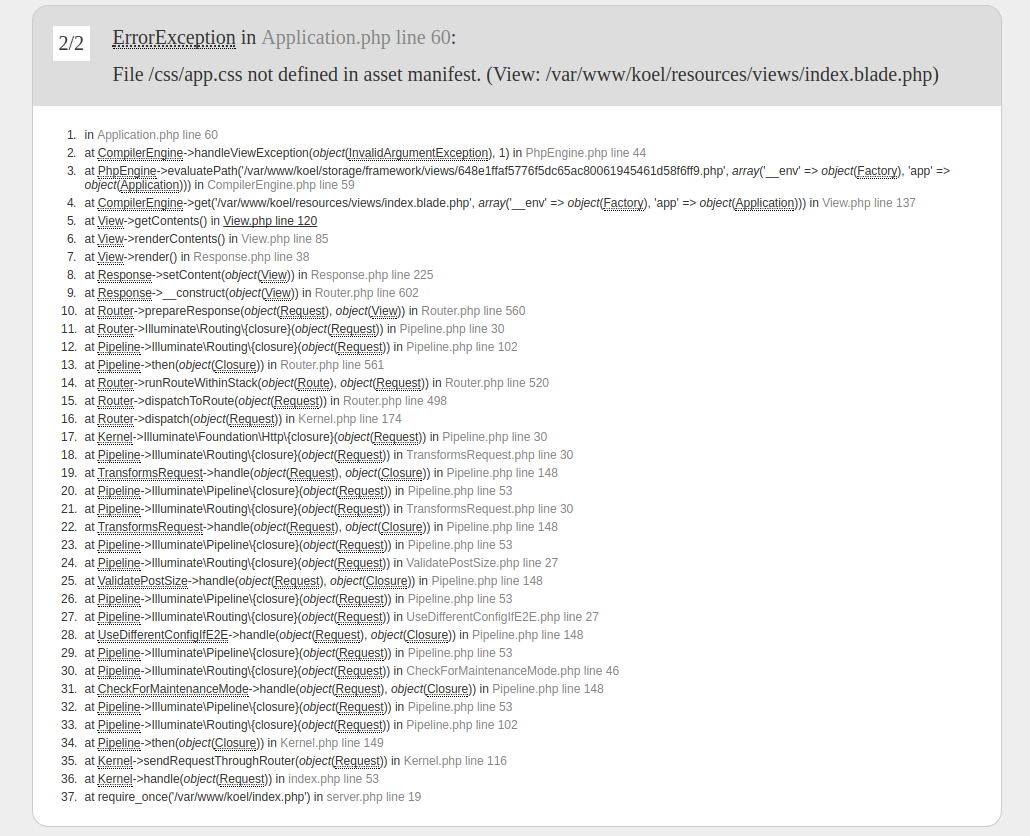
unfortunately same here: got an "css/app-css not defined in asset manifest"
(Node.js 7.10 installed/ Composer 1.4.2))
 sfb2
on 25 May 2017
sfb2
on 25 May 2017
@sfb2
Did you install with Yarn? That's the only supported installation method at the moment as far as I'm aware, you'll receive a lot of errors otherwise.
sootstone
on 25 May 2017
Did you install with Yarn? That's the only supported installation method at the moment as far as I'm aware, you'll receive a lot of errors otherwise.
I did exactly the steps you posted..many many thx btw.: great "tutorial"..!!
yes, i installed with Yarn, but maybe an old version ? 0.15.4 or something ? could really be the problem..
installed the steps here on a "normal" Xubuntu 16.04 (PC) and under Raspbian Jessie (RPI)..
guess, i have to make it completely/fresh again..
but many thx for your hint here !!; guess also Koel is a great piece of streamer; has to be in the dietpi-software (optional)..
many thx again (try it now again) ;-)
Edit: Sooo great, superb !! runs now..updated to yarn 0.24.5->was the problem !!
and btw.: Your "tutorial" was the greatest in a long time, really..no joke !!!
thx again ;-)
sfb2
on 25 May 2017
- 🈯️ Lighttpd
- 🈯️ Nginx
- 🈯️ Apache2
- Online Doc: http://dietpi.com/phpbb/viewtopic.php?f=8&t=5&p=7305#p7305
Fourdee
on 25 May 2017
Completed.
Fourdee
on 25 May 2017
@sfb2
No problem! Glad you could get it working.
sootstone
on 25 May 2017
Great job @Fourdee, looks awesome! :+1:
I'm probably going to stick with my own setup for personal use so I can customize it for Apache, but yours is perfect for DietPi users. Hope you don't mind if I steal some of it?
sootstone
on 25 May 2017
@sootstone
Hope you don't mind if I steal some of it?
By all means 👍 Its based on your install notes, without which, wouldn't be possible :)
Fourdee
on 26 May 2017
Updated for future reference.
sootstone
on 1 Jun 2017
Hi, I followed your guide step by step and I keep stumbling on this error after php artisan koel:init. is there anything I can do to fix it?
gyp ERR! stack     at emitTwo (events.js:125:13)
gyp ERR! stack     at ChildProcess.emit (events.js:213:7)
gyp ERR! stack     at Process.ChildProcess._handle.onexit (internal/child_proces                                                                             s.js:197:12)
gyp ERR! System Linux 3.4.113-sun8i
gyp ERR! command "/usr/local/bin/node" "/var/www/koel/node_modules/node-gyp/bin/                                                                             node-gyp.js" "rebuild" "--verbose" "--libsass_ext=" "--libsass_cflags=" "--libsa                                                                             ss_ldflags=" "--libsass_library="
gyp ERR! cwd /var/www/koel/node_modules/sass-loader/node_modules/node-sass
gyp ERR! node -v v8.1.3
gyp ERR! node-gyp -v v3.5.0
gyp ERR! not ok
Build failed with error code: 1
info Visit https://yarnpkg.com/en/docs/cli/install for documentation about this
 ghost
on 5 Jul 2017
ghost
on 5 Jul 2017
@MasaruKato
That's odd, what system are you trying to install Koel on?
Are you installing it as root?
Have you tried removing the $HOME/.node-gyp and $HOME/.npmrc directories, and rebooting/retrying? (Worked for people with similar problems)
sootstone
on 8 Jul 2017
I'm trying to install it on a Orange Pi PC.
Yes, I'm using the default DietPi account... I will try to do a fresh installation and delete those folders before
php artisan koel:init. Dumb question, do I need npm install or yarn is enough?
ghost
on 10 Jul 2017
Dumb question, do I need npm install or yarn is enough?
php artisan koel:init will automatically use yarn, so no need to use either :)
sootstone
on 13 Jul 2017
For curiosity, I tried to install it from the dietpi-software list and it doesn't work all the same. Maybe something changed in the installation process?
ghost
on 31 Aug 2017
@MasaruKato
For curiosity, I tried to install it from the dietpi-software list and it doesn't work all the same. Maybe something changed in the installation process?
Not that we are aware, which device tested on?
Fourdee
on 31 Aug 2017
Not that we are aware, which device tested on?
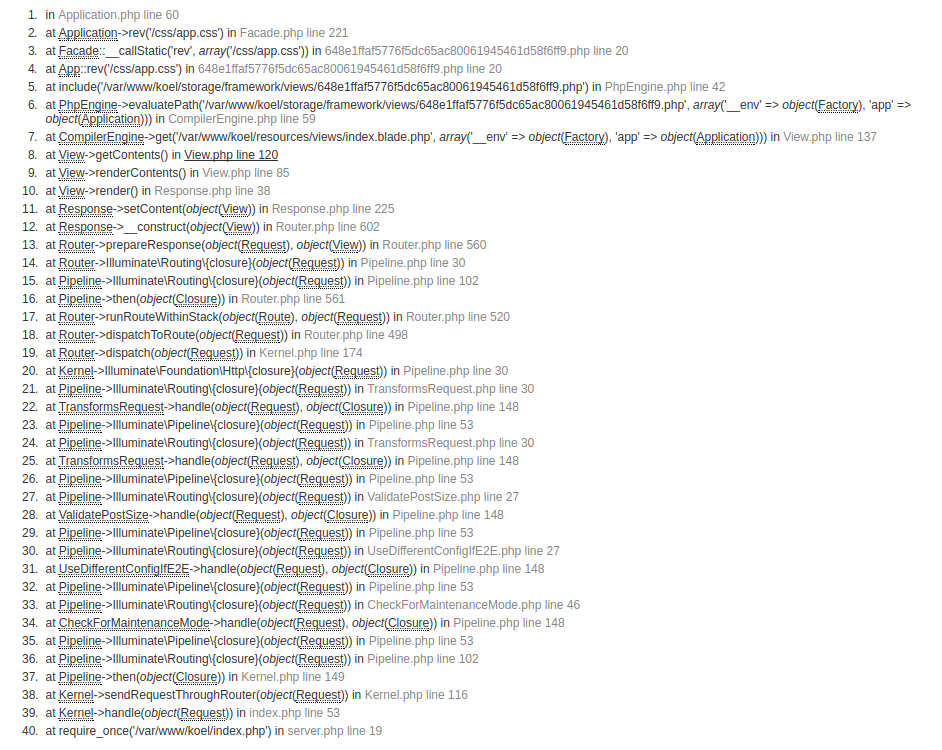
On a Orange Pi PC. These are the screenshots of the broken web page.
ghost
on 31 Aug 2017
hi there,
looks like a yarn problem..try to update it to the latest..
sfb2
on 31 Aug 2017
hi there,
looks like a yarn problem..try to update it to the latest..
So I tried again, with yarn updated at 0.27.5... same result.
ghost
on 3 Sep 2017
@MasaruKato
We tested install with the swapfile increase in v155 on fresh install, was functional. Are you running v155?
https://github.com/Fourdee/DietPi/issues/1126#issuecomment-326749203
Also please check swapfile size:
/DietPi/dietpi/func/dietpi-set_dphys-swapfile
We tested install with the swapfile increase in v155 on fresh install, was functional. Are you running v155?
I'm currently running v155.
I tried to install it from dietpi-software and it worked. I will try a "manual" installation following the guide above and I'll let you know.
edit: unfortunately following this guide I can't seem to get it work.
The first time I encountered these errors:
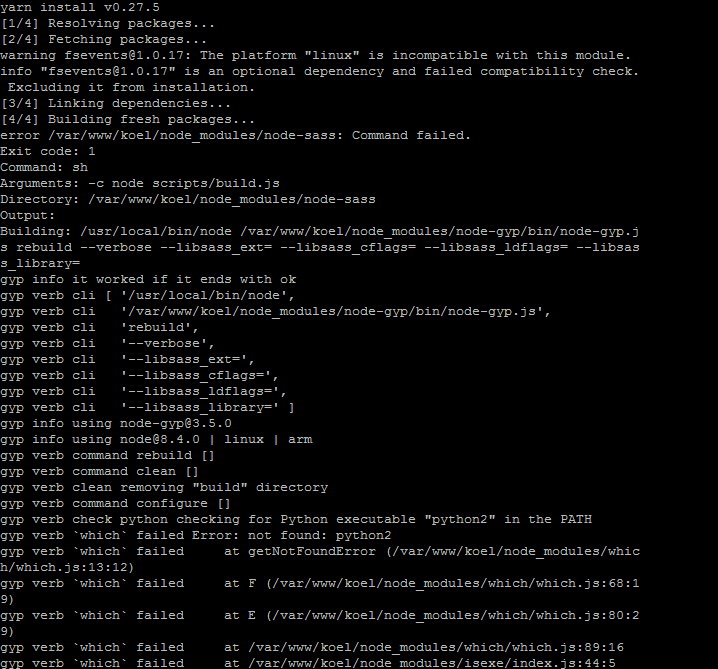
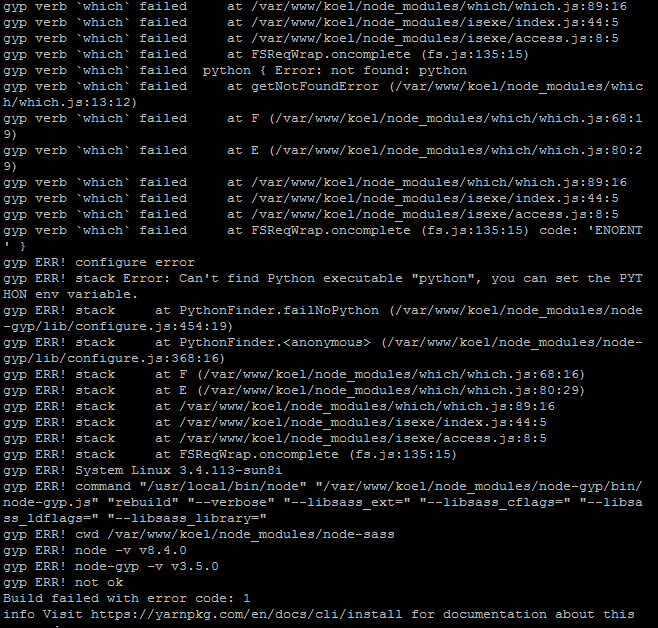
I tried to read between the lines and I installed python by running apt-get install python2.7
After that, yarn seemed to work correctly, until the very end when I encountered several errors like this one
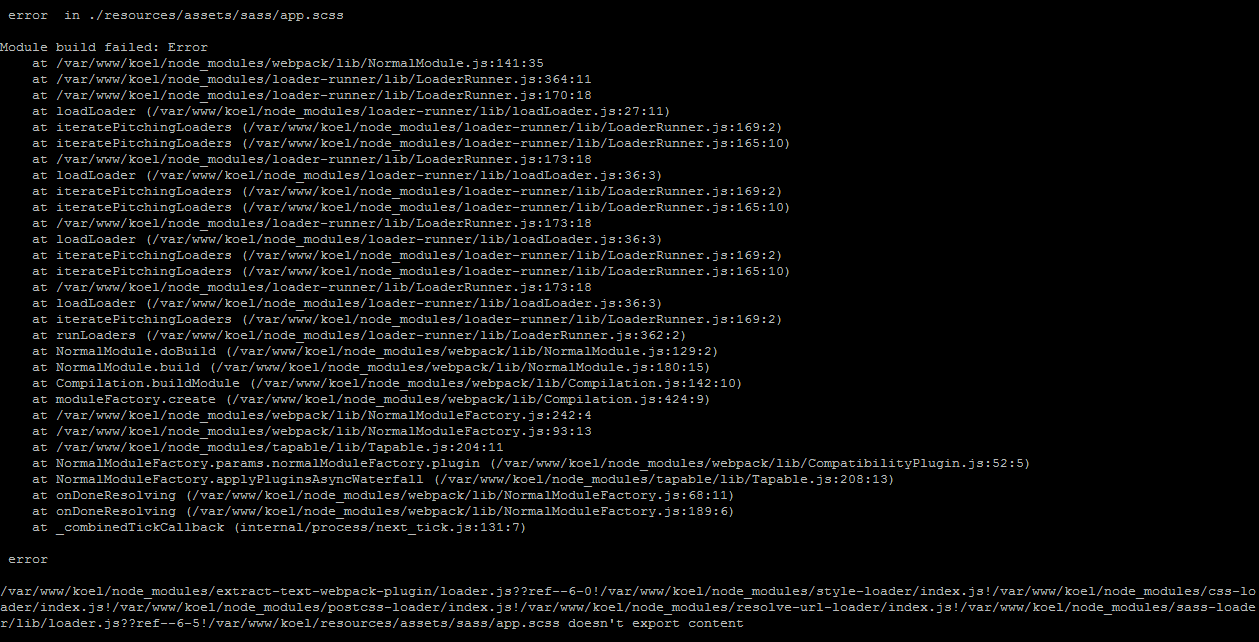
ghost
on 3 Sep 2017
Related issues
 Kapot
·
3Comments
Kapot
·
3Comments
 Invictaz
·
3Comments
Invictaz
·
3Comments
 k-plan
·
3Comments
k-plan
·
3Comments
k-plan
·
3Comments
k-plan
·
3Comments
 1021683053
·
3Comments
1021683053
·
3Comments