Dialogflow-fulfillment-nodejs: How to persistently store value in conv.user.storage?
This happens when I migrate from deprecated anonymous ID in userId to userStorage.
Based on this guideline, we are advised to generate our own user id (not using userId property)
https://developers.google.com/actions/identity/user-info
Using this dialogflow-fulfillment-nodejs, how to store data in conv.user.storage?
I use this way, but it seems that the data are not persistently stored in user.storage. It can only be access in that particular conversation session.
In the action simulator, after I click cancel and start new conversation Talk to appName, the user.storage always back to empty.
// profile_information contains user data such as uid, name, etc.
let conv = agent.conv();
conv.user.storage = {
    profile: profile_information
};
conv.ask(`Thank you! Hello ${profile.givenName}, how can I help you?`);
agent.add(conv);
My current usage is this.
For new user, the bot asks permission to get user name. After that I will assign a uid to the user. Store the uid info in user.storage.
Next time the user 'talk to appName', I check user.storage, if the user is new, the bot will ask for the permission, otherwise the bot straightaway offer the service.
Please advise.
 philipskokoh
All 32 comments
are you using the lates version of the library? I am using the storage in my app and it works fine. are you sure you are not overwriting the user.storage by accident?
 r-nasiri
on 9 Dec 2018
r-nasiri
on 9 Dec 2018
I am using dialogflow-fulfillment version 0.6.1, and action-on-google version 2.5.0.
In one chat session it works, the information is attached in the user storage.
However, when I close the conversation, new session starts with empty user storage. At the moment, I still rely on (deprecated) conv.user._id for detect returning users.
philipskokoh
on 10 Dec 2018
here is a sample code that has been tested and works :
 function welcome(agent) {
     const conv = agent.conv();
     if(conv) {
         let guid = '';
         if(!conv.user.storage.guid) {
             conv.user.storage.guid='6b0434fe-82d5-43da-96ad-0da7377de3e4';
         } else {
             guid = `back ${conv.user.storage.guid}`;
         }
         conv.ask(`welcome ${guid}`);
         agent.add(conv);
         return;
     }
     agent.add(`Welcome to my agent!`);
    }
Hmm.. It does not work at my side.
After the bot left the conversation (by clicking 'cancel' or conv.close()), the conv.user.storage is back to empty. At least, this is what I see on testing using action simulator.
philipskokoh
on 12 Dec 2018
Having the same issue....
 palg
on 19 Dec 2018
palg
on 19 Dec 2018
Have you checked user storage expiration reasons? There might be two reasons that causes empty storage:
- Voice match is set up and there is no match.
- The user disabled personal data.
You can check more from here: https://developers.google.com/actions/assistant/save-data
 zehrasubas
on 25 Feb 2019
zehrasubas
on 25 Feb 2019
How to check whether a user disabled/enabled personal data? Any way to check that?
I never set anything during the test.
philipskokoh
on 28 Feb 2019
You can search that in Google, there're settings to disable it. You might have done while setting your Google account. Have you checked voice match option?
zehrasubas
on 28 Feb 2019
I do not use any voice. It's still running on the simulator test.
Actually the user identity is matched because the conv.user._id is always correct. It's just the user storage somehow always resets to empty in the beginning of the conversation.
philipskokoh
on 1 Mar 2019
hmm... that's not the case for you then. One other thing might be disabling and enabling simulator (I'm assuming you're having this issue on the test version). Every time when you disable and enable the simulator on AoG it resets everything.
zehrasubas
on 1 Mar 2019
I am facing the same issue. Any luck resolving it?
 priyankark
on 3 May 2019
priyankark
on 3 May 2019
I'm facing the same issue too. Is there any update? thanks!
 yucensun
on 7 May 2019
yucensun
on 7 May 2019
any resolution?
 pareshv
on 21 May 2019
pareshv
on 21 May 2019
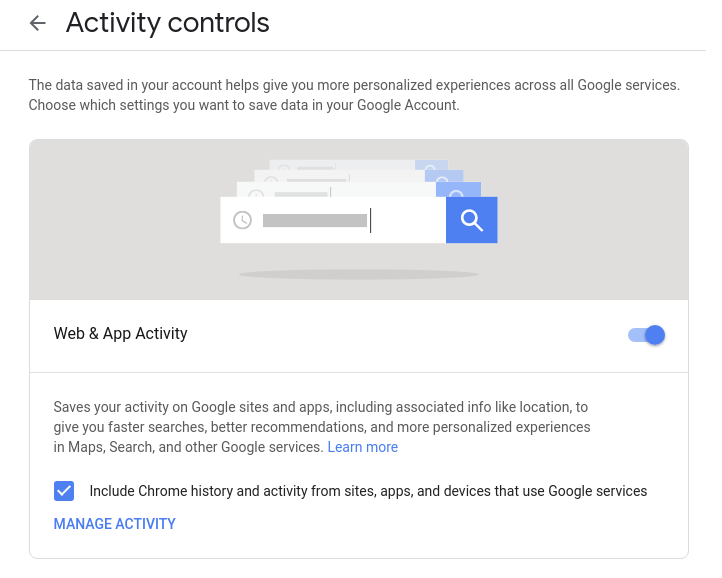
Hi, I think this issue is related with G-suite account permissions. Can you enable Web & App Activity for all accounts also sWAA needs to be enabled (please see attached screenshot)
zehrasubas
on 21 May 2019
This is already set on the account I use.
pareshv
on 22 May 2019
Hi, i was facing the same problem as you.. I found the fix in this comment. Basically when enabling the Web & App permissions in the Activity Center you need also to check "include chrome history .... "
 achraf-boussaada
on 27 May 2019
achraf-boussaada
on 27 May 2019
Me too. My case is stored data is saved and fetched as expected, but sometimes it returns empty so it becomes undefined when I access it. I have no clue to solve this. Anyone having similar issues?
 rpyn
on 4 Jun 2019
rpyn
on 4 Jun 2019
It seems that the issue does not happen in the simulator UI, so I close this issue.
Latest documentation shows that user storage does not work if user status is GUEST.
https://developers.google.com/actions/assistant/guest-users
It's better to use account linkage to identify a user, not relying on user storage.
philipskokoh
on 1 Jul 2019
I am having the same problem. the conv.user.verification is VERIFIED and also include chrome history is checked. any other suggestions?
 bruriah1999
on 8 Sep 2019
bruriah1999
on 8 Sep 2019
I have the same issue. VERIFIED user but userStorage is not returned in the next request. Please reopen..
 arjan
on 23 Sep 2019
arjan
on 23 Sep 2019
I'm running into the same issue. After a week of tinkering, the best I am able to get is the following:
- If I perform the save onto conv.user.storage using the google home mini device or in the simulator, then it works.
If I use my S7's assistant, then it doesn't store into the conv.user.storage. The odd thing is that according to my logs it's making it. But, it's not storing.
Could this be a stale cache issue (just throwing this out there. I'm out of ideas)?
Thanks in advance!
 hacmia
on 23 Sep 2019
hacmia
on 23 Sep 2019
Today i've seen this issue as well, in the simulator; for one account it did work, for the other it didn't. Both accounts showed up as VERIFIED in the requests.
arjan
on 23 Sep 2019
I'm also having issues. The user storage only seems to be active in the welcome intent. Any data that I try to retrieve outside the welcome intent is undefined and storing data outside the welcome intent is lost.
 CodeByJordi
on 24 Sep 2019
CodeByJordi
on 24 Sep 2019
I second this issue in simulator.
 sachitad
on 28 Sep 2019
sachitad
on 28 Sep 2019
I was having this issue months ago. At the time, I contacted the support team at Google and they came back with the response that use your own external database despite me pointing out their own documentation of using the local storage.
Eventually I got the local storage thing to work on phones. It still wouldn't work on the simulator though.
priyankark
on 28 Sep 2019
@priyankark - I wasn't having the issue w/just the simulator. It actually worked most times in the simulator, but not always. It worked always on the google home mini I am testing on. But, it never worked right on the assistant using my phone. I mean never... In the end I set myself back about a week and a half and I ended up just using the conversation token in conjunction with a database to store what I need persistence.
edit: Minor setback which I hope one day is fixed, because the capabilities this has and ease of development overall are super cool
hacmia
on 28 Sep 2019
@hacmia , I don't mind using conversationToken because I am using firestore DB anyway for other stuff. Having said that though, is conversationToken always same for the same user object? I don't have account linking in the app that I am building.
sachitad
on 29 Sep 2019
@hacmia , I don't mind using conversationToken because I am using firestore DB anyway for other stuff. Having said that though, is conversationToken always same for the same user object? I don't have account linking in the app that I am building.
conversationToken isn't related to the user, it is different in every 'call', every request from the user is a new token. It refers to the context of the conversation.
How do you test your app? I'll tell you where to see the token
bruriah1999
on 29 Sep 2019
@bruriah1999 Agreed 100% it's not the conversationToken. I was already using it between the intents. I wanted to use the userStorage to persist the data between conversations because the size of the data lent itself perfectly for this functionality. It just didn't work out for me, so I ended up using a firebase realtime database for now.
hacmia
on 29 Sep 2019
@bruriah1999 at the moment I am testing it in the console.
sachitad
on 2 Oct 2019
@sachitad
So under the REQUEST headline, with every input of the user, you receive some sort of JSON file. Look for the key conversationToken and the value of it should be the context you are currently on, it could be more than one.
Any wayes if you are still trying to store the data of the conversation, I managed to do that with the conv.user.data. If you are still having trouble with this please try to be more specified.
bruriah1999
on 2 Oct 2019
for me, assistant on 2 different phones, on actions on google sdk, both of the VERIFIED users,
one of them stops sending the user token on the third response, every time 🤦
the other works fine, and the MAIN intent always receives user token. anybody else face this?
 paul3412
on 14 Apr 2020
paul3412
on 14 Apr 2020
Related issues
 omfd
·
6Comments
omfd
·
6Comments
 SiddAjmera
·
8Comments
SiddAjmera
·
8Comments
 KirillMoizik
·
3Comments
KirillMoizik
·
3Comments
 gakuba
·
8Comments
gakuba
·
8Comments
 mukuljainx
·
5Comments
mukuljainx
·
5Comments
Most helpful comment
@priyankark - I wasn't having the issue w/just the simulator. It actually worked most times in the simulator, but not always. It worked always on the google home mini I am testing on. But, it never worked right on the assistant using my phone. I mean never... In the end I set myself back about a week and a half and I ended up just using the conversation token in conjunction with a database to store what I need persistence.
edit: Minor setback which I hope one day is fixed, because the capabilities this has and ease of development overall are super cool