Diagnostics: list-processes command fails when any dotnet process is running elevated
D:\diagnostics\artifacts\bin\dotnet-counters\Debug\netcoreapp2.1 [master ≡]> dotnet .\dotnet-counters.dll list-processes
     19224 dotnet     C:\Program Files\dotnet\dotnet.exe
Unhandled exception: System.Reflection.TargetInvocationException: Exception has been thrown by the target of an invocation. ---> System.ComponentModel.Win32Exception: Access is denied
   at System.Diagnostics.ProcessManager.OpenProcess(Int32 processId, Int32 access, Boolean throwIfExited)
   at System.Diagnostics.NtProcessManager.GetModules(Int32 processId, Boolean firstModuleOnly)
   at System.Diagnostics.NtProcessManager.GetFirstModule(Int32 processId)
   at System.Diagnostics.Process.get_MainModule()
   at Microsoft.Diagnostics.Tools.Counters.Program.ListProcesses(IConsole console) in D:\diagnostics\src\Tools\dotnet-counters\Program.cs:line 73
   --- End of inner exception stack trace ---
   at System.RuntimeMethodHandle.InvokeMethod(Object target, Object[] arguments, Signature sig, Boolean constructor, Boolean wrapExceptions)
   at System.Reflection.RuntimeMethodInfo.Invoke(Object obj, BindingFlags invokeAttr, Binder binder, Object[] parameters, CultureInfo culture)
   at System.Delegate.DynamicInvokeImpl(Object[] args)
   at System.CommandLine.Invocation.ModelBindingCommandHandler.InvokeAsync(InvocationContext context) in /_/src/System.CommandLine/Invocation/ModelBindingCommandHandler.cs:line 48
   at System.CommandLine.Invocation.InvocationPipeline.<>c__DisplayClass2_0.<<InvokeAsync>b__0>d.MoveNext() in /_/src/System.CommandLine/Invocation/InvocationPipeline.cs:line 37
--- End of stack trace from previous location where exception was thrown ---
   at System.CommandLine.Invocation.InvocationExtensions.<>c.<<UseParseErrorReporting>b__16_0>d.MoveNext() in /_/src/System.CommandLine/Invocation/InvocationExtensions.cs:line 331
--- End of stack trace from previous location where exception was thrown ---
   at System.CommandLine.Invocation.InvocationExtensions.<>c__DisplayClass8_0.<<UseTypoCorrections>b__0>d.MoveNext() in /_/src/System.CommandLine/Invocation/InvocationExtensions.cs:line 225
--- End of stack trace from previous location where exception was thrown ---
   at System.CommandLine.Invocation.InvocationExtensions.<>c.<<UseSuggestDirective>b__7_0>d.MoveNext() in /_/src/System.CommandLine/Invocation/InvocationExtensions.cs:line 206
--- End of stack trace from previous location where exception was thrown ---
   at System.CommandLine.Invocation.InvocationExtensions.<>c.<<UseParseDirective>b__6_0>d.MoveNext() in /_/src/System.CommandLine/Invocation/InvocationExtensions.cs:line 177
--- End of stack trace from previous location where exception was thrown ---
   at System.CommandLine.Invocation.InvocationExtensions.<>c.<<UseHelp>b__14_0>d.MoveNext() in /_/src/System.CommandLine/Invocation/InvocationExtensions.cs:line 299
--- End of stack trace from previous location where exception was thrown ---
   at System.CommandLine.Builder.CommandLineBuilderExtensions.<>c__DisplayClass3_0.<<UseVersionOption>b__0>d.MoveNext() in /_/src/System.CommandLine/Builder/CommandLineBuilderExtensions.cs:line 67
--- End of stack trace from previous location where exception was thrown ---
   at System.CommandLine.Invocation.InvocationExtensions.<>c.<<RegisterWithDotnetSuggest>b__17_0>d.MoveNext() in /_/src/System.CommandLine/Invocation/InvocationExtensions.cs:line 370
--- End of stack trace from previous location where exception was thrown ---
   at System.CommandLine.Invocation.InvocationExtensions.<>c__DisplayClass5_0.<<UseExceptionHandler>b__0>d.MoveNext() in /_/src/System.CommandLine/Invocation/InvocationExtensions.cs:line 142
 shirhatti
All 3 comments
@shirhatti
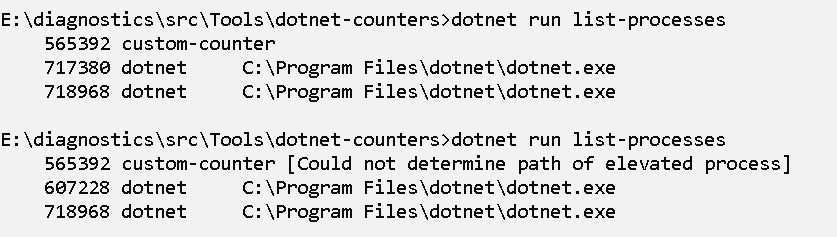
This happens because we're trying to print the path to the process (which we don't have access to if the process is elevated). I have a fix for this but wanted to get your opinion on what looks better between the two options below:
 sywhang
on 5 Jun 2019
sywhang
on 5 Jun 2019
also cc @jorive @josalem since dotnet-trace has same issue.
sywhang
on 5 Jun 2019
I think the second option is more user friendly because it explains why we can't show the information.
 josalem
on 5 Jun 2019
josalem
on 5 Jun 2019
👍2
Was this page helpful?
0 / 5 - 0 ratings
Related issues
 noahfalk
·
7Comments
noahfalk
·
7Comments
dotnet-trace: Error in speedscope.app showing with Failed to load format Error: Tried to leave frame
 mcraiha
·
8Comments
noahfalk
·
8Comments
mcraiha
·
8Comments
noahfalk
·
8Comments
 mleenhardt
·
6Comments
mleenhardt
·
6Comments
 juliusfriedman
·
6Comments
juliusfriedman
·
6Comments
Most helpful comment
I think the second option is more user friendly because it explains why we can't show the information.