Dexie.js: DataError Failed to write blobs.
{
message: "DataError Failed to write blobs."
name: "AbortError"
}
//my operation
let archivo = new Blob() // this also come some request axios
let io = await db.transaction('rw',db.archivos,async()=>{
let obj = { id: new Date().getTime(), url, archivo }
console.log('t paso 1' ,obj);
return await db.archivos.put(obj)
})
This works well for me but at some point it starts to throw that error and does not allow anything, my solution is to delete the database and from then on if it starts working well what could it be? the blob provide of axios in response type blob
i don't speak english. :)
 carlos00027
All 14 comments
Catch the error and check its inner property to see why it fails:
One common scenario is when you exceed your storage quota, IndexedDB will fail with AbortError. In this case Dexie has a workaround that puts the real reason for the AbortError into the error property so you can see if it's that.
See https://dexie.org/docs/DexieErrors/Dexie.AbortError
See also: https://dexie.org/docs/StorageManager
 dfahlander
on 23 Jan 2020
dfahlander
on 23 Jan 2020
Incidentally I'm also experiencing this error for the first time (Dexie 2.0.4 in Electron 7.1.7).
inner contains: DOMException: Failed to write blobs. (error 0).
 dperetti
on 26 Jan 2020
dperetti
on 26 Jan 2020
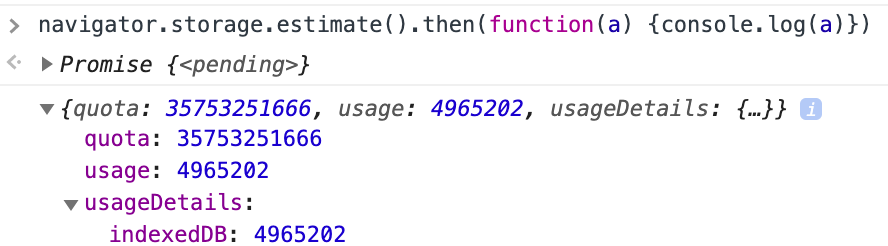
Not a quota issue as far as I'm concerned 🤔
dperetti
on 26 Jan 2020
Rebuilt the same database from scratch, now the problem cannot be reproduced. 🤷♂️
dperetti
on 26 Jan 2020
I see. That's interesting information. The issue seems to go deeper than the level that dexie operates on though. Don't know if it's a chromium or electron issue or the previous data folder happened to contain corrupt data. I don't know enough about the what states a crashed electron application may put the data files into for example. It would not surprise me if crash recovery of data isn't fully supported in Electron.
When you say you rebuilt the database from scratch, did you do that using Dexie.delete() or by removing the data files where Electron stores the data?
dfahlander
on 27 Jan 2020
I deleted the data files from the devtools (Application > Clear storage).
I agree it looks like a very low level data corruption.
dperetti
on 27 Jan 2020
I'm getting this error on Chromium (Version 83.0.4103.61 (Official Build) (64-bit))
code: 0
message: "Failed to write blobs."
name: "DataError"
I rebuilt the database. It works in Firefox (latest) The specific file is a glorified text file:
https://github.com/gdsestimating/dxf-parser/blob/master/samples/data/api-cw750-details.dxf
I'm using the same code to store jpegs in the same database. Seems odd.
edit: and then the problem fixes itself for no apparent reason? WEIRD.
 disarticulate
on 27 Jun 2020
disarticulate
on 27 Jun 2020
I was seeing this error regularly. What I eventually figured out (I think) is that the problem was not with Dexie, but with the blobs I was trying to put.
I was fetching a lot of images first, saving each blob to a variable, and then after fetching them all, trying to put them into Dexie. My guess is that I was running into memory limits or something, because I could save the first N images into Dexie successfully, and then the rest of the images would fail.
I resolved the issue by fetching one image, putting it in Dexie, and then fetching the next one
 nbrustein
on 21 Jul 2020
nbrustein
on 21 Jul 2020
One common scenario is when you exceed your storage quota, IndexedDB will fail with AbortError. In this case Dexie has a workaround that puts the real reason for the AbortError into the
errorproperty so you can see if it's that.
@dfahlander to confirm, should that have been the inner property, rather than error?
 j-mew-s
on 23 Jul 2020
j-mew-s
on 23 Jul 2020
You could do something like the sample in AbortError and have a function handleError that calls itself if there's an inner error present.
dfahlander
on 23 Jul 2020
Hi,
Seeking help here, it would be much appreciated.
I have a similar issue but in my case i'm not trying to write any files, i'm trying to write a json with a property which is an array of objects (screen below).
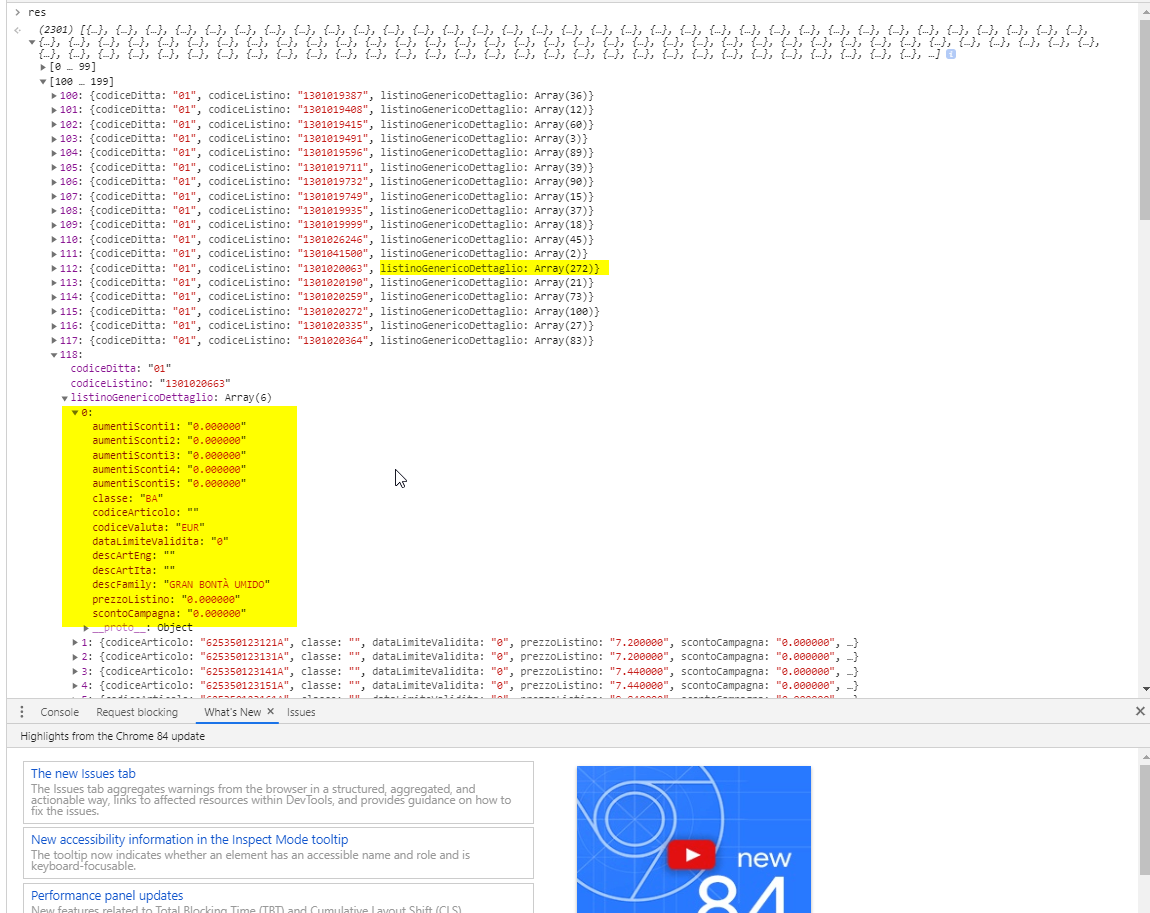
In my case i have this cordova app which writes some data through Dexie as a first sync. This is only one of the tables, i have other ones with much more results but this is the only one which have a complex property. The app worked fine the last 2 years with this workflow, i think this is related to the last update of Android Webview. The problem started 2 days ago with some Android users and now have grown bigger. This is the code which writes the json to my db:
db.open().then(function () {
                    db.transaction('rw', db[objStoreName], function () {
                            db[objStoreName].clear().then(function () {
                                db[objStoreName].bulkAdd(res);
                            })
                    }).then(function () {
                        console.log("Transaction completed: database modification for " + objStoreName + " finished.");
                    }).catch(function (err) {
                        //***********This is where the error is catched, on end of transaction
                        console.error(err.stack || err);
                    });
                }).catch(function (err) {
                    console.error(err.stack || err);
                });
I tried different things as workarounds, i tried to:
1) catch the error on bulkAdd, but no error is thrown, instead it says it writes correctly but on end of transaction it throws the error.
2) use add() in loop, same error happens.
3) write array with chunks of 500, same problem.
4) JSON.stringify the array property, same error.
This is a screen of the error:

If anyone have a workaround or a solution for this it would be much appreciated, especially you @dfahlander .
Thanks,
AN
 anushi1210
on 24 Jul 2020
anushi1210
on 24 Jul 2020
We are also see an increasing number of these kind of errors. Quota seems to be fine. Also looking for workaround or solution. We don't use blobs, inserting simple json objects, some of them a bit bigger tho.
 steveetm
on 4 Aug 2020
steveetm
on 4 Aug 2020
@anushi1210 Chromium does only fire the error on the transaction but not on the add operation. That's the reason you only get the error on the transaction. When calling bulkAdd in chunks, it is important to do it in one separate transaction per chunk. The easiest way to do that is to just call bulkAdd() without a transaction block around. But in case the caller has spawned a transaction around your call it will still be in a bigger transaction, so the safest way to force this is to do something like the following:
function addNextChunk(rowsToAdd) {
   return db.transaction('rw!', db.yourTable, tx => tx.yourTable.bulkAdd(rowsToAdd));
}
Adding an exclamation mark after 'rw' will force a new top-level transaction, see these docs
At least, this will minimise the consumed memory per transaction within the internal IDB implementation, and maybe workaround a possible issue in Android WebView. Please let me know if it takes you any further.
dfahlander
on 4 Aug 2020
@anushi1210 Chromium does only fire the error on the transaction but not on the add operation. That's the reason you only get the error on the transaction. When calling bulkAdd in chunks, it is important to do it in one separate transaction per chunk. The easiest way to do that is to just call bulkAdd() without a transaction block around. But in case the caller has spawned a transaction around your call it will still be in a bigger transaction, so the safest way to force this is to do something like the following:
function addNextChunk(rowsToAdd) {
   return db.transaction('rw!', db.yourTable, tx => tx.yourTable.bulkAdd(rowsToAdd));
}
_Adding an exclamation mark after 'rw' will force a new top-level transaction, see these docs_
At least, this will minimise the consumed memory per transaction within the internal IDB implementation, and maybe workaround a possible issue in Android WebView. Please let me know if it takes you any further.
Thanks @dfahlander for the tips, the solution you proposed is working fine (bulkAdd(chunk) with no wrapper transaction block).
You saved my holidays :)
anushi1210
on 4 Aug 2020
Related issues
 SlIdE42
·
11Comments
SlIdE42
·
11Comments
 jboulmal
·
21Comments
jboulmal
·
21Comments
 puhazh
·
14Comments
puhazh
·
14Comments
 bennycode
·
24Comments
bennycode
·
24Comments
 nicolashenry
·
29Comments
nicolashenry
·
29Comments