Devise: Unauthenticated DELETE /users/sign_out returns 204 status
While working with a gem called devise-jwt, i noticed that an unauthenticated request to DELETE /users/sign_out returns a 204 No-Content.
The same as an authenticated request, whereas an unauthenticated one should return something like 401 Unauthorized.
You can see the issue in detail here https://github.com/waiting-for-dev/devise-jwt/issues/71
Tracking down the problem, it turned out that this problem is actually coming from devise, a plain devise app returns a 204 on an unauthorized request too.
You can try this out with sending a simple DELETE /users/sign_out to a plain devise app without providing a session cookie.
Additionally while testing that, i recognized that if you have a http_basic_authenticate_with in your ApplicationController it returns a 204 too, while it actually should be intercepted before by the basic_auth, or not? This wasn't an error on my side because maybe the basic_auth was still authenticated by an earlier request. Tried it on a GET request before too and got a 401 and a basic_auth message. After that rejected request i directly tried the DELETE again and it returned a 204 again.
I'm not sure what caused this behaviour of the http_basic_authenticate_with, maybe it's actually a bug in rails? Not sure if i should open an issue there right now too.
@rafaelfranca since you're in the rails team and contribute a lot to devise, do you maybe have an idea?
Thanks!
 christophweegen
All 18 comments
I see no problem in returning a 401 if the user isn't signed in, we actually already check if there's any user in the session before calling sign out, so if you're willing to work on this, a PR would be welcomed.
I'm also curious, is this causing a problem in your application? For me, it seems like we only hit this request if we know upfront that a user is signed in.
 tegon
on 30 Mar 2018
tegon
on 30 Mar 2018
Hey thanks for your reply :-)
Actually it isn't really a problem. I just discovered it while using devise-jwt for a rails api-only application while i was making some requests while testing. The idea was to show flash-like messages in the frontend like "You signed out successfully" or "You are already signed out" smth. like that, depending on the http status. This obviously doesn't work out since both possibilities return the same status code. I just thought making a distinction would adhere more to http semantics too, like described above.
I will work smth. out when i got time. :-)
christophweegen
on 1 Apr 2018
Hello,
I am looking to make my first open source contribution. Is this a good issue to take on?
If not, feel free to point me other issues that might be good for someone that's new to open source.
Thanks!
 aamarill
on 14 May 2018
aamarill
on 14 May 2018
Hey @aamarill, thanks for your interest in contributing to devise 😄
This is a good first issue, but I'm not sure whether @christophweegen is going to work on that or not.
@christophweegen Have you started to work on this - or intend to?
tegon
on 15 May 2018
Hey @tegon,
right now i didn't find the time to work on it yet. So @amarill if you want to work on it, feel free :-)
Thanks and success!
christophweegen
on 16 May 2018
@tegon just wanted to give you a heads up that I am gonna get started on this 😄
I am actually super excited to better understand Devise since I've used it on my own projects a few times now!
I am thinking of starting out by writing a test that expects a 401 response to an unauthenticated request to DELETE /users/sign_out. Then, I'll have to figure out what part of the code is sending the 204 and modify that to 401.
aamarill
on 17 May 2018
@christophweegen if you have the tests you mentioned here:
... show flash-like messages in the frontend like "You signed out successfully" or "You are already signed out" smth. like that, depending on the http status.
Let me know if those are anywhere in your GitHub repo, I would like to take a look to help me replicate the issue and write my own tests. Thanks!
aamarill
on 17 May 2018
Hey @aamarill,
great you're working on that :-)
Just tested it manually in an http client, in my case https://insomnia.rest/ but you can use whatever client you like ( Postman etc. ). Ii like Insomnia ( because it's easy to use and it has GraphQL support ) and maybe you'll like it too :-) )
I don't know if you would like to go on search for the problem of your own for learning purposes, but if you get stuck or don't know where to start, here's a thing that I identified as the source of the problem(SPOILER ALERT :-)):
I located this line which always returns a 204 No Content header no matter if the user is logged in or not. https://github.com/plataformatec/devise/blob/715192a7709a4c02127afb067e66230061b82cf2/app/controllers/devise/sessions_controller.rb#L79
In the same file you find the destroy action which always calls this method. Didn't spend much time on it yet to think everything through though, but i guess solving it would be just a conditional for checking if the user isn't signed in and return another http status then.
If you got questions feel free to ask :-)
christophweegen
on 18 May 2018
@christophweegen Thank you for your comment! 😄 The solution you suggested is exactly what I was expecting/thinking. I have been working on understanding the testing structure so that I place the right test in the right place. Once I am confident I have a good test then I'll look at devise/app/controllers/devise/sessions_controller.rb for the implementation.
Also, thanks for the suggestion on http clients! I actually have an app that uses devise and I was trying to send sign_in and sign_out requests via cURL (to see HTTP response codes) but I couldn't get that to work. I looked through Devise's wiki and I wasn't able to find documentation on how to send an HTTP request. Let me know if you have some insight on this, or maybe the HTTP client handles that for you?
aamarill
on 18 May 2018
Hey @aamarill,
you have to send request to the right paths with the right http methods.
To find out what these paths are you can use $ rails routes or look in your html which paths/methods get generated in your sign_in / sign_out forms/links.
You can use curl, but it's easier and more comfortable to use a http client. There you can save requests and stuff like that :-)
Did that solve your problem?
christophweegen
on 20 May 2018
Thanks for your comments @christophweegen 😄 However, I am confident I was using the right routes and used the DELETE http method. I believe my problem was not passing the auth_token with my request, which I still don't know how to get. If you know, please let me know thanks!
aamarill
on 21 May 2018
Hey @aamarill, sorry for the late reply.
So to avoid misunderstandings: Do you use plain devise or devise-jwt? And can you post a link to your test project repo? So i can see your setup / try it myself if future questions arise :-)
Which auth_token do you mean exactly? There can be several tokens for authentication involved, depending on your setup.
Can you please post the error message(s)? ( If future problems arise too, please. Usually the error message makes it directly clear which problem is at hand. So this could help speed up our workflow ;-)
Best wishes :-)
christophweegen
on 23 May 2018
Here's the repo if you wanna check it out. Just sign up (takes 15 seconds) and you can play with logging in and out 😄
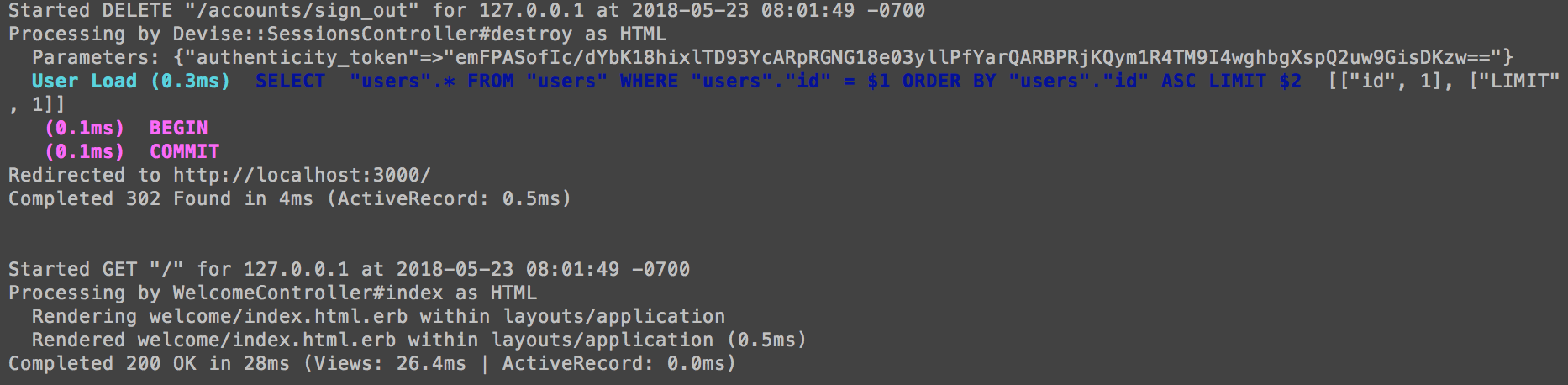
Here's what I get when I CLICK "log out"
But, when I send
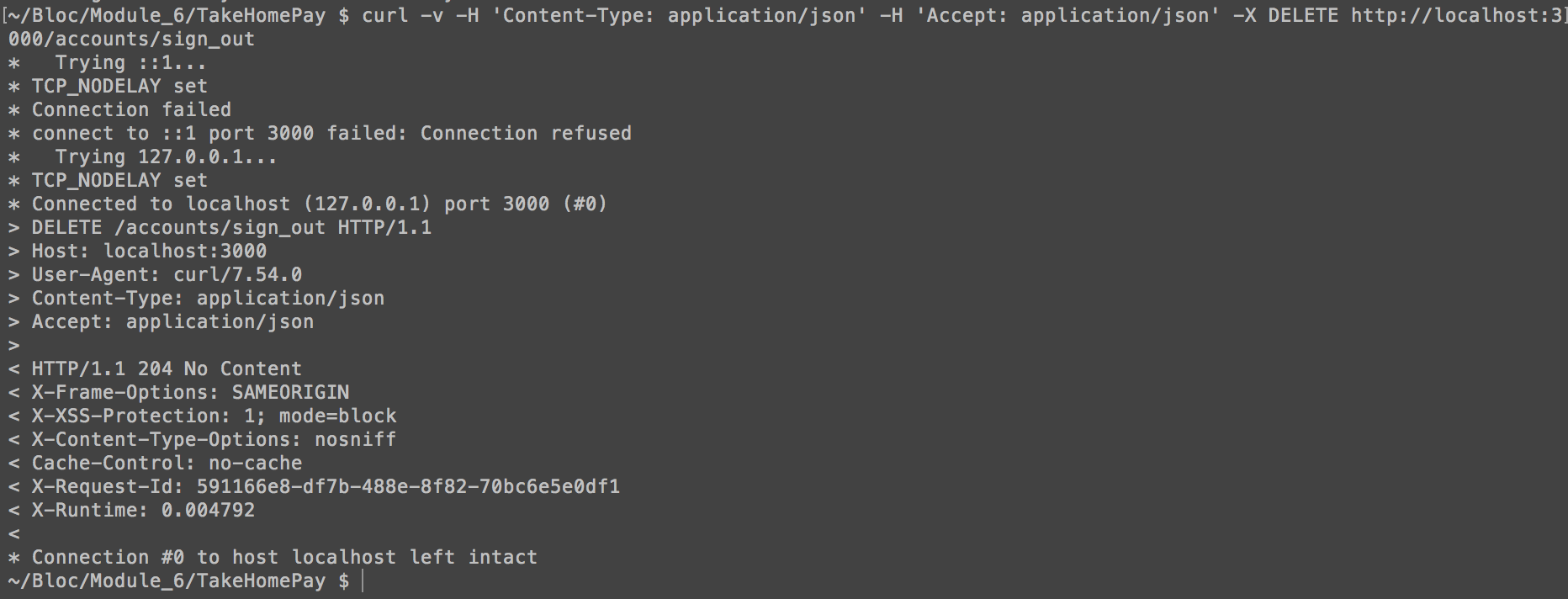
curl -v -H 'Content-Type: application/json' -H 'Accept: application/json' -X DELETE http://localhost:3000/accounts/sign_out
I see this on the server.

And this in the terminal window where I entered the cURL request.
My routes!

Thanks for helping me out @christophweegen 🙌
aamarill
on 23 May 2018
I guess the error is exactly what i thought :-)
Can you see the authenticity_token in the params, when you make a browser request, which isn't in the parameter hash when you send it over curl? It needs to be added to the params list, otherwise rails/devise will reject the request.
This is rails mechanism for preventing Cross-Site-Request-Forgery vulnerability, when using a cookie based auth mechanism. At first it sounds difficult but its actually very easy to understand.
This behavior gets added by //= require rails-ujs in your application.js file, which allows for sending non-GET request from HTML links..
How deep is your knowledge about CSRF? No problem to explain that, but it could save me some time if know where your standing to avoid maybe unnecessary repetition ;-)
christophweegen
on 23 May 2018
Thanks @christophweegen I am aware of CSRF so no need to explain 😄
It wouldn't make sense for anyone to be able to log anyone out if they use Devise hence the need for CSRF correct? 😅
What I would like to know is how to pass the authenticty_token. It wasn't able to find it in the docs, if you do, please send it over! Alternatively, feel free to send me a screenshot of you sending a request on a HTTP client. Cheers and thank you for your help and patience 🙌
aamarill
on 23 May 2018
Ok that's good you know about CSRF. :-) Makes it a lot easier.
Actually it isn't enough just to pass any valid authenticity_token. The authenticity_token is duplicated and encrypted in the session cookie too, so you have to send a matching session cookie AND matching authenticity_token.
It actually works like this:
Whenever you get a response from your app with rendered html, Rails will include the authenticity_token in your HTML head section via the csrf_meta_tag helper.
This is needed for the unobstrusive javascript adapter to work e.g. making hyperlinks work with non-GET requests, the authenticity token gets send along, as you can see in the console screenshot from the browser request.
This gets also included as a hidden value in every html form.
Additionally this authenticity_token is also encrypted in your session cookie. Rails compares the token in the cookie with the token that gets send along as a parameter. Since only your site knows the token as parameter value, this prevents CSRF from another site where only the cookie gets send along.
So to make a valid authenticated request that doesn't get intercepted by CSRF countermeasures you have to send along a valid session_cookie ( you can get that from your response headers ) AND a matching authenticity_token which is "buried" somewhere in your html. The problem is that the token always gets randomly recalculated from your secrets as you (re-)load a page. It only works for one request as far as i know, to provide additional security.
So in order to make a working request from an HTTP client you must find a way to grab this token from html and include it in the next request as a parameter AND send the matching session cookie along too.
It needs both values to work properly.
A rather dirty workaround would be to disable protect_from_forgery with: :exception in your ApplicationController, but i highly recommend against it.
In your case i would use Postman HTTP Client. There you can setup requests via javascript where you could make a sign_in request, grab your tokens/cookies and include them in the following sign_out request.
If you need more info feel free to ask :-)
christophweegen
on 23 May 2018
Addition:
The problem is that the token always gets randomly recalculated from your secrets as you (re-)load a page. It only works for one request as far as i know, to provide additional security.
I thought things through and I'm not sure if this resembles the facts. Maybe it's enough to have the same authenticity_token/session_cookie in each request, since rails only compares both. I'm sure it doesn't keep track of dispatched tokens and if there already have been used. This could make it easier, just grab a token and cookie once and you can use them consecutively.
And I'm not sure if the token gets calculated by or checked against rails secrets. Every random token would suffice i guess. But keep things with a grain of salt. Would have to dig through source to find the exact mechanism.
Just provide a matching cookie/auth token and you should be good to go :-)
christophweegen
on 24 May 2018
tegon
on 28 Dec 2018
Related issues
 lancecarlson
·
3Comments
lancecarlson
·
3Comments
 HerbertKoelman
·
3Comments
HerbertKoelman
·
3Comments
 Boneshj
·
3Comments
Boneshj
·
3Comments
 jmarchello
·
4Comments
jmarchello
·
4Comments
 BimaPanduW
·
3Comments
BimaPanduW
·
3Comments
Most helpful comment
Ok that's good you know about CSRF. :-) Makes it a lot easier.
Actually it isn't enough just to pass any valid
authenticity_token. Theauthenticity_tokenis duplicated and encrypted in the session cookie too, so you have to send a matching session cookie AND matchingauthenticity_token.It actually works like this:
Whenever you get a response from your app with rendered html, Rails will include the
authenticity_tokenin your HTML head section via thecsrf_meta_taghelper.This is needed for the
unobstrusive javascript adapterto work e.g. making hyperlinks work with non-GET requests, the authenticity token gets send along, as you can see in the console screenshot from the browser request.This gets also included as a hidden value in every html form.
Additionally this
authenticity_tokenis also encrypted in your session cookie. Rails compares the token in the cookie with the token that gets send along as a parameter. Since only your site knows the token as parameter value, this prevents CSRF from another site where only the cookie gets send along.So to make a valid authenticated request that doesn't get intercepted by CSRF countermeasures you have to send along a valid session_cookie ( you can get that from your response headers ) AND a matching
authenticity_tokenwhich is "buried" somewhere in your html. The problem is that the token always gets randomly recalculated from your secrets as you (re-)load a page. It only works for one request as far as i know, to provide additional security.So in order to make a working request from an HTTP client you must find a way to grab this token from html and include it in the next request as a parameter AND send the matching session cookie along too.
It needs both values to work properly.
A rather dirty workaround would be to disable
protect_from_forgery with: :exceptionin your ApplicationController, but i highly recommend against it.In your case i would use Postman HTTP Client. There you can setup requests via javascript where you could make a sign_in request, grab your tokens/cookies and include them in the following sign_out request.
If you need more info feel free to ask :-)