Devilutionx: [Switch] Game hangs on new character creation
Game hangs on new character creation. I've compiled it yesterday from git master for Nintendo Switch. Running firmware 10.1.0 with Atmosphere 0.14.4.
To reproduce try following these steps:
Run game (not in the album mode)
(Use Joycons to navigate)
Select:
Single Player
New Hero
Select any class
The game starts showing the cursor even though it was not there before, the Diablo logo animates as do the 'coins' before and after name, but it is not reacting to any input. Tried doing the same only with USB keyboard/mouse connected (turned Pro Controller off right after entering game).
The mouse and keyboard stop working right after proceeding to the same step (entering the name), while the animations keep displaying.
 spitfire
All 22 comments
Thank you for reporting this.
Would you be willing to try and help identify the point where it stopped working?
Also just as a sanity check does the 1.0.1 release work correctly?
 AJenbo
on 6 Oct 2020
AJenbo
on 6 Oct 2020
Checked on 1.0.1 - it lets me pass there - so now we have "pinpointed" the time of regression to somewhere between 1.0.1 and yesterday ;) If you can guess the commit that you think broke it, I could try to do a checkout of it, recompile and test.
I have noticed another issue though - I can't change the name of the character. I don't think there's a keyboard emulator that would let me enter the name using a gamepad, but even when I use keyboard I can't change the name.
Using backspace works to delete randomly generated one, but I can't type in a new one . Should I create a new issue for it?
spitfire
on 6 Oct 2020
Could you check out 7f7ab8c3dd7ba53264c9ba295513c7020704234f as if if it work there, if you know how to bisect with git that would allow you to quickly find the offending commit
AJenbo
on 6 Oct 2020
7f7ab8c3dd7ba53264c9ba295513c7020704234f behaves the same as the latest commit (screen freezes besides animations).
spitfire
on 6 Oct 2020
How about 3c5982083f2e3778128d6541ea3038e6d517fe33 :)
AJenbo
on 6 Oct 2020
That doesn't even compile for me:
```┌─[spitfire@g01mieszko01] - [~] - [2020-10-06 06:32:04]
└─[0] cd devilutionX
┌─[spitfire@g01mieszko01] - [~/devilutionX] - [2020-10-06 06:32:10]
└─[0] git reset --hard
HEAD is now at 3c598208 Merge branch 'master' of github.com:diasurgical/devilution
┌─[spitfire@g01mieszko01] - [~/devilutionX] - [2020-10-06 06:32:19]
└─[0] git checkout 3c5982083f2e3778128d6541ea3038e6d517fe33
HEAD is now at 3c598208 Merge branch 'master' of github.com:diasurgical/devilution
┌─[spitfire@g01mieszko01] - [~/devilutionX] - [2020-10-06 06:32:26]
└─[0] sudo ./Packaging/switch/build.sh
- install_deps
- /opt/devkitpro/pacman/bin/pacman -S --needed --noconfirm --quiet switch-freetype switch-mesa switch-glad switch-glm switch-sdl2 switch-sdl2_ttf switch-sdl2_mixer switch-libvorbis switch-libmikmod switch-libsodium libnx devkitA64 devkitA64 general-tools switch-tools devkitpro-pkgbuild-helpers
ostrzeżenie: switch-freetype-2.10.1-1 jest w najnowszej wersji -- pomijanie
ostrzeżenie: switch-mesa-20.1.0-1 jest w najnowszej wersji -- pomijanie
ostrzeżenie: switch-glad-0.1.27-1 jest w najnowszej wersji -- pomijanie
ostrzeżenie: switch-glm-0.9.9.7-1 jest w najnowszej wersji -- pomijanie
ostrzeżenie: switch-sdl2-2.0.12-3 jest w najnowszej wersji -- pomijanie
ostrzeżenie: switch-sdl2_ttf-2.0.15-1 jest w najnowszej wersji -- pomijanie
ostrzeżenie: switch-sdl2_mixer-2.0.4-2 jest w najnowszej wersji -- pomijanie
ostrzeżenie: switch-libvorbis-1.3.5-2 jest w najnowszej wersji -- pomijanie
ostrzeżenie: switch-libmikmod-3.3.11.1-2 jest w najnowszej wersji -- pomijanie
ostrzeżenie: switch-libsodium-1.0.18-1 jest w najnowszej wersji -- pomijanie
ostrzeżenie: libnx-3.3.0-2 jest w najnowszej wersji -- pomijanie
ostrzeżenie: devkitA64-r16-1 jest w najnowszej wersji -- pomijanie
ostrzeżenie: devkitA64-r16-1 jest w najnowszej wersji -- pomijanie
ostrzeżenie: general-tools-1.2.0-2 jest w najnowszej wersji -- pomijanie
ostrzeżenie: switch-tools-1.8.0-1 jest w najnowszej wersji -- pomijanie
ostrzeżenie: devkitpro-pkgbuild-helpers-2.2.0-1 jest w najnowszej wersji -- pomijanie
nie ma nic do zrobienia - build
- mkdir -p ../../build
- cd ../../build
- rm -f CMakeCache.txt
- DEVKITPRO=/opt/devkitpro
- cmake .. -DBINARY_RELEASE=ON -DCMAKE_TOOLCHAIN_FILE=../CMake/switch/devkita64-libnx.cmake
-- The C compiler identification is GNU 10.2.0
-- The CXX compiler identification is GNU 10.2.0
-- Check for working C compiler: /opt/devkitpro/devkitA64/bin/aarch64-none-elf-gcc
-- Check for working C compiler: /opt/devkitpro/devkitA64/bin/aarch64-none-elf-gcc -- broken
CMake Error at /usr/share/cmake/Modules/CMakeTestCCompiler.cmake:60 (message):
The C compiler
"/opt/devkitpro/devkitA64/bin/aarch64-none-elf-gcc"
is not able to compile a simple test program.
It fails with the following output:
Change Dir: /home/spitfire/devilutionX/build/CMakeFiles/CMakeTmp

Run Build Command(s):/usr/bin/gmake cmTC_a6c9f/fast && /usr/bin/gmake -f CMakeFiles/cmTC_a6c9f.dir/build.make CMakeFiles/cmTC_a6c9f.dir/build
gmake[1]: Wejście do katalogu '/home/spitfire/devilutionX/build/CMakeFiles/CMakeTmp'
Building C object CMakeFiles/cmTC_a6c9f.dir/testCCompiler.c.obj
/opt/devkitpro/devkitA64/bin/aarch64-none-elf-gcc -DSWITCH -D__SWITCH__ -isystem /opt/devkitpro/libnx/include  -D__SWITCH__ -march=armv8-a+crc+crypto -mtune=cortex-a57 -mtp=soft -ftls-model=local-exec -ffunction-sections -fdata-sections  -fPIE   -o CMakeFiles/cmTC_a6c9f.dir/testCCompiler.c.obj   -c /home/spitfire/devilutionX/build/CMakeFiles/CMakeTmp/testCCompiler.c
Linking C executable cmTC_a6c9f
/usr/bin/cmake -E cmake_link_script CMakeFiles/cmTC_a6c9f.dir/link.txt --verbose=1
/opt/devkitpro/devkitA64/bin/aarch64-none-elf-gcc -D__SWITCH__ -march=armv8-a+crc+crypto -mtune=cortex-a57 -mtp=soft -ftls-model=local-exec -ffunction-sections -fdata-sections   -specs=/opt/devkitpro/libnx/switch.specs  CMakeFiles/cmTC_a6c9f.dir/testCCompiler.c.obj  -o cmTC_a6c9f  /opt/devkitpro/libnx/lib/libnx.a
/opt/devkitpro/devkitA64/bin/../lib/gcc/aarch64-none-elf/10.2.0/../../../../aarch64-none-elf/bin/ld: read-only segment has dynamic relocations
collect2: error: ld returned 1 exit status
gmake[1]: *** [CMakeFiles/cmTC_a6c9f.dir/build.make:87: cmTC_a6c9f] Błąd 1
gmake[1]: Opuszczenie katalogu '/home/spitfire/devilutionX/build/CMakeFiles/CMakeTmp'
gmake: *** [Makefile:121: cmTC_a6c9f/fast] Błąd 2
CMake will not be able to correctly generate this project.
Call Stack (most recent call first):
CMakeLists.txt:49 (project)
-- Configuring incomplete, errors occurred!
See also "/home/spitfire/devilutionX/build/CMakeFiles/CMakeOutput.log".
See also "/home/spitfire/devilutionX/build/CMakeFiles/CMakeError.log".```
spitfire
on 6 Oct 2020
Damn, sorry about that. It's a bit odd because the log shows that this commit used to build at one point.
(edit: The build error you have is because of a recent change in devkitPro, 4ac152ea419224e246fc96ee1681c26e916099f6 is probably the oldest that is compatible with the newer version of devkitPro)
Solving this issue is a really high priority for me. Would you be able to join the chat? Then we can get things going a bit quicker. https://discord.gg/YQKCAYQ
Just as a sanity check could you try the latest build from the bot: https://12902-143324737-gh.circle-artifacts.com/0/devilutionx.nro
And possibly build c677e783c5aba0dfb39e2dd0e9f6a1d7a5f27d73 to see if that works when self build.
AJenbo
on 6 Oct 2020
@WinterMute I'm a bit at a loss here :( Do you have any idea what might be causing this issue?
To summarise:
- Game builds and runs
- After calling
SDL_StartTextInput()controller input is no longer received. - Controller navigation works correctly on PC
With the current devkitPro 4ac152e is the latest commit that builds. It is unclear if the issue happened between c677e78 and 4ac152e or because of changes in devkitPro.
AJenbo
on 7 Oct 2020
Removing SDL_StartTextInput() indeed allows the user to click continue by pressing A on the controller.
Test build with out SDL_StartTextInput() calls: https://12953-143324737-gh.circle-artifacts.com/0/devilutionx.nro
AJenbo
on 7 Oct 2020
@rsn8887 have you heard of a similar issue on Switch using the latest devkitPro?
AJenbo
on 7 Oct 2020
Virtual Keyboard always worked for me, are you sure the user is not starting the game in applet mode? If you use ALBUM to start any game on Switch, the Virtual keyboard will never work.
 rsn8887
on 8 Oct 2020
rsn8887
on 8 Oct 2020
I added virtual keyboard code ages ago and it was tested. I suspect user is using ALBUM to start the game, instead of holding R on a game.
rsn8887
on 8 Oct 2020
The compiler error is due to missing -fPIC flag in compiler and linker. Maybe make clean and make again making sure -fPIC is always used.
rsn8887
on 8 Oct 2020
I have asked @spitfire to make sure that he starts the game, and he says this issue is not present when using the 1.0.1 release build. But the part that makes me suspicious that this isn't the case is that he also says the keyboard doesn't show when running 1.0.1. @rsn8887 could you test the latest build to see if you can replicate the issue?
https://12985-143324737-gh.circle-artifacts.com/0/devilutionx.nro
AJenbo
on 8 Oct 2020
I just build latest master 1d3f0aa103fc48b83990f983d02be15a0cece095
Works fine here. Only problem: The virtual keyboard on new character creation appears twice. Once from my own code, and then again from the new SDL_StartTextInput functionality that is now in SDL. But it works.
rsn8887
on 8 Oct 2020
Tell users to never use ALBUM to start homebrew. Always HOLD R while launching a TITLE. Otherwise, home-brew will be loaded in applet mode and vkeybd won't work.
rsn8887
on 8 Oct 2020
Tested https://12985-143324737-gh.circle-artifacts.com/0/devilutionx.nro
works fine. This is 99.9% certainly user error.
rsn8887
on 8 Oct 2020
@spitfire please start the game correctly. Don't ever use ALBUM. Hold R while launching a GAME, then hbmenu appears, select devolutionX there.
If you are in hbmenu and a BIG RED APPLET MODE appears, you are doing it wrong.
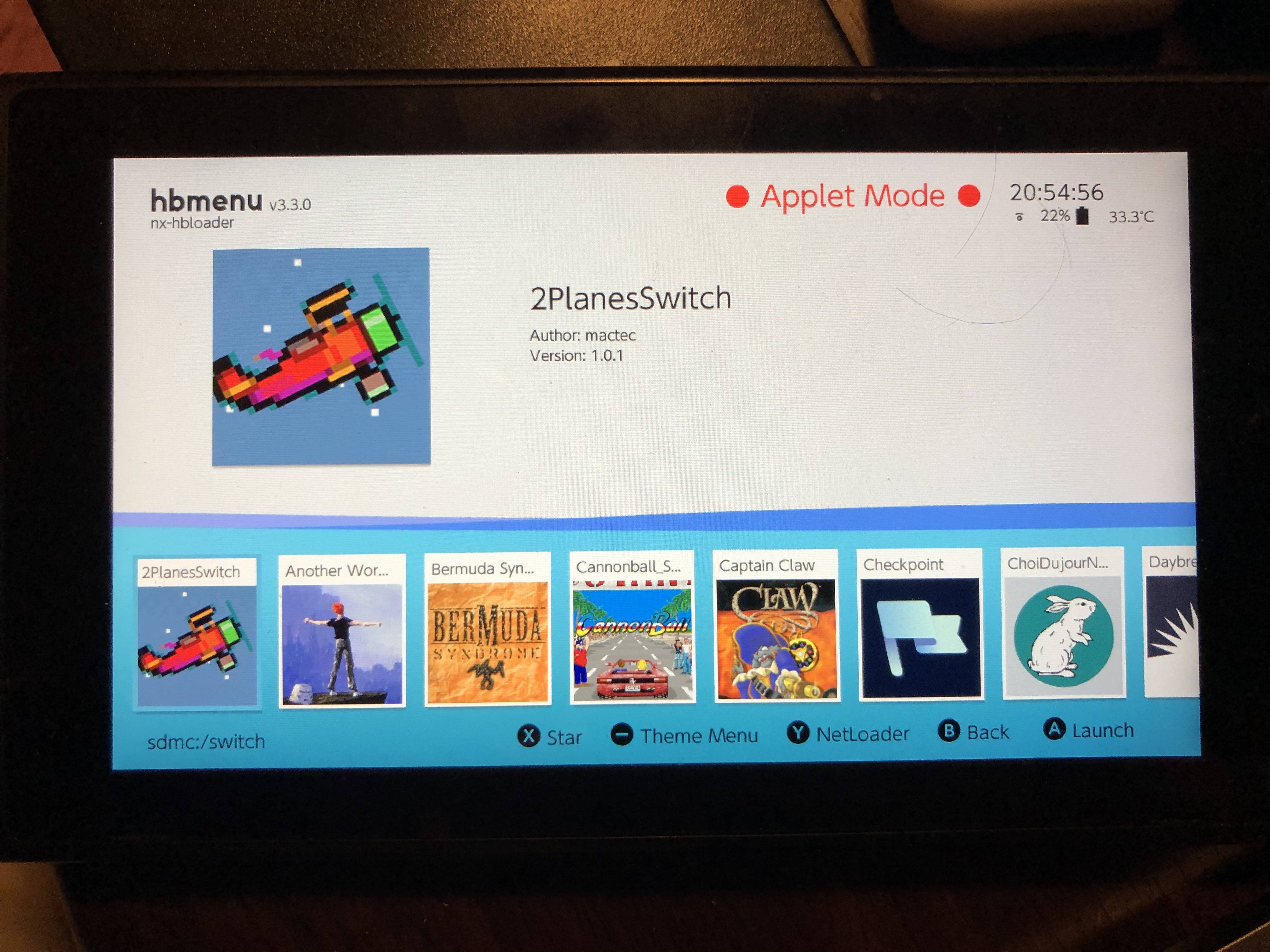
The screenshot above shows the WRONG WAY. If the big red Applet Mode is visible, it will not work.
This is how it should look like:
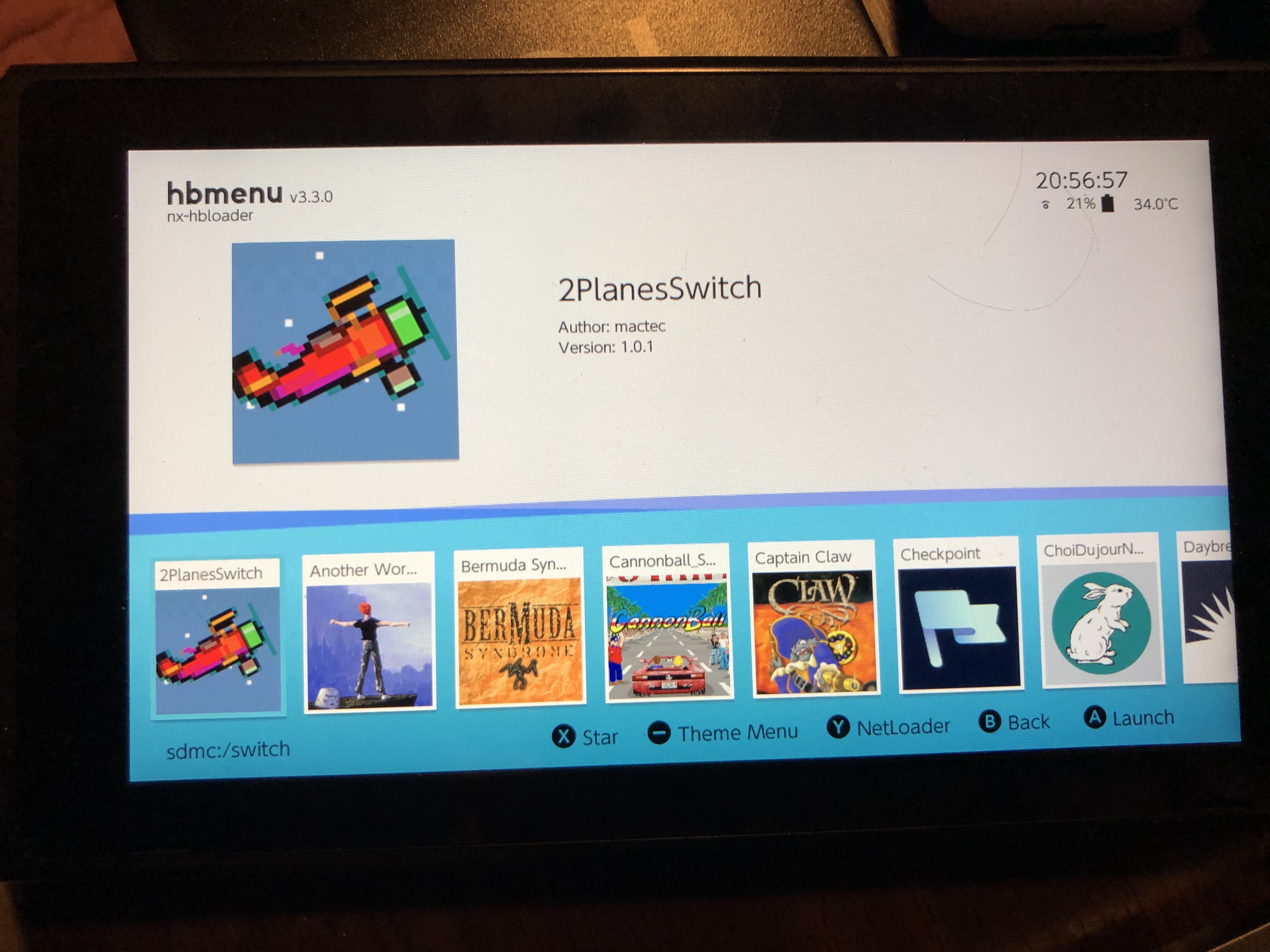
The screenshot above shows the RIGHT WAY. The big red Applet Mode is not visible, the virtual keyboard in Diablo will work.
rsn8887
on 8 Oct 2020
I never use the album mode, as I am aware it does not allow apps to use much memory. Maybe the firmware version is the issue? I'm running 10.1.0.
spitfire
on 8 Oct 2020
Tested https://12985-143324737-gh.circle-artifacts.com/0/devilutionx.nro
works fine. This is 99.9% certainly user error.
@rsn8887 we've got 0.1% here, I've restarted my Switch, replaced the pro with the one from the link, ran hbmenu in full memory (not applet) mode and it hangs when I reach the stage of entering name while creating a new character. Running HOS 10.1.0 with Atmosphere 0.14.4 launching with current fusee-primary payload.
spitfire
on 8 Oct 2020
Since I learned it works for @rsn8887 in both 1.0.1 and git master, I've poked around the system and uninstalled few tweaks I had installed via hb App Store (SaltyNX, ReverseNX, Fizeau ). After that it started working for me (although with double keyboard as @rsn8887 mentioned in #865).
spitfire
on 8 Oct 2020
Ok glad to know it was the extensions. I didn’t even think of that.
rsn8887
on 8 Oct 2020
Related issues
 Tmkrth
·
25Comments
Tmkrth
·
25Comments
 predator8bit
·
21Comments
predator8bit
·
21Comments
 julealgon
·
16Comments
julealgon
·
16Comments
 dalvim
·
16Comments
rsn8887
·
14Comments
dalvim
·
16Comments
rsn8887
·
14Comments
Most helpful comment
Since I learned it works for @rsn8887 in both 1.0.1 and git master, I've poked around the system and uninstalled few tweaks I had installed via hb App Store (SaltyNX, ReverseNX, Fizeau ). After that it started working for me (although with double keyboard as @rsn8887 mentioned in #865).