Devilutionx: [Suggestion] Allow diabdat.mpq to be symlinked
Describe
When installing DevilutionX, instead of having to copy the diabdat.mpq file I would like to use a symlink from another location to avoid duplicating large files on my system.
To Reproduce
- Symlink diabdat.mpq from another folder to ~/snap/devilutionx/common
- Start DevilutionX
- Receive diabdat.mpq not found screen
Expected behavior
Diablo starts as normal
 AnthonyEdmonds
All 10 comments
if you say it works in singleplayer, it probably works everywhere, 500mb is nothing near large nowadays, creating a symlink is up to the user
 qndel
on 19 Jun 2020
qndel
on 19 Jun 2020
Just to clarify, my statement about the game working well was a general comment when using a copied version; apologies for the confusion.
You cannot currently use a symlink with DevilutionX.
AnthonyEdmonds
on 19 Jun 2020
I don't know of anything that should prevent symlinks from working. But to solve your problem you can specify where you diabdat.mpq is located via --data-dir /folder/with/diablo
 AJenbo
on 19 Jun 2020
AJenbo
on 19 Jun 2020
Just tested, symlinks work fine. Can you please provide some more detail on what you are doing.
AJenbo
on 19 Jun 2020
Here's the exact steps I am taking for you:
ln -s "/home/anthony/Programs/Diablo 1/DIABDAT.MPQ" ~/snap/devilutionx/common/diabdat.mpqls -la(To check the symlink is correct)diabdat.mpq -> '/home/anthony/Programs/Diablo 1/DIABDAT.MPQ'- Run DevilutionX
- Receive cannot find diabdat.mpq message
It occurred to me that it might be the quotation marks or the space in the path, so I tried it some other ways:
- No space, no quotes, absolute path
ln -s /home/anthony/Programs/Diablo/DIABDAT.MPQ ~/snap/devilutionx/common/diabdat.mpqdiabdat.mpq -> /home/anthony/Programs/Diablo/DIABDAT.MPQNo space, no quotes, relative path
ln -s ~/Programs/Diablo/DIABDAT.MPQ ~/snap/devilutionx/common/diabdat.mpqdiabdat.mpq -> /home/anthony/Programs/Diablo/DIABDAT.MPQNo space, no quotes, absolute, lowercase on both ends
ln -s /home/anthony/Programs/Diablo/diabdat.mpq ~/snap/devilutionx/common/diabdat.mpqdiabdat.mpq -> /home/anthony/Programs/Diablo/diabdat.mpqNo space, no quotes, relative, lowercase on both ends
ln -s ~/Programs/Diablo/diabdat.mpq ~/snap/devilutionx/common/diabdat.mpqdiabdat.mpq -> /home/anthony/Programs/Diablo/diabdat.mpq
It's not a world ending issue for me, as I can copy the file across or use the suggested flag above. I have kept everything on the same disc in my examples for simplicity.
AnthonyEdmonds
on 19 Jun 2020
Are you running this from a snap package? We do not provide a snap distribution first of all, but also snap packages have additional security that sandbox applications, and can make them slow to load. If you did indeed install it via a Snap package then I would say that is your problem, but also where did you get it from?
AJenbo
on 19 Jun 2020
Ok I think I found out where you got your version from, you need to bring the issue up here instead: https://github.com/lotharsm/devilutionx-snapcraft
Conclusion, DevilutionX supports symlinks, Snap does not.
AJenbo
on 19 Jun 2020
Makes sense; I stumbled across DevilutionX in the Ubuntu software store.

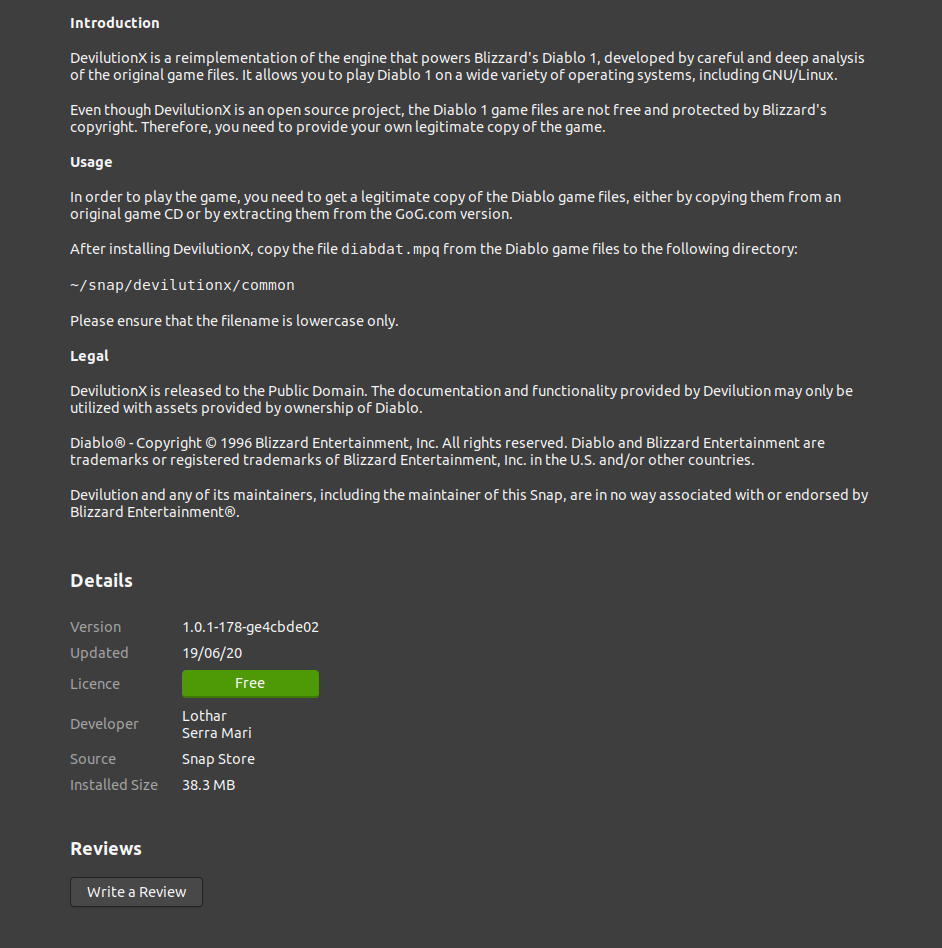
I guess that's what I get for not going to the source myself! Good to know for the future.
Thanks for your help, I'll pull the original version and symlink to my hearts content.
AnthonyEdmonds
on 19 Jun 2020
He, It's nice that it's easy to find and install, but I wish people would colaborate and inform us instead of providing a copy under there own name with no references to the original project :)
AJenbo
on 19 Jun 2020
Well, "providing a copy under there own name" is unfortunately a bit misleading - or the way the Snap Store handles the developer information, to be more precise. "Developer" in this case is not exactly correct - if it was me, a better wording would be "Packaged by". I'll get in touch with the Snap Store developers and address this issue. This problem occurs with all snap packages not written by the original authors and are contributed by a third party like me in this case.
I agree that it would have been better to contact you first - sorry for that. Actually, this was the first time I created a snap package for a project I'm not directly involved. In the meantime, I'll improve the wording on the Snap Store page to give proper credit to the project.
Regarding the issue itself: Yes, you can't easily symlink to the "outside world" from within a snap due to it's sandboxing features. In fact, I think copying a file to the snap itself is quite hacky, but since we obviously can't package the DIABDAT.MPQ file itself, I see no way around this.
 lotharsm
on 20 Jun 2020
lotharsm
on 20 Jun 2020
Related issues
 cain05
·
18Comments
cain05
·
18Comments
 pbekesky
·
27Comments
pbekesky
·
27Comments
 snigel
·
23Comments
snigel
·
23Comments
 predator8bit
·
22Comments
predator8bit
·
22Comments
 julealgon
·
16Comments
julealgon
·
16Comments
Most helpful comment
Well, "providing a copy under there own name" is unfortunately a bit misleading - or the way the Snap Store handles the developer information, to be more precise. "Developer" in this case is not exactly correct - if it was me, a better wording would be "Packaged by". I'll get in touch with the Snap Store developers and address this issue. This problem occurs with all snap packages not written by the original authors and are contributed by a third party like me in this case.
I agree that it would have been better to contact you first - sorry for that. Actually, this was the first time I created a snap package for a project I'm not directly involved. In the meantime, I'll improve the wording on the Snap Store page to give proper credit to the project.
Regarding the issue itself: Yes, you can't easily symlink to the "outside world" from within a snap due to it's sandboxing features. In fact, I think copying a file to the snap itself is quite hacky, but since we obviously can't package the
DIABDAT.MPQfile itself, I see no way around this.