ISSUE TYPE
- Feature request
SUMMARY
Hello good afternoon
About Requesting Addendums
Please add Varnish to the Devilbox Container, I am using Magento 2.3 and it seems that with this active feature the application becomes faster, waiting for your help
Goal
 mozgbrasil
All 26 comments
@mozgbrasil I could provide this relatively quickly if there is an official Varnish image. I had a look on Dockerhub, but could not find one. Do you know where Varnish keeps their Docker images?
 cytopia
on 16 Feb 2019
cytopia
on 16 Feb 2019
@cytopia I don't know if there are official Varnish images, but I found a project that may help.
docker4php. There are lot of custom images and, of course one for varnish.
 llaville
on 16 Feb 2019
llaville
on 16 Feb 2019
Varnish is available here
@mozgbrasil @llaville
Add the following docker-compose.override.yml to the root of the Devilbox git directory:
version: '2.1'

services:
  varnish:
    image: devilbox/varnish:${VARNISH_SERVER:-6}
    hostname: varnish
    ports:
      - "${LOCAL_LISTEN_ADDR}${HOST_PORT_VARNISH:-6081}:6081"
    networks:
      app_net:
        ipv4_address: 172.16.238.230
    environment:
      - VARNISH_CONFIG=/etc/varnish/default.vcl
      - CACHE_SIZE=${VARNISH_CACHE_SIZE:-128m}
      - VARNISHD_PARAMS=${VARNISH_PARAMS:--p default_ttl=3600 -p default_grace=3600}
      - BACKEND_HOST=httpd
      - BACKEND_PORT=80
    depends_on:
      - bind
      - php
      - httpd
It is all pre-configured. Intranet and projects will be available on port 6081.
Example intranet: http://localhost:6081
Example project test.loc: http://test.loc:6081
.env variables
VARNISH_SERVERcan be set to4,5, or6(defaults to6)HOST_PORT_VARNISHon what port varnish should be available (defaults to6081)VARNISH_CACHE_SIZECache size of varnish (defaults to128m)VARNISH_PARAMSvarnish startup parameters (defaults to-p default_ttl=3600 -p default_grace=3600)
Varnish Docker image
The Varnish Docker images can be found here:
https://github.com/devilbox/docker-varnish
Let me know how this works and I will properly integrate it into the Devilbox also with documentation.
cytopia
on 16 Feb 2019
@cytopia ok i will send you my feedback tomorrow
llaville
on 16 Feb 2019
Varnish integration
I've tested varnish for a couple of projects successfully and have done the initial implementation. If anything comes up we'll iterate from here.
cytopia
on 17 Feb 2019
I've just tested your varnish image.
I've a little question about doc and config :
VARNISH_CONFIG | /etc/varnish/default.vcl | Path to Varnish configuration file (custom config can be mounted).
-- | -- | --
How can you mount custom config ?
Another point about test.
I've tested homepage of devilbox with such command curl -IL http://localhost:6081 from my host (not inside containers) and i always got cache MISS
HTTP/1.1 200 OK
Date: Sun, 17 Feb 2019 09:46:01 GMT
Content-Type: text/html; charset=UTF-8
Set-Cookie: PHPSESSID=bd6b9e1eeb0097927b0895a082582080; path=/
Expires: Thu, 19 Nov 1981 08:52:00 GMT
Cache-Control: no-store, no-cache, must-revalidate
Pragma: no-cache
Age: 0
X-Cache: MISS
X-Cache-Hits: 0
X-Server: Varnish 6.1.1
X-Powered-By: Devilbox
Connection: keep-alive
Confirmed by varnishstat command when i am into varnish container
llaville
on 17 Feb 2019
How can you mount custom config ?
@llaville Totally missed that point. I will adjust it today.
I've tested homepage of devilbox with such command
curl -IL http://localhost:6081from my host (not inside containers) and i always got cache MISS
@llaville This is probably due to all the ajax requests (I am not a Varnish expert unfortunately). However when testing this on projects itself. E.g.: http://my-project.loc:6081 you will get a HIT.
I've taken very generic varnish configurations that should actually work out of the box for all kinds of projects. If you know a little about Varnish, have a look here: https://github.com/devilbox/docker-varnish/blob/master/data/default-6.vcl and let me know what you think.
The docker-varnish repository also states in the README, where those files have been taken from. Which is from here: https://github.com/mattiasgeniar/varnish-6.0-configuration-templates
cytopia
on 17 Feb 2019
@cytopia I'm not a Varnish expert too, and I've tried the little experience I got with Varnish Cache.
I've read the /etc/varnish/default.vcl and see the origin (on line 2: the external repo). I think it's pretty good, but we need a way to overload it. See my previous comment about custom config.
For tests, i've test not only the localhost devilbox homepage (i'm pretty sure, like you, that this is due to ajax requests).
I've also test one of may project that use https protocol, and got error when I use the 6081 port.
Probably doc may explain how to use (differences) between http and https protocol.
on https, i've configure the BACKEND_PORT to 443 by i didn't get X-Cache headers as expected.
llaville
on 17 Feb 2019
I've found also a nive picture that explain Varnish architecture for http and https : see at https://www.linode.com/docs/websites/varnish/use-varnish-and-nginx-to-serve-wordpress-over-ssl-and-http-on-debian-8/
llaville
on 17 Feb 2019
on https, i've configure the
BACKEND_PORTto 443 by i didn't get X-Cache headers as expected.
I am pretty sure Varnish can only do http, so BACKEND_PORT should be set to 80. When you also want to do HTTPS, that must be in front of varnish and then terminated before Varnish. So to also use HTTPS in combination with Varnish, I will have to integrate an offloader (nginx, haproxy, traefik, or similar). I will leave this part for another ticket as it will be way out of scope for now.
I will have custom config ready soon, for people to play around with it and then let's attack SSL afterwards.
cytopia
on 17 Feb 2019
https://www.digitalocean.com/community/tutorials/how-to-configure-varnish-cache-4-0-with-ssl-termination-on-ubuntu-14-04
should help to add varnish support for nginx over https.
llaville
on 17 Feb 2019
@llaville PR is ready: https://github.com/cytopia/devilbox/pull/509
- Ensure to first pull varnish again:
docker pull devilbox/varnish:4
docker pull devilbox/varnish:5
docker pull devilbox/varnish:6
- Checkout
varnish-mountbranch - Add custom config to
cfg/varnish-X/*.vcl - Set
VARNISH_CONFIGtoVARNISH_CONFIG=/etc/varnish.d/<my-config>.vclin.envfile
Note: Docker Compose override files have also been changed, so ensure to copy them again.
Note 2: When using custom varnish configs, ensure to manually set your backend server and backend port in those configs:
- Backend server should be
httpd - Backend port should be
80
cytopia
on 17 Feb 2019
@cytopia Just tested the new Varnish image 6 with custom vcl config. I like it :-) Will continue to play with it !
BTW, you need to add a note on documentation about VARNISH_CONFIG and folders /etc/varnish.d for custom config and the default value with /etc/varnish folder
llaville
on 17 Feb 2019
@cytopia About Varnish configuration: i think we should continue configuration and allow Alternative 3, Advanced configuration as seen in /etc/default/varnish file which seems more powerfull. Tell me your point of view about this. Thanks in advance.
I've tried to implement SSL support with Nginx as explained in https://www.digitalocean.com/community/tutorials/how-to-configure-varnish-cache-4-0-with-ssl-termination-on-ubuntu-14-04#ssl-support-with-nginx-(optional) but without success.
llaville
on 17 Feb 2019
BTW, you need to add a note on documentation about
VARNISH_CONFIGand folders/etc/varnish.dfor custom config and the default value with/etc/varnishfolder
Let me know if this is sufficient: https://devilbox.readthedocs.io/en/latest/custom-container/enable-varnish.html#custom-varnish-config-optional
About Varnish configuration: i think we should continue configuration and allow
Alternative 3, Advanced configurationas seen in/etc/default/varnishfile which seems more powerfull.
Can you explain a little further, I am not following
I've tried to implement SSL support with Nginx as explained in
As far as I know, this will require another server (nginx, haproxy, traefik, or similar) in front of varnish.
cytopia
on 17 Feb 2019
Let me know if this is sufficient: https://devilbox.readthedocs.io/en/latest/custom-container/enable-varnish.html#custom-varnish-config-optional
This is enough for me. You did a great documentation (as always) !
Can you explain a little further, I am not following
When I follow this tutorial https://www.digitalocean.com/community/tutorials/how-to-configure-varnish-cache-4-0-with-ssl-termination-on-ubuntu-14-04#ssl-support-with-nginx-(optional) they explains to change the DAEMON_OPTS. These options are available only in /etc/default/varnish file of the varnish container. Inside this file, they explains that we my have 4 alternatives. 2nd with vcl is the default.
Alternative 3 used env vars, and defined like that :
# # DAEMON_OPTS is used by the init script.  If you add or remove options, make
# # sure you update this section, too.
# DAEMON_OPTS="-a ${VARNISH_LISTEN_ADDRESS}:${VARNISH_LISTEN_PORT} \
#              -f ${VARNISH_VCL_CONF} \
#              -T ${VARNISH_ADMIN_LISTEN_ADDRESS}:${VARNISH_ADMIN_LISTEN_PORT} \
#              -t ${VARNISH_TTL} \
#              -S ${VARNISH_SECRET_FILE} \
#              -s ${VARNISH_STORAGE}"
This link https://www.varnish-software.com/wiki/content/tutorials/varnish/varnish_ubuntu.html#step-2-configure-varnish explained there are 2 main categories of configuration, the /etc/default/varnish file and the vcl files.
Currently only vcl config approach is possible with your varnish docker image.
Hope my explains are better this time. Tell me if it's not !
As far as I know, this will require another server (nginx, haproxy, traefik, or similar) in front of varnish.
I'll try again tomorrow
llaville
on 17 Feb 2019
Currently only vcl config approach is possible with your varnish docker image.
Now I get you. However, you could currently already use VARNISHD_PARAMS (just needs Docker Compose change for the Devilbox): https://github.com/devilbox/docker-varnish/blob/master/data/docker-entrypoint.sh#L48
cytopia
on 17 Feb 2019
Hello good Morning
I can only say that you guys are fantastic
My congratulations and success to all involved
mozgbrasil
on 18 Feb 2019
@cytopia I've finally be able to use Varnish cache with Nginx (only 1 host) and SSL.
Feel free to code/process review of my procedure (I'll appreciate a lot)
I use standard compose/docker-compose.overwrite.yml-varnish
  varnish:
    image: devilbox/varnish:${VARNISH_SERVER:-6}
    hostname: varnish
    ports:
      - "${LOCAL_LISTEN_ADDR}${HOST_PORT_VARNISH:-6081}:6081"
    networks:
      app_net:
        ipv4_address: 172.16.238.230
    environment:
      - VARNISH_CONFIG=/etc/varnish/default.vcl
      - CACHE_SIZE=${VARNISH_CACHE_SIZE:-128m}
      - VARNISHD_PARAMS=${VARNISH_PARAMS:--p default_ttl=3600 -p default_grace=3600}
      - BACKEND_HOST=httpd
      - BACKEND_PORT=80
    volumes:
      - ${DEVILBOX_PATH}/cfg/varnish-${VARNISH_SERVER:-6}:/etc/varnish.d
    depends_on:
      - bind
      - php
      - httpd
Varnish Image tested is 6, with default.vcl (no custom version)
I've added a reverse proxy following such procedure.
Copy from cfg/vhost-gen/nginx.yml-example-rproxy to one of my vhost project .devilbox folder (nginx.yml)
Replace few lines in location "/"
      location / {
        proxy_set_header Host $host;
        proxy_set_header X-Real-IP $remote_addr;
        proxy_set_header X-Forwarded-For $proxy_add_x_forwarded_for;
        proxy_set_header X-Forwarded-Proto https;
        proxy_set_header X-Forwarded-Port 443;
        proxy_pass http://varnish:6081;
      }
And when I access to https://my-vhost.local:6081/path/to/some-uri I got X-Cache and X-Cache-Hits headers as expected.
BTW, i don't be able to configure port to 80 rather than 6081.
llaville
on 18 Feb 2019
@llaville this is pretty good work already.
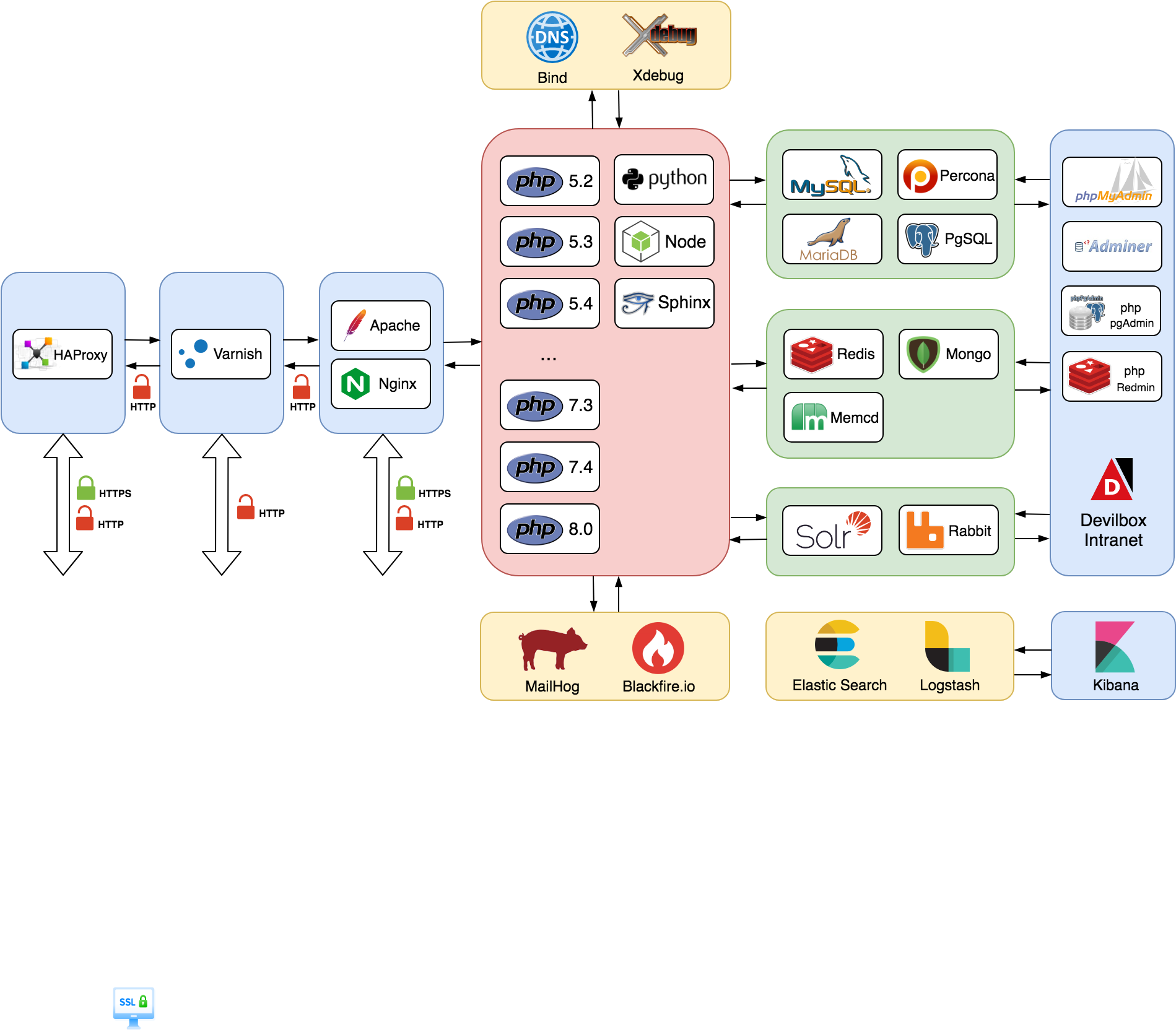
On the other side I think its still more convenient to implement an SSL terminating proxy in front of varnish which will auto-start with varnish's compose definition, and which will auto-discover all projects without any configuration (just like the current webserver do).
Going this approach will allow you to any of the following:
- Use varnish with SSL (via SSL terminating proxy in front)
- Access varnish directly (via HTTP)
- Access the webserver (nginx/apache) without varnish in front via HTTP/HTTPS
This will probably satisfy everyone and not having to configure anything (except of course change Varnish to your needs, if desired) will make it much easier for beginner to use all those technologies right in the beginning.
Edit:
I try to get an MVP ready soon via HA proxy (which seems very light-weight and fast, so that the additional hop will not be noticed). The setup should then look similar to this one:
cytopia
on 20 Feb 2019
thanks for your answer. Graph is pretty nice and allow to have a global view!
Thanks again for all your works that make Devilbox a swift knife 👏
llaville
on 20 Feb 2019
SSL Offloading
Work on Varnish and HAProxy (for HTTPS offloading) has been finished and PR is open: https://github.com/cytopia/devilbox/pull/512
cytopia
on 27 Feb 2019
I've beginning to have a look; i'll continue later this evening. I've already added a comment about usage of varnish server version in your PR
llaville
on 27 Feb 2019
I've already added a comment about usage of varnish server version in your PR
Not seeing the comment
cytopia
on 27 Feb 2019
@cytopia Sorry I forgot to press submit review button ;-) this is now done in PR #512
llaville
on 27 Feb 2019
@mozgbrasil @llaville
Merged and announced here: https://devilbox.discourse.group/t/feature-haproxy-ssl-offloading/69
Feel free to continue casual discussions in the Forum (linked above) and add any issues/problems here on GitHub.
cytopia
on 1 Mar 2019
Related issues
 hurrtz
·
5Comments
hurrtz
·
5Comments
 folkevil
·
5Comments
folkevil
·
5Comments
 mwmichael
·
3Comments
mwmichael
·
3Comments
 RaffyeMemon
·
4Comments
RaffyeMemon
·
4Comments
 msyhr
·
7Comments
msyhr
·
7Comments
Most helpful comment
@mozgbrasil @llaville
Merged and announced here: https://devilbox.discourse.group/t/feature-haproxy-ssl-offloading/69
Feel free to continue casual discussions in the Forum (linked above) and add any issues/problems here on GitHub.