Devilbox: Add support multiple TLD_SUFFIX
Can devilbox support nultiple TLD_SUFFFIX ?
eg TLD_SUFFIX=loc,dev,test
 lbngoc
All 23 comments
@lbngoc could you explain the use-case for multiple TLD_SUFFIX's?
 cytopia
on 8 Nov 2017
cytopia
on 8 Nov 2017
I think it may be a new ENV, bind service should be listened to all TLD_SUPPORTED_SUFFIX in the list instead one at current. For example:
- File
.env
TLD_SUFFIX= # leave empty because I want to put TLD_SUFFIX by myself when creating vhost folder
TLD_SUPPORTED_SUFFIX=dev,com,net
- In
data/www:
├── example.dev
│   └── htdocs
├── example.com
│   ├── htdocs
├── example.net
│   ├── htdocs
By looking at your directory structure, I now better understand why this should be added. Looks valid to me.
cytopia
on 14 Nov 2017
I further looked into this feature. It requires changes in
- Intranet
- Apache 2.2, Apache 2.4, Nginx stable, Nginx mainline
- DNS server
Its quite extensive, but possible
cytopia
on 16 Nov 2017
@lbngoc I had another look. I missunderstood you.
When having multiple tld suffices, it is not going to give you want you want. Lets check your example:
TLD_SUFFIX=dev,com,net
├── example.dev
│   └── htdocs
├── example.com
│   ├── htdocs
├── example.net
│   ├── htdocs
This would make each of your projects available under three suffices:
For directory example.dev/:
http://example.dev.devhttp://example.dev.comhttp://example.dev.net
For directory example.com/:
http://example.com.devhttp://example.com.comhttp://example.com.net
For directory example.net/:
http://example.net.devhttp://example.net.comhttp://example.net.net
This is probably not what you wanted or?
cytopia
on 21 Nov 2017
You could however use a custom virtual host config for your webserver and set the server_name (nginx) or ServerName (apache) yourself. Have a look at the following comment to see how to customize a single vhost configuration:
https://github.com/cytopia/devilbox/issues/142#issuecomment-343670549
Let me know if this helps
cytopia
on 21 Nov 2017
Hi @cytopia,
I have already config vhost before open issue here, I think that a core issue here came from bind_service. I could not disable TLD_SUFFIX (because the default is .loc), then maybe all my vhost was not working.
I will reconfigure this again and let you know my results later. Thanks.
lbngoc
on 2 Dec 2017
@lbngoc are there any updates on this?
cytopia
on 7 Apr 2018
I will close this issue due to inactivity. Feel free to open this up again in case you still experience issues.
cytopia
on 25 Apr 2018
@cytopia
I will close this issue due to inactivity. Feel free to open this up again in case you still experience issues.
is this still a thing on development?
use-case: have multiple .com, .space domain that i have purchase that perhaps 1 devilbox instance may autodns it using
TLD_SUFFIX=com,space
// for example.com
// for example.space
because i have tried to use multiple instance, but doesnt seem to work at my local machine
*multiple instance of devilbox
 alzen8work
on 26 Oct 2018
alzen8work
on 26 Oct 2018
@alzen8work even with multiple domains you can still use the directory structure I've shown above: https://github.com/cytopia/devilbox/issues/139#issuecomment-345947795
Also using official domain TLD's for the Devilbox should be avoided, as the DNS server will catch-all all sub-domains and redirect everything to the bundled webserver (apache or nginx). You won't be able to make any http(s)? requests anymore from inside the PHP container.
cytopia
on 27 Oct 2018
what u mean by "Also using official domain TLD's for the Devilbox should be avoided?"
for instance i have purchase 2 domain with different tld,
1 is http://example.com,
another is http://example.space
will it be possible to setup like this
TLD_SUFFIX=space,com
because the last time I tried at my digitalocean droplet, does not work.
alzen8work
on 27 Oct 2018
what u mean by "Also using official domain TLD's for the Devilbox should be avoided?"
https://devilbox.readthedocs.io/en/latest/configuration-files/env-file.html#tld-suffix
The reason if you are using e.g. com as your TLD_SUFFIX, the DNS server will intercept all requests from the PHP-FPM container going to *.com and redirect them to the Devilbox webserver.
So the container won't have any internet for the *.com part of the web.
will it be possible to setup like this
TLD_SUFFIX=space,com
The bind container does already support multiple DNS names: https://github.com/cytopia/docker-bind#wildcard_dns
Its just not yet reflected in the docker-compose.yml file.
However what is the benefit over using the following:
- example.com.loc
- example.space.loc
cytopia
on 27 Oct 2018
However what is the benefit over using the following:
- example.com.loc
- example.space.loc
well @cytopia my objective is not to have
example.com.loc
example.space.loc
but to have
example.com
example.space
working... so... any steps to follow to accomplish that?
alzen8work
on 30 Oct 2018
@alzen8work Is this setup to be a production environment?
Because Cytopia's answers are assuming a development environment with autodns.
If this was to be a production environment, you would want to use your public DNS, and not autodns.
 science695
on 31 Oct 2018
science695
on 31 Oct 2018
@alzen8work let me know if you're trying to setup a production environment as @science695 was assuming.
Then reverse-proxying one might be a good starting point to dig into. Have a look here for the idea: https://github.com/cytopia/devilbox/issues/405#issuecomment-434908527
cytopia
on 1 Nov 2018
@cytopia well... it is for staging (digital ocean droplet ) but the domain ( purchased with namecheap) is real. at this moment i dont mind of using http instead of https
alzen8work
on 1 Nov 2018
@science695
can elaborate the how to configure in devilbox of using public DNS , and not autodns?
alzen8work
on 1 Nov 2018
@alzen8work if you need that publically available, why don't you just take one of your valid domains as the TLD_SUFIX. e.g.: TLD_SUFFIX=example.space
This way all of your projects advertise as:
- project1.example.space
- project2.example.space
- ...
You will only need to take care about creating DNS records for project1 and project2 separately.
Alternatively you can also create a staging sub-domain with a catch-all to your staging server: TLD_SUFFIX=staging.example.space (where *.staging.example.space is a catch-all to the staging server)
This way all of your projects automatically advertise as:
- project1.staging.example.space
- project2.staging.example.space
- ...
cytopia
on 1 Nov 2018
@cytopia well...
proj1.example.space
proj2.example.space
might be staging for 1 domain...
how about adding staging to another domain eg .com:
proj3.just-another-domain.com
proj4.just-another-domain.com
well thats my usecase.... any solution on going about that?
alzen8work
on 1 Nov 2018
So basically there are two choices:
1. Do not care about the domain, but separate your projects by different subdomains to emulate different domains:
Domain 1:
- project1.staging-subdomain.example.com
- project2.staging-subdomain.example.com
Domain 2:
- project3.staging-just-another-subdomain.example.com
- project4.staging-just-another-subdomain.example.com
2. Add vhost-gen templates to your project to overwrite the default nginx/apache behaviour:
You are free to choose any domain you want. Read up more here: https://devilbox.readthedocs.io/en/latest/vhost-gen/example-add-subdomains.html
2.1 Keep at least one entry for the original domain which uses the TLD_SUFFIX, otherwise you won't be able to access the project from within the PHP container
2.2 Or you use FQDN and can just rely on vhost-gen changes
Hope that helps. I would however still be interested why there is a need for different domains.
cytopia
on 1 Nov 2018
So basically there are two choices:
1. Do not care about the domain, but separate your projects by different subdomains to emulate different domains:
Domain 1:
- project1.staging-subdomain.example.com
- project2.staging-subdomain.example.com
Domain 2:
- project3.staging-just-another-subdomain.example.com
- project4.staging-just-another-subdomain.example.com
2. Add vhost-gen templates to your project to overwrite the default nginx/apache behaviour:
You are free to choose any domain you want. Read up more here: https://devilbox.readthedocs.io/en/latest/vhost-gen/example-add-subdomains.html
2.1 Keep at least one entry for the original domain which uses the TLD_SUFFIX, otherwise you won't be able to access the project from within the PHP container
2.2 Or you use FQDN and can just rely on vhost-gen changes
Hope that helps. I would however still be interested why there is a need for different domains.
Well, as describe at the image below are my domains in namecheap.com
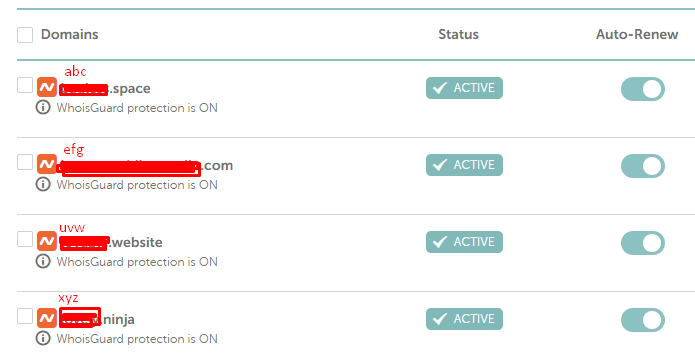
Well my objective is simple:
- to make use of the above domain to different project
_(might be sub domain, might be without sub domain):_
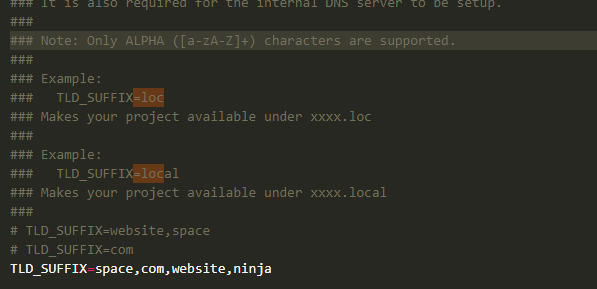
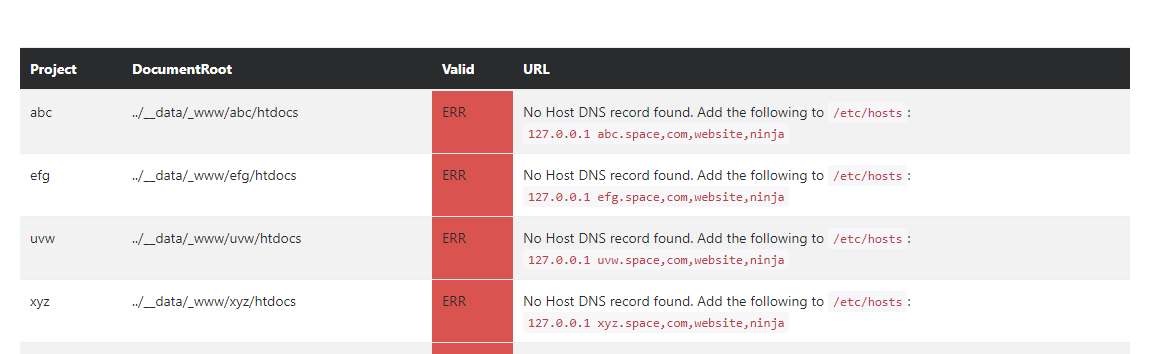
well obviously this doesn't work.
Assume all the domain have 1 project without sub domain, 1 with subdomain.

- abc
- sub.abc
- efg
- sub2.efg
- uvw
- sub3.uvw
- xyz
- sub4.xyz
8 project in total, 4 different TLD: abc.space... efg.com... uvw.website... xyz.ninja..
@cytopia how to come about to accomplish that step by step
alzen8work
on 4 Nov 2018
I already got the what and was actually interested in the why.
Anyway, the answer to how is still the same:
2. Add vhost-gen templates to your project to overwrite the default nginx/apache behaviour:
You are free to choose any domain you want. Read up more here: https://devilbox.readthedocs.io/en/latest/vhost-gen/example-add-subdomains.html
Are more in-depth explanation about how vhost-gen integration works is explained here: https://devilbox.readthedocs.io/en/latest/vhost-gen/customize-specific-virtual-host.html
cytopia
on 4 Nov 2018
Related issues
 robots4life
·
6Comments
cytopia
·
4Comments
robots4life
·
6Comments
cytopia
·
4Comments
 lostncg
·
3Comments
lostncg
·
3Comments
 normance
·
4Comments
normance
·
4Comments
 sustained
·
6Comments
sustained
·
6Comments