Device-os: Photon/P1 does not always recover from a WiFi channel switch / WiFi.ready() can return true with IP 0.0.0.0
Bug Report
According to the docs, WiFi.ready() returns true only if the device is connected to WiFi and has a valid IP address. My P1 based board connects to WiFi without problems initially. Then it loses network, and the code I have to restore WiFi is not triggered, because WiFi.ready() stil returns true.
I have narrowed down the cause to WiFi channel switching. Auto channel seems to be the default on many routers, so this affects many setups.
Initially, this bug report was about WiFi.ready() returning 'true' while the IP address was 0.0.0.0, but this seems to be one of the symptoms of WiFi channel switching not being handled correctly.
Expected Behavior
WiFi.ready()
WiFi.ready() returns true only if the P1 has a valid IP address, as described here:
https://docs.particle.io/reference/firmware/photon/#ready-
What should it do?
Return false if the IP address is 0.0.0.0.
Channel switching
The photon should be able to switch seamlessly to a new WiFi channel if the router changes the channel.
Observed Behavior
When I switch the WiFi channel on my router, the behavior of the photon is not consistent.
I see one of the following behaviors:
- Photon starts blinking green. Display shows WiFi.ready() returning false and IP address becoming 0.0.0.0. A short blue blink is followed by a white blink and then green blinking again and a successful reconnect.
- Photon starts flashing green, then switches to breathing green. WiFi.ready() stays true, but IP address becomes 0.0.0.0. Doesn't recover from this state. It's in limbo until a reboot.
- Hard fault SOS (1 blink).
Analysis of the problem
In my application, I display WiFi status on a TFT display. It displays the IP address in light grey when connected and in dark grey when not connected (code below).
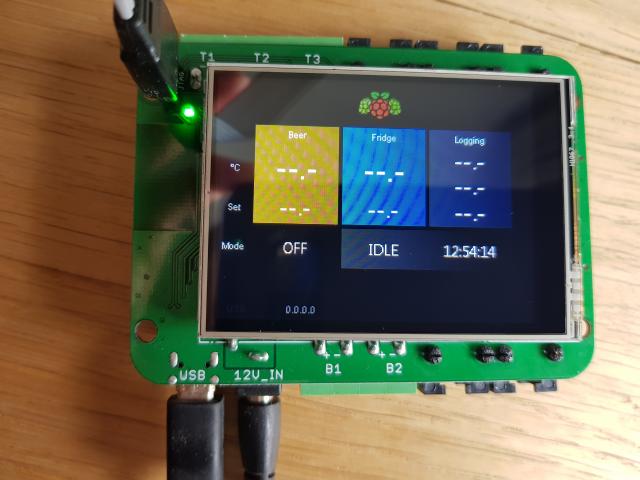
void ControllerWiFiView::update(bool wifiConnected, char * const ipAddress)
{
    if(obj != nullptr){
        obj->clrScheme->fore = wifiConnected ? D4D_COLOR_LIGHT_GREY : D4D_COLOR_GREY;
        D4D_SetText(obj, ipAddress);
    }
}

void ControllerWiFiPresenter::update(){
#if BREWPI_USE_WIFI
    char ipAddressString[16];
    bool wifiConnected = WiFi.ready();
    piLink.ipAddressAsString(ipAddressString);
    view_.update(wifiConnected, ipAddressString);
#endif
}
I observe light grey with IP address 0.0.0.0. This means that it is possible for the P1 to get in a state where WiFi.ready() returns true, while the IP address is 0.0.0.0.
I have connected a debugger and step debugged the code with Eclipse. This confirms that WiFi.ready() returns false.
I cannot fully step debug to the actual code that determines the ready status, because it seems to be a dynalib system call. But here is my analysis:
WiFi.ready() calls network_ready(..)
    bool ready(void) {
        return network_ready(*this, 0, NULL);
    }
Which is defined here:
DYNALIB_FN(4, system_net, network_ready, bool(network_handle_t, uint32_t, void*))
And results in:
bool network_ready(network_handle_t network, uint32_t param, void* reserved)
{
    return nif(network).ready();
}
Which seems to call wifi.ready().
I think all the virtual functions eventually end up here (ManagedNetworkInterface class):
    bool ready() override
    {
        return (SPARK_WLAN_STARTED && WLAN_CONNECTED);
    }
So the volatile status byte WLAN_CONNECTED is used.
It is set to 1 on a successful DHCP connect.
It is set to '0' on
ManagedNetworkInterface::notify_disconnected()
ManagedNetworkInterface::disconnect()
ManagedNetworkInterface::off()
In system_network_internal.cpp
My guess is that the notify_disconnect never happens in this case. I have set a breakpoint on all 3 write occurrences that set WLAN_CONNECTED to zero. We'll have to wait until it happens again.
Steps to Reproduce
Log in to your router, change the WiFi channel.
I am running the latest 0.7.0-rc.3 system firmware, compiled with arm-non-eabi-gcc 0.5.3.
I also use:
SYSTEM_MODE(MANUAL);
SYSTEM_THREAD(ENABLED);
However, this behavior has been present with older versions of the system firmware too (0.5.3). It seems to occur less often on 0.7.0 though.
References
Full firmware I am running:
https://github.com/BrewPi/firmware
Code to maintain WiFi connection (it can switch between WiFi and Serial):
https://github.com/BrewPi/firmware/blob/master/app/controller/PiLink.cpp#L80
Code to display WiFi status on display:
https://github.com/BrewPi/firmware/blob/master/platform/spark/modules/eGUI_screens/ConnectivityDisplay.cpp#L42
Possible workaround
Instead of WiFi.ready() use WiFi.ready() && WiFi.localIP()[0]==0).
Related forum topic (from 2014): https://community.particle.io/t/wifi-ready-not-working/6627
 elcojacobs
All 33 comments
Another untested idea to work around this bug is to include this in my main loop somewhere:
if(WiFi.ready() && WiFi.localIP()[0]==0){
   HAL_NET_notify_disconnected();
}
What do you think?
elcojacobs
on 20 Aug 2017
Another question of course is: Why and where did the IP address become zero?
Let me know if you want me to place a breakpoint somewhere else in the code.
elcojacobs
on 20 Aug 2017
Some more observations:
- Switched router from WPA to WPA2. Router says P1 DHCP client is disconnected. Photon still displays the same IP address (192.168.1.66) and seems unaware of the disconnect.
Another test (in which the photon works well):
- Photon is connected to router (192.168.1.66)
- I turn on tethering on my Android phone with the same SSID and password as the router, so we have 2 competing networks. Nothing happens. Photon stays connected to router.
- I reboot the Photon. It now connects to my phone (192.168.43.9). Green breathing.
- I turn off tethering on my phone. As expected, P1 loses WiFi and it starts blinking green rapidly. Then it goes to white very shortly and starts blinking green again and connects to the router again (192.168.1.66).
elcojacobs
on 20 Aug 2017
Found the cause and a way to reproduce! It came to me that the WiFi channel was set to auto and that it was possible that the channel switched infrequently, which could cause the disconnect in the middle of the night.
Changing the WiFi channel on the router from 12 to 1 caused the photon to lose connection and display IP-address 0.0.0.0.
The result is not the same each time I switch the WiFi channel on the router. I have seen these behaviors:
- Photon starts blinking green and reconnects.
- Photon starts flashing green, then switches to breathing green. WiFi.ready() returns true, but IP address remains 0.0.0.0. Doesn't recover from this state.
- Hard fault SOS (1 blink)
Updated original bug report to include WiFi channel switching as the cause.
elcojacobs
on 20 Aug 2017
I have added a workaround in my app:
https://github.com/BrewPi/firmware/commit/25d6303ede71de9b59a4cde0ad39b4cfb10167c1
I disconnect when in the limbo state and have coded that calls WiFi.connect() elsewhere.
elcojacobs
on 21 Aug 2017
This is quite an amazing write up, and follow up bug report! Thank you very much @elcojacobs.
 technobly
on 23 Aug 2017
technobly
on 23 Aug 2017
You're welcome. I'm curious to hear what the cause is. I have tried to look for a bug, but haven't found it yet obviously.
I do have many, many warnings reported by eclipse in the particle code, but cannot really judge them myself. Happy to help improve code quality a bit, but don't know enough about the details of the code base.
For example, this missing break seems like an error to me, but maybe it is intentional:
https://github.com/spark/firmware/blob/ad64959eac6e3e3e68c1e17ef817e5bbbf1dca29/hal/src/photon/wiced/platform/MCU/BCM4390x/peripherals/include/wiced_osl.h#L98
There are many missing breaks in the code, without a comment whether it is intentional, or even better,
wrapped by a #pragma to temporarily disable the compiler warning.
Most of the warnings/errors I get in Eclipse are:
- No return in function returning non-void
- Return has value in function returning void
- Assignment to self
- Many Uninitialized member variables in constructor
- No break at the end of case
- Suggested parenthesis around expression
- Virtual functions, but no virtual destructor (if it isn't needed, using empty protected non-virtual destructors to prevent destruction through base class would silence the warnings)
Maybe one of these warnings is related to the WiFi bug, maybe not. Maybe give the static code analysis of Eclipse a try.
elcojacobs
on 23 Aug 2017
@elcojacobs how often would you say this is reproducible in 0.7.0-rc.3? I've tried 6 times now and it has recovered each time with the following test app:
SYSTEM_MODE(MANUAL);
SYSTEM_THREAD(ENABLED);

void setup() {
    Particle.connect();
    waitUntil(Particle.connected);
}

void loop() {
    static uint32_t last_update = millis();
    if ( millis() - last_update > 4000UL ) {
        last_update = millis();
        IPAddress ip = WiFi.localIP();
        Serial.printlnf("%d - %d.%d.%d.%d", millis(), ip[0],ip[1],ip[2],ip[3]);
    }
    Particle.process();
}
Would you please try the minimal test app above to rule out anything in your firmware?
technobly
on 23 Aug 2017
After downgrading to 0.6.2 (with bootloader) I was able to reproduce the bug on the 5th attempt. The result was flashing green while the IP remained 0.0.0.0. A further attempt at changing the channel did nothing to help the device recover. FYI new data point: Then I toggled into and out of listening mode with the SETUP button and observed fast flashing cyan continuously.
UPDATE: was able to reproduce the above test a second time after 4 more attempts on 0.6.2.
technobly
on 23 Aug 2017
I am not using the cloud, so I am trying this minimal example:
#include "application.h"

SYSTEM_MODE(MANUAL);
SYSTEM_THREAD(ENABLED);

void setup() {
    Serial.begin(57600);
    WiFi.connect();
}

void loop() {
    static uint32_t last_update = millis();
    if ( millis() - last_update > 1000UL ) {
        last_update = millis();
        IPAddress ip = WiFi.localIP();
        Serial.printlnf("%d - %d - %d.%d.%d.%d", millis(), WiFi.ready(), ip[0],ip[1],ip[2],ip[3]);
    }
}
I have not been able to trigger it with this example (on 0.7.0-rc.3). Which led me to think that perhaps it is timing related and I added a blocking delay:
#include "application.h"

SYSTEM_MODE(MANUAL);
SYSTEM_THREAD(ENABLED);

void setup() {
    Serial.begin(57600);
    WiFi.connect();
}

void loop() {
    IPAddress ip = WiFi.localIP();
    Serial.printlnf("%d - %d - %d.%d.%d.%d", millis(), WiFi.ready(), ip[0],ip[1],ip[2],ip[3]);
    delayMicroseconds(1000000UL);
}
Still no luck in reproducing it. Yet with our BrewPi firmware, it happens often. With this version:
https://github.com/BrewPi/firmware/blob/0.5.3-rc.2/app/controller/PiLink.cpp#L47
Everything WiFi related happens in NetworkSerialMuxer.
It occurred less frequently on 0.7.0 though.
elcojacobs
on 23 Aug 2017
Another idea:
Is there a bug in the TCP server or client that could trigger undefined behavior if WiFi has disconnected at just the wrong time?
Once in a blue moon, I get a hard fault SOS in our BrewPi app when I keep switching my WiFi channel.
elcojacobs
on 24 Aug 2017
Updates: in the background I've been switching channels when I remember and I have not been able to reproduce any of the described symptoms with 0.7.0-rc.3 after about 20 channel changes.
TCP server / client fixes were implemented in 0.7.0-rc.1 so there is a chance that those issues are already fixed. Please give 0.7.0-rc.3 a bit more testing time and see what shows up.
I have not seen any hard faults with 0.6.2 and Wi-Fi channel changes. I'm going to switch this back to unconfirmed for the time being. We will be addressing the 0.0.0.0 ip address potential in the WiFi.ready() API (it will not be true if the IP is still 0.0.0.0 in a future version of firmware), so that's at least a good outcome of this report :)
If you can provide any further evidence that this is still an issue with 0.7.0-rc.3 and the minimum test app, please do! I would appreciate knowing how often it occurs and will be looking into the ability to automate WAP channel changing.
technobly
on 24 Aug 2017
I have new data!
I could trigger the bug on a P1 on first attempt, with the P1 running our brewing firmware.
I couldn't trigger it on a Photon after 20 tries.
But then I realized there was a difference:
My python script was set up to connect the IP address of the P1. I switched it to the IP address of the Photon and boom: Photon gets Wifi.ready() true and IP 0.0.0.0 on first attempt.
The P1 however, stayed online now.
So TCP being connected makes a difference in triggering this bug. I'll try to get to a minimal example from there.
elcojacobs
on 24 Aug 2017
Sounds good! Are you also using 0.7.0-rc.3 for this?
technobly
on 24 Aug 2017
Yes.
Here is my current test app:
#include "application.h"

SYSTEM_MODE(MANUAL);
SYSTEM_THREAD(ENABLED);

void setup() {
    Serial.begin(57600);
}

void loop() {
    static uint32_t last_update = millis();
    static uint32_t last_counter_send = millis();

    static TCPServer tcpServer = TCPServer(6666);
    static TCPClient tcpClient;
    static bool tcpServerRunning = false;
    static int counter = 0;

    if (WiFi.ready()) {
       if(!tcpServerRunning) {
           tcpServer.begin();
           tcpServerRunning = true;
       }

       // if a new client appears, drop the old one
       TCPClient newClient = tcpServer.available();
       if(newClient) {
           tcpClient.stop();
           tcpClient = newClient;
       }
    }
    else {
       tcpServer.stop();
       tcpClient.stop();
       tcpServerRunning = false;

       if (WiFi.hasCredentials() && !WiFi.connecting()) {
           WiFi.connect();
       }
    }
    if ( millis() - last_update > 1000UL ) {
        last_update = millis();
        bool wifiReady = WiFi.ready();
        IPAddress ip = WiFi.localIP();
        Serial.printlnf("%d - %d - %d.%d.%d.%d", millis(), wifiReady, ip[0],ip[1],ip[2],ip[3]);
    }
    if ( millis() - last_counter_send > 100UL ) {
        last_counter_send = millis();
        tcpClient.println(counter++);
    }
}
WiFi does reconnect, but after a WiFi channel switch I cannot connect to the TCP server anymore. This can be explained by WiFi.ready() never going to false, so the TCPServer needs a restart but never gets one.
If I change the line to:
if (WiFi.ready() && WiFi.localIP()[0] != 0) {
then the TCP reconnect works after a WiFi switch.
However, the test code still does not cause the limbo state where it remains in 0.0.0.0.
If you can spot the difference with the code here, let me know:
https://github.com/BrewPi/firmware/blob/0.5.3-rc.2/app/controller/PiLink.cpp#L47
That code triggers limbo quickly, as long as our python script is connected.
I was using packetsender as a TCP client now. I can try writing a quick python script (pyserial over socket) so that the test conditions are equal on that side too.
elcojacobs
on 24 Aug 2017
One step further again. I went back to our BrewPi firmware code.
int available() {
        const ticks_millis_t wifiAttemptInterval = 60000;
        static ticks_millis_t lastWifiAttempt = -wifiAttemptInterval + 5000; // first attempt 5 seconds after boot
        static bool tcpServerRunning = false;

        int available = 0;

        if (Serial.isConnected()) {
            available = Serial.available();
        }
        if(available > 0) {
            currentStream = &Serial;
        }
        else if (WiFi.ready() && WiFi.localIP()[0] != 0) {
            if(!tcpServerRunning) {
                tcpServer.begin();
                tcpServerRunning = true;
            }

            // if a new client appears, drop the old one
            TCPClient newClient = tcpServer.available();
            if(newClient) {
                tcpClient.stop();
                tcpClient = newClient;
            }
            if (tcpClient.connected()) {
                available = tcpClient.available();
                if(available > 0) {
                    currentStream = &tcpClient;
                }
            }
        }
        else {
            tcpServer.stop();
            tcpClient.stop();
            tcpServerRunning = false;

            if (WiFi.hasCredentials() && !WiFi.connecting()) {
                if(ticks.timeSinceMillis(lastWifiAttempt) > wifiAttemptInterval) {
                    lastWifiAttempt = ticks.millis();
                    WiFi.connect();
                }
            }
        }

        return available;
    }
If I remove && WiFi.localIP()[0] != 0, I can very easily get the P1 in limbo 0.0.0.0 state. With the check in place, I can't. So I think it is triggered by using tcp server or client in case WiFi.ready() is true and the IP is still 0.0.0.0. This causes the system to stay in that state.
The good news is that fixing WiFi.ready() will probably solve the limbo bug too. It is probably caused by WiFi.ready() usage in TCPServer or TCPClient.
Update
Nope, with the check in place I can still trigger limbo. But that could be a timing issue and with the check in place it is less likely.
elcojacobs
on 25 Aug 2017
Did anyone find a valid workaround for this? We are starting to see this with our customers and I can't have them all change their routers to a fixed channel. I'm experimenting with the following code but don't believe it is working, as my Photon hasn't come back online after I changed router channel.
if(WiFi.ready() && WiFi.localIP()[0]==0){
     WiFi.disconnect();
     delay(1000);
     WiFi.connect();
  }
 ryancush
on 15 Nov 2017
ryancush
on 15 Nov 2017
I have not found a fool proof workaround yet.
To reproduce the issue, it is important to connect to the TCP socket and continuously send/receive data.
* edited *
Full test code to reproduce here:
https://community.particle.io/t/wifi-channel-switching-stops-wifi-connectivity-and-is-only-recoverable-by-reboot-bug/38275
In my tests, I have found that if I am not using the TCP socket, a WiFi channel switch does not cause the limbo state. Maybe the channel switch tears down the wifi while the TCP client is still using it and this causes the bug. I hope this helps finding the cause, because this is still causing a lot of issues for my customers.
elcojacobs
on 21 Dec 2017
Updated Python code for python3:
import time;
import serial;

tcp = None
ser = serial.serial_for_url('COM229',baudrate=256000, timeout=0.1, write_timeout=0)
timer = time.time()

while True:
    # send something to the photon via TCP every 0.2 sec
    try:
        if tcp is None:
            time.sleep(1)
            tcp = serial.serial_for_url("socket://192.168.2.149:6666", baudrate=57600, timeout=0.1, write_timeout=0)

        if time.time() - timer > 0.2:
            tcp.write('t'.encode())
            print("->tic")
            timer = time.time()

        # read something back via TCP
        new_tcp_data = ""
        while tcp.in_waiting > 0:
            # for sockets, in_waiting returns 1 instead of the actual number of bytes
            # this is a workaround for that
            new_tcp_data = new_tcp_data + str(tcp.read(tcp.in_waiting))

        if len(new_tcp_data) > 0:
            print("<-" + new_tcp_data)
    except (IOError, OSError, serial.SerialException) as e:
        print('Serial Error: {0})'.format(str(e)))
        if tcp:
            tcp.close()
        tcp = None
        time.sleep(1)


    # read serial and print it
    new_serial_data = ""
    while ser.in_waiting > 0:
        new_serial_data = new_serial_data + str(ser.read(ser.in_waiting))
        time.sleep(0.1)

    if len(new_serial_data) > 0:
        print("**" + new_serial_data)
requirements:
pip install pyserial
Code for Photon:
SYSTEM_MODE(MANUAL);
SYSTEM_THREAD(ENABLED);
SerialLogHandler traceLog(LOG_LEVEL_TRACE);

void setup() {
    WiFi.on();
    Serial.begin(115200);
    pinMode(D7, OUTPUT);
}

void loop() {
    static uint32_t last_update = millis();
    static TCPServer tcpServer = TCPServer(6666);
    static TCPClient tcpClient;
    static bool tcpServerRunning = false;

    // Tic/toc on WiFi over TCP
    // reply to 't' with 'toc' over TCP, print other characters to serial
    if (WiFi.ready() && WiFi.localIP()[0] != 0) {
       if(!tcpServerRunning) {
           tcpServer.begin();
           tcpServerRunning = true;
       }
       else {
           // if a new client appears, drop the old one
           TCPClient newClient = tcpServer.available();
           if(newClient) {
               tcpClient.stop();
               tcpClient = newClient;
           }
       }
    }
    else {
       tcpClient.stop();
       tcpServer.stop();
       tcpServerRunning = false;

       if (WiFi.hasCredentials() && !WiFi.connecting()) {
           WiFi.connect();
           waitUntil(WiFi.ready);
       }
    }
    while (tcpClient.available() > 0) {
        char inByte = tcpClient.read();
        switch(inByte){
        case ' ':
        case '\n':
        case '\r':
            break;
        case 't':
            tcpClient.write("toc");
            break;
        default:
            Serial.printf("<-%c", inByte);
        }
    }

    // print status on serial every second
    if ( millis() - last_update > 1000UL ) {
        last_update = millis();
        bool wifiReady = WiFi.ready();
        IPAddress ip = WiFi.localIP();
        Serial.printf("WiFi.ready(): %d - IP: %d.%d.%d.%d\n", wifiReady, ip[0],ip[1],ip[2],ip[3]);
    }

    digitalWrite(D7, WiFi.ready());
}
Output during reconnect after WiFi channel switch:
->tic
->tic
->tic
->tic
->tic
**WiFi.ready(): 1 - IP: 192.168.2.149

->tic
->tic
->tic
->tic
->tic
**WiFi.ready(): 1 - IP: 192.168.2.149

->tic
**0001031290 [hal.wlan] INFO: Joining brewpi-subnet
0001031290 [hal.wlan] TRACE: Free RAM connect: 45312

->tic
->tic
->tic
->tic
->tic
->tic
->tic
->tic
->tic
->tic
->tic
->tic
->tic
->tic
->tic
->tic
->tic
->tic
->tic
->tic
->tic
->tic
->tic
->tic
->tic
->tic
->tic
->tic
->tic
->tic
->tic
->tic
->tic
->tic
->tic
**0001038298 [hal.wlan] ERROR: wiced_join_ap_specific(), result: 1025
0001038298 [hal.wlan] INFO: Joining brewpi-subnet
0001038298 [hal.wlan] TRACE: Free RAM connect: 46600

->tic
->tic
->tic
**0001039023 [hal.wlan] INFO: Bringing WiFi interface up with DHCP
WiFi.ready(): 1 - IP: 0.0.0.0

->tic
->tic
->tic
Serial Error: read failed: [WinError 10054] An existing connection was forcibly closed by the remote host)
**WiFi.ready(): 1 - IP: 0.0.0.0
WiFi.ready(): 1 - IP: 0.0.0.0

->tic
**WiFi.ready(): 1 - IP: 0.0.0.0
WiFi.ready(): 1 - IP: 0.0.0.0
WiFi.ready(): 1 - IP: 0.0.0.0
WiFi.ready(): 1 - IP: 192.168.2.149

<-toc
->tic
<-toc
->tic
<-toc
->tic
**WiFi.ready(): 1 - IP: 192.168.2.149
Please note this line:
WiFi.ready(): 1 - IP: 0.0.0.0
If the IP is 0.0.0.0, should WiFi.ready() return true?
And should the application be blocked? There are no serial prints as soon as WiFi is lost.
The TCP server also stops responding often:
->tic
->tic
->tic
->tic
->tic
**WiFi.ready(): 1 - IP: 192.168.2.149

->tic
->tic
->tic
->tic
->tic
**WiFi.ready(): 1 - IP: 192.168.2.149

->tic
->tic
->tic
Serial Error: read failed: [WinError 10054] An existing connection was forcibly closed by the remote host)
**WiFi.ready(): 1 - IP: 192.168.2.149
WiFi.ready(): 1 - IP: 192.168.2.149

->tic
**WiFi.ready(): 1 - IP: 192.168.2.149

<-toc
->tic
<-toc
->tic
<-toc
->tic
<-toc
->tic
**WiFi.ready(): 1 - IP: 192.168.2.149
Last results were against 0.8.0-rc.2.
Seems even worse than before, because even though I have
SYSTEM_MODE(MANUAL);
SYSTEM_THREAD(ENABLED);
The application is completely blocked when WiFi is lost.
WiFi connectivity handling still seems to be absolutely terrible.
I am getting unhappy about my choice of Particle as a platform for my products.
Is it too much to ask from an IOT platform that:
- Losing WiFi does not completely block the system
- Wifi disconnects and channel switches are handled correctly and when WiFi returns, it always reconnects
- A TCP server ran by the device does not get into an unrecoverable error state when WiFi is bad or temporarily lost?
I have given you test code. I reported this bug over 6 months ago. I feel unheard and ignored.
elcojacobs
on 22 Feb 2018
@elcojacobs Thanks once again for the detailed reports and test apps!
I'd appreciate if you could try out this branch, that contains a set of fixes for some of the issues you are experiencing:
https://github.com/particle-iot/firmware/tree/fix/photon-tcp
 avtolstoy
on 26 Feb 2018
avtolstoy
on 26 Feb 2018
Thank you! I have tried the fixes with my test code and here is the result of a channel switch:
Log file output during a wifi channel switch (and test code from #1490):
Before fix (Particle system framework 0.7.0-rc.6)
router-channel-switch-log-before-fix.txt
Note line 911-920:
0000419414 [hal.wlan] wlan_hal.cpp:614, wlan_join(): INFO: Joining brewpi-subnet
0000419414 [hal.wlan] wlan_hal.cpp:616, wlan_join(): TRACE: Free RAM connect: 42520
WiFi.ready(): 0     IP: 192.168.1.61        RSSI: 0     TCP client connected: 0     millis(): 419511
py->hw: tic
WiFi.ready(): 0     IP: 192.168.1.61        RSSI: 0     TCP client connected: 0     millis(): 420512
py->hw: tic
WiFi.ready(): 0     IP: 192.168.1.61        RSSI: 0     TCP client connected: 0     millis(): 421513
py->hw: tic
0000422364 [hal.wlan] wlan_hal.cpp:733, wlan_connect_finalize(): INFO: Bringing WiFi interface up with DHCP
network event 7
It didn't get actually start to work until line 55839, which you can see from the line 'New TCP client).
0000493186 [hal] socket_hal.cpp:925, socket_close(): TRACE: socket closed 20003d98
0000493286 [hal.wlan] wlan_hal.cpp:1365, wlan_connect_cancel(): TRACE: connect cancel
WiFi.ready(): 1     IP: 192.168.1.61        RSSI: 2     TCP client connected: 0     millis(): 492197


WiFi is in ERROR state (RSSI ==2)


network event 10
WiFi.ready(): 0     IP: 192.168.1.61        RSSI: 0     TCP client connected: 0     millis(): 493397
network event 11
network event 2
network event 3
network event 4
0000493972 [hal.wlan] wlan_hal.cpp:763, fetch_antenna_selection(): INFO: Using internal antenna
network event 5
network event 6
0000493996 [hal.wlan] wlan_hal.cpp:614, wlan_join(): INFO: Joining brewpi-subnet
0000493998 [hal.wlan] wlan_hal.cpp:616, wlan_join(): TRACE: Free RAM connect: 47096
WiFi.ready(): 0     IP: 0.0.0.0     RSSI: 0     TCP client connected: 0     millis(): 494398
WiFi.ready(): 0     IP: 0.0.0.0     RSSI: 0     TCP client connected: 0     millis(): 495399
WiFi.ready(): 0     IP: 0.0.0.0     RSSI: 0     TCP client connected: 0     millis(): 496400
0000497115 [hal.wlan] wlan_hal.cpp:733, wlan_connect_finalize(): INFO: Bringing WiFi interface up with DHCP
network event 7
Restarting TCP
0000497148 [wiring] spark_wiring_tcpclient.cpp:189, TCPClient::stop(): TRACE: sock -1 closesocket
TCP server started
WiFi.ready(): 1     IP: 192.168.1.61        RSSI: -66       TCP client connected: 0     millis(): 497401
WiFi.ready(): 1     IP: 192.168.1.61        RSSI: -65       TCP client connected: 0     millis(): 498402
New TCP client
After fixes (your fix/photon-tcp branch (which is 0.8.1-rc.1):
router-router-channel-fix-log-after-fix.txt
0000134961 [hal.wlan] wlan_hal.cpp:618, wlan_join(): INFO: Joining brewpi-subnet
py->hw: tic
0000134961 [hal.wlan] wlan_hal.cpp:620, wlan_join(): TRACE: Free RAM connect: 46600
py->hw: tic
WiFi.ready(): 0     IP: 0.0.0.0     RSSI: 2     TCP client connected: 0     millis(): 135394

py->hw: tic


WiFi is in ERROR state (RSSI ==2)


TCP Error: read failed: [Errno 104] Connection reset by peer)
WiFi.ready(): 0     IP: 0.0.0.0     RSSI: 2     TCP client connected: 0     millis(): 136395
py->hw: tic


WiFi is in ERROR state (RSSI ==2)
py<-hw: toc


WiFi.ready(): 0     IP: 0.0.0.0     RSSI: 2     TCP client connected: 0     millis(): 137396


WiFi is in ERROR state (RSSI ==2)


0000138065 [hal.wlan] wlan_hal.cpp:739, wlan_connect_finalize(): INFO: Bringing WiFi interface up with DHCP
network event 7
So at least the WiFi.ready() issue seems to be fixed. I will try to break it in other ways and cause see if I can trigger some of the SOSes that occurred before.
Note that the second log file is a lot shorter :)
I didn't the WiFi ready true with IP 0.0.0.0 during this particular run.
elcojacobs
on 26 Feb 2018
Perhaps worthy of attention, in the second log after the fixes, there is still a wall of these:
0000133796 [hal] socket_hal.cpp:813, socket_receive(): TRACE: socket_receive on 536910200 returned -9
0000133797 [hal] socket_hal.cpp:767, read_packet_and_dispose(): TRACE: Socket 0 receive fail 9
0000133797 [hal] socket_hal.cpp:813, socket_receive(): TRACE: socket_receive on 536910200 returned -9
0000133798 [hal] socket_hal.cpp:767, read_packet_and_dispose(): TRACE: Socket 0 receive fail 9
0000133798 [hal] socket_hal.cpp:813, socket_receive(): TRACE: socket_receive on 536910200 returned -9
0000133799 [hal] socket_hal.cpp:767, read_packet_and_dispose(): TRACE: Socket 0 receive fail 9
0000133799 [hal] socket_hal.cpp:813, socket_receive(): TRACE: socket_receive on 536910200 returned -9
Probably coming from here:
 if(tcp_state == tcp_state_enum::RUNNING_FINE){
        if(tcpClient.status()){
            bool noErrors = true;
            while (noErrors && tcpClient.available() > 0) {
                int received = tcpClient.read();
                switch(received){
                case ' ':
                case '\n':
                case '\r':
                    break;
                case 't':
                {
                    size_t result = tcpClient.write("toc"); // send toc back over tcp
                    Serial.printf("hw->py: toc (%d bytes sent) \n", result); // confirm toc sent over tcp
                }
                    break;
                default:
                    if(received < 0){
                        Serial.printf("Receive error: %d\n", received); // confirm toc sent over tcp
                        noErrors = false;
                    }
                    else{
                        Serial.printf("py->hw: %c\n", received); // confirm character received from tcp
                    }
                    break;
                }
            }
        }
But I would expect TcpClient.read() to return a negative error value during this. I have never seen that bit of the code triggered.
elcojacobs
on 26 Feb 2018
Here is another serious bug:
When I add this code to manage the cloud connection (https://github.com/BrewPi/firmware/commit/8d6c287241e71931d0e0a55f1141d6640a14645a) to try to find a workaround for #1491
void manageCloudConnection(){
    // Only try to connect to the cloud once per hour, because it will reset the WiFi stack on failure
    const system_tick_t cloudConnectAttemptInterval = 30000; // 30s in milliseconds
    system_tick_t lastCloudConnect = 0UL - cloudConnectAttemptInterval; // try immediately

    if(!Particle.connected()){
        if(timeSince(lastCloudConnect) >= cloudConnectAttemptInterval){
            lastCloudConnect = millis();
            Particle.connect();
        }
        else{
            Particle.disconnect();
        }
    }
}
Serial connected

0000021993 [hal] socket_hal.cpp:781, read_packet_and_dispose(): TRACE: Socket 0 receive bytes 1 of 1
0000021994 [wiring] spark_wiring_tcpclient.cpp:163, TCPClient::available(): TRACE: recv(=1)
0000021995 [hal] socket_hal.cpp:1015, socket_send_ex(): TRACE: Write 3 bytes to socket 536886992 result=0
py<-hw: toc
hw->py: toc (3 bytes sent)
WiFi.ready(): 1         IP: 192.168.1.61                RSSI: -63               TCP client connected: 1         millis(): 22154
py->hw: tic
0000022994 [hal] socket_hal.cpp:781, read_packet_and_dispose(): TRACE: Socket 0 receive bytes 1 of 1
0000022994 [wiring] spark_wiring_tcpclient.cpp:163, TCPClient::available(): TRACE: recv(=1)
py<-hw: toc
0000022995 [hal] socket_hal.cpp:1015, socket_send_ex(): TRACE: Write 3 bytes to socket 536886992 result=0
hw->py: toc (3 bytes sent)
WiFi.ready(): 1         IP: 192.168.1.61                RSSI: -63               TCP client connected: 1         millis(): 23154
py->hw: tic
0000023994 [hal] socket_hal.cpp:781, read_packet_and_dispose(): TRACE: Socket 0 receive bytes 1 of 1
0000023994 [wiring] spark_wiring_tcpclient.cpp:163, TCPClient::available(): TRACE: recv(=1)
py<-hw: toc
0000023995 [hal] socket_hal.cpp:1015, socket_send_ex(): TRACE: Write 3 bytes to socket 536886992 result=0
hw->py: toc (3 bytes sent)
WiFi.ready(): 1         IP: 192.168.1.61                RSSI: -63               TCP client connected: 1         millis(): 24154
py->hw: tic
0000024994 [hal] socket_hal.cpp:781, read_packet_and_dispose(): TRACE: Socket 0 receive bytes 1 of 1
0000024994 [wiring] spark_wiring_tcpclient.cpp:163, TCPClient::available(): TRACE: recv(=1)
py<-hw: toc
0000024995 [hal] socket_hal.cpp:1015, socket_send_ex(): TRACE: Write 3 bytes to socket 536886992 result=0
hw->py: toc (3 bytes sent)
0000025142 [hal] socket_hal.cpp:1015, socket_send_ex(): TRACE: Write 18 bytes to socket 536886520 result=0
WiFi.ready(): 1         IP: 192.168.1.61                RSSI: -63               TCP client connected: 1         millis(): 25154
0000025243 [hal] socket_hal.cpp:781, read_packet_and_dispose(): TRACE: Socket 0 receive bytes 2 of 18
0000025243 [hal] socket_hal.cpp:781, read_packet_and_dispose(): TRACE: Socket 0 receive bytes 16 of 16
py->hw: tic
0000025994 [hal] socket_hal.cpp:781, read_packet_and_dispose(): TRACE: Socket 0 receive bytes 1 of 1
0000025994 [wiring] spark_wiring_tcpclient.cpp:163, TCPClient::available(): TRACE: recv(=1)
py<-hw: toc
0000025995 [hal] socket_hal.cpp:1015, socket_send_ex(): TRACE: Write 3 bytes to socket 536886992 result=0
hw->py: toc (3 bytes sent)
WiFi.ready(): 1         IP: 192.168.1.61                RSSI: -63               TCP client connected: 1         millis(): 26154
py->hw: tic
0000026995 [hal] socket_hal.cpp:781, read_packet_and_dispose(): TRACE: Socket 0 receive bytes 1 of 1
0000026995 [wiring] spark_wiring_tcpclient.cpp:163, TCPClient::available(): TRACE: recv(=1)
py<-hw: toc
0000026996 [hal] socket_hal.cpp:1015, socket_send_ex(): TRACE: Write 3 bytes to socket 536886992 result=0
hw->py: toc (3 bytes sent)
WiFi.ready(): 1         IP: 192.168.1.61                RSSI: -64               TCP client connected: 1         millis(): 27154
py->hw: tic
0000027994 [hal] socket_hal.cpp:781, read_packet_and_dispose(): TRACE: Socket 0 receive bytes 1 of 1
0000027995 [wiring] spark_wiring_tcpclient.cpp:163, TCPClient::available(): TRACE: recv(=1)
py<-hw: toc
0000027995 [hal] socket_hal.cpp:1015, socket_send_ex(): TRACE: Write 3 bytes to socket 536886992 result=0
hw->py: toc (3 bytes sent)
WiFi.ready(): 1         IP: 192.168.1.61                RSSI: -63               TCP client connected: 1         millis(): 28154
py->hw: tic
0000028994 [hal] socket_hal.cpp:781, read_packet_and_dispose(): TRACE: Socket 0 receive bytes 1 of 1
py<-hw: toc
0000028995 [wiring] spark_wiring_tcpclient.cpp:163, TCPClient::available(): TRACE: recv(=1)
0000028995 [hal] socket_hal.cpp:1015, socket_send_ex(): TRACE: Write 3 bytes to socket 536886992 result=0
hw->py: toc (3 bytes sent)
WiFi.ready(): 1         IP: 192.168.1.61                RSSI: -63               TCP client connected: 1         millis(): 29154
py->hw: tic
0000029994 [hal] socket_hal.cpp:781, read_packet_and_dispose(): TRACE: Socket 0 receive bytes 1 of 1
0000029995 [wiring] spark_wiring_tcpclient.cpp:163, TCPClient::available(): TRACE: recv(=1)
py<-hw: toc
0000029995 [hal] socket_hal.cpp:1015, socket_send_ex(): TRACE: Write 3 bytes to socket 536886992 result=0
hw->py: toc (3 bytes sent)
WiFi.ready(): 1         IP: 192.168.1.61                RSSI: -63               TCP client connected: 1         millis(): 30154
py->hw: tic
0000030995 [hal] socket_hal.cpp:781, read_packet_and_dispose(): TRACE: Socket 0 receive bytes 1 of 1
0000030996 [wiring] spark_wiring_tcpclient.cpp:163, TCPClient::available(): TRACE: recv(=1)
py<-hw: toc
0000030997 [hal] socket_hal.cpp:1015, socket_send_ex(): TRACE: Write 3 bytes to socket 536886992 result=0
hw->py: toc (3 bytes sent)
WiFi.ready(): 1         IP: 192.168.1.61                RSSI: -62               TCP client connected: 1         millis(): 31154
py->hw: tic
0000031995 [hal] socket_hal.cpp:781, read_packet_and_dispose(): TRACE: Socket 0 receive bytes 1 of 1
py<-hw: toc
0000031995 [wiring] spark_wiring_tcpclient.cpp:163, TCPClient::available(): TRACE: recv(=1)
0000031996 [hal] socket_hal.cpp:1015, socket_send_ex(): TRACE: Write 3 bytes to socket 536886992 result=0
hw->py: toc (3 bytes sent)
py->hw: tic
WiFi.ready(): 1         IP: 192.168.1.61                RSSI: -63               TCP client connected: 1         millis(): 32154
0000032995 [hal] socket_hal.cpp:781, read_packet_and_dispose(): TRACE: Socket 0 receive bytes 1 of 1
0000032996 [wiring] spark_wiring_tcpclient.cpp:163, TCPClient::available(): TRACE: recv(=1)
py<-hw: toc
0000032997 [hal] socket_hal.cpp:1015, socket_send_ex(): TRACE: Write 3 bytes to socket 536886992 result=0
hw->py: toc (3 bytes sent)
WiFi.ready(): 1         IP: 192.168.1.61                RSSI: -63               TCP client connected: 1         millis(): 33154
py->hw: tic
0000033995 [hal] socket_hal.cpp:781, read_packet_and_dispose(): TRACE: Socket 0 receive bytes 1 of 1
0000033996 [wiring] spark_wiring_tcpclient.cpp:163, TCPClient::available(): TRACE: recv(=1)
py<-hw: toc
0000033997 [hal] socket_hal.cpp:1015, socket_send_ex(): TRACE: Write 3 bytes to socket 536886992 result=0
hw->py: toc (3 bytes sent)
WiFi.ready(): 1         IP: 192.168.1.61                RSSI: -63               TCP client connected: 1         millis(): 34154
py->hw: tic
0000034995 [hal] socket_hal.cpp:781, read_packet_and_dispose(): TRACE: Socket 0 receive bytes 1 of 1
0000034996 [wiring] spark_wiring_tcpclient.cpp:163, TCPClient::available(): TRACE: recv(=1)
py<-hw: toc
0000034997 [hal] socket_hal.cpp:1015, socket_send_ex(): TRACE: Write 3 bytes to socket 536886992 result=0
hw->py: toc (3 bytes sent)
WiFi.ready(): 1         IP: 192.168.1.61                RSSI: -62               TCP client connected: 1         millis(): 35154
py->hw: tic
0000035995 [hal] socket_hal.cpp:781, read_packet_and_dispose(): TRACE: Socket 0 receive bytes 1 of 1
0000035996 [wiring] spark_wiring_tcpclient.cpp:163, TCPClient::available(): TRACE: recv(=1)
py<-hw: toc
0000035997 [hal] socket_hal.cpp:1015, socket_send_ex(): TRACE: Write 3 bytes to socket 536886992 result=0
hw->py: toc (3 bytes sent)
WiFi.ready(): 1         IP: 192.168.1.61                RSSI: -63               TCP client connected: 1         millis(): 36154
py->hw: tic
0000036995 [hal] socket_hal.cpp:781, read_packet_and_dispose(): TRACE: Socket 0 receive bytes 1 of 1
0000036996 [wiring] spark_wiring_tcpclient.cpp:163, TCPClient::available(): TRACE: recv(=1)
py<-hw: toc
0000036997 [hal] socket_hal.cpp:1015, socket_send_ex(): TRACE: Write 3 bytes to socket 536886992 result=0
hw->py: toc (3 bytes sent)
WiFi.ready(): 1         IP: 192.168.1.61                RSSI: -63               TCP client connected: 1         millis(): 37154
py->hw: tic
0000037996 [hal] socket_hal.cpp:781, read_packet_and_dispose(): TRACE: Socket 0 receive bytes 1 of 1
0000037996 [wiring] spark_wiring_tcpclient.cpp:163, TCPClient::available(): TRACE: recv(=1)
py<-hw: toc
0000037997 [hal] socket_hal.cpp:1015, socket_send_ex(): TRACE: Write 3 bytes to socket 536886992 result=0
hw->py: toc (3 bytes sent)
WiFi.ready(): 1         IP: 192.168.1.61                RSSI: -62               TCP client connected: 1         millis(): 38154
py->hw: tic
0000038996 [hal] socket_hal.cpp:781, read_packet_and_dispose(): TRACE: Socket 0 receive bytes 1 of 1
0000038996 [wiring] spark_wiring_tcpclient.cpp:163, TCPClient::available(): TRACE: recv(=1)
py<-hw: toc
0000038997 [hal] socket_hal.cpp:1015, socket_send_ex(): TRACE: Write 3 bytes to socket 536886992 result=0
hw->py: toc (3 bytes sent)
WiFi.ready(): 1         IP: 192.168.1.61                RSSI: -63               TCP client connected: 1         millis(): 39154
py->hw: tic
0000039996 [hal] socket_hal.cpp:781, read_packet_and_dispose(): TRACE: Socket 0 receive bytes 1 of 1
0000039997 [wiring] spark_wiring_tcpclient.cpp:163, TCPClient::available(): TRACE: recv(=1)
py<-hw: toc
0000039998 [hal] socket_hal.cpp:1015, socket_send_ex(): TRACE: Write 3 bytes to socket 536886992 result=0
hw->py: toc (3 bytes sent)
WiFi.ready(): 1         IP: 192.168.1.61                RSSI: -63               TCP client connected: 1         millis(): 40154
0000040294 [hal] socket_hal.cpp:1015, socket_send_ex(): TRACE: Write 18 bytes to socket 536886520 result=0
0000040496 [hal] socket_hal.cpp:929, socket_close(): TRACE: socket closed 20003cf8
0000040851 [hal] socket_hal.cpp:929, socket_close(): TRACE: socket closed 20003cf8
0000040855 [hal] socket_hal.cpp:929, socket_close(): TRACE: socket closed 20003d58
TCP Error: read failed: socket disconnected)
network event 10
TCP Error: Could not open port socket://192.168.1.61:6666: timed out)
Stopping TCP
TCP Error: Could not open port socket://192.168.1.61:6666: timed out)
0000040956 [hal] socket_hal.cpp:929, socket_close(): TRACE: socket closed 20003ed0
py->hw: tic
TCP server stopped
0000040957 [hal.wlan] wlan_hal.cpp:1415, wlan_connect_cancel(): TRACE: connect cancel
network event 11
network event 2
network event 3
py<-hw: toc
network event 4
TCP Error: read failed: socket disconnected)
TCP Error: Could not open port socket://192.168.1.61:6666: timed out)
TCP Error: Could not open port socket://192.168.1.61:6666: timed out)
TCP Error: Could not open port socket://192.168.1.61:6666: timed out)
TCP Error: Could not open port socket://192.168.1.61:6666: timed out)
TCP Error: Could not open port socket://192.168.1.61:6666: timed out)
elcojacobs
on 26 Feb 2018
I've also encountered multiple consecutive socket_receive errors and agree that we should review and revise how available() and read() report errors :+1:
@elcojacobs Just to confirm, is the crash happening with https://github.com/particle-iot/firmware/tree/fix/photon-tcp or vanilla 0.8.0-rc.1/2 ?
avtolstoy
on 27 Feb 2018
The hard fault happens both with and without your fixes.
If you want to easily try it for yourself, clone the BrewPi/firmware repo.
Then in the directory platform/spark run
make all program-dfu PLATFORM=P1 PARTICLE_DEVELOP=y USE_SWD_JTAG=y DEBUG_BUILD=y APP=wifi-test -s
Should make it a bit easier for you to switch between different commits.
To re-flash the system firmware that is used in the commit you are working with, run this in /platform/spark/firmware/modules:
make all program-dfu PLATFORM=P1 PARTICLE_DEVELOP=y USE_SWD_JTAG=y DEBUG_BUILD=y
Both commands will compile with SWD/JTAG support
elcojacobs
on 27 Feb 2018
@elcojacobs The hardfault you were seeing should be fixed as well in https://github.com/particle-iot/firmware/pull/1492. I'd appreciate if you could confirm that it resolves the issues you were seeing. Thanks!
avtolstoy
on 28 Feb 2018
Took a while to test (different build system, other photon). Had to revert my compiler to 5.3, because 5.4 overflows SRAM in system modules.
I first flashed the photon with system before fixes. This triggered safe mode (I think some modules were outdated) and in safe mode or perhaps immediately when exiting safe mode, it hard faulted. I flashed tinker using the CLI and then it connected to the cloud okay.
I went through a few cycles of system/app versions to test all scenarios.
I think the fix works, but I have a problem triggering the hard fault reliably on the older version at the office (different router, build system (windows), photon). I will try again tonight at home on my linux system where I could easily trigger this bug.
elcojacobs
on 28 Feb 2018
I have tried the fixes at home now, and this time I get an SOS with 13 flashes (stack overflow)
I use the code in this commit, for both system and application.
https://github.com/BrewPi/firmware/commit/613f54fc53c01a2bc27f987f963238638cf702a6
You can see the wifi fixes were the last commit in the branch.
You can see that while the Photon is continuously resetting WiFi, the python script manages to squeeze in some tic-tocs over TCP in the short time that the photon has an IP.
I suspect that that's where the issue comes from.
If I don't start the python script, no hard fault. When I start it, I get a hard fault soon enough. This is with the photon allowed to connect to the local network, but not to the Internet.
I do have a JTAG debugger, so I can step debug. But I think the faulty parts of the code might be inaccessible to me.
elco@elco-workstation:~/repos/firmware/app/wifi-test$ python3 /home/elco/repos/firmware/app/wifi-test/python/wifi-test.py
Serial connected

TCP Error: Could not open port socket://192.168.1.61:6666: timed out)
WiFi.ready(): 0         IP: 0.0.0.0             RSSI: 2         TCP client connected: 0         millis(): 33268
TCP Error: Could not open port socket://192.168.1.61:6666: timed out)
0000033689 [hal.wlan] wlan_hal.cpp:739, wlan_connect_finalize(): INFO: Bringing WiFi interface up with DHCP
TCP Error: Could not open port socket://192.168.1.61:6666: timed out)
network event 7
TCP Error: Could not open port socket://192.168.1.61:6666: timed out)
Restarting TCP
py->hw: tic
TCP server started
0000033770 [hal] socket_hal.cpp:931, socket_close(): TRACE: socket closed 20009898
0000033781 [hal] socket_hal.cpp:931, socket_close(): TRACE: socket closed 20009898
Stopping TCP
0000033888 [hal] socket_hal.cpp:532, SocketList::close_all(): TRACE: 20015ae0 socket list: 0 active sockets closed
0000033889 [hal] socket_hal.cpp:931, socket_close(): TRACE: socket closed 200091d0
TCP server stopped
network event 10
py<-hw: toc
0000033890 [hal] socket_hal.cpp:532, SocketList::close_all(): TRACE: 20015ae8 socket list: 0 active sockets closed
0000033890 [hal.wlan] wlan_hal.cpp:1415, wlan_connect_cancel(): TRACE: connect cancel
0000033897 [hal] socket_hal.cpp:532, SocketList::close_all(): TRACE: 20015ae0 socket list: 0 active sockets clnetwork event 11
TCP Error: read failed: socket disconnected)
osed
TCP Error: Could not open port socket://192.168.1.61:6666: timed out)
0000033899 [hal] socket_hal.cpp:532, SocketList::close_all(): TRACE: 20015ae8 socket list: 0 active sockets closed
TCP Error: Could not open port socket://192.168.1.61:6666: timed out)
0000033899 [hal] socket_hal.cpp:532, SocketList::close_all(): TRACE: 20015ae0 socket list: 0 network event 2
py->hw: tic
active sockets closed
0000033901 [hal] socket_hal.cpp:532, SocketList::close_all(): TRACE: 20015ae8 socket list: 0 active sockets closed
network event 3
network event 4
py<-hw: toc
WiFi.ready(): 0         IP: 0.0.0.0             RSSI: 2         TCP client connected: 0         millis(): 34268
TCP Error: read failed: socket disconnected)
TCP Error: Could not open port socket://192.168.1.61:6666: [Errno 113] No route to host)
TCP Error: Could not open port socket://192.168.1.61:6666: [Errno 113] No route to host)
TCP Error: Could not open port socket://192.168.1.61:6666: [Errno 113] No route to host)
TCP Error: Could not open port socket://192.168.1.61:6666: [Errno 113] No route to host)
TCP Error: Could not open port socket://192.168.1.61:6666: [Errno 113] No route to host)
I know this way of managing the cloud disconnect is completely wrong, but I have left it in there to show you the stack overflow SOS.
Here is another run. I started the python script right after rebooting the photon. SOS in about 30 seconds.:
elco@elco-workstation:~/repos/firmware/app/wifi-test$ python3 /home/elco/repos/firmware/app/wifi-test/python/wifi-test.py
Serial connected

py->hw: tic

py<-hw: toc
0000004053 [wih 20003eb0
TCP Error: read failed: socket disconnected)
TCP Error: Could not open port socket://192.168.1.61:6666: timed out)
network event 3
py->hw: tic
network event 4
py<-hw: toc
packet_and_disp0000016359 [hal] socket_hal.cpp:931, socket_close(): TRACE: socket closed 20009a40
TCP Error: read failed: socket disconnected)
TCP Error: Could not open port socket://192.168.1.61:6666: timed out)
WiFi.ready(): 0         IP: 0.0.0.0             RSSI: 2         TCP client connected: 0         millis(): 22163
py->hw: tic
WiFi.ready(): 0         IP: 0.0.0.0             RSSI: 2         TCP client connected: 0         millis(): 23163
WiFi.ready(): 0         IP: 0.0.0.0             RSSI: 2         TCP client connected: 0         millis(): 24163
0000024463 [hal.wlan] wlan_hal.cpp:739, wlan_connect_finalize(): INFO: Bringing WiFi interface up with DHCP
network event 7
Restarting TCP
TCP server started
0000024561 [hal] socket_hal.cpp:931, socket_close(): TRACE: socket closed 20009178
py<-hw: toc
0000024565 [hal] socket_hal.cpp:931, socket_close(): TRACE: socket closed 20009a78
network 0000024675 [hal] socket_hal.cpp:532, SocketList::close_all(): TRACE: 20015ae0 socket list: 0 active sockets closed
event 10
Stopping TCP
0000024675 [hal] socket_hal.cpp:532, SocketList::close_all(): TRACE: 20015ae8 socket list: 3 active sockets closed
TCP Error: read failed: socket disconnected)
0000024676 [hal.wlan] wlan_hal.cpp:1415, wlan_connect_cancel(): TRACE: connect cancel
TCP Error: Could not open port socket://192.168.1.61:6666: timed out)
0000024676 [hal] socket_hal.cpp:931, socket_close(): TRACE: socket closed 20009820
py->hw: tic
TCP server stopped
0000024682 [hal] socket_hal.cpp:532, SocketList::close_all(): TRACE: 20015ae0 socket list: 0 active sockets network event 11
closed
0000024684 [hal] socket_hal.cpp:532, SocketList::close_all(): TRACE: 20015ae8 socket list: 2 active sockets closed
0000024684 [hal] socket_hal.cpp:532, SocketList::close_all(): TRACE: 20015ae0 socket list: 0 active sockets closed
network event 2
0000024684 [hal] socket_hal.cpp:532, SocketList::close_all(): TRACE: 20015ae8 socket list: 2 active sockets closed
network event 3
network event 4
py<-hw: toc
WiFi.ready(): 0         IP: 0.0.0.0             RSSI: 2         TCP client connected: 0         millis(): 25163
0000025418 [hal.wlan] wlan_hal.cpp:769, fetch_antenna_selection(): INFO: Using internal antenna
network event 5
network event 6
0000025468 [hal.wlan] wlan_hal.cpp:618, wlan_join(): INFO: Joining brewpi-subnet
0000025468 [hal.wlan] wlan_hal.cpp:620, wlan_join(): TRACE: Free RAM connect: 43864
WiFi.ready(): 0         IP: 0.0.0.0             RSSI: 2         TCP client connected: 0         millis(): 26163
WiFi.ready(): 0         IP: 0.0.0.0             RSSI: 2         TCP client connected: 0         millis(): 27163
WiFi.ready(): 0         IP: 0.0.0.0             RSSI: 2         TCP client connected: 0         millis(): 28163
0000028661 [hal.wlan] wlan_hal.cpp:739, wlan_connect_finalize(): INFO: Bringing WiFi interface up with DHCP
TCP Error: read failed: socket disconnected)
TCP Error: Could not open port socket://192.168.1.61:6666: timed out)
TCP Error: Could not open port socket://192.168.1.61:6666: [Errno 113] No route to host)
Hi!
I've been running the script with system 0.8.0rc1 and the wifi-app test.
When I reboot my router, the Wifi doesn't recover and the board becomes unreachable on the network.
Here you can find my log: https://pastebin.com/KahFLf4Q (RSSI goes to 2 while an IP and a connection were reestablished).
Thank you
 glibersat
on 5 Mar 2018
glibersat
on 5 Mar 2018
Interesting about this trace is that WiFi.ready() returns true with RSSI at 2. I have not been able to trigger that with the fixes included myself, but @glibersat could have a different router/wifi setup that can.
In any case, I think WiFi.ready() and RSSI ==2 is probably wrong.
Also note that the RSSI switched to 2, but there were no network or cloud events logged.
Could the system thread hang in a socket write? The tcp write timeout code scheduled for release 0.8.2 is not included in this test yet.
elcojacobs
on 5 Mar 2018
I confirm checking for RSSI >=0 and restarting the TCPServer in that case too fixes the problem here. The photon is back after a router reboot with this fix.
glibersat
on 5 Mar 2018
If a fix of this has been implemented, can we get this into a release even before "A number of networking-related fixes is all finished?" It seems like this is a fairly critical bug and allowing those of us who are launching products to have this fixed without having to wait for other 'related fixes' would be beneficial to us all...
 incorvia
on 20 Mar 2018
incorvia
on 20 Mar 2018
Related issues
 ScruffR
·
8Comments
ScruffR
·
6Comments
ScruffR
·
8Comments
ScruffR
·
8Comments
ScruffR
·
6Comments
ScruffR
·
8Comments
 jaredwolff
·
7Comments
technobly
·
3Comments
jaredwolff
·
7Comments
technobly
·
3Comments