Devextreme: DataGrid and TreeList - keyboard navigation improvements
The Problem
Developers and end-users that use the DevExtreme DataGrid and TreeList components require the following features:
- Keyboard navigation to DataGrid/TreeList elements (headers, filtering and paging controls, etc.)
- Excel-like keyboard navigation between grid cells for fast data editing
- Focused row highlighting and keyboard support
- The ability to implement custom keyboard-related scenarios
The Proposed Solution
Accessibility improvements
You will be able to use the keyboard to set focus on the following DataGrid/TreeList elements:
- Headers (for sorting and filtering)
- Regular rows (for selection and expansion/collapse)
- Master-detail rows
- Paging controls
- Grouping controls
Excel-like editing
Currently, a user can only move from column to column when editing grid cells. We are planning to support a faster navigation mode in our TreeList and DataGrid that allows you to move from one row to another within a column.
This Excel-like editing process will allow you to:
- Use the arrow keys to move between cells;
- Press a character key to enter a new value in the focused cell. Note that you cannot change the cursor’s position until you press F2;
- Press ENTER or an arrow key to save changes and navigate to the next cell.
You can press F2 to switch to a mode in which you can change the cursor’s position inside the cell using the arrow keys. In this case, only ENTER saves the changes.
Select cell text on edit start
When editing starts, the cell text gets selected. This is conventional behavior, and it will become default.
editing: {
    selectTextOnEditStart: false // disable the feature
}
Focused row and cell
You will be able to do the following:
- Enable/disable focusing a row;
- Highlight a focused row;
- Move the focus to another row using the mouse or keyboard;
- Get and set the focused row using the
focusedRowIndexorfocusedRowKeyoption; - Navigate to a row using the
navigateToRow(key)method (and automatically switch to a particular data page if necessary); - Get and set the focused column using the
focusedColumnIndexoption.
The following events will allow you to control navigation:
- onFocusedCellChanging
- Arguments:
- cellElement
- prevColumnIndex
- prevRowIndex
- newColumnIndex
- newRowIndex
- newRowData
- cancel
- onFocusedCellChanged
- Arguments:
- cellElement
- columnIndex
- rowIndex
- rowData
- onFocusedRowChanging
- Arguments:
- rowElement
- prevRowIndex
- newRowIndex
- newRowData
- cancel
- onFocusedRowChanged
- Arguments:
- rowElement
- rowIndex
- rowData
We Need Your Feedback
Take a Quick Poll
Do the new keyboard navigation features meet your needs?
Live Sandbox
Get Notified of Updates
Subscribe to this thread or our Facebook and Twitter accounts for updates on this topic.
 dxbykov
All 17 comments
What about mouse buttons? Buttons like middle mouse click?
Also I want to ability to -for example- deselect a row using the right mouse button.
 MightyFo0l
on 6 Sep 2018
MightyFo0l
on 6 Sep 2018
@MightyFo0l Thank you for the feedback. The features you've mentioned are in our backlog. Currently, they are not high priority, but we'll consider introducing them in future updates. As a workaround, to handle a right mouse click, you can refer to this example.
dxbykov
on 6 Sep 2018
Update: According to the external feedback, the new 'Select cell text on edit start' section has been added.
dxbykov
on 7 Sep 2018
is it possible to add copy cell value to another cells with mouse drag, just like what excel does.
 m-yazdani
on 12 Sep 2018
m-yazdani
on 12 Sep 2018
@m-yazdani Thank you for the feedback. We don't have plans to implement the feature you are talking about. It looks like a feature of a Spreadsheet component that DevExtreme doesn't have yet.
dxbykov
on 13 Sep 2018
Thanks for reply; is it possible to tell me when the features of this issue
will be ready?
m-yazdani
on 13 Sep 2018
We expect to have a release in the mid-November.
dxbykov
on 13 Sep 2018
At last! Can't wait for the release date!

 Shiko1st
on 18 Sep 2018
Shiko1st
on 18 Sep 2018
Could you consider drag and drop rows, for move rows in the greed, example the last row drag to be the first row?
 apis3445
on 21 Sep 2018
apis3445
on 21 Sep 2018
Hi @apis3445,
Could you consider drag and drop rows
It's in our Roadmap for 2019.
dxbykov
on 21 Sep 2018
Hi, what do you think about "Copy a formula by dragging the fill handle in Excel", I find it very useful. ;)
 FabianoCastro
on 30 Sep 2018
FabianoCastro
on 30 Sep 2018
Hi @FabianoCastro,
Thank you for your suggestion. It's not in our plans for v18.2. Could you please clarify if you find it helpful while editing Excel spreadsheets or while working with data records in DataGrid? What are your real-world scenarios?
dxbykov
on 2 Oct 2018
Hi @dxbykov
Something similar to the image, when you click on "vanishing point" and drag down, fill in the cells below.
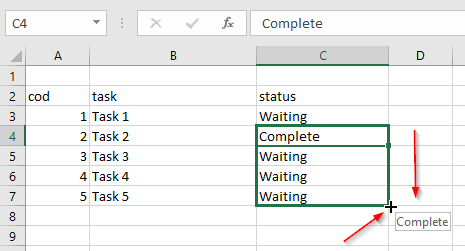
The example is in Excel, but I´m suggesting in DataGrid in topic "Excel-like editing"
FabianoCastro
on 2 Oct 2018
I would like to see the selection on cell focus asap
 klawusel2121
on 13 Nov 2018
klawusel2121
on 13 Nov 2018
@dxbykov
hey boddy, haven't you finished related tasks of this issue yet?
m-yazdani
on 8 Dec 2018
@m-yazdani
Hi, we've released the features described in the 'Focused row and cell' section. The rest is under development.
dxbykov
on 11 Dec 2018
We have published a preview version of the keyboard navigation enhancements in DataGrid and TreeList. I'm closing this issue.
You are welcome to leave your feedback and continue this discussion here.
 AntonSermyazhko
on 18 Mar 2019
AntonSermyazhko
on 18 Mar 2019
Related issues
 JuFrolov
·
9Comments
JuFrolov
·
9Comments
 drugarce
·
4Comments
drugarce
·
4Comments
 wcldyx
·
3Comments
wcldyx
·
3Comments
 Semigradsky
·
3Comments
Semigradsky
·
3Comments
 hakimio
·
5Comments
hakimio
·
5Comments
Most helpful comment
At last! Can't wait for the release date!