Devextreme-reactive: Is there a way to show AppointmentForm as modal?
- [x] I have searched this repository's issues and believe that this is not a duplicate.
I'm using ...
- [ ] React Grid
- [ ] React Chart
- [x] React Scheduler
Description
- Is there a way to show AppointmentForm as modal in center of screen?
Default behaviour of AppointmentForm is when you double click on a cell, appointmentForm shows up from left side. But is there any possibility to show existing AppointmentForm in a modal?
What I would like to achieve:
single click on a cell or existing appointment, should open appointmenForm in a Modal.
- I was able to find an related issue, where your team specifies how to open appointmenForm with single click on a cell. But is there a way to open appointmenForm, if I single click on existing appointment?
In this scenario, I want to open appointmenForm on singleClick (right now if you single click on an existing appointment, it opens AppointmentTooltip, in my case I want to open AppointmentForm instead of AppointmentTooltip)
 Rakhisharma
All 2 comments
Hello!
You can customize AppointmentForm's Overlay component. Here is a small example: https://codesandbox.io/s/amazing-goldwasser-zrb1f?file=/demo.js. In it I have also customized Appointment component so that AppointmentForm opens on onClick event instead of onDoubleClick. Note: in this case you will not be able to open AppointmentTooltip.
If you want to open the form
If you have any other questions, we will be happy to assist you.
 AryamnovEugeniy
on 13 Jan 2021
AryamnovEugeniy
on 13 Jan 2021
Hello @AryamnovEugeniy Thank you for your reply, really appreciate the help. I have one more question:
How to handle custom CREATE ,DELETE and CANCEL button in the modal? I don't want to use the default SAVE / DELETE buttons.
What I am trying to achieve:
I want to provide same functionality to my custom CREATE button as SAVE button in default appointment form in the modal. Same for DELETE button and CANCEL button. For example:
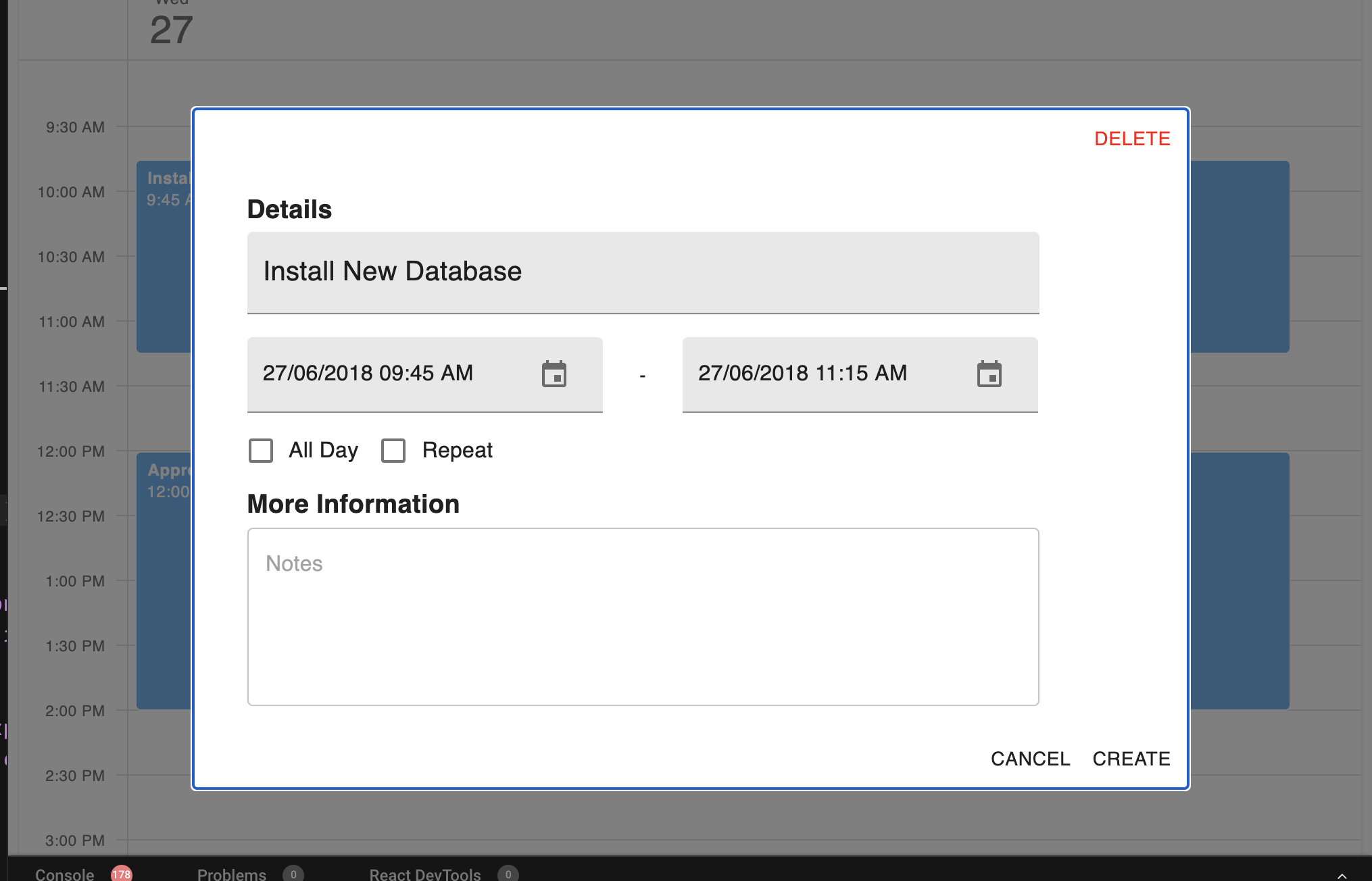
I created a small example here for the buttons: https://codesandbox.io/s/scheduler-appointmentform-modal-vcb6r?file=/demo.js.
Would very much appreciate any help. Thank you!.
Rakhisharma
on 22 Jan 2021
Related issues
 glenpadua
·
3Comments
glenpadua
·
3Comments
 zcuric
·
3Comments
zcuric
·
3Comments
 stclairdaniel
·
3Comments
stclairdaniel
·
3Comments
 linuxhype
·
3Comments
linuxhype
·
3Comments
 pbalzano91
·
3Comments
pbalzano91
·
3Comments
Most helpful comment
Hello!
You can customize
AppointmentForm's Overlay component. Here is a small example: https://codesandbox.io/s/amazing-goldwasser-zrb1f?file=/demo.js. In it I have also customized Appointment component so thatAppointmentFormopens ononClickevent instead ofonDoubleClick. Note: in this case you will not be able to open AppointmentTooltip.If you want to open the form
If you have any other questions, we will be happy to assist you.