Devextreme-reactive: Incorrect viewport of VirtualTable inside dx Popup
- [x] I have searched this repository's issues and believe that this is not a duplicate.
I'm using ...
- [x] React Grid
Current Behaviour
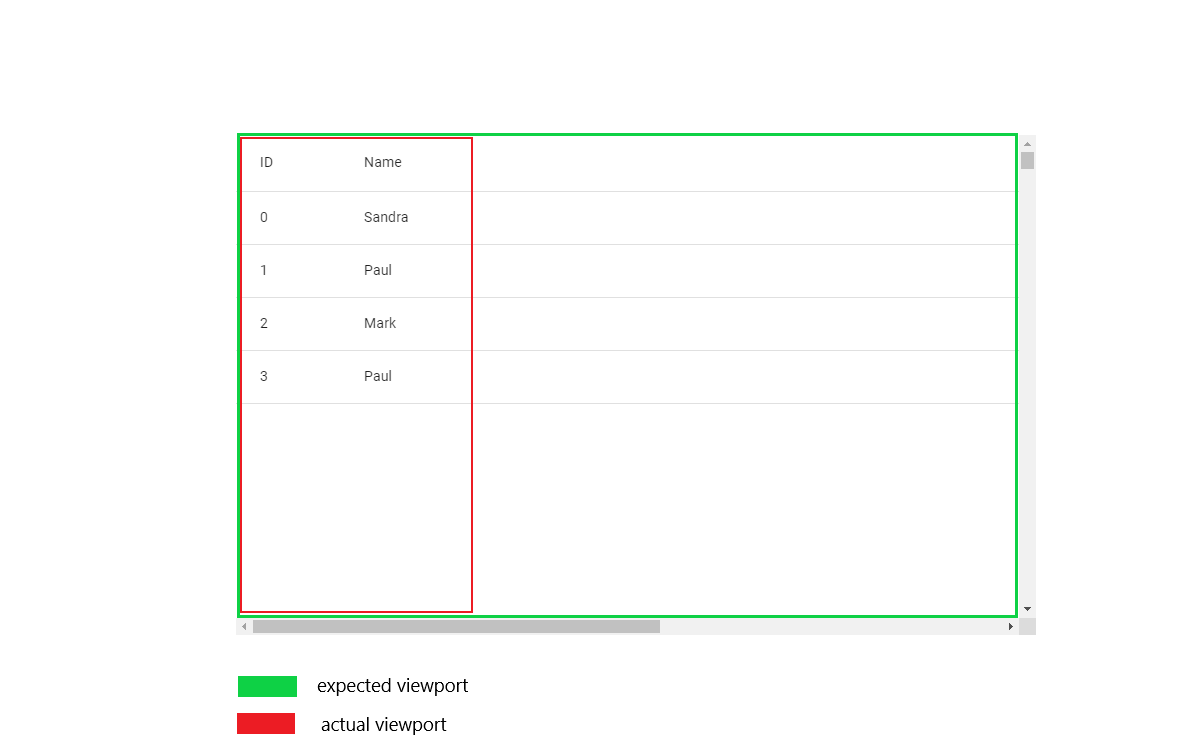
VirtualTable incorrectly calculate the width of the viewport when using Grid inside devextreme Popup component. Regardless of Popup width only two column with data are visible but table rows are displayed across the entire width.
Expected Behaviour
Columns with data are visible across the entire width of the table.
Steps to Reproduce
- Open Codesandbox example
- Scroll table horizontally
Link to the example that reproduces the issue: <https://codesandbox.io/s/dark-microservice-ngddk?file=/demo.js>
Screenshots
Environment
@devexpress/dx-react-core: "2.6.2"
@devexpress/dx-react-grid: "2.6.2"
@devexpress/dx-react-grid-material-ui: "2.6.2"
@material-ui/core: "^4.9.7"
@material-ui/icons: "^4.9.1"
devextreme: "19.2.7"
devextreme-react: "19.2.7"
react: "^16.13.1"
react-dom: "latest"
 igor-stecyura
All 3 comments
This issue is being discussed in the DX Support Center: https://supportcenter.devexpress.com/ticket/details/t887799/reactive-grid-doesn-t-correctly-render-columns-and-rows-when-using-virtualtable-inside
 LovedByTheLord
on 8 May 2020
LovedByTheLord
on 8 May 2020
@igor-stecyura
If you have any further questions, feel free to contact us.
 LazyLahtak
on 12 May 2020
LazyLahtak
on 12 May 2020
This thread has been automatically locked since it is closed and there has not been any recent activity. Please open a new issue for related bugs or feature requests.
![lock[bot] picture](https://avatars.githubusercontent.com/in/6672?v=4&s=40) lock[bot]
on 24 Jun 2020
lock[bot]
on 24 Jun 2020
Related issues
 acentfrio
·
3Comments
acentfrio
·
3Comments
 sintuchintu
·
3Comments
sintuchintu
·
3Comments
 ccamusso
·
3Comments
ccamusso
·
3Comments
 stclairdaniel
·
3Comments
stclairdaniel
·
3Comments
 franklixuefei
·
3Comments
franklixuefei
·
3Comments
Most helpful comment
This issue is being discussed in the DX Support Center: https://supportcenter.devexpress.com/ticket/details/t887799/reactive-grid-doesn-t-correctly-render-columns-and-rows-when-using-virtualtable-inside