Devextreme-reactive: Add one custom header button ( Expand/Collapse All)
- [X] I have searched this repository's issues and believe that this is not a duplicate.
I'm using ...
- [X] React Grid
- [ ] React Chart
- [ ] React Scheduler
Description
I would like to add a custom button in the header (see attachment). This would be a "expand/collapse all button". I wish to keep all the other header titles. I know about "TableHeaderRow cellComponent={}" but it seems to overwrite all of the header. Is it possible to add custom button in the header or implement a expand/collapse all button ?
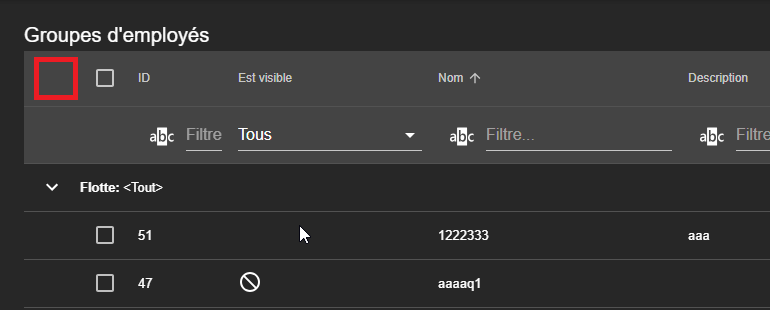
Environment
- devextreme-reactive: 1.10.1
- react: 16.8.1
- browser: Chrome V73.0.3683.86 64bit
- bootstrap: none
- react-bootstrap: none
- material-ui: 1.10.1
 franciscailleAstus
All 7 comments
Hi @franciscailleAstus,
We suggest adding custom buttons into the Toolbar plugin. For more information, see this topic.
Adding custom elements into TableheaderRow can break our markup alignment.
For the Expand/Collapse all button implementation, see here.
 MaximKudriavtsev
on 12 Apr 2019
MaximKudriavtsev
on 12 Apr 2019
Hi @MaximKudriavtsev,
Thanks for the answer.
Is it possible that it does not work with the latest versions ?
https://stackblitz.com/edit/react-emb86m?file=package.json
franciscailleAstus
on 12 Apr 2019
@franciscailleAstus,
The updated example https://codesandbox.io/s/kk2jnnyyn5
MaximKudriavtsev
on 13 Apr 2019
@MaximKudriavtsev Thanks again for the answer.
This seems to be for _RowDetailState_. Is there a way to do something similar with _GroupingState_ ?
franciscailleAstus
on 16 Apr 2019
@franciscailleAstus,
You can see in this topic how to work with Grouping. I created a simple example to demonstrate the implementation of the Expand/Collapse button for grouping. You can play with logic and customize behavior as you like.
MaximKudriavtsev
on 17 Apr 2019
@MaximKudriavtsev
Thank you very much !
franciscailleAstus
on 17 Apr 2019
This thread has been automatically locked since it is closed and there has not been any recent activity. Please open a new issue for related bugs or feature requests.
![lock[bot] picture](https://avatars.githubusercontent.com/in/6672?v=4&s=40) lock[bot]
on 15 Jun 2019
lock[bot]
on 15 Jun 2019
Related issues
 stclairdaniel
·
3Comments
stclairdaniel
·
3Comments
 cavr
·
3Comments
cavr
·
3Comments
 acentfrio
·
3Comments
acentfrio
·
3Comments
 franklixuefei
·
3Comments
franklixuefei
·
3Comments
 pbalzano91
·
3Comments
pbalzano91
·
3Comments