Devextreme-reactive: How to add "Rows Selected" to PagingPanel, not outside of Grid?
- [x] I have searched this repository's issues and believe that this is not a duplicate.
I'm using ...
- [x] React Grid
- [ ] React Chart
- [ ] React Scheduler
Current Behaviour
I am using this code.
<Paper>
    <Grid>
    ... ...
    </Grid>
    <div>
        <span>Rows Selected: <strong>{selection.length}</strong></span>
    </div>
</Paper>
It shows "Row Selected" div in next row in the PagingPanel.
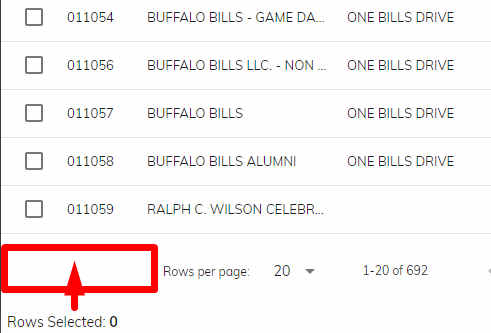
Expected Behaviour
I wanted it shows "Row Selected" in same row with "PagingPanel". so that I can save the space.
Steps to Reproduce (for Bugs)
Environment
dx-react-grid": "1.10.0"
dx-react-grid-material-ui": "1.10.0"
- react: latest
- bootstrap: none
- react-bootstrap: none
"@material-ui/core": "3.6.0",
 lin-zy1229
All 2 comments
Hi,
You can create a plugin that renders the number of selected rows in the "footer" template. Here is a sample project for your reference.
 ushkal
on 16 Jan 2019
ushkal
on 16 Jan 2019
❤1
🎉1
👍1
This thread has been automatically locked since it is closed and there has not been any recent activity. Please open a new issue for related bugs or feature requests.
![lock[bot] picture](https://avatars.githubusercontent.com/in/6672?v=4&s=40) lock[bot]
on 16 Jun 2019
lock[bot]
on 16 Jun 2019
Was this page helpful?
0 / 5 - 0 ratings
Related issues
 slava-lu
·
3Comments
slava-lu
·
3Comments
 ProjectaJE
·
3Comments
ProjectaJE
·
3Comments
 franklixuefei
·
3Comments
franklixuefei
·
3Comments
 bloolizard
·
3Comments
bloolizard
·
3Comments
 cavr
·
3Comments
cavr
·
3Comments
Most helpful comment
Hi,
You can create a plugin that renders the number of selected rows in the "footer" template. Here is a sample project for your reference.