Devextreme-angular: Vendor.bundle.js
1) I created a brand new angular project:
ng new ngTest
2) then in the file "app.module.ts" I imported the following:
import { DxButtonModule } from 'devextreme-angular/ui/button';
import { DxTextAreaModule } from 'devextreme-angular/ui/text-area';
import { DxSelectBoxModule } from 'devextreme-angular/ui/select-box';
import { DxDateBoxModule } from 'devextreme-angular/ui/date-box';
import { DxDropDownBoxModule } from 'devextreme-angular/ui/drop-down-box';
import { DxMenuModule } from 'devextreme-angular/ui/menu';
import { DxPopupModule } from 'devextreme-angular/ui/popup';
import { DxTextBoxModule } from 'devextreme-angular/ui/text-box';
import { DxCheckBoxModule } from 'devextreme-angular/ui/check-box';
import { DxDataGridModule } from 'devextreme-angular/ui/data-grid';
import { DxLoadPanelModule } from 'devextreme-angular/ui/load-panel';
import { DxTemplateModule } from 'devextreme-angular/core/template';
import { DxPopoverModule } from 'devextreme-angular/ui/popover';
import { DxValidatorModule } from 'devextreme-angular/ui/validator';
import { DxValidationSummaryModule } from 'devextreme-angular/ui/validation-summary';
import { DxTreeListModule } from 'devextreme-angular/ui/tree-list';
3) I added them to:
@NgModule({
declarations: [
AppComponent
],
imports: [ ....
4) I run the follow: ng build --prod --aot
5) in the dist folder the vendor.xxxxxxxx.bundle.js is 2078 KB
note: if I zip this file it will be: 537KB
Question: Are you planning to minify this big file size?

 keserwan
All 9 comments
Same Problem!!!
I tried also tree shaking. and there was no significant changes in the Vendor.js file size
 sleimanrami
on 25 Oct 2017
sleimanrami
on 25 Oct 2017
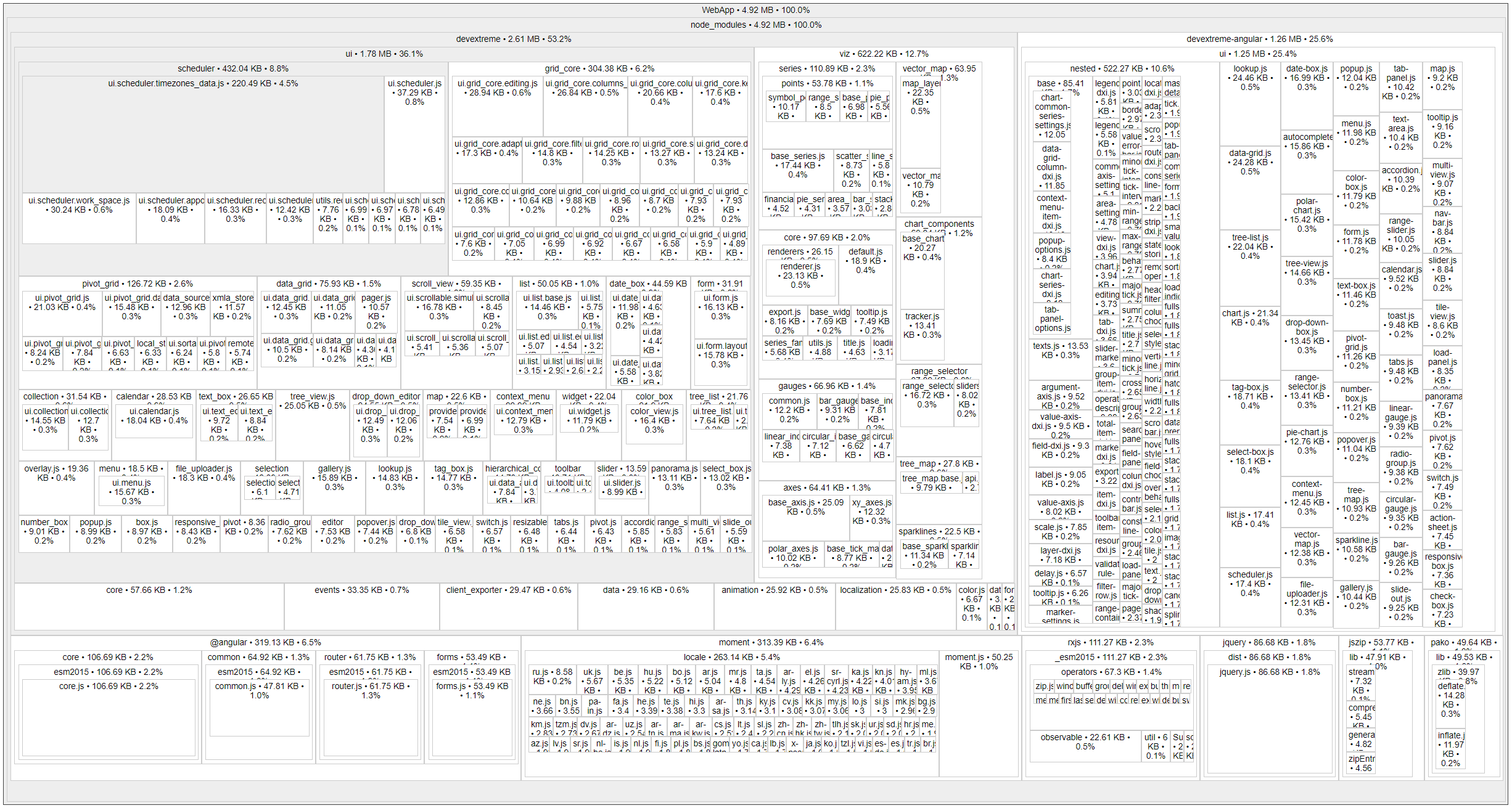
You are getting the correct bundle size. DevExtreme modules you are using are of 1.14 MB in size and 305 KB if zipped. devextreme-angular modules are of 371 KB in size and 30 KB if zipped. Plus, jQuery is of 85 KB in size and 30 if zipped. Plus, jszip , which is also our dependency, is of 45 KB in size and 13 KB if zipped. You can check this using the webpack-bundle-analyzer plugin. This is how much our code occupies. If you don't use certain of our modules that you included, remove them to decrease the bundle size.
 GoshaFighten
on 25 Oct 2017
GoshaFighten
on 25 Oct 2017
Have almost same situation, on Angular 4 I have almost the same size of vendor.js file. But for Angular 5 it's 2 times more.
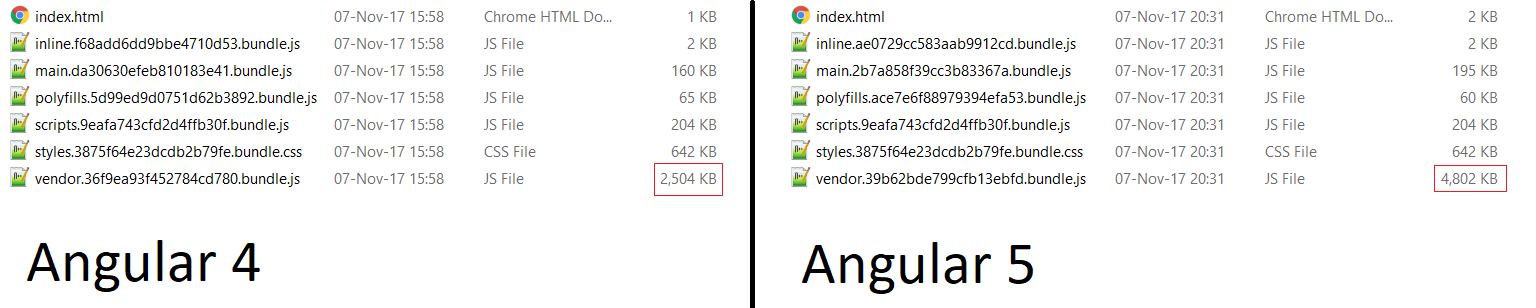

 Prontsevich
on 8 Nov 2017
Prontsevich
on 8 Nov 2017
@Prontsevich , what our modules did you import? It looks like you included our charts in an Angular 5 application.
GoshaFighten
on 8 Nov 2017
@GoshaFighten, we used:
DxDataGridModule,
DxPopupModule,
DxButtonModule,
DxTextBoxModule,
DxNumberBoxModule,
DxDateBoxModule,
DxMenuModule,
DxSelectBoxModule,
DxValidatorModule,
DxRadioGroupModule,
DxValidationGroupModule
Prontsevich
on 9 Nov 2017
Hello @Prontsevich ! Thanks for the detailed report. I can reproduce the issue only if short paths are used. The issue doesn't occur on my side with long paths. Would you please elaborate on this and send us the example you're using for testing?
 dxvladislavvolkov
on 13 Nov 2017
dxvladislavvolkov
on 13 Nov 2017
Hello @dxvladislavvolkov ! Sorry, but I can't send my project :( But we use short path , for example:
import { DxDateBoxModule, DxDataGridModule, DxButtonModule, DxCheckBoxModule } from 'devextreme-angular';
Prontsevich
on 15 Nov 2017
This problem is related to the new version of angular cli. For more information, you can see this issue. As a workaround, you can use long paths to modules. For example:
import { DxButtonModule } from 'devextreme-angular/ui/button';
import { DxDateBoxModule } from 'devextreme-angular/ui/date-box';
import { DxDataGridModule } from 'devextreme-angular/ui/data-grid';
import { DxCheckBoxModule } from 'devextreme-angular/ui/check-box';
This issue is closed because of being inactive. If you need further assistance, leave a comment here.
GoshaFighten
on 15 Dec 2017
Related issues
 fdcastel
·
7Comments
fdcastel
·
6Comments
fdcastel
·
7Comments
fdcastel
·
6Comments
 bjabbar
·
5Comments
bjabbar
·
5Comments
 sheetaldshivdas
·
3Comments
sheetaldshivdas
·
3Comments
 Cito
·
5Comments
Cito
·
5Comments
Most helpful comment
This problem is related to the new version of angular cli. For more information, you can see this issue. As a workaround, you can use long paths to modules. For example: