Describe the bug
After running the detox test command, the tests fail before doing any actions in a couple of seconds. The metro-bundler runs but the app doesn't launch past the splash screen. If I close the app and open it again the app is irresponsive. It moves past the splash screen but the buttons do not work. Running the app through XCode works fine.
To Reproduce
- [x] I have tested this issue on the latest Detox release and it still reproduces
Environment (please complete the following information):
- Detox: 13.2.0
- React Native: 0.60.3
- Node: 10.15.3
- Device: iPhone 7
- Xcode: 10.2.1
- iOS: 12.2
- macOS: 10.14.3
Device and Verbose Detox Logs
logs.txt
XCode log: https://gist.github.com/ReshmiCode/d79d6652a5373256147b1bac20c49cb0
 ReshmiCode
All 89 comments
I am sorry, but this looks like a log from Detox earlier than 13.2.0.
If this is indeed 13.2.0, please add the following launch argument to your scheme in Detox and post the Xcode log again: -enableAppDelegateVerboseLogging YES.
Thanks
 LeoNatan
on 23 Jul 2019
LeoNatan
on 23 Jul 2019
Also, do you use any analytic frameworks?
LeoNatan
on 23 Jul 2019
I think I was using the Detox.framework from the older version but this one should be updated.
logs.txt
We use Mixpanel, Amplitude, and Firebase for analytics.
ReshmiCode
on 23 Jul 2019
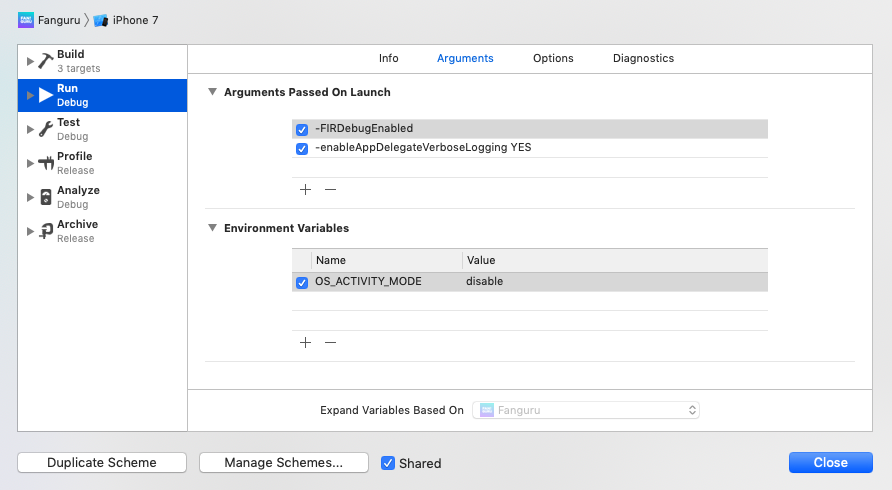
Did you add the -enableAppDelegateVerboseLogging YES launch argument?
LeoNatan
on 23 Jul 2019
Yup
ReshmiCode
on 23 Jul 2019
Please disable the OS_ACTIVITY_MODE environment variable and attach log again. Could be why I am seeing nothing from Detox.
LeoNatan
on 23 Jul 2019
Is this better? https://gist.github.com/ReshmiCode/3a05e8495033f1544681c9609a16119f
The bottom seemed to be cut off so I just commented it.
ReshmiCode
on 23 Jul 2019
Yes, much better now. This is an old Detox.
LeoNatan
on 23 Jul 2019
Is there some way I can check which version it is in the framework file? I deleted the folders in Library/Detox and ran npm i again to regenerate what I thought was the new version. In the repo I ran detox --version and 13.2.0 appears.
ReshmiCode
on 23 Jul 2019
detox version I think only prints what is in package.json.
Make sure the project doesn't include any Detox. run detox rebuild-framework-cache and then try again. You should not be testing with the ios.none configuration.
LeoNatan
on 23 Jul 2019
After doing that I get:
logs.txt
I'm fairly certain it was updated properly before because I received the exception breakpoint at a different location than before the update. I could do another video run through if you'd like.
This crash is occurring before I run the tests command. I don't have the ios.none config in the project.
This is the closet relevant looking log to the bottom of the XCode console.
2019-07-23 10:52:01.664338-0500 Fanguru[55027:1662837] [DetoxManager] Using default 'detoxServer': ws://localhost:8099
2019-07-23 10:52:01.664546-0500 Fanguru[55027:1662837] [DetoxManager] Using default 'detoxSessionId': guru.fan.app
2019-07-23 10:52:01.669413-0500 Fanguru[55027:1663223] [] nw_socket_handle_socket_event [C21.1:1] Socket SO_ERROR [61: Connection refused]
2019-07-23 10:52:01.670968-0500 Fanguru[55027:1663223] [] nw_socket_handle_socket_event [C21.2:1] Socket SO_ERROR [61: Connection refused]
2019-07-23 10:52:01.671710-0500 Fanguru[55027:1663211] [] nw_connection_get_connected_socket [C21] Client called nw_connection_get_connected_socket on unconnected nw_connection
2019-07-23 10:52:01.672189-0500 Fanguru[55027:1662837] [DetoxManager] Web socket failed to connect with error: Error Domain=NSPOSIXErrorDomain Code=61 "Connection refused" UserInfo={_kCFStreamErrorCodeKey=61, _kCFStreamErrorDomainKey=1}
And this is where the crash takes me to at first

ReshmiCode
on 23 Jul 2019
If you are running from Xcode, you are most likely using an old version. Remove all traces from Detox inside your project.
LeoNatan
on 23 Jul 2019
So the folder in node_modules and the line from package.json?
ReshmiCode
on 23 Jul 2019
If possible revert all changes you've made to your project while debugging the previous issue.
I will close this one as this issue was solved already in 13.2.0.
LeoNatan
on 23 Jul 2019
@LeoNatan Is it not a different issue than the previous issue I was facing? Since the update, the tests fail differently than before. If I run the tests not through XCode (w/ the updated Detox) I get the first log I attached in the description.
ReshmiCode
on 23 Jul 2019
I think it isn't.
  * frame #2: 0x00000001073f00fa Detox`-[DetoxAppDelegateProxy applicationDidBecomeActive:](self=0x0000600003665640, _cmd="applicationDidBecomeActive:", application=0x0000000000000000) at DetoxAppDelegateProxy.m:317
    frame #3: 0x00000001073f017d Detox`-[DetoxAppDelegateProxy applicationDidBecomeActive:](self=0x0000600003665640, _cmd="applicationDidBecomeActive:", application=0x00007f970c707300) at DetoxAppDelegateProxy.m:323:3
    frame #4: 0x00000001073f017d Detox`-[DetoxAppDelegateProxy applicationDidBecomeActive:](self=0x0000600003665640, _cmd="applicationDidBecomeActive:", application=0x00007f970c707300) at DetoxAppDelegateProxy.m:323:3
    frame #5: 0x00000001073f017d Detox`-[DetoxAppDelegateProxy applicationDidBecomeActive:](self=0x0000600003665640, _cmd="applicationDidBecomeActive:", application=0x00007f970c707300) at DetoxAppDelegateProxy.m:323:3
    frame #6: 0x00000001073f017d Detox`-[DetoxAppDelegateProxy applicationDidBecomeActive:](self=0x0000600003665640, _cmd="applicationDidBecomeActive:", application=0x00007f970c707300) at DetoxAppDelegateProxy.m:323:3
    frame #7: 0x00000001073f017d Detox`-[DetoxAppDelegateProxy applicationDidBecomeActive:](self=0x0000600003665640, _cmd="applicationDidBecomeActive:", application=0x00007f970c707300) at DetoxAppDelegateProxy.m:323:3
Cannot happen with the latest Detox. This is why I immediately suspected that was it.
LeoNatan
on 23 Jul 2019
You can see recent line 323:
https://github.com/wix/Detox/blob/52a567f735c68ea8cc77a61d00215e4a601878bc/detox/ios/Detox/DetoxAppDelegateProxy.m#L323
with old:
https://github.com/wix/Detox/blob/1627025cb31376e4540a8e960374fe1e9cc79edb/detox/ios/Detox/DetoxAppDelegateProxy.m#L323
super_class(&super, _cmd, application); is the call to the super implementation, that due to bad swizzling, caused a stack overflow (infinite recursion).
LeoNatan
on 23 Jul 2019
Now that I compared the lines, I am 100% sure you are using an old Detox.
LeoNatan
on 23 Jul 2019
Wait. I might be mixing up logs.
 Signal 11 was raised
(
    0   Detox                               0x000000010a650186 _ZL16__DTXHandleCrashP11NSExceptionP8NSNumberP8NSString + 497
    1   Detox                               0x000000010a64ff0b _ZL17__DTXHandleSignali + 61
    2   libsystem_platform.dylib            0x00000001134f6b5d _sigtramp + 29
    3   ???                                 0x0000600002fb5b50 0x0 + 105553166293840
    4   UIKitCore                           0x000000011c80e311 -[UIApplication _handleDelegateCallbacksWithOptions:isSuspended:restoreState:] + 280
    5   UIKitCore                           0x000000011c80fcad -[UIApplication _callInitializationDelegatesForMainScene:transitionContext:] + 3932
    6   UIKitCore                           0x000000011c8150c6 -[UIApplication _runWithMainScene:transitionContext:completion:] + 1617
    7   UIKitCore                           0x000000011c05a6d6 __111-[__UICanvasLifecycleMonitor_Compatability _scheduleFirstCommitForScene:transition:firstActivation:completion:]_block_invoke + 904
    8   UIKitCore                           0x000000011c062fce +[_UICanvas _enqueuePostSettingUpdateTransactionBlock:] + 153
    9   UIKitCore                           0x000000011c05a2ec -[__UICanvasLifecycleMonitor_Compatability _scheduleFirstCommitForScene:transition:firstActivation:completion:] + 236
    10  UIKitCore                           0x000000011c05ac48 -[__UICanvasLifecycleMonitor_Compatability activateEventsOnly:withContext:completion:] + 1091
    11  UIKitCore                           0x000000011c058fba __82-[_UIApplicationCanvas _transitionLifecycleStateWithTransitionContext:completion:]_block_invoke + 782
    12  UIKitCore                           0x000000011c058c71 -[_UIApplicationCanvas _transitionLifecycleStateWithTransitionContext:completion:] + 433
    13  UIKitCore                           0x000000011c05d9b6 __125-[_UICanvasLifecycleSettingsDiffAction performActionsForCanvas:withUpdatedScene:settingsDiff:fromSettings:transitionContext:]_block_invoke + 576
    14  UIKitCore                           0x000000011c05e610 _performActionsWithDelayForTransitionContext + 100
    15  UIKitCore                           0x000000011c05d71d -[_UICanvasLifecycleSettingsDiffAction performActionsForCanvas:withUpdatedScene:settingsDiff:fromSettings:transitionContext:] + 223
    16  UIKitCore                           0x000000011c0626d0 -[_UICanvas scene:didUpdateWithDiff:transitionContext:completion:] + 392
    17  UIKitCore                           0x000000011c8139a8 -[UIApplication workspace:didCreateScene:withTransitionContext:completion:] + 514
    18  UIKitCore                           0x000000011c3cadfa -[UIApplicationSceneClientAgent scene:didInitializeWithEvent:completion:] + 361
    19  FrontBoardServices                  0x0000000119ada125 -[FBSSceneImpl _didCreateWithTransitionContext:completion:] + 448
    20  FrontBoardServices                  0x0000000119ae3ed6 __56-[FBSWorkspace client:handleCreateScene:withCompletion:]_block_invoke_2 + 283
    21  FrontBoardServices                  0x0000000119ae3700 __40-[FBSWorkspace _performDelegateCallOut:]_block_invoke + 53
    22  libdispatch.dylib                   0x0000000113124d02 _dispatch_client_callout + 8
    23  libdispatch.dylib                   0x0000000113127d41 _dispatch_block_invoke_direct + 295
    24  FrontBoardServices                  0x0000000119b15146 __FBSSERIALQUEUE_IS_CALLING_OUT_TO_A_BLOCK__ + 30
    25  FrontBoardServices                  0x0000000119b14dfe -[FBSSerialQueue _performNext] + 451
    26  FrontBoardServices                  0x0000000119b15393 -[FBSSerialQueue _performNextFromRunLoopSource] + 42
    27  CoreFoundation                      0x000000010ff38be1 __CFRUNLOOP_IS_CALLING_OUT_TO_A_SOURCE0_PERFORM_FUNCTION__ + 17
    28  CoreFoundation                      0x000000010ff38463 __CFRunLoopDoSources0 + 243
    29  CoreFoundation                      0x000000010ff32b1f __CFRunLoopRun + 1231
    30  CoreFoundation                      0x000000010ff32302 CFRunLoopRunSpecific + 626
    31  GraphicsServices                    0x0000000114df82fe GSEventRunModal + 65
    32  Detox                               0x000000010a645d68 __detox_UIApplication_run + 365
    33  UIKitCore                           0x000000011c816ba2 UIApplicationMain + 140
    34  Fanguru                             0x0000000108a61410 main + 112
    35  libdyld.dylib                       0x0000000113192541 start + 1
)
Hmm. So I will ask you to please follow again the steps you did, but with the latest Detox. Your Detox.framework was cached somehow, and so it was outdated. With the latest Detox.framework from node_modules and the launch argument, try to run from Xcode.
LeoNatan
on 23 Jul 2019
If you do not see [AppDelegateProxy] in the log in Xcode, it's not the correct version of Detox.
LeoNatan
on 23 Jul 2019
This is the log generated using the Detox.xcodeproj from when I recursively clone the Detox repo. Inside the folder, I checked line 323 of DetoxAppDelegateProxy.m and it matched the new one.
Now my XCode console has an infinite loop of the web socket failing. I do see AppDelegateProxy in it though. https://gist.github.com/ReshmiCode/a53a13b539bd50016792f2934957ad34
ReshmiCode
on 23 Jul 2019
Did you reproduce the issue here in this log? I see Detox is in stand-by, waiting for a server to start.
LeoNatan
on 23 Jul 2019
Please follow our discussion in the previous issue to run your test from ios.none.
LeoNatan
on 23 Jul 2019
I deleted Library/Detox and the Detox node modules and ran npm i. If I follow the ios.none stuff using Detox.framework from the node modules, the tests run but if I go it through detox build and test the normal way I'm still getting the original error. Is there some reason for this?
ReshmiCode
on 23 Jul 2019
Hmm I can't think of any. In both cases, the same framework is used.
Let's try to debug the problem without Xcode (the flow that is broken).
Open a new terminal and run the following command:
xcrun simctl spawn booted log stream --style compact --process "<your binary name>" --predicate "subsystem != 'CFNetwork' || subsystem != 'com.apple.network'"
Then reproduce your issue and attach the log from the above command.
LeoNatan
on 23 Jul 2019
I'm not getting a log. The binary name is the bundle id right?
https://www.loom.com/share/b7977ae73ef843c9a3657f9f92ed48d2
ReshmiCode
on 23 Jul 2019
The binary name is the binary name, not the bundle id. You can find out what it is by inspecting the CFBundleExecutable key in the Info.plist of your app.
LeoNatan
on 23 Jul 2019
ReshmiCode
on 23 Jul 2019
No Detox logs in that one.
LeoNatan
on 23 Jul 2019
Was I supposed to keep anything from before? I removed everything.
ReshmiCode
on 23 Jul 2019
@henrymoulton Please follow this guide: https://github.com/wix/Detox/blob/master/docs/Guide.DebuggingInXcode.md
Add exceptions breakpoint and add -enableAppDelegateVerboseLogging YES launch argument to your scheme. Run from Xcode, reproduce and attach the log from Xcode here. Thanks
LeoNatan
on 24 Jul 2019
Terminal output:
https://gist.github.com/henrymoulton/3dabcbc549d0973f067b2ee2f52281f1
Log1:
https://gist.github.com/henrymoulton/82a20c30efa3449e570e4b93f34bdbd3
Log2:
https://gist.github.com/henrymoulton/04c4a128eb789938d136fa97d78931ad
Log3:
https://gist.github.com/henrymoulton/cafa7671b823242065999d80b7a8ab5a
Not sure this will be helpful as tests aren't running, let me know what I can do to provide further logs.
Thanks!
 henrymoulton
on 25 Jul 2019
henrymoulton
on 25 Jul 2019
I don't see the crash happening in the logs provided. Try to figure out which tests reproduces this issue when you run tests normally, and run that test specifically with -c ios.none.
LeoNatan
on 25 Jul 2019
Even if I run the same command with the working tests using the XCode config, the logs don't have anything Detox related
https://gist.github.com/ReshmiCode/c2a1dcfe7b733666aeeee92c7f9d73c2
ReshmiCode
on 26 Jul 2019
Is this issue related? https://github.com/wix/Detox/issues/1525
EDIT: I thought that tests not running on CI/CD and my machine were related, I'm going to upgrade the project dep and test on both.
henrymoulton
on 29 Jul 2019
detox[42222] ERROR: [Detox.js/APP_CRASH] App crashed in test 'edit profile should successfully update all their details', here's the native stack trace:
Signal 11 was raised
(
        0   Detox                               0x0000000102875186 _ZL16__DTXHandleCrashP11NSExceptionP8NSNumberP8NSString + 497
        1   Detox                               0x0000000102874f0b _ZL17__DTXHandleSignali + 61
        2   libsystem_platform.dylib            0x00000001093c3b5d _sigtramp + 29
        3   ???                                 0x0000000000600000 0x0 + 6291456
        4   UIKitCore                           0x000000011124a731 -[UIApplication _handleDelegateCallbacksWithOptions:isSuspended:restoreState:] + 280
        5   UIKitCore                           0x000000011124c0cd -[UIApplication _callInitializationDelegatesForMainScene:transitionContext:] + 3932
        6   UIKitCore                           0x00000001112514e6 -[UIApplication _runWithMainScene:transitionContext:completion:] + 1617
        7   UIKitCore                           0x0000000110a95a4e __111-[__UICanvasLifecycleMonitor_Compatability _scheduleFirstCommitForScene:transition:firstActivation:completion:]_block_invoke + 904
        8   UIKitCore                           0x0000000110a9e346 +[_UICanvas _enqueuePostSettingUpdateTransactionBlock:] + 153
        9   UIKitCore                           0x0000000110a95664 -[__UICanvasLifecycleMonitor_Compatability _scheduleFirstCommitForScene:transition:firstActivation:completion:] + 236
        10  UIKitCore                           0x0000000110a95fc0 -[__UICanvasLifecycleMonitor_Compatability activateEventsOnly:withContext:completion:] + 1091
        11  UIKitCore                           0x0000000110a94332 __82-[_UIApplicationCanvas _transitionLifecycleStateWithTransitionContext:completion:]_block_invoke + 782
        12  UIKitCore                           0x0000000110a93fe9 -[_UIApplicationCanvas _transitionLifecycleStateWithTransitionContext:completion:] + 433
        13  UIKitCore                           0x0000000110a98d2e __125-[_UICanvasLifecycleSettingsDiffAction performActionsForCanvas:withUpdatedScene:settingsDiff:fromSettings:transitionContext:]_block_invoke + 576
        14  UIKitCore                           0x0000000110a99988 _performActionsWithDelayForTransitionContext + 100
        15  UIKitCore                           0x0000000110a98a95 -[_UICanvasLifecycleSettingsDiffAction performActionsForCanvas:withUpdatedScene:settingsDiff:fromSettings:transitionContext:] + 223
        16  UIKitCore                           0x0000000110a9da48 -[_UICanvas scene:didUpdateWithDiff:transitionContext:completion:] + 392
        17  UIKitCore                           0x000000011124fdc8 -[UIApplication workspace:didCreateScene:withTransitionContext:completion:] + 514
        18  UIKitCore                           0x0000000110e0702f -[UIApplicationSceneClientAgent scene:didInitializeWithEvent:completion:] + 361
        19  FrontBoardServices                  0x000000010c43dd25 -[FBSSceneImpl _didCreateWithTransitionContext:completion:] + 448
        20  FrontBoardServices                  0x000000010c447ad6 __56-[FBSWorkspace client:handleCreateScene:withCompletion:]_block_invoke_2 + 283
        21  FrontBoardServices                  0x000000010c447300 __40-[FBSWorkspace _performDelegateCallOut:]_block_invoke + 53
        22  libdispatch.dylib                   0x0000000108ff1d02 _dispatch_client_callout + 8
        23  libdispatch.dylib                   0x0000000108ff4d41 _dispatch_block_invoke_direct + 295
        24  FrontBoardServices                  0x000000010c4790da __FBSSERIALQUEUE_IS_CALLING_OUT_TO_A_BLOCK__ + 30
        25  FrontBoardServices                  0x000000010c478d92 -[FBSSerialQueue _performNext] + 451
        26  FrontBoardServices                  0x000000010c479327 -[FBSSerialQueue _performNextFromRunLoopSource] + 42
        27  CoreFoundation                      0x0000000105b99db1 __CFRUNLOOP_IS_CALLING_OUT_TO_A_SOURCE0_PERFORM_FUNCTION__ + 17
        28  CoreFoundation                      0x0000000105b99633 __CFRunLoopDoSources0 + 243
        29  CoreFoundation                      0x0000000105b93cef __CFRunLoopRun + 1231
        30  CoreFoundation                      0x0000000105b934d2 CFRunLoopRunSpecific + 626
        31  GraphicsServices                    0x000000010d5422fe GSEventRunModal + 65
        32  Detox                               0x000000010286a968 __detox_UIApplication_run + 365
        33  UIKitCore                           0x0000000111252fc2 UIApplicationMain + 140
        34  RedactedApp                        0x0000000101951214 main + 80
        35  libdyld.dylib                       0x000000010905f541 start + 1
)
Same error on my machine on 13.3.1
henrymoulton
on 29 Jul 2019
I need the full logs as requested above.
The linked issue was something I fixed with the current code.
LeoNatan
on 29 Jul 2019
Ok thanks @LeoNatan I struggled to get a log because when I ran in that mode via xCode as instructed Detox didn't start/didn't get any logs. This seems similar to what @ReshmiCode reported.
henrymoulton
on 30 Jul 2019
If you have that environment variable set, please remove it. If you are not debugging the process, set it to debug. Otherwise, there is no reason why the logs would not appear when running in Xcode. Unless those logs are provided, I cannot help, as I have not been able to reproduce this.
LeoNatan
on 30 Jul 2019
Apologies, still struggling to produce a log here.
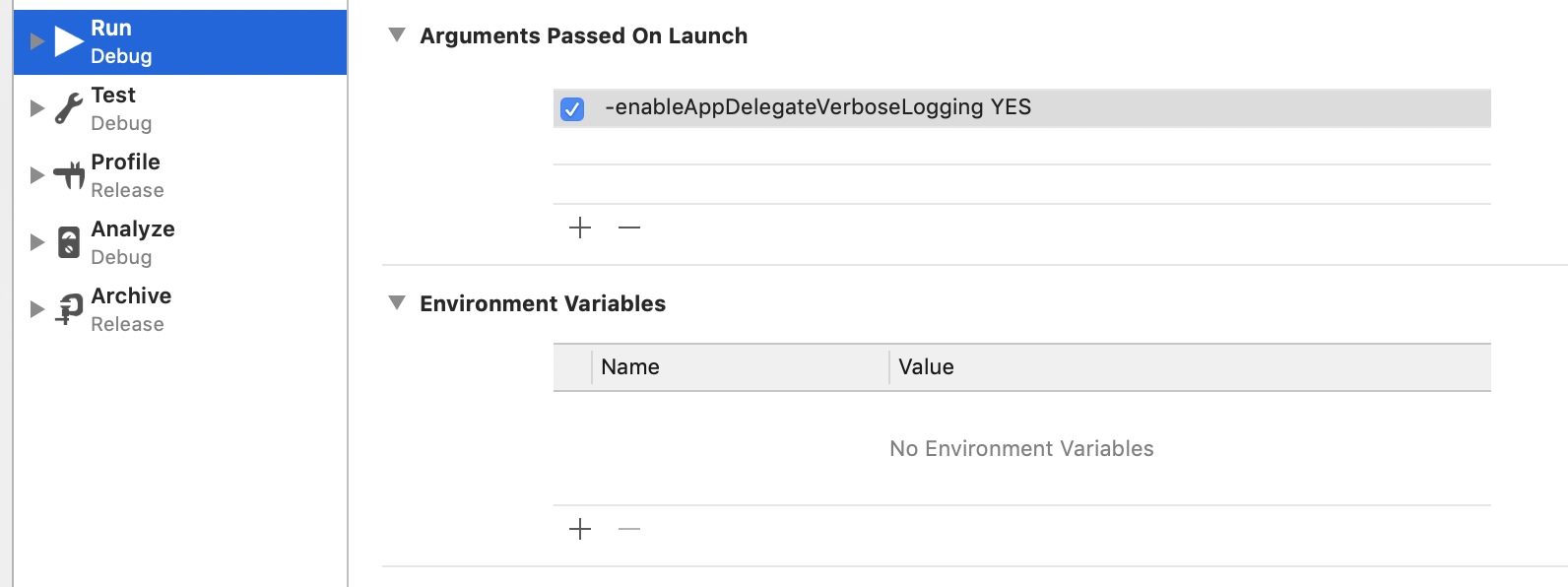
If you have that environment variable set, please remove it. If you are not debugging the process, set it to debug.
Does this look correct?
Detox server running:

Test runner output with a specific test selected:
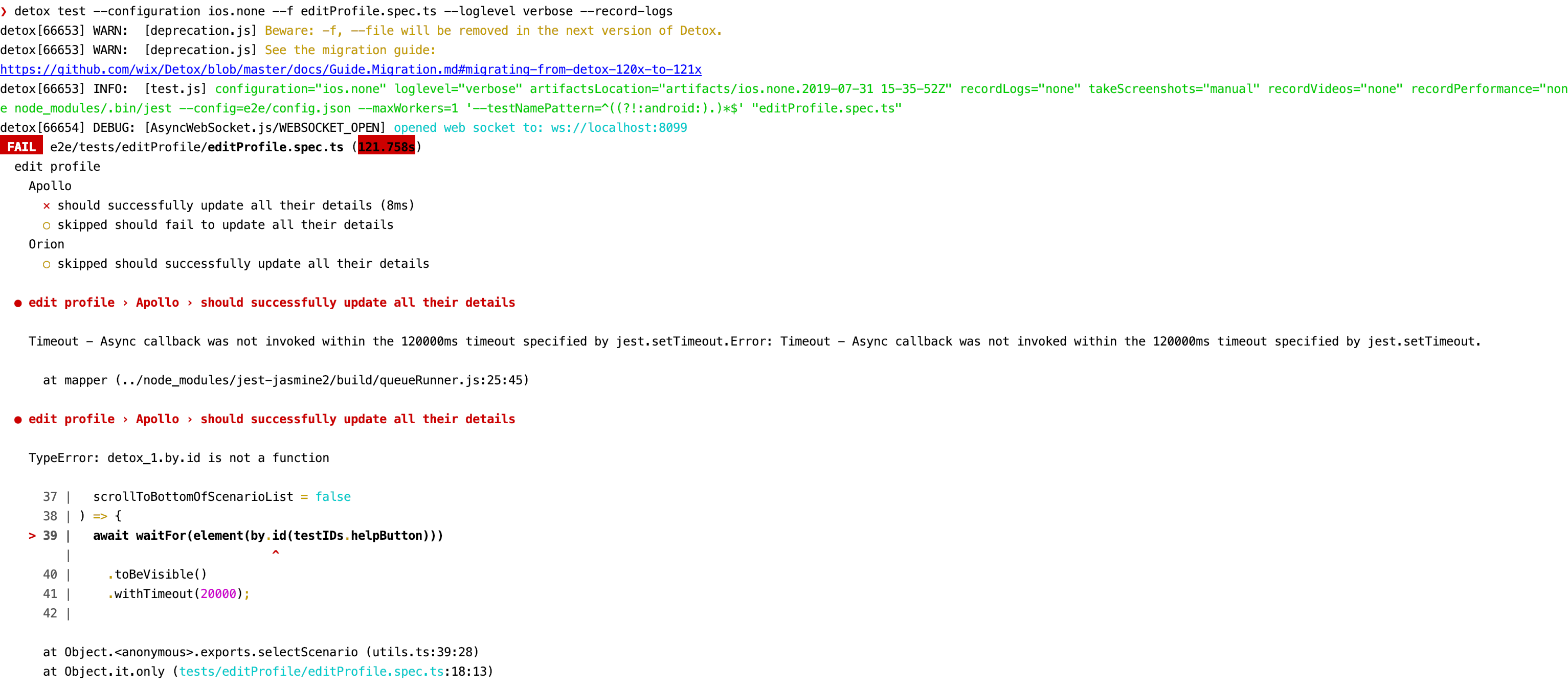
Logs from within the Xcode window:
Log1
Log2
I've tried the other way of getting the log you suggested in the thread:
xcrun simctl spawn booted log stream --style compact --process "<your binary name>" --predicate "subsystem != 'CFNetwork' || subsystem != 'com.apple.network'"
however I wasn't able to get a log from that either.
I went to a React Native meetup where they some people suggested downgrading the applesimutils, but I'm reluctant to do so as I assume it would mean not being able to use future versions of Xcode.
henrymoulton
on 31 Jul 2019
applesimutils has nothing to do with the problem. When running from Xcode, applesimutils is not used.
In the Xcode logs you have posted, I see Detox logs, but you have not reproduced there the crash. Try to focus on the specific test that reproduces the crash, set it as .only and try running as your are running now.
LeoNatan
on 31 Jul 2019
I have set .only to the initial test that runs in the test suite.
However the behaviour of the simulator when it starts is to timeout with nothing happening.
henrymoulton
on 31 Jul 2019
Just to make sure, the following order should be followed:
run-server
Play in Xcode
detox test
When running like this, do you see nothing happen in the simulator?
LeoNatan
on 31 Jul 2019
Yes that's the order I'm using, nothing is happening in simulator.
henrymoulton
on 31 Jul 2019
Happy to send a video recording privately.
henrymoulton
on 31 Jul 2019
Contact me at lnatan [at} wix.com
LeoNatan
on 31 Jul 2019
Sent, thanks in advance.
henrymoulton
on 31 Jul 2019
@ReshmiCode, I've sent the video to @LeoNatan and he confirmed that even with the setup there wasn't a Detox log / Detox wasn't able to start.
However, when using the example projects https://github.com/wix/Detox/tree/master/examples I find that the tests do run.
When I remove all of my projects tests and use the Detox cli to initialise a new set it still fails. That makes me think that my projects native iOS dependencies are causing an issue for Detox to start.
Looking inside my AppDelegate.m file I find:
#import "AppDelegate.h"
#import <CodePush/CodePush.h>

#import <React/RCTBridge.h>
#import <React/RCTBundleURLProvider.h>
#import <React/RCTRootView.h>
#import <Fabric/Fabric.h>
#import <Crashlytics/Crashlytics.h>
#import "Firebase.h"
#import <React/RCTPushNotificationManager.h>
#import "RNSplashScreen.h"
Does your project have any similar dependencies that you suspect have recently changed/added that might have caused this freeze?
henrymoulton
on 2 Aug 2019
My assumption is that the fix inside 13.2.0 that fixes #1525 still doesn't fix some projects
henrymoulton
on 2 Aug 2019
@henrymoulton After a certain pr (the RN update to 0.60.3) our iOS tests start breaking. They used to have the timeout error but with the newer Detox version they started failing almost immediately and throwing the signal 11 error. If I use the XCode setup from Detox.framework from either my node modules or from the Detox repo the tests run (can't remember which) but they don't run through the detox cli.
The only thing that had been edited from AppDelegate.m recently was removing #import <CodePush/CodePush.h> but that wasn't in the breaking pr.
Ours currently looks like:
```#import
import
import
import
import
import
import
import
import "RNBranch.h"
import "Orientation.h"
import
import "RNFirebaseMessaging.h"
import "RNFirebaseNotifications.h"
import "RNSplashScreen.h"
import ```
ReshmiCode
on 2 Aug 2019
Ok so we have common dependencies on:
#import <Fabric/Fabric.h>
#import <Crashlytics/Crashlytics.h>
#import <Firebase.h>
#import "RNSplashScreen.h"
@ReshmiCode can you try seeing if downgrading to 12.11.3 works for you?
henrymoulton
on 2 Aug 2019
@henrymoulton downgrading does make it work!
ReshmiCode
on 2 Aug 2019
Awesome it does for me too! @LeoNatan do any of the four dependencies we share feel like it would break Detox from v12 to v13?
I can probably tackle debugging with adding one or two using the example projects, perhaps @ReshmiCode has time to debug the other two.
henrymoulton
on 2 Aug 2019
13.2.0 was released because of an analytics framework. Don't remember which one. Please reproduce on a demo project so I can investigate.
LeoNatan
on 2 Aug 2019
Will try Firebase. @ReshmiCode do you use Cocoapods in your project?
henrymoulton
on 2 Aug 2019
Yeah we use Cocoapods @henrymoulton
ReshmiCode
on 2 Aug 2019
@LeoNatan I was able to make a reproducible repo with Crashlytics and Fabric.
https://github.com/ReshmiCode/Detox-Test/tree/breaking-stuff
ReshmiCode
on 5 Aug 2019
Great. Please do not remove this repository. I will take a look soon.
LeoNatan
on 5 Aug 2019
+1 I have the same problem
 redbluenat
on 12 Aug 2019
redbluenat
on 12 Aug 2019
The repo throws the following exception:
[Fabric] Value of Info.plist key "Fabric" must be a NSDictionary.
@ReshmiCode
LeoNatan
on 12 Aug 2019
@LeoNatan the exception appears in which step of the process? Running detox build and detox test (-c ios) reproduces the issue.
I've added the minimum integration possible to reproduce the bug so I might have missed a setup step as I wasn't the one to originally add these dependencies to our project.
ReshmiCode
on 12 Aug 2019
The app is crashing on launch:

It crashes because you haven't provided the necessary information in Info.plist. The crash you are seeing when running tests is not the one reported here.
LeoNatan
on 12 Aug 2019
Try to run your app in Xcode without tests. Once you fix all issues, let me know.
LeoNatan
on 12 Aug 2019
@LeoNatan pushed a fix, it now properly builds and launches through XCode
ReshmiCode
on 12 Aug 2019
I am starting to get impatient here. After your fix, the test succeeds.
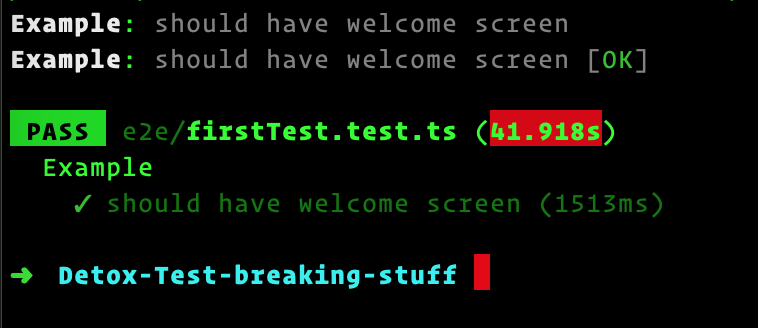
Please make an effort to have working project (=reproducing the issue) before posting it here.
LeoNatan
on 12 Aug 2019
I have the same problem but I'm not using Crashlytics and Fabric.
My common dependencies with @ReshmiCode and @henrymoulton are Firebase and RNSplashScreen.
#import <Firebase.h>
#import "RNSplashScreen.h"
 minhloi
on 12 Aug 2019
minhloi
on 12 Aug 2019
Please try to create clean project with Firebase and Splash screen and see if the issue reproduces. Thank you.
LeoNatan
on 12 Aug 2019
I was able to make a working project with RN Splash Screen so just Firebase is left. @henrymoulton have you had a chance to make a repo with it?
ReshmiCode
on 13 Aug 2019
Sorry haven't had a chance, once I saw you'd submitted a broken build I waited for that to resolve. What version of react-native-firebase are you using?
henrymoulton
on 13 Aug 2019
I have the same problem and I have version 5.5.5
"react-native-firebase": "^5.5.5",
redbluenat
on 13 Aug 2019
Thanks for confirmation @redbluenat, @ReshmiCode what's a way to contact you, email? Also have some questions about your jest-circus setup I saw in another thread.
henrymoulton
on 13 Aug 2019
@henrymoulton I'm using version 5.2.3. You can contact me at [email protected]
ReshmiCode
on 13 Aug 2019
Haven't been able to get Firebase to compile using the Detox example as a boilerplate. Ran into this issue https://github.com/invertase/react-native-firebase/issues/321 and don't have time to look into further
henrymoulton
on 13 Aug 2019
Wait. I might be mixing up logs.
I am getting the same error as your log. Have you investigated that? Note: I am also using firebase.
 kevinresol
on 13 Aug 2019
kevinresol
on 13 Aug 2019
Disabling RNSplashScreen in AppDelegate.m fixes the signal 11 crash for me.
// [RNSplashScreen show];
 ywongweb
on 18 Aug 2019
ywongweb
on 18 Aug 2019
@yairganon it fixed for me too, but it is not really a solution because I need to show splash :/
redbluenat
on 19 Aug 2019
@ywongweb solution works for me too, I wrapped the line using our env variables
We are using react-native-config library, react-native 0.59.10
// need to import the lib
#import "ReactNativeConfig/ReactNativeConfig.h"

...

  if(![[ReactNativeConfig envFor:@"ENV"] isEqualToString:@"e2e"]){
   [RNSplashScreen show];
  }
But I guess this is just a workaround and there's a way to fix it in Detox
 aqmebrak
on 19 Aug 2019
aqmebrak
on 19 Aug 2019
@LeoNatan if you still need repo with splash screen and firebase I can provide you one.
 kantorm
on 22 Aug 2019
kantorm
on 22 Aug 2019
Yes, please.
But please make sure the project is complete, compiles, launches normally without Detox and reproduces this issue specifically.
LeoNatan
on 22 Aug 2019
@LeoNatan here is a link for repo with firebase and splash screen. If you have any questions let me know. https://github.com/kantorm/testDetox
kantorm
on 22 Aug 2019
Thank you!
Please do not delete this repo. It will take me a while before I can look at the issue.
LeoNatan
on 22 Aug 2019
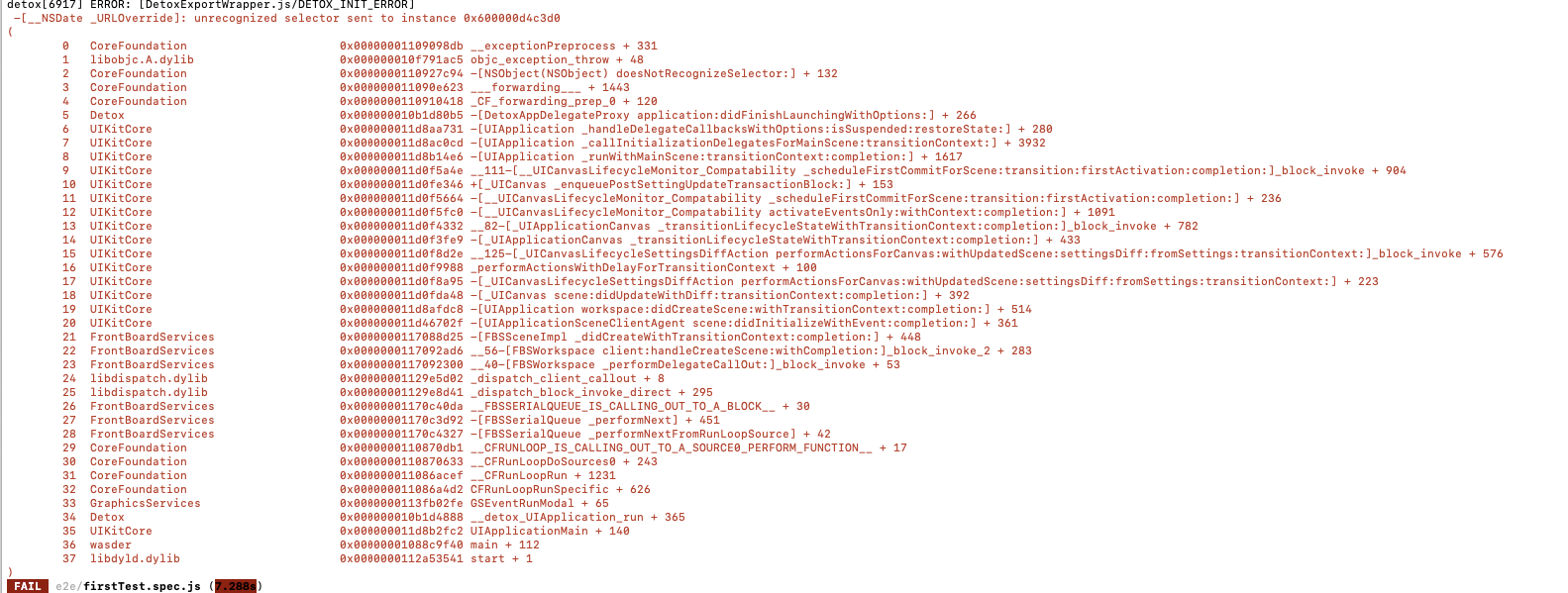
I have the same problem splashscreen and firebase also
 humarkx
on 25 Aug 2019
humarkx
on 25 Aug 2019
humarkx
on 25 Aug 2019
Good news, I managed to reproduce using the demo project. Investigating.
LeoNatan
on 25 Aug 2019
Fixed.
LeoNatan
on 25 Aug 2019
Thanks for the fix @LeoNatan 🎉
 FrikanRw
on 25 Aug 2019
FrikanRw
on 25 Aug 2019
Related issues
 aamorozov
·
3Comments
aamorozov
·
3Comments
 brunobar79
·
4Comments
brunobar79
·
4Comments
 alexmngn
·
3Comments
alexmngn
·
3Comments
 raphkr
·
4Comments
LeoNatan
·
4Comments
raphkr
·
4Comments
LeoNatan
·
4Comments
Most helpful comment
Fixed.