Detectron2: Object Detection on 1000+ Objects per Image
Instructions To Reproduce the Issue:
I am looking to perform basic object detection on an image (shape = [688, 1024]) with many hundreds of small objects. I have successfully trained a model on a dataset composed of smaller cropped images (shape = [341, 344]) which works well:

I then tried to run the trained model on the full-scale (688x1024) image but only about 60-80% of the objects are detected:
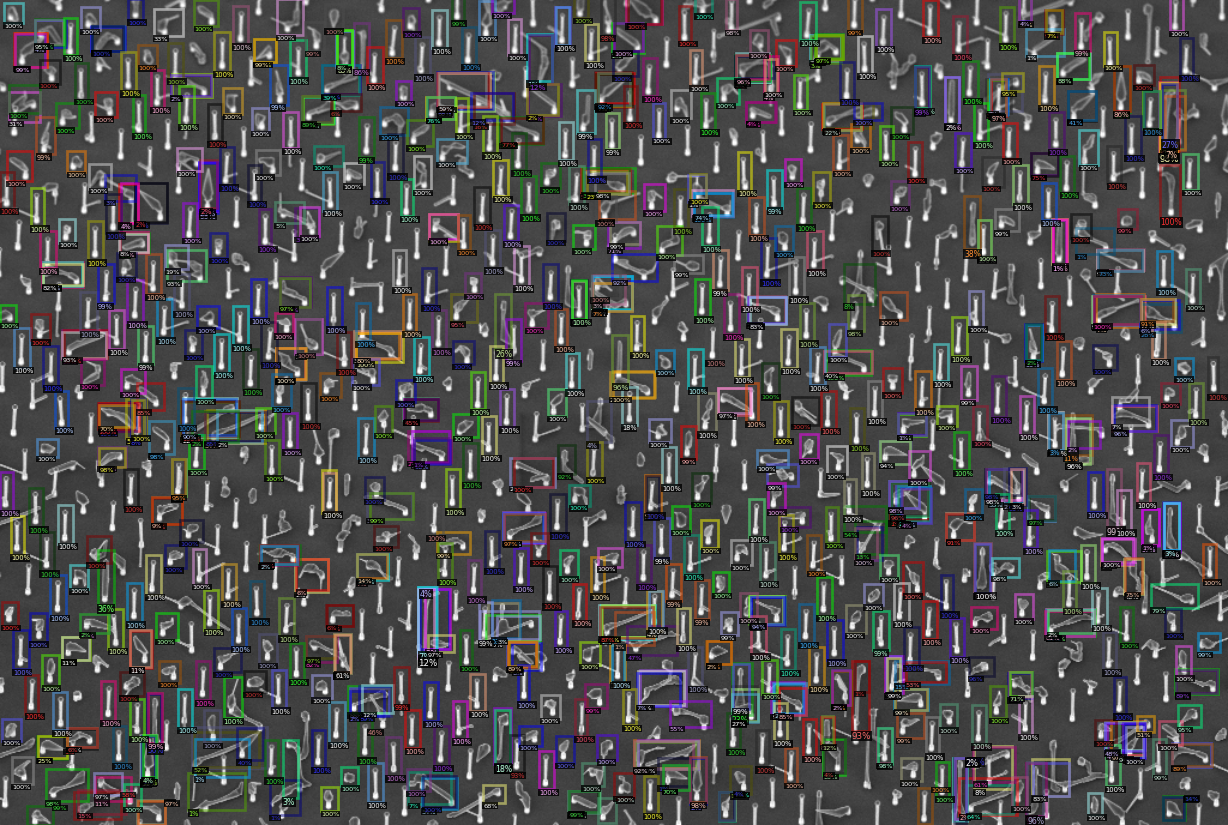
I've tried to increase the number of outputs and ROIs in the config, hoping this would help but so far no luck.
Here is my training config:
cfg = get_cfg()
cfg.merge_from_file(model_zoo.get_config_file("COCO-Detection/faster_rcnn_R_50_FPN_3x.yaml"))
cfg.DATASETS.TRAIN = ("labels/nw_yield_train",)
cfg.DATASETS.TEST = ()
cfg.DATALOADER.NUM_WORKERS = 8
cfg.MODEL.WEIGHTS = model_zoo.get_checkpoint_url("COCO-Detection/faster_rcnn_R_50_FPN_3x.yaml")  # Let training initialize from model zoo
cfg.SOLVER.IMS_PER_BATCH = 8
cfg.SOLVER.MAX_ITER = 30000
cfg.SOLVER.CHECKPOINT_PERIOD = 5000  # Save a checkpoint after every this number of iterations

# Weight decay
cfg.SOLVER.BASE_LR = 0.0050  # learning rate
cfg.SOLVER.GAMMA = 0.0002
# The iteration number to decrease learning rate by GAMMA.
cfg.SOLVER.STEPS = (1000,)

# Don't scale the input images
cfg.INPUT.MIN_SIZE_TRAIN = 0
cfg.INPUT.MAX_SIZE_TRAIN = 99999
cfg.MODEL.RPN.IN_FEATURES = ['p2', 'p2', 'p3', 'p4', 'p5', 'p6']
cfg.MODEL.ANCHOR_GENERATOR.ASPECT_RATIOS = [[0.25, 0.5, 1.0, 2.0, 4.0, 8.0]]
cfg.MODEL.ANCHOR_GENERATOR.SIZES = [[4], [8], [16], [32], [64], [128]]
cfg.MODEL.PIXEL_MEAN = [58.33, 58.33, 58.33]
cfg.MODEL.PIXEL_STD = [1.0, 1.0, 1.0]
cfg.MODEL.ROI_HEADS.BATCH_SIZE_PER_IMAGE = 10240
cfg.MODEL.ROI_HEADS.POSITIVE_FRACTION = 0.7
cfg.MODEL.ROI_HEADS.IOU_THRESHOLDS = [0.5] # Intersection over union threshold
cfg.MODEL.ROI_HEADS.NUM_CLASSES = 3 # We have three classification classes `
For inference I tried this config to get as many objects out as possible, but on the full-scale image this only results in ~940 objects and i would expect about double that for such relaxed thresholds:
# Don't scale the input image
cfg.INPUT.MIN_SIZE_TEST = 0
cfg.INPUT.MAX_SIZE_TEST = 9999
cfg.MODEL.ROI_HEADS.SCORE_THRESH_TEST = 0.01   # Set the testing threshold for this model
cfg.MODEL.ROI_HEADS.NMS_THRESH_TEST = 0.99     # Non-max supression threshold
cfg.MODEL.ROI_HEADS.BATCH_SIZE_PER_IMAGE = 10240
cfg.TEST.DETECTIONS_PER_IMAGE = 10000
Expected behaviour:
I was expecting the model to work as well on the uncropped image as on the cropped image and detect 95-100% of the objects. It is able to identify about 60-80% of the objects but doesn't see the rest.
I am probably missing something in the config or some basic understanding of the limitations of the model. Is there a limit in the model for the number of outputs? Any help is greatly appreciated. Thanks!
Environment:
I am running this on Colab starting from the provided "Detectron2 Tutorial.ipynb" notebook.
------------------------  ---------------------------------------------------------------
sys.platform              linux
Python                    3.6.9 (default, Apr 18 2020, 01:56:04) [GCC 8.4.0]
numpy                     1.18.4
detectron2                0.1.2 @/usr/local/lib/python3.6/dist-packages/detectron2
detectron2 compiler       GCC 7.3
detectron2 CUDA compiler  10.1
detectron2 arch flags     sm_35, sm_37, sm_50, sm_52, sm_60, sm_61, sm_70, sm_75
DETECTRON2_ENV_MODULE     <not set>
PyTorch                   1.5.0+cu101 @/usr/local/lib/python3.6/dist-packages/torch
PyTorch debug build       False
CUDA available            True
GPU 0                     Tesla P100-PCIE-16GB
CUDA_HOME                 /usr/local/cuda
NVCC                      Cuda compilation tools, release 10.1, V10.1.243
Pillow                    7.0.0
torchvision               0.6.0+cu101 @/usr/local/lib/python3.6/dist-packages/torchvision
torchvision arch flags    sm_35, sm_50, sm_60, sm_70, sm_75
fvcore                    0.1.1.post200513
cv2                       4.1.2
------------------------  ---------------------------------------------------------------
PyTorch built with:
  - GCC 7.3
  - C++ Version: 201402
  - Intel(R) Math Kernel Library Version 2019.0.5 Product Build 20190808 for Intel(R) 64 architecture applications
  - Intel(R) MKL-DNN v0.21.1 (Git Hash 7d2fd500bc78936d1d648ca713b901012f470dbc)
  - OpenMP 201511 (a.k.a. OpenMP 4.5)
  - NNPACK is enabled
  - CPU capability usage: AVX2
  - CUDA Runtime 10.1
  - NVCC architecture flags: -gencode;arch=compute_37,code=sm_37;-gencode;arch=compute_50,code=sm_50;-gencode;arch=compute_60,code=sm_60;-gencode;arch=compute_61,code=sm_61;-gencode;arch=compute_70,code=sm_70;-gencode;arch=compute_75,code=sm_75;-gencode;arch=compute_37,code=compute_37
  - CuDNN 7.6.3
  - Magma 2.5.2
  - Build settings: BLAS=MKL, BUILD_TYPE=Release, CXX_FLAGS= -Wno-deprecated -fvisibility-inlines-hidden -fopenmp -DNDEBUG -DUSE_FBGEMM -DUSE_QNNPACK -DUSE_PYTORCH_QNNPACK -DUSE_XNNPACK -DUSE_INTERNAL_THREADPOOL_IMPL -O2 -fPIC -Wno-narrowing -Wall -Wextra -Werror=return-type -Wno-missing-field-initializers -Wno-type-limits -Wno-array-bounds -Wno-unknown-pragmas -Wno-sign-compare -Wno-unused-parameter -Wno-unused-variable -Wno-unused-function -Wno-unused-result -Wno-strict-overflow -Wno-strict-aliasing -Wno-error=deprecated-declarations -Wno-stringop-overflow -Wno-error=pedantic -Wno-error=redundant-decls -Wno-error=old-style-cast -fdiagnostics-color=always -faligned-new -Wno-unused-but-set-variable -Wno-maybe-uninitialized -fno-math-errno -fno-trapping-math -Werror=format -Wno-stringop-overflow, PERF_WITH_AVX=1, PERF_WITH_AVX2=1, PERF_WITH_AVX512=1, USE_CUDA=ON, USE_EXCEPTION_PTR=1, USE_GFLAGS=OFF, USE_GLOG=OFF, USE_MKL=ON, USE_MKLDNN=ON, USE_MPI=OFF, USE_NCCL=ON, USE_NNPACK=ON, USE_OPENMP=ON, USE_STATIC_DISPATCH=OFF,
 Martin09
All 2 comments
Met the same problem. Hope these ideas could help you.
if your model is converge, you can try to increase cfg.MODEL.RPN.POST_NMS_TOPK_TEST cfg.MODEL.RPN.PRE_NMS_TOPK_TEST cfg.TEST.DETECTIONS_PER_IMAGE.
if you model isn't converge, you can try to increase cfg.MODEL.RPN.POST_NMS_TOPK_TRAIN cfg.MODEL.RPN.PRE_NMS_TOPK_TRAIN cfg.MODEL.ROI_HEADS.BATCH_SIZE_PER_IMAGE, and train again.
 freedenS
on 27 May 2020
freedenS
on 27 May 2020
That did it! Thanks a lot for the help, it solved my problem.
As my model had converged during training on the smaller images I just had to add these two lines to get it to properly process the larger image:
cfg.MODEL.RPN.POST_NMS_TOPK_TEST = 10000  # originally 1000
cfg.MODEL.RPN.PRE_NMS_TOPK_TEST = 10000  # originally 1000
Cheers!
Martin09
on 27 May 2020
Related issues
 LotharTUM
·
3Comments
LotharTUM
·
3Comments
 marcoippolito
·
4Comments
marcoippolito
·
4Comments
 GiovanniPasq
·
3Comments
GiovanniPasq
·
3Comments
 aminekechaou
·
3Comments
aminekechaou
·
3Comments
 jinfagang
·
3Comments
jinfagang
·
3Comments
Most helpful comment
Met the same problem. Hope these ideas could help you.
if your model is converge, you can try to increase cfg.MODEL.RPN.POST_NMS_TOPK_TEST cfg.MODEL.RPN.PRE_NMS_TOPK_TEST cfg.TEST.DETECTIONS_PER_IMAGE.
if you model isn't converge, you can try to increase cfg.MODEL.RPN.POST_NMS_TOPK_TRAIN cfg.MODEL.RPN.PRE_NMS_TOPK_TRAIN cfg.MODEL.ROI_HEADS.BATCH_SIZE_PER_IMAGE, and train again.