Detectron: there are no output .pdf when successfully complier demo files?
root@e9019bc3c0c3:/detectron# python2 tools/infer_simple.py \
--cfg configs/12_2017_baselines/e2e_mask_rcnn_R-101-FPN_2x.yaml \
--output-dir demo/output \
--image-ext jpg \
--wts https://s3-us-west-2.amazonaws.com/detectron/35861858/12_2017_baselines/e2e_mask_rcnn_R-101-FPN_2x.yaml.02_32_51.SgT4y1cO/output/train/coco_2014_train:coco_2014_valminusminival/generalized_rcnn/model_final.pkl \
demo
E0202 10:06:27.787480 38 init_intrinsics_check.cc:54] CPU feature avx is present on your machine, but the Caffe2 binary is not compiled with it. It means you may not get the full speed of your CPU.
E0202 10:06:27.787498 38 init_intrinsics_check.cc:54] CPU feature avx2 is present on your machine, but the Caffe2 binary is not compiled with it. It means you may not get the full speed of your CPU.
E0202 10:06:27.787502 38 init_intrinsics_check.cc:54] CPU feature fma is present on your machine, but the Caffe2 binary is not compiled with it. It means you may not get the full speed of your CPU.
WARNING cnn.py: 40: [====DEPRECATE WARNING====]: you are creating an object from CNNModelHelper class which will be deprecated soon. Please use ModelHelper object with brew module. For more information, please refer to caffe2.ai and python/brew.py, python/brew_test.py for more information.
INFO net.py: 57: Loading weights from: /tmp/detectron-download-cache/35861858/12_2017_baselines/e2e_mask_rcnn_R-101-FPN_2x.yaml.02_32_51.SgT4y1cO/output/train/coco_2014_train:coco_2014_valminusminival/generalized_rcnn/model_final.pkl
I0202 10:06:32.272874 38 net_dag_utils.cc:118] Operator graph pruning prior to chain compute took: 0.000144569 secs
I0202 10:06:32.273200 38 net_dag.cc:61] Number of parallel execution chains 63 Number of operators = 402
I0202 10:06:32.290997 38 net_dag_utils.cc:118] Operator graph pruning prior to chain compute took: 0.000129367 secs
I0202 10:06:32.291281 38 net_dag.cc:61] Number of parallel execution chains 30 Number of operators = 358
I0202 10:06:32.292923 38 net_dag_utils.cc:118] Operator graph pruning prior to chain compute took: 1.0203e-05 secs
I0202 10:06:32.292951 38 net_dag.cc:61] Number of parallel execution chains 5 Number of operators = 18
INFO infer_simple.py: 111: Processing demo/18124840932_e42b3e377c_k.jpg -> demo/output/18124840932_e42b3e377c_k.jpg.pdf
INFO infer_simple.py: 119: Inference time: 0.872s
INFO infer_simple.py: 121: | im_detect_bbox: 0.824s
INFO infer_simple.py: 121: | misc_mask: 0.023s
INFO infer_simple.py: 121: | im_detect_mask: 0.023s
INFO infer_simple.py: 121: | misc_bbox: 0.002s
INFO infer_simple.py: 124: \ Note: inference on the first image will be slower than the rest (caches and auto-tuning need to warm up)
INFO infer_simple.py: 111: Processing demo/17790319373_bd19b24cfc_k.jpg -> demo/output/17790319373_bd19b24cfc_k.jpg.pdf
INFO infer_simple.py: 119: Inference time: 0.380s
INFO infer_simple.py: 121: | im_detect_bbox: 0.307s
INFO infer_simple.py: 121: | misc_mask: 0.040s
INFO infer_simple.py: 121: | im_detect_mask: 0.031s
INFO infer_simple.py: 121: | misc_bbox: 0.002s
INFO infer_simple.py: 111: Processing demo/19064748793_bb942deea1_k.jpg -> demo/output/19064748793_bb942deea1_k.jpg.pdf
INFO infer_simple.py: 119: Inference time: 0.320s
INFO infer_simple.py: 121: | im_detect_bbox: 0.210s
INFO infer_simple.py: 121: | misc_mask: 0.058s
INFO infer_simple.py: 121: | im_detect_mask: 0.050s
INFO infer_simple.py: 121: | misc_bbox: 0.002s
INFO infer_simple.py: 111: Processing demo/34501842524_3c858b3080_k.jpg -> demo/output/34501842524_3c858b3080_k.jpg.pdf
INFO infer_simple.py: 119: Inference time: 0.239s
INFO infer_simple.py: 121: | im_detect_bbox: 0.215s
INFO infer_simple.py: 121: | misc_mask: 0.012s
INFO infer_simple.py: 121: | im_detect_mask: 0.010s
INFO infer_simple.py: 121: | misc_bbox: 0.002s
INFO infer_simple.py: 111: Processing demo/15673749081_767a7fa63a_k.jpg -> demo/output/15673749081_767a7fa63a_k.jpg.pdf
INFO infer_simple.py: 119: Inference time: 0.324s
INFO infer_simple.py: 121: | im_detect_bbox: 0.220s
INFO infer_simple.py: 121: | misc_mask: 0.056s
INFO infer_simple.py: 121: | im_detect_mask: 0.045s
INFO infer_simple.py: 121: | misc_bbox: 0.002s
INFO infer_simple.py: 111: Processing demo/16004479832_a748d55f21_k.jpg -> demo/output/16004479832_a748d55f21_k.jpg.pdf
INFO infer_simple.py: 119: Inference time: 0.238s
INFO infer_simple.py: 121: | im_detect_bbox: 0.211s
INFO infer_simple.py: 121: | misc_mask: 0.015s
INFO infer_simple.py: 121: | im_detect_mask: 0.009s
INFO infer_simple.py: 121: | misc_bbox: 0.002s
INFO infer_simple.py: 111: Processing demo/24274813513_0cfd2ce6d0_k.jpg -> demo/output/24274813513_0cfd2ce6d0_k.jpg.pdf
INFO infer_simple.py: 119: Inference time: 0.250s
INFO infer_simple.py: 121: | im_detect_bbox: 0.215s
INFO infer_simple.py: 121: | misc_mask: 0.017s
INFO infer_simple.py: 121: | im_detect_mask: 0.016s
INFO infer_simple.py: 121: | misc_bbox: 0.002s
INFO infer_simple.py: 111: Processing demo/33823288584_1d21cf0a26_k.jpg -> demo/output/33823288584_1d21cf0a26_k.jpg.pdf
INFO infer_simple.py: 119: Inference time: 0.417s
INFO infer_simple.py: 121: | im_detect_bbox: 0.313s
INFO infer_simple.py: 121: | misc_mask: 0.058s
INFO infer_simple.py: 121: | im_detect_mask: 0.044s
INFO infer_simple.py: 121: | misc_bbox: 0.002s
INFO infer_simple.py: 111: Processing demo/33887522274_eebd074106_k.jpg -> demo/output/33887522274_eebd074106_k.jpg.pdf
INFO infer_simple.py: 119: Inference time: 0.224s
INFO infer_simple.py: 121: | im_detect_bbox: 0.202s
INFO infer_simple.py: 121: | misc_mask: 0.011s
INFO infer_simple.py: 121: | im_detect_mask: 0.009s
INFO infer_simple.py: 121: | misc_bbox: 0.002s
demo/output folder got no pdf files.
 ccs1605
All 19 comments
please help! google so many times and got no luck!
ccs1605
on 3 Feb 2018
as the logging shows that the result is located at demo/output/ an related path in the $Detection_Home(where you ran the code on shell)
 huyangc
on 4 Feb 2018
huyangc
on 4 Feb 2018
I thinke you can "mkdir" a new folder and "chmod xxx -777 your folder" to make the folder writeable, then change the 2nd line of infer_simple.py:
--output-dir /yours folder
hope it may help you!
 lvboodvl
on 5 Feb 2018
lvboodvl
on 5 Feb 2018
@huyangc checked the output folder and even try from searching the whole computer with it. it just doesnt print the pdf files.
ccs1605
on 5 Feb 2018
@lvboodvl thanks for replying. there is what i did.
- mkdir a folder
- cd to the path
- chmod -R 777 .
then i run the command, and unfortunately the folder is persistently empty.
by the way, i use nvidia-docker.
ccs1605
on 5 Feb 2018

tried a command to copy pdf file out of tmp:
cp -a detectron-visualizations/. /home/ray/demos2/
but doesnt work. how do i access pdf from nvidia-docker? thanks.
ccs1605
on 5 Feb 2018
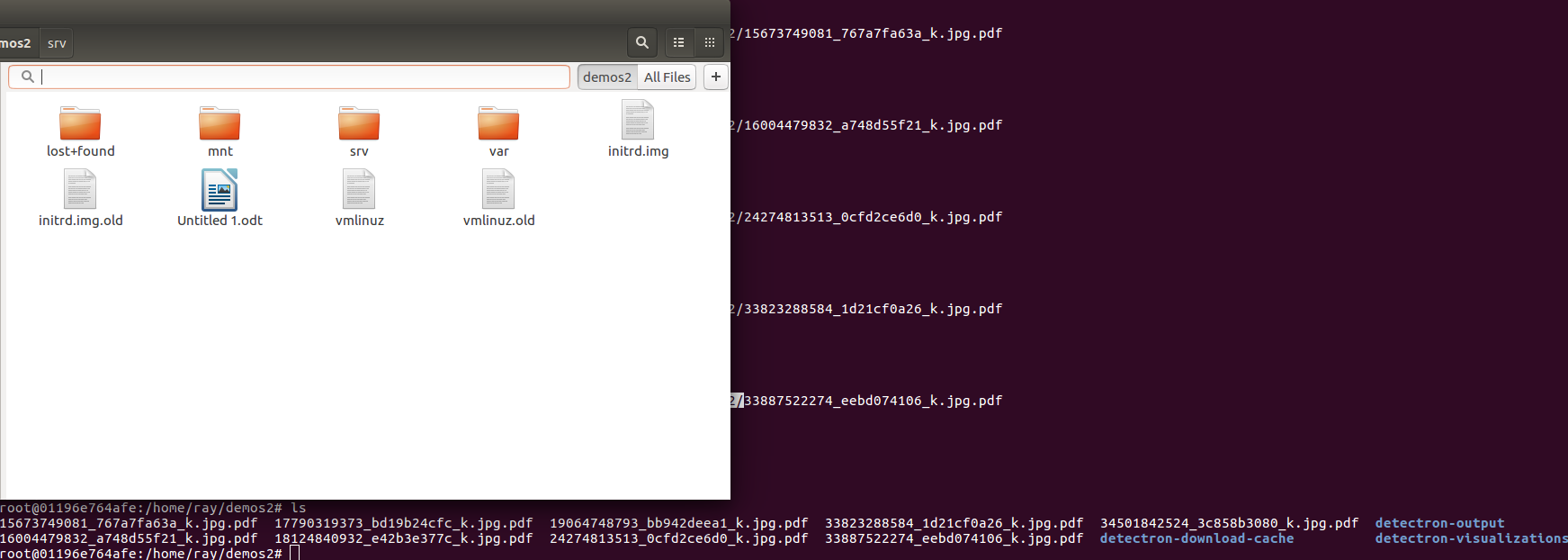
could anyone tell me how do i access pdf files,please?
the demos2 folder doesnt contain pdf.
ccs1605
on 5 Feb 2018
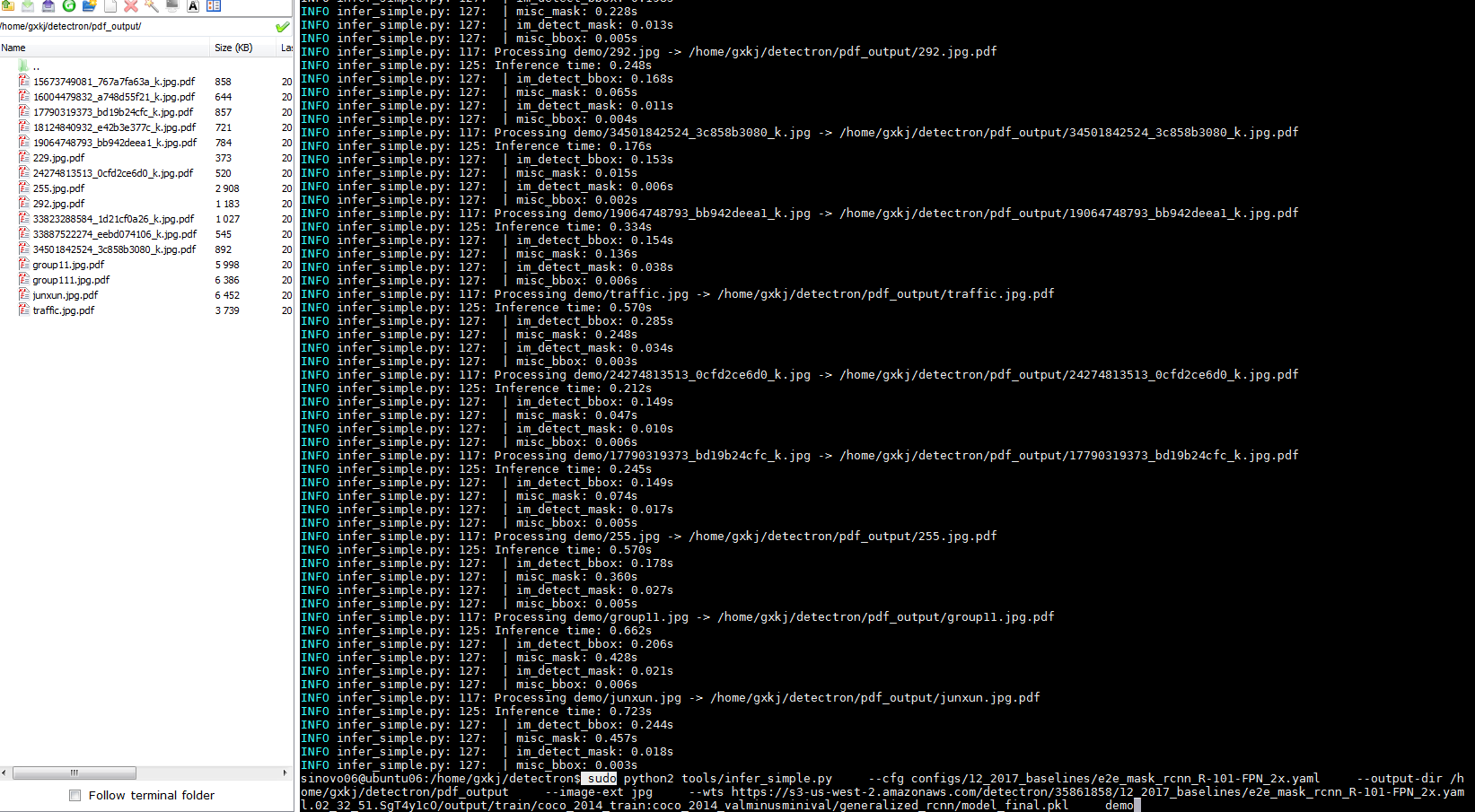
@ccs1605 try to run sudo python infer_simple.py ..., it really works in my terminal, but not with nvidia-docker
lvboodvl
on 6 Feb 2018
@ccs1605
lvboodvl
on 6 Feb 2018
”sudo python infer_simple.py............“ will not work,you can just use"python infer_simple.py............."
 fangpengcheng95
on 17 Feb 2018
fangpengcheng95
on 17 Feb 2018
@ccs1605 you can copy files from your container using:
docker cp <containerId>:/file/path/within/container /host/path/target
 Ox24
on 19 Feb 2018
Ox24
on 19 Feb 2018
I'll echo this issue from @ccs1605. About 20+ days ago when running infer_simple.py it would save the .pdf outputs to the --output-dir like expected. Now, it prints that it is saving the image to my dir, but nothing is there. I too am using nvidia-docker and have tried chmod on my local machine and in the docker container with no success. I will try to investigate further tomorrow.
 learnbott
on 21 Feb 2018
learnbott
on 21 Feb 2018
Same thing here.
I tried shared and local volumes but none worked. The pdfs aren't being generated.
There is no warning nor error messages in the console.
 fabito
on 22 Feb 2018
fabito
on 22 Feb 2018
I have trained my own model by train_net.py and used infer_simple.py to test that model. There is no error messages appeared during the whole process, but the pdfs weren't being gennerated!!!!
 wkoa
on 8 Mar 2018
wkoa
on 8 Mar 2018
check docker copy command documents, i finally extracted the results from it.
Be aware docker images is not on local HD.
ccs1605
on 9 Mar 2018
Hey guys, I don't think this is a docker problem. We were just experiencing this problem and here's what I think was going on. In tools/infer_simple.py there is some code that looks like so:
vis_utils.vis_one_image(
            im[:, :, ::-1],  # BGR -> RGB for visualization
            im_name,
            args.output_dir,
            cls_boxes,
            cls_segms,
            cls_keyps,
            dataset=dummy_coco_dataset,
            box_alpha=0.3,
            show_class=True,
            thresh=0.1,
            kp_thresh=2
        )
Notice the line with thresh. If this is too high (and your network hasn't been trained enough yet) then your labels will likely not meet the threshold and the image will therefore not save. I'm doing transfer learning and this was my problem, hopefully this will help lead you in the right direction as well!
 telwell
on 11 Mar 2018
telwell
on 11 Mar 2018
If you take a look at the code for infer_simple, you will see that it will not save images if any object boxes haven't been detected. You can force the output to save the pdfs (even without any detections) by using the argument '--always-out'. In this case, you will see the output pdfs.
As @telwell suggests this could be a problem with inference (null detections) rather than visualization. Changing the threshold values did not make a difference to me however.
 rakidedigama
on 3 Sep 2018
rakidedigama
on 3 Sep 2018
I have this problem as well. Did anyone found a solution for this?
 remcova
on 9 Oct 2018
remcova
on 9 Oct 2018
I have tried all the solutions above, but still not fixed. There are no error messages appeared during the whole process, but the pdf wasn't being generated!
 Emma0928
on 4 Jun 2019
Emma0928
on 4 Jun 2019
Related issues
 elfpattern
·
3Comments
elfpattern
·
3Comments
 pacelu
·
3Comments
pacelu
·
3Comments
 gaopeng-eugene
·
4Comments
gaopeng-eugene
·
4Comments
 realwecan
·
3Comments
realwecan
·
3Comments
 coldgemini
·
3Comments
coldgemini
·
3Comments
Most helpful comment
Hey guys, I don't think this is a docker problem. We were just experiencing this problem and here's what I think was going on. In
tools/infer_simple.pythere is some code that looks like so:Notice the line with thresh. If this is too high (and your network hasn't been trained enough yet) then your labels will likely not meet the threshold and the image will therefore not save. I'm doing transfer learning and this was my problem, hopefully this will help lead you in the right direction as well!