Desktop: Update routine issue started with 3.0.2 (present in 3.0.3 as well)
Expected behaviour
I wanted to install 3.0.3 client and ran it like everytime. Just started the 3.0.3 installer and it should offer to remove the previous function and actually uninstall the previous version before installing the latest one.
Actual behaviour
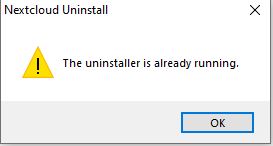
A message pops up that "The uninstaller is already running." (original message from my german installation: "Das Deinstallationsprogramm wird bereits ausgeführt.").
Steps to reproduce
- Install 3.0.2 .
- Try to install 3.0.3 with selecting to remove the previous installation.
- See the message. That never happened before version 3.0.1
Client configuration
Client version:
3.0.3 (now, previous version was 3.0.2).
Operating system:
Windows 10 Pro x64
OS language:
German
Installation path of client:
Original one: "C:\Program Files\Nextcloud\"
I could narrow it down to 3.0.2 client release. With that version that behaviour started. I can install 3.0.3 if I manually remove 3.0.2 first. When I want to install 3.0.2 over 3.0.3 then the same issue appears. If I use the 3.0.1 installer, then the uninstallation works as intended. So that bug was introduced with 3.0.2 .
 DrCarsonBeckett
All 11 comments
Same Issue here. Hadn't had that with 3.0.2 but it is present with 3.0.3
 MeCias
on 30 Oct 2020
MeCias
on 30 Oct 2020
@MeCias You can workaround that by manually uninstalling the 3.0.2 client. Just in case you didn't noticed or if it wasn't clear enough from my post. 😃
DrCarsonBeckett
on 30 Oct 2020
Oh yeah thanks. That is what I did first, to verify the uninstaller was really not already active. ;-)
MeCias
on 30 Oct 2020
Had the same problem; with the identical client configuration as @DrCarsonBeckett .
Workaround was to deinstall the 3.0.2 version manually first. Luckily all my settings were kept, so it was no effort at all!
 Id3aFly
on 31 Oct 2020
Id3aFly
on 31 Oct 2020
...the same behaviour with me with the same environment.
 devdracon
on 11 Nov 2020
devdracon
on 11 Nov 2020
...the same behaviour with me with the same environment.
Because we are still testing it and we didn't replace the installer for 3.0.2 and 3.0.3 on https://download.nextcloud.com yet. The ones there still have the error.
 camilasan
on 11 Nov 2020
camilasan
on 11 Nov 2020
same here, it's super annoying that you have to go to Control Panel to uninstall the old version instead of using the new installer
 cyril23
on 14 Nov 2020
cyril23
on 14 Nov 2020
Just to make it clear: uninstalling the 3.0.2, rebooting the machine, and then run the install did solve the "uninstaller already running", but still causes lots of trouble since some QT files are still blocked by the system.
 pstimpel
on 16 Nov 2020
pstimpel
on 16 Nov 2020
Just to make it clear: uninstalling the 3.0.2, rebooting the machine, and then run the install did solve the "uninstaller already running", but still causes lots of trouble since some QT files are still blocked by the system.
you can get rid of this by removing the 3.0.2 as described, then reboot in protected mode, delete the nextcloud folder, reboot & install the new version.
annoying - but as camilsan stated, they're working on this problem
devdracon
on 16 Nov 2020
"annoying"? No, wrong word. Glad they are working on a fix already.
pstimpel
on 16 Nov 2020
"annoying"? No, wrong word. Glad they are working on a fix already.
...this was related to the cumbersome update routine ;)
devdracon
on 16 Nov 2020
Related issues
 Valdiralita
·
3Comments
Valdiralita
·
3Comments
 nilsbecker
·
3Comments
nilsbecker
·
3Comments
 steven-omaha
·
3Comments
steven-omaha
·
3Comments
 DBLouis
·
3Comments
DBLouis
·
3Comments
 Ackis
·
4Comments
Ackis
·
4Comments