Desktop: [Desktop v2.7.0beta1] - App Randomly Crashes and Shuts Down on Windows 10
Hello folks,
I've been testing the 2.7.0beta1 version of the Desktop Client on Windows 10 Pro 2004 for about two months now and noticed that the application icon keeps disappearing from the system tray. So in investigated further and it appears that the entire application is crashing randomly.
Expected behaviour
The NextCloud.exe application should run indefinitely on the OS desktop until manually exited by user.
Actual behaviour
The NextCloud.exe application crashes randomly and triggers Windows Event ID# 1000
Steps to reproduce
- Launch the application and allow it to dock to the system tray and run as normal
- Just wait an indetermined amount of time and the system tray icon simply disappears without warning.
- Launch Windows Event Viewer and you should see Event ID# 1000 in the Application Log
Client configuration
Client version: 2.7.0beta1
Operating system: Windows 10 Professional, version 2004 (OS Build 19041.329)
OS language: EN-US
Qt version used by client package (Linux only, see also Settings dialog): N/A
Client package (From Nextcloud or distro) (Linux only): N/A
Installation path of client: C:\Program Files\Nextcloud
Logs
Client logfile: Contained sensitive information. Tried to sanitize it then realized that it listed the names of all files and folders that were synced, thus, would require too much time to sanitize the entire log file.
Web server error log: N/A
Server logfile: nextcloud log (data/nextcloud.log): N/A
Windows Event Viewer (screenshot)
I've also attached a screenshot of the Windows Event Viewer showing the time stamp of the errors.
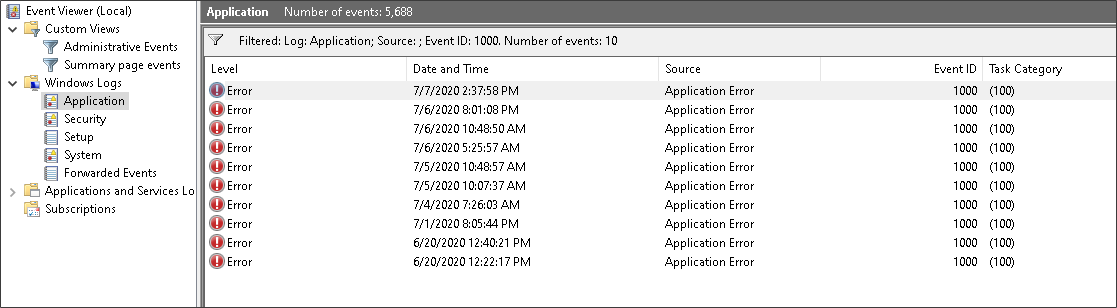
One very interesting phenomenon I noticed is, when I launched Nextcloud from the command line using either the -logfile or -logdir switches, the application did not crash. This can be observed when you look at the timestamp between the most recent two crashes (_top two lines of screenshot_). I literally had to kill the application and launch it without the switches to get it to crash again.
Hope this is enough information for you to investigate. I'm here to lend a hand, just ask.
 kismetgerald
All 9 comments
Hey @kismetgerald,
thanks for testing and for your report :-)
This week we are about to release 2.7 Beta 2, you may give it a try then :)
The Beta 2 will become available here once it's been built and uploaded:
https://github.com/nextcloud/desktop/releases/tag/v2.7.0-beta2
 misch7
on 7 Jul 2020
misch7
on 7 Jul 2020
2.7 Beta 2 is now available, here's the Windows download:
https://download.nextcloud.com/desktop/prereleases/Windows/Nextcloud-2.7.0.15621-beta2-20200709.exe
misch7
on 9 Jul 2020
I can confirm @kismetgerald 's symptoms also occur for me with 2.7 Beta 2.
In case further details from the Windows Event Viewer are helpful:
Faulting application name: nextcloud.exe, version: 2.7.0.15621, time stamp: [removed]
Faulting module name: ucrtbase.dll, version: 10.0.18362.815, time stamp: [removed]
Exception code: 0xc0000409
Fault offset: 0x000000000006db9e
[...]
Faulting application path: C:\Program Files (x86)\Nextcloud\nextcloud.exe
Faulting module path: C:\WINDOWS\System32\ucrtbase.dll
 mactrent
on 13 Jul 2020
mactrent
on 13 Jul 2020
@mactrent Does setting the -logfile option also prevent the crashes from happening on your side?
Generally this is very helpful and would at least make sense regarding the ucrtbase.dll relation, as this will be used by Windows io.h inclusion for the logging part. However, from a first glimpse I wasn't able to spot any related changes introduced into 2.7 specifically so far.
 DominiqueFuchs
on 17 Jul 2020
DominiqueFuchs
on 17 Jul 2020
Could someone try with beta3? So far I couldn't reproduce it but I suspect it's my setup being at play.
Also if that's really a crash, bonus points for providing a stack trace. Even better if that's a proper build ran within a debugger at time of failure (one can dream).
 er-vin
on 21 Jul 2020
er-vin
on 21 Jul 2020
Could someone try with beta3? So far I couldn't reproduce it but I suspect it's my setup being at play.
This would be really helpful :)
Could everybody facing the issue also please send us the following file:
C:\WINDOWS\System32\ucrtbase.dll
And if possible also provide the list of versions of the _Microsoft Visual C++ Runtime_'s installed on the system? (You can find this in the system's settings -> Apps / programs). And of course the exact Windows version too please ;-)
I suspect it could be related to VC runtime version conflicts, installed version on the system vs. our bundled version / dependencies since ucrtbase.dll in involved.
misch7
on 21 Jul 2020
@DominiqueFuchs I tried it again with the -logging option briefly, and it didn't crash during that time.
I tried it with beta 3 starting on Monday, and it's been running continuously without a crash since then. Of note, though, Windows updates were installed over the weekend.
@misch7 Since I've applied updates (and it hasn't crashed again since), I might not be a candidate for this anymore.
With that said, here's the build number I'm on now: Windows 10 Enterprise, Version 1909 (OS Build 18363.959)
The list of VC++ versions installed:
x86:
9.0.30729
14.24.28127.4

Unspecified (probably x86):
8.0.61001
8.0.59193

x64:
8.0.56336
8.0.61000
14.26.28720.3

Both (separate entries):
9.0.30729.4148
9.0.30729.6161
9.0.21022
10.0.40219
11.0.60610
11.0.61030
12.0.30501
12.0.40660
If you'd still like my ucrtbase.dll, just let me know how you'd like it sent to you, if you have a preference.
mactrent
on 23 Jul 2020
If you'd still like my ucrtbase.dll, just let me know how you'd like it sent to you, if you have a preference.
Thanks for the update @mactrent and nice to hear, it's working now.
Since you've updated your system in the meantime the dll might also have changed, I guess we don't need it anymore now that it works.
misch7
on 23 Jul 2020
Since it looks like it's gone with beta3 and latest system updates I'll just close it.
er-vin
on 28 Jul 2020
Related issues
 RobertZenz
·
3Comments
RobertZenz
·
3Comments
 MichaIng
·
3Comments
MichaIng
·
3Comments
 AndreyNazarchuk
·
4Comments
AndreyNazarchuk
·
4Comments
 nilsbecker
·
3Comments
nilsbecker
·
3Comments
 Engineer-of-Stuff
·
3Comments
Engineer-of-Stuff
·
3Comments