Desktop: Linux client doesn't respect GNOME font selection
Expected behaviour
The Nextcloud client uses the same font seen throughout the rest of the GNOME desktop environment.
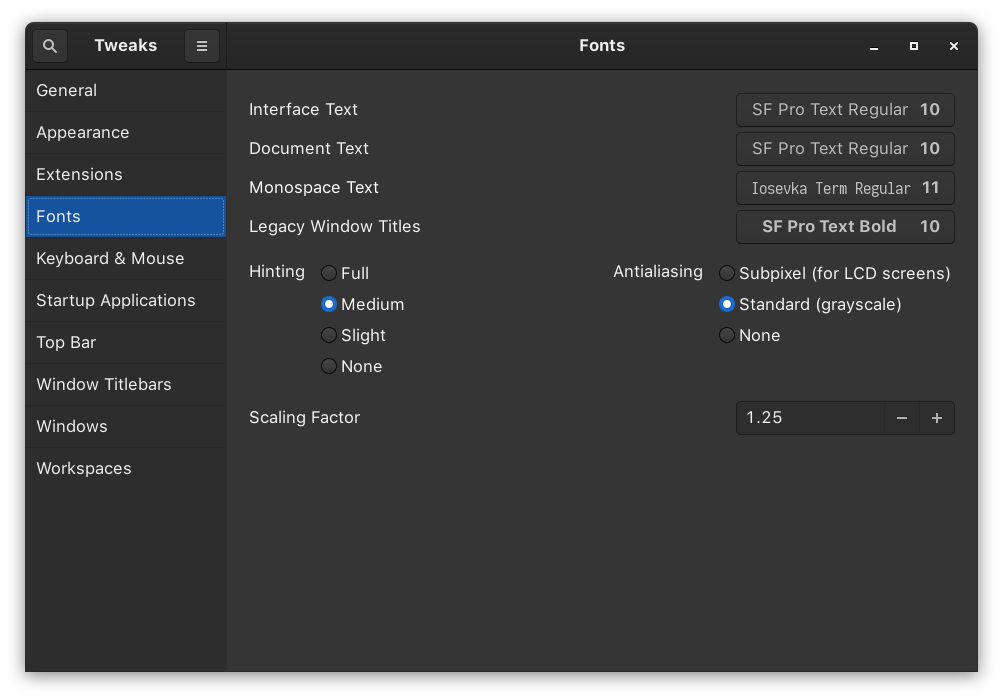
Actual behaviour
Nextcloud client instead uses the default GNOME font 'Cantarell.'

Steps to reproduce
- Install Nextcloud desktop client
- Double click tray icon
Client configuration
Client version: 2.6.4.git
Operating system: Arch Linux
Qt version used by client package (Linux only, see also Settings dialog): 5.15
Client package (From Nextcloud or distro) (Linux only): distro
Logs
Please use Gist (https://gist.github.com/) or a similar code paster for longer
logs.
- Client logfile: Output of
nextcloud --logwindowornextcloud --logfile log.txt
(On Windows usingcmd.exe, you might need to firstcdinto the Nextcloud directory)
(See also https://docs.nextcloud.com/desktop/2.3/troubleshooting.html#log-files)
[OCC::Application::setupLogging         "################## Nextcloud locale:[en_US] ui_lang:[en_US] version:[2.6.4git] os:[Arch Linux]"
[OCC::Application::slotParseMessage     Running for 116957 sec
[OCC::AccessManager::createRequest      6 "PROPFIND" "https://us.cloudamo.com/remote.php/dav/files/[email protected]/" has X-Request-ID "b49d4bb7-199c-4b36-80eb-0ffc155ec6d0"
[OCC::AbstractNetworkJob::start         OCC::PropfindJob created for "https://us.cloudamo.com" + "/" "OCC::ConnectionValidator"
[OCC::WebFlowCredentials::slotFinished  request finished
Additional information omitted for privacy
 eh8
eh8
All 6 comments
@er-vin if you point out which file this likely needs to be changed in, it could possibly be a "good first issue", what do you think? :)
 jancborchardt
on 25 Jun 2020
jancborchardt
on 25 Jun 2020
Let me know if I can provide any additional context or debugging info!
eh8
on 26 Jun 2020
@er-vin if you point out which file this likely needs to be changed in, it could possibly be a "good first issue", what do you think? :)
I wish I knew. ;-)
Actually this could even be something upstream, apart if we somehow overridden fonts it should be picked up for us by the Qt platform theme plugin...
 er-vin
on 26 Jun 2020
er-vin
on 26 Jun 2020
When I first installed the client it used the correct font. After a few days it switched to Cantarell and has remained since. Disabling Cantarell via font-manager results in Vera Sans being used.
eh8
on 26 Jun 2020
What happens if you run it like this
QT_QPA_PLATFORMTHEME=qt5ct nextcloud
?
 vtronko
on 12 Jul 2020
vtronko
on 12 Jul 2020
@vtronko solved!
eh8
on 12 Jul 2020
Related issues
 Engineer-of-Stuff
·
3Comments
Engineer-of-Stuff
·
3Comments
 jospoortvliet
·
4Comments
jospoortvliet
·
4Comments
 rguenther-dz
·
3Comments
rguenther-dz
·
3Comments
 dkebler
·
3Comments
dkebler
·
3Comments
 js-d-coder
·
3Comments
js-d-coder
·
3Comments
Most helpful comment
What happens if you run it like this
QT_QPA_PLATFORMTHEME=qt5ct nextcloud?