Desktop: New tabbar integrates poorly with native system.
I confirm (by marking "x" in the [ ] below: [x]):
- [x] This is not a troubleshooting question. Troubleshooting questions go here: http://www.mattermost.org/troubleshoot/.
- [x] This doesn't reproduce on web browsers (such as in Chrome). If it does, issue reports go to the Mattermost Server repository.
- [x] I have read contributing guidelines.
Summary
The new application boarder/tab bar causes poor system integration.
Environment
- Operating System: Linux ( KDE desktop )
- Mattermost Desktop App version: 4.4.0
- Mattermost Server version: 5.16.2
Steps to reproduce
Open the application, observe the window, comparing it to every other window on the system.
Expected behavior
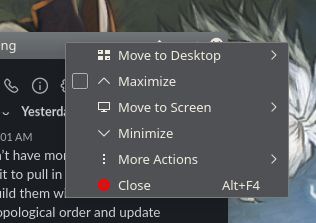
It has the same controls as other windows, the title bar can be right clicked on to bring up a menu of window controls, etc. This could be optional, as it is in Chrome, and Firefox, which can optionally have tabs separate from the titlebar.
Observed behavior
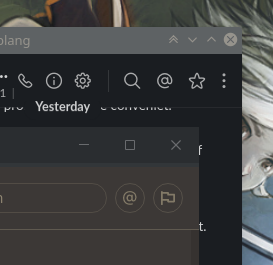
The application has a custom title bar, with a different set of controls (importantly, it is missing "pin to top", which I use a lot), and right clicking on the tile bar does nothing. Forcing system title-bars using the window manager causes mattermost to not resize correctly, and causes duplicate minimize/maximize/close buttons. There is no option to get the native title bar.
This comparison shows slack with native window boarders compared to mattermost with uncommon ones that look out of place.
The menu of useful stuff that I would expect when right clicking on a window boarder:
This is likely related to issues #1228 and #1225
Possible fixes
Ideally when setting up the main window it should check a preference before setting the window to frameless. The unconditional frame: false in mianWindow.js is causing this.
 BumblingCoder
All 20 comments
A ticket was opened here: https://mattermost.atlassian.net/browse/MM-23196.
 amyblais
on 11 Mar 2020
amyblais
on 11 Mar 2020
My main issue with this is that I have a configuration on my KDE desktop to push the topmost window to the back of the window stack and this is not possible when the app suppresses the native window title bar. Also, maximize sideways or vertical won't work.
(Not to mention the inhrent ugliness of the Windows design it implements)
 heckert-epost
on 23 Mar 2020
heckert-epost
on 23 Mar 2020
This new design also severely breaks my workflow on a Linux desktop, as any Alt shortcut keys used to move around do not work with the new window design. Please add the functionality to use the native OS window management again.
 tmakgit
on 30 Mar 2020
tmakgit
on 30 Mar 2020
Is it possible to hide or disable the new tab bar/menu bar completely?
 donnex
on 2 Apr 2020
donnex
on 2 Apr 2020
As a workaround I managed to define a dedicated rule for my window manger to override Mattermost requesting a title-less window and force it to have a proper titlebar...
mattermost_titlebar.kwinrule
[Mattermost title fixer]
Description=Mattermost title fixer
clientmachine=localhost
clientmachinematch=0
noborder=false
noborderrule=6
title=ignored
titlematch=0
types=1
wmclass=mattermost mattermost
wmclasscomplete=true
wmclassmatch=1
The current design also does not respect window title bar min/max/close button layout under Ubuntu 18.04 LTS. Where all other windows have these buttons on the left hand side on my system, Mattermost places them on the right.
 advancingu
on 6 Apr 2020
advancingu
on 6 Apr 2020
I use tiling window manager. always disable WM min/max/close button, Use shortcut keys to control windows
Don`t need min/max/close button. but this application carries its own window management buttons
How to disable the built-in min/max/close button?

 a-wing
on 8 Apr 2020
a-wing
on 8 Apr 2020
I am also affected. I'm not sure why such a destructive change would be made. It is never a good idea for an application to render its own window controls. Thought we'd collectively moved on from 2001.
 suwalski
on 20 Apr 2020
suwalski
on 20 Apr 2020
This is a significant problem for me, under my preferred Linux window manager I am unable to even move or resize the mm client window. Please revert this change.
 smoti17
on 30 Apr 2020
smoti17
on 30 Apr 2020
Yeah, this win10 style top bar makes app window behave weirdly when i try to move it around with keyboard hotkeys. I think it should use os native window design and functionality.
 danilkhromov
on 12 May 2020
danilkhromov
on 12 May 2020
Here https://mattermost.atlassian.net/browse/MM-22751#icft=MM-22751, it is stated that "this will require a bit of work including a bunch of testing", but I think you could already make a lot of people happy by introducing an option 'Use system titlebar'.
In fact, I used the workaround from @heckert-epost and now my window looks like this (KDE Neon User Edition 5.18).

This essentially fixed all of my problems, but now I am left with two 'close' buttons etc. So maybe it would be a good idea to introduce the option 'Use system titlebar' and if it is true, do not request a frameless window and do not draw the three buttons, which should result in something like this

and if it is false, just proceed as normal to obtain the usual output

I did not yet go through all the code, but to me this sounds like a rather small change, but of course I could be missing something.
 hep-mh
on 12 May 2020
hep-mh
on 12 May 2020
How about an option for using the system titlebar, _and_ don't show the silly tab-bar when there is only one connection, as is probably the case with the vast majority of users.
suwalski
on 12 May 2020
How about an option for using the system titlebar, _and_ don't show the silly tab-bar when there is only one connection, as is probably the case with the vast majority of users.
YES! Please do this. Not having the system titlebar has broken my normal workflow of having my chat windows visible on all my workspaces. Also, I have no desire to see the tabs when I only have a single server I'm connected to (which will always be the case for me). Give me that vertical space back!
 knackjason
on 5 Jun 2020
knackjason
on 5 Jun 2020
For those following this thread we have a PR open to respect the native OS window bar on systems that aren't Win10: https://github.com/mattermost/desktop/pull/1322
Thanks for the feedback!
 esethna
on 10 Jun 2020
esethna
on 10 Jun 2020
I've also opened a ticket to investigate how we can remove the tab bar for OS's using the native window frame to regain the vertical space: https://mattermost.atlassian.net/browse/MM-25961
esethna
on 10 Jun 2020
@knackjason @suwalski, if we hid the server tab bar if there was only one server connected, how would you expect to access the menu items (file, edit, view etc)? Would it be expected to reintroduce a menu bar row below the native OS window frame? If so, wouldn't that consume a similar amount of vertical real estate as the current tab bar?

esethna
on 11 Jun 2020
The tab-bar is still twice as tall as the menu bar that was there.
The only items in there of any use are "Settings" and "Sign in to another server". These are the kinds of things that normally go into the Application Menu:
https://developer.gnome.org/ApplicationMenu/
Chrome and Firefox, for example, have options in there to open a new window and switch windows. Mattermost has the option there to open a new window, but it doesn't seem to do anything.
Of course, if you go to that link, you'll see they are starting to deprecate it. The replacement, of having a secondary menu that gets rendered in the title bar, most likely isn't going to be compatible with Electron yet. Frankly, it will be just as broken to implement as the custom title bar magic that this issue is about. So it's not an easy answer.
If it were strictly up to me, I'd pull a Firefox and hide the menu until Alt is pressed, with a menu option to not hide the menu bar. But I realize this is probably a lot more work.
A possible alternative might be to have the dot-dot-dot button floating over the content in the top-left corner. Obviously, it would be present if the tab-bar was showing because there were two or more connections.
On a related but separate UX observation, it is less than ideal that there is the dot-dot-dot menu and 5cm away is the "hamburger" menu. Logically, these would be a single menu and none of this would be an issue. In the world of Electron apps, I imagine this would be done by adding items to the hamburger menu when running under Electron, and doing postMessage() to the wrapper to launch the settings or sign-in page.
Another possible alternative might be a context menu? The right mouse button doesn't currently do anything in most of the UI. The keyboard "menu" key also doesn't bring anything up. It could conceivably bring up a floating menu.
Oh, the fun of intersecting a web app with the desktop...
suwalski
on 12 Jun 2020
Appreciate the feedback @suwalski! We're investigating options
esethna
on 17 Jun 2020
@knackjason @suwalski, if we hid the server tab bar if there was only one server connected, how would you expect to access the menu items (file, edit, view etc)?
Have you considered moving / merging them into the hamburger menu? Or have both menu buttons side-by-side if somebody is still of the belief that they both make good sense.
 skewty
on 17 Aug 2020
skewty
on 17 Aug 2020
Have you considered moving / merging them into the hamburger menu? Or have both menu buttons side-by-side if somebody is still of the belief that they both make good sense.
I think the issue is that the blue-area hamburger menu is rendered in HTML from the server, while the tabs are the local electron application.
That said, it should be possible for electron to send a signal through Javascript, making it possible to open the menu from a native widget.
suwalski
on 17 Aug 2020
Related issues
 echosa
·
6Comments
echosa
·
6Comments
 jasonblais
·
5Comments
jasonblais
·
5Comments
 attzonko
·
5Comments
attzonko
·
5Comments
 DanShockley
·
6Comments
DanShockley
·
6Comments
 lip-d
·
6Comments
lip-d
·
6Comments
Most helpful comment
How about an option for using the system titlebar, _and_ don't show the silly tab-bar when there is only one connection, as is probably the case with the vast majority of users.