Desktop: Application hides behind the taskbar upon minimize to maximize with a left window taskbar
I confirm (by marking "x" in the [ ] below: [x]):
- [x] This is not a troubleshooting question. Troubleshooting questions go here: http://www.mattermost.org/troubleshoot/.
- [x] This doesn't reproduce on web browsers (such as in Chrome). If it does, issue reports go to the Mattermost Server repository.
- [x] I have read contributing guidelines.
Summary
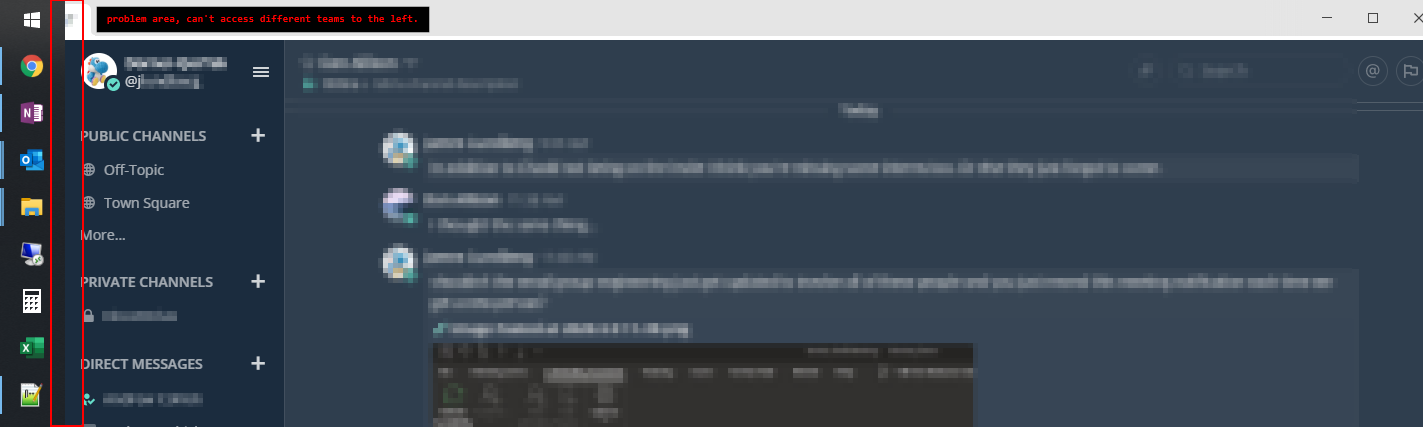
Features get hidden behind a left mounted windows task bar.
Environment
- Operating System:
Windows 10 Pro - Mattermost Desktop App version: X.X.X
4.4.0 - Mattermost Server version: X.X.X
5.16.2
Steps to reproduce
Set the task bar to be docked on the left side of your window with windows 10 and proceed to minimize and re-expand the mattermost window.
Expected behavior
Align the window to the task bar and not behind it.
Observed behavior
Application settings are hidden behind the taskbar.
Possible fixes
 Jeffreyjelly
All 11 comments
hello @Jeffreyjelly thanks for ther report!
i'm trying to reproduce but I'm sure I'm doing something wrong
can you record a video/gif on how do you get it to happen? I'd like to make sure I'm not confusing any steps.
 Willyfrog
on 9 Mar 2020
Willyfrog
on 9 Mar 2020

Jeffreyjelly
on 9 Mar 2020
If that's not enough to recreate the problem let me know.
Jeffreyjelly
on 9 Mar 2020
looks to be also related to #1225
Jeffreyjelly
on 9 Mar 2020
Ticket created here: https://mattermost.atlassian.net/browse/MM-23195.
 amyblais
on 11 Mar 2020
amyblais
on 11 Mar 2020
This is now fixed in v4.4.1 dot release,
amyblais
on 22 Apr 2020
This same problem is happening with a left aligned taskbar in windows.
(two monitor setup)
Minimize on the non-main display and it reopens on the main monitor display (seems to have forgotten location) while being hidden behind the taskbar
Mattermost Version: 5.16.2
Database Schema Version: 5.16.0
Database: mysql
Jeffreyjelly
on 12 Jun 2020
Our supported server versions include v5.19 and later versions. Would you be open to upgrading to see if it helps with the issue? Also, are you currently on desktop app v4.4.1?
amyblais
on 12 Jun 2020
I'm on 4.4.0 for the desktop app, I'll try and see if I can push for some updates
Jeffreyjelly
on 12 Jun 2020
The latest version of the desktop app can be dowloaded here https://mattermost.com/download/#mattermostApps.
amyblais
on 12 Jun 2020
4.4.2 fixed it. Thanks.
Jeffreyjelly
on 12 Jun 2020
Related issues
 jasonblais
·
5Comments
jasonblais
·
6Comments
jasonblais
·
5Comments
jasonblais
·
6Comments
 nerfologist
·
7Comments
nerfologist
·
7Comments
 JtheBAB
·
5Comments
jasonblais
·
6Comments
JtheBAB
·
5Comments
jasonblais
·
6Comments