Desktop: Getting build errors ( "Could NOT find LIBCLOUDPROVIDERS" )
Following This Guys Build Procedure HERE
Everything including (cmake,openssl,QT,MinQW,Zlib,QtKeychain,Git,Visual Studios) Has been Installed as well as pkgconfig and the correct PATH hopefully have been placed.
C:\Nextcloud\desktop\cmake>cmake -G "Visual Studio 15 2017 Win64" .. -DCMAKE_INSTALL_PREFIX=C:\Nextcloud\desktop\build -DQTKEYCHAIN_INCLUDE_DIR=C:\qtkeychain-master\qtkeychain-master -DZLIB_LIBRARY=C:\zlib\lib -DZLIB_INCLUDE_DIR=C:\zlib\  -DCMAKE_BUILD_TYPE=Debug -DNO_SHIBBOLETH=1
-- Build of crashreporter disabled.
5adbc01ef138efd252c5c8c340f57dae0b34d8b9
-- GIT_SHA1 5adbc01ef138efd252c5c8c340f57dae0b34d8b9
Compiling without shibboleth
-- Could NOT find INOTIFY (missing: INOTIFY_INCLUDE_DIR INOTIFY_LIBRARY_DIR)
-- Could NOT find Sphinx (missing: SPHINX_EXECUTABLE)
-- Could NOT find PdfLatex (missing: PDFLATEX_EXECUTABLE)
-- Found ZLIB: C:\zlib\lib
-- Could NOT find GLib2 (missing: GLib2_LIBRARY GLib2_INCLUDE_DIR)
================> LIBCLOUDPROVIDERS_LIBRARY-NOTFOUND
-- Could NOT find LIBCLOUDPROVIDERS (missing: LIBCLOUDPROVIDERS_INCLUDE_DIR LIBCLOUDPROVIDERS_LIBRARY)
CMake Error at C:/Qt/5.12.6/msvc2017/lib/cmake/Qt5/Qt5Config.cmake:28 (find_package):
  Could not find a package configuration file provided by
  "Qt5WebEngineWidgets" with any of the following names:

    Qt5WebEngineWidgetsConfig.cmake
    qt5webenginewidgets-config.cmake

  Add the installation prefix of "Qt5WebEngineWidgets" to CMAKE_PREFIX_PATH
  or set "Qt5WebEngineWidgets_DIR" to a directory containing one of the above
  files.  If "Qt5WebEngineWidgets" provides a separate development package or
  SDK, be sure it has been installed.
Call Stack (most recent call first):
  src/CMakeLists.txt:7 (find_package)


-- Configuring incomplete, errors occurred!
See also "C:/Nextcloud/desktop/cmake/CMakeFiles/CMakeOutput.log".
These are the Errors im getting someone please help
 larslight11
All 17 comments
Hi, thanks for trying to build it :tada: :)
Could NOT find LIBCLOUDPROVIDERS -> this is just a warning, it can be ignored.
Could not find a package configuration file provided by "Qt5WebEngineWidgets" -> now this is an error, you don't have $QT_PATH set and I also always add the same path in $PATH

Happy hacking!
 camilasan
on 2 Dec 2019
camilasan
on 2 Dec 2019
Hi thanks for the answer i added QT_PATH Already in my system variable and $path still getting the same error.
larslight11
on 2 Dec 2019
Did you restart the terminal? And did you add the same path to $PATH?
camilasan
on 2 Dec 2019
Hey @larslight11 Have you seen our build repo for the Windows client?
https://github.com/nextcloud/client-building/
This is how we create the daily builds and releases, maybe the script there can help you to get a clue if you compare them with your build instructions :)
 misch7
on 2 Dec 2019
misch7
on 2 Dec 2019
@camilasan yea i restarted the terminal and have added to $PATH as well , still getting errors.


Thanks @misch7 will look into that repo and hopefully successfully build the client
larslight11
on 3 Dec 2019
@larslight11 If the error is still:
CMake Error at C:/Qt/5.12.6/msvc2017/lib/cmake/Qt5/Qt5Config.cmake:28 (find_package):
  Could not find a package configuration file provided by
  "Qt5WebEngineWidgets" with any of the following names:

    Qt5WebEngineWidgetsConfig.cmake
    qt5webenginewidgets-config.cmake

  Add the installation prefix of "Qt5WebEngineWidgets" to CMAKE_PREFIX_PATH
  or set "Qt5WebEngineWidgets_DIR" to a directory containing one of the above
  files.  If "Qt5WebEngineWidgets" provides a separate development package or
  SDK, be sure it has been installed.
- Did you install Qt with the Qt Maintenance Tool?
- If so, did you also check the "Qt WebEngine" option?
Here is a screenshot of the components I selected, when I created the build instructions:
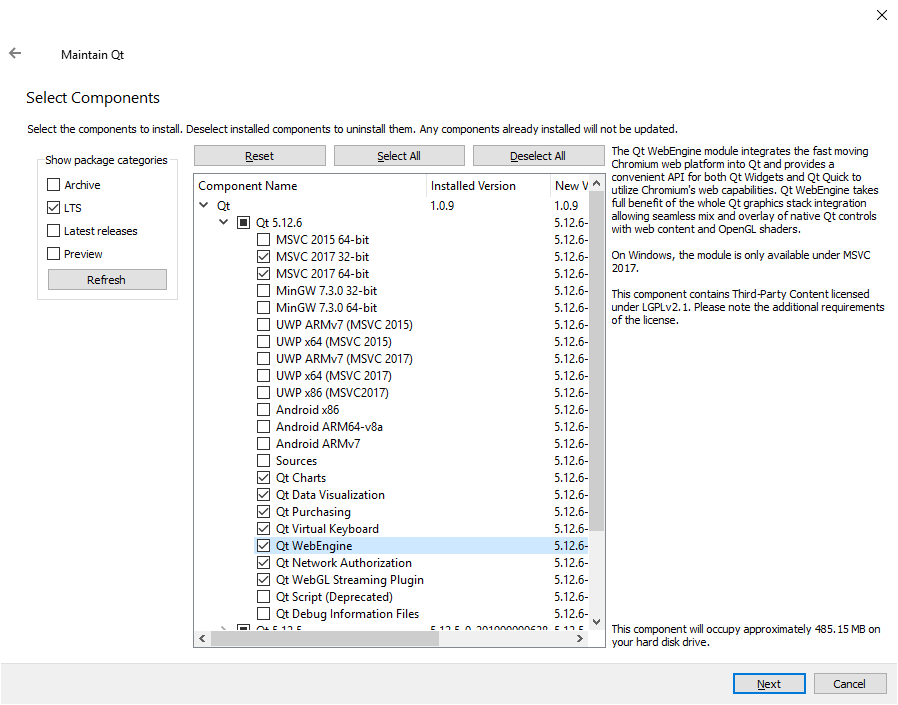
- MSVC 2017 for 64-bit and 32-bit building
- Qt WebEngine and more, but no deprecated stuff
- _Note:_ Did not select the Debug Symbols, just because of their size
misch7
on 3 Dec 2019
Ok i did not select that , let me install and try again thanks.
larslight11
on 3 Dec 2019
Now im getting this error
C:\Nextcloud\desktop\cmake>cmake -G "Visual Studio 15 2017 Win64" .. -DCMAKE_INSTALL_PREFIX=C:\Nextcloud\desktop\build -DQTKEYCHAIN_INCLUDE_DIR=C:\qtkeychain-master\qtkeychain-master -DZLIB_LIBRARY=C:\zlib\lib -DZLIB_INCLUDE_DIR=C:\zlib\ -DQT_PATH=   -DCMAKE_BUILD_TYPE=Debug -DNO_SHIBBOLETH=1
-- Build of crashreporter disabled.
5adbc01ef138efd252c5c8c340f57dae0b34d8b9
-- GIT_SHA1 5adbc01ef138efd252c5c8c340f57dae0b34d8b9
Compiling without shibboleth
-- Could NOT find INOTIFY (missing: INOTIFY_INCLUDE_DIR INOTIFY_LIBRARY_DIR)
-- Could NOT find Sphinx (missing: SPHINX_EXECUTABLE)
-- Could NOT find PdfLatex (missing: PDFLATEX_EXECUTABLE)
-- Could NOT find GLib2 (missing: GLib2_LIBRARY GLib2_INCLUDE_DIR)
================> LIBCLOUDPROVIDERS_LIBRARY-NOTFOUND
-- Could NOT find LIBCLOUDPROVIDERS (missing: LIBCLOUDPROVIDERS_INCLUDE_DIR LIBCLOUDPROVIDERS_LIBRARY)
CMake Error at C:/Program Files (x86)/Microsoft Visual Studio/2017/Community/Common7/IDE/CommonExtensions/Microsoft/CMake/CMake/share/cmake-3.12/Modules/FindPackageHandleStandardArgs.cmake:137 (message):
  Could NOT find Qt5Keychain (missing: QTKEYCHAIN_LIBRARY)
Call Stack (most recent call first):
  C:/Program Files (x86)/Microsoft Visual Studio/2017/Community/Common7/IDE/CommonExtensions/Microsoft/CMake/CMake/share/cmake-3.12/Modules/FindPackageHandleStandardArgs.cmake:378 (_FPHSA_FAILURE_MESSAGE)
  cmake/modules/FindQt5Keychain.cmake:47 (find_package_handle_standard_args)
  src/CMakeLists.txt:13 (find_package)


-- Configuring incomplete, errors occurred!
See also "C:/Nextcloud/desktop/cmake/CMakeFiles/CMakeOutput.log".
I really do appreciate your guys help as its my first c++ project :)
larslight11
on 3 Dec 2019
Now im getting this error
Could NOT find Qt5Keychain (missing: QTKEYCHAIN_LIBRARY)
CMake is unable to find the Qt Keychain library.
Taking a closer look at your command line, this parameter is missing (example):
-DQTKEYCHAIN_LIBRARY=C:\qtkeychain-master\lib\qt5keychain.lib
Note: You have to modify the path above to point to your qt5keychain.lib
If it then still fails:
-DQTKEYCHAIN_INCLUDE_DIR=C:\qtkeychain-master\qtkeychain-master
Are the QtKeychain includes really in
C:\qtkeychain-master\qtkeychain-master?Maybe it's in another :
\includedirectory somewhere in your (output) build path?
To get a better idea how to specify the correct library defines, take a look at this file in the _client-building_ repository:
_client-building/build-desktop.bat_
https://github.com/nextcloud/client-building/blob/80b53964fcfb44b48cb04d64bfcc9a72500d8c02/build-desktop.bat#L22-L31
_Lines 22 to 31:_
set QTKEYCHAIN_PATH=%PROJECT_PATH%/libs/%BUILD_TYPE%/qtkeychain/%%G
set OPENSSL_ROOT_DIR=%OPENSSL_PATH%/%%G
set ZLIB_PATH=%PROJECT_PATH%/libs/%BUILD_TYPE%/zlib/%%G

set QTKEYCHAIN_INCLUDE_DIR=!QTKEYCHAIN_PATH!/include/qt5keychain
set QTKEYCHAIN_LIBRARY=!QTKEYCHAIN_PATH!/lib/qt5keychain.lib
set OPENSSL_INCLUDE_DIR=!OPENSSL_ROOT_DIR!/include
set OPENSSL_LIBRARIES=!OPENSSL_ROOT_DIR!/lib
set ZLIB_INCLUDE_DIR=!ZLIB_PATH!/include
set ZLIB_LIBRARY=!ZLIB_PATH!/lib/zlib!DLL_SUFFIX!.lib
And in your first post, zlib seems to have been found:
-- Found ZLIB: C:\zlib\lib
But just in case you later run into more trouble with zlib or other missing paths:
-DZLIB_LIBRARY=C:\zlib\lib
-DZLIB_INCLUDE_DIR=C:\zlib\
-DQT_PATH=
zlib is likely to reside in these folders and for _LIBRARY you normally must specify a library file:
-DZLIB_LIBRARY=C:\zlib\lib\zlib.lib
-DZLIB_INCLUDE_DIR=C:\zlib\include
QT_PATH is not specified
I really do appreciate your guys help as its my first c++ project :)
Cool, happy coding! :)
misch7
on 3 Dec 2019
Ok will do thanks , the funny thing is it found my QTKEYCHAIN before i ran into errors , now it cant find it for some reason
larslight11
on 3 Dec 2019
Ok guys i had to rebuild my QTKEYCHAIN, so now its working. It built the BUILD files already in my cmake folder
now when i hit
cmake --build . --config Debug --target nextcloud
````

i get this
Done Building Project "C:Nextcloud\desktop\cmake\src\csync\ocsync.vcxproj" (default targets) -- FAILED.
Done Building Project "C:Nextcloud\desktop\cmake\src\libsyncnextcloudsync.vcxproj" (default targets) -- FAILED.
Done Building Project "C:Nextcloud\desktop\cmake\src\guinextcloud.vcxproj" (default targets) -- FAILED.
Build FAILED.
"C:Nextcloud\desktop\cmake\src\guinextcloud.vcxproj" (default target) (1) ->
"C:Nextcloud\desktop\cmake\src\libsyncnextcloudsync.vcxproj" (default target) (3) ->
"C:Nextcloud\desktop\cmake\src\csync\ocsync.vcxproj" (default target) (4) ->
(ClCompile target) ->
c:nextcloud\desktop\src\common\filesystembase.cpp(32): fatal error C1083: Cannot open include file: 'zlib.h': No suc
h file or directory [C:Nextcloud\desktop\cmake\src\csync\ocsync.vcxproj]
0 Warning(s)
1 Error(s)
Time Elapsed 00:00:48.81
```
I have added Zlib already in my PATH

larslight11
on 3 Dec 2019
Look at my previous comment above, regarding:
-DZLIB_INCLUDE_DIR=C:\zlib\include
You need to specify it either via define like above or add it manually in the VS project settings in the include search path. I'd recommend to do it via define, like in our build scripts.
misch7
on 3 Dec 2019
Ok Thanks that worked , i had the wrong path defined . Now im getting this error
Qt5Cored.lib(Qt5Cored.dll) : fatal error LNK1112: module machine type 'x86' conflicts with target machine type 'x64' [C
:\Nextcloud\desktop\cmake\src\csync\ocsync.vcxproj]
Done Building Project "C:\Nextcloud\desktop\cmake\src\csync\ocsync.vcxproj" (default targets) -- FAILED.

Done Building Project "C:\Nextcloud\desktop\cmake\src\libsync\nextcloudsync.vcxproj" (default targets) -- FAILED.

Done Building Project "C:\Nextcloud\desktop\cmake\src\gui\nextcloud.vcxproj" (default targets) -- FAILED.


Build FAILED.

"C:\Nextcloud\desktop\cmake\src\gui\nextcloud.vcxproj" (default target) (1) ->
"C:\Nextcloud\desktop\cmake\src\libsync\nextcloudsync.vcxproj" (default target) (3) ->
"C:\Nextcloud\desktop\cmake\src\csync\ocsync.vcxproj" (default target) (4) ->
(Link target) ->
  Qt5Cored.lib(Qt5Cored.dll) : fatal error LNK1112: module machine type 'x86' conflicts with target machine type 'x64'
[C:\Nextcloud\desktop\cmake\src\csync\ocsync.vcxproj]

    0 Warning(s)
    1 Error(s)

Time Elapsed 00:00:02.89
Ok Thanks that worked , i had the wrong path defined . Now im getting this error
Qt5Cored.lib(Qt5Cored.dll) : fatal error LNK1112:
  module machine type 'x86' conflicts with target machine type 'x64'
You're mixing 32-bit libraries (and so DLL's) with your 64-bit build.
I'd guess the reason is, you're having the wrong Qt bin-dir in your path:
C:/Qt/5.12.6/msvc2017/bin
You must use the 64-bit directory instead: msvc2017_64/bin
misch7
on 3 Dec 2019
Have set the correct variable already still getting the same error

larslight11
on 3 Dec 2019
Have set the correct variable already still getting the same error
Did you create all CMake targets with?:
cmake -G "Visual Studio 15 2017 Win64" ..
You can also check the library path in the project settings of Visual Studio.
misch7
on 3 Dec 2019
Did you create all CMake targets with?:
cmake -G "Visual Studio 15 2017 Win64" ..
sorry was working on another project but the only thing i built was the qtkeychain with this command
cmake .. -DCMAKE_PREFIX_PATH=%QTDIR%\lib\cmake
the %QTDIR% was set to C:\Qt\5.11.1\msvc2017 because it wasnt building with the 64bit version so i had to set it to the 32bit
then the next thing i tried to build was the client itself with this command cmake -G "Visual Studio 15 2017 Win64" ..
also how can i check the library path in the project settings of visual studios?(still a noob on using visual studios as well)
larslight11
on 5 Dec 2019
Related issues
 andresantacruz
·
3Comments
andresantacruz
·
3Comments
 Linuxfabrik
·
3Comments
Linuxfabrik
·
3Comments
 AndreyNazarchuk
·
4Comments
AndreyNazarchuk
·
4Comments
 jospoortvliet
·
4Comments
jospoortvliet
·
4Comments
 Ich5003
·
3Comments
Ich5003
·
3Comments