Desktop: Seeing white screen after leaving desktop app on standby for a while
https://mattermost.atlassian.net/browse/MM-14166
Reported by customers, this issue is for tracking. QA has a related ticket to investigate: https://mattermost.atlassian.net/browse/MM-10408. Might be network related.
 amyblais
All 27 comments
I get it several times a day - I don't seem get it on Linux - error logs come up with this a lot:
Application: Mattermost 4.1.1
Platform: Windows_NT 6.1.7601 x64
Error: webContents 'crashed' event has been emitted
at WebContents.mainWindow.webContents.on (C:Users\d2\AppData\Local\mattermost\app-4.1.1\resources\app.asar\main_bundle.js:6159:11)
at emitTwo (events.js:130:20)
at WebContents.emit (events.js:213:7)
Toggling GPU acceleration didn't seem to do anything.
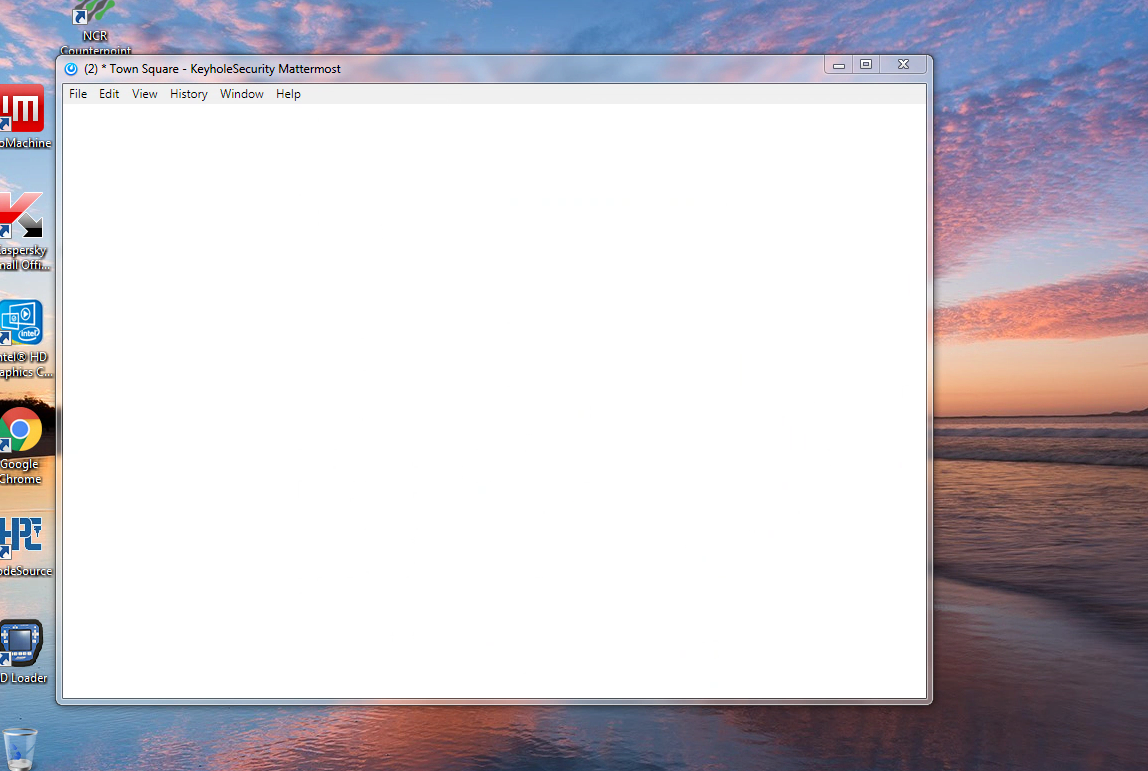
 colchuck
on 1 Jun 2018
colchuck
on 1 Jun 2018
Hi @colchuck! Thank you for reporting this. Do you see any errors in logs or the Console?
amyblais
on 1 Jun 2018
So I can't get to the Javascript console (CTRL SHIFT I) - it just turns the white screen to black. The logs (USER\AppData\Roaming\Mattermost\uncaughtException-*) just repeat the message from the last post over and over.

colchuck
on 4 Jun 2018
@colchuck - Thank you for additional information - a few more questions: does this happen randomly or are there any specific repro steps to take? Is it temporary and do any steps help resolve the issue (e.g. refreshing the app)?
amyblais
on 5 Jun 2018
It happens randomly - particularly when it hasn't been touched in a while - the only thing I can do is restart the App - going View->reload flashes the Mattermost splash logo and then goes back to blank. Closing the window but keeping it in the tray doesn't work - it just comes back blank - you have to completely exit out. I have 3 x64 Windows 7 machines - two with the exact same hardware and one with older hardware. All run as unprivileged users within a domain and all experience the same issue. For whatever reason, the older machine crashes maybe a couple time a week. The two newer ones that get much more use actually crash maybe 4 times a day. I have a fourth machine with older hardware and the same software that hasn't crashed at all.
colchuck
on 6 Jun 2018
@yuya-oc FYI ^ - reporter has error logs here: https://github.com/mattermost/desktop/issues/794#issuecomment-393919550 and toggling GPU setting didn't help.
Is there any other additional information we could help gather to investigate this?
amyblais
on 7 Jun 2018
The log Error: webContents 'crashed' event has been emitted was made by our event handler. So actually a process had been dead by some reason. To notice this via a dialog, we had added the event handler. But this prevents other behavior even if the internal chromium has countermeasure against to this kind of problem.
Now I worry about that we should not handle the crashed event. The test build which doesn't use the handler is below.
https://circleci.com/gh/yuya-oc/desktop/909#artifacts
If this doesn't make sense, we might need deep debugging of electron.
 yuya-oc
on 7 Jun 2018
yuya-oc
on 7 Jun 2018
Any updates on this issue? Been driving me crazy for last two versions and makes me reboot mattermost on a daily basis.
 Austin1
on 5 Sep 2018
Austin1
on 5 Sep 2018
I have the same issue every time I'm starting windows.
- windows 7
- mattermost client 4.1.2
 mickaelprogramming
on 6 Sep 2018
mickaelprogramming
on 6 Sep 2018
Yeah, I never got anywhere with it - my (newer) suspicion was that it was something to do with it being run as an unprivileged user - I installed it as a user on 3 Windows 7 Pro/X64 (domain environment) machines and all 3 ended up crashing randomly. The one machine that was an administrator didn't seem to have any issues - but it's also running virtualized... so that doesn't exactly narrow down possibilities. I was never able to pull anything valuable from the logs... I assumed it was an electron problem and it was a "just me" thing.
colchuck
on 12 Sep 2018
Just some random ideas: What GPU? Does your display go into power save/turn off after being idle for a while?
 torlenor
on 10 Oct 2018
torlenor
on 10 Oct 2018
I have seen a similar behaviour on my Linux Box (openSUSE 42.3) w/ KDE 3.5 as well. I am running my Linux with a Nvidia GT 610 and two attached displays configured using Nvidia's technique to have one screen with 3840x1080 pixels.
Behaviour:
Whenever Mattermost (official 4.1.2 release) had been idle for some time and I receive an incoming message the following happens:
- I get a blank (black) screen and the app is not even responding to "Quit"
- After approx. a minute or two the client recovers and shows the normal screen and can be used as if nothing had happened
The same version of mattermost-desktop on my mac book connected to the same private mattermost server does not expose this behaviour.
I have now turned off GPU acceleration to try figuring out any relations there.
 holle
on 5 Nov 2018
holle
on 5 Nov 2018
I'd like to propose you target this issue for the 4.3.0 milestone. We've been waiting a while for the many great fixes already incorporated into 4.2.0 and a Priority 2 issue such as this one shouldn't delay the 4.2.0 release (IMO).
 weekscharlie
on 27 Nov 2018
weekscharlie
on 27 Nov 2018
Jira ticket for tracking: https://mattermost.atlassian.net/browse/MM-14166
amyblais
on 13 Feb 2019
Is this still happening for folks in v4.2.0?
 esethna
on 27 Feb 2019
esethna
on 27 Feb 2019
Closing this as we cannot reproduce this anymore. Please report back if you still see this issue on v4.2.0.
amyblais
on 7 Jun 2019
Still seeing the issue in Version 4.2.1 (4.2.1.62)
Mac version 10.13.3 (High Sierra)
The issue happened at least 7 times within an hour and the issue happens to everyone in our team at the same time. Tried disabling the GPU acceleration and still didn't help.
The mac book was not in standby mode and it happened while replying to the message.
 ravening
on 20 Jun 2019
ravening
on 20 Jun 2019
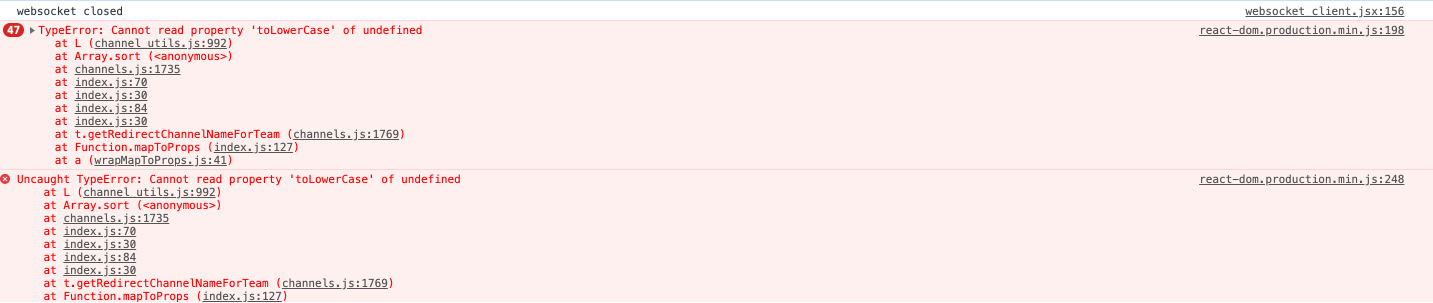
Hi @rakgenius, do you see any log or Console errors?
amyblais
on 20 Jun 2019
I have attached the screenshot.
ravening
on 21 Jun 2019
@rakgenius What Mattermost server version are you on?
amyblais
on 21 Aug 2019
@amyblais Sorry for the late response.. Im using the version Version 4.2.1 (4.2.1.62)
ravening
on 24 Aug 2019
@rakgenius You can find out your server version from Mattermost > Main Menu > About Mattermost.
amyblais
on 26 Aug 2019
Hello,
For information, I have the same problem with Desktop App version 4.3.1 (server version is "Mattermost Édition Team 5.16.3).
The log is:
Application: Mattermost 4.3.1
Platform: Windows_NT 10.0.17763 x64
Error: webContents 'crashed' event has been emitted
at WebContents.handleMainWindowWebContentsCrashed (C:Users\userName\AppData\Local\Programs\mattermost-desktop\resources\app.asar\main_bundle.js:887:9)
at WebContents.emit (events.js:194:13)
I noticed that simply maximize the window resolves the problem (the blank screen is replaced by the expected content).
Regards,
Laurent
 lredor
on 19 Nov 2019
lredor
on 19 Nov 2019
Same issue here, white screen after upgrading Windows desktop clients from 4.2.x to 4.3.1.
Only occurs when upgrading, not on clean installs of 4.3.1.Deleting appdata\roaming\mattermost solves the problem- Deleting the 3 cache folders in appdata\roaming\mattermost doesn't solve the problem
- Resizing the window or exiting, then opening Mattermost again fixes the problem
- Closing the window, then opening the window from the tray icon doesn't fix the problem
- Disabling GPU acceleration makes no difference
- Only happens when users first login, happens every time
- Console doesn't list any errors
uncaughtexception file
Application: Mattermost 4.3.1
Platform: Windows_NT 10.0.18362 x64
Error: webContents 'crashed' event has been emitted
    at WebContents.handleMainWindowWebContentsCrashed (C:\Program Files\Mattermost\Desktop\resources\app.asar\main_bundle.js:887:9)
    at WebContents.emit (events.js:194:13)
I believe this issue is not the same as the original post, but what @lredor is referring to
Looks like the fix is in 4.3.2: https://github.com/mattermost/desktop/commit/d23c8cf48a4c90b371919f2b367e232dd2c206f1
 ghost
on 22 Nov 2019
ghost
on 22 Nov 2019
Same issue. Had 4.2.1 for a very long time and no problem at all. Upgraded to 4.3.1 and after a restart of the PC I now have a white screen.
Maximizing the window solves the problem.
 T3rm1
on 25 Nov 2019
T3rm1
on 25 Nov 2019
Same issue. Had 4.2.1 for a very long time and no problem at all. Upgraded to 4.3.1 and after a restart of the PC I now have a white screen.
Maximizing the window solves the problem.
I can't believe that actually worked for me. Many thanks.
 alexei-ciobanu
on 2 Mar 2020
alexei-ciobanu
on 2 Mar 2020
Should be fixed in v4.3.2, and v4.4 is available now, are we okay to close this issue? cc// @amyblais
esethna
on 3 Mar 2020
Related issues
 maximd
·
4Comments
maximd
·
4Comments
 mcarthur-cpt
·
6Comments
mcarthur-cpt
·
6Comments
 nerfologist
·
7Comments
nerfologist
·
7Comments
 DanShockley
·
6Comments
DanShockley
·
6Comments
 fmp777
·
6Comments
fmp777
·
6Comments
Most helpful comment
Any updates on this issue? Been driving me crazy for last two versions and makes me reboot mattermost on a daily basis.