Desktop: Cannot login with mattermost v4 and u2f enabled
Summary
U2F auth fails because some files cannot be found.
Steps to reproduce
Login with u2f enabled, get greeted with the following:
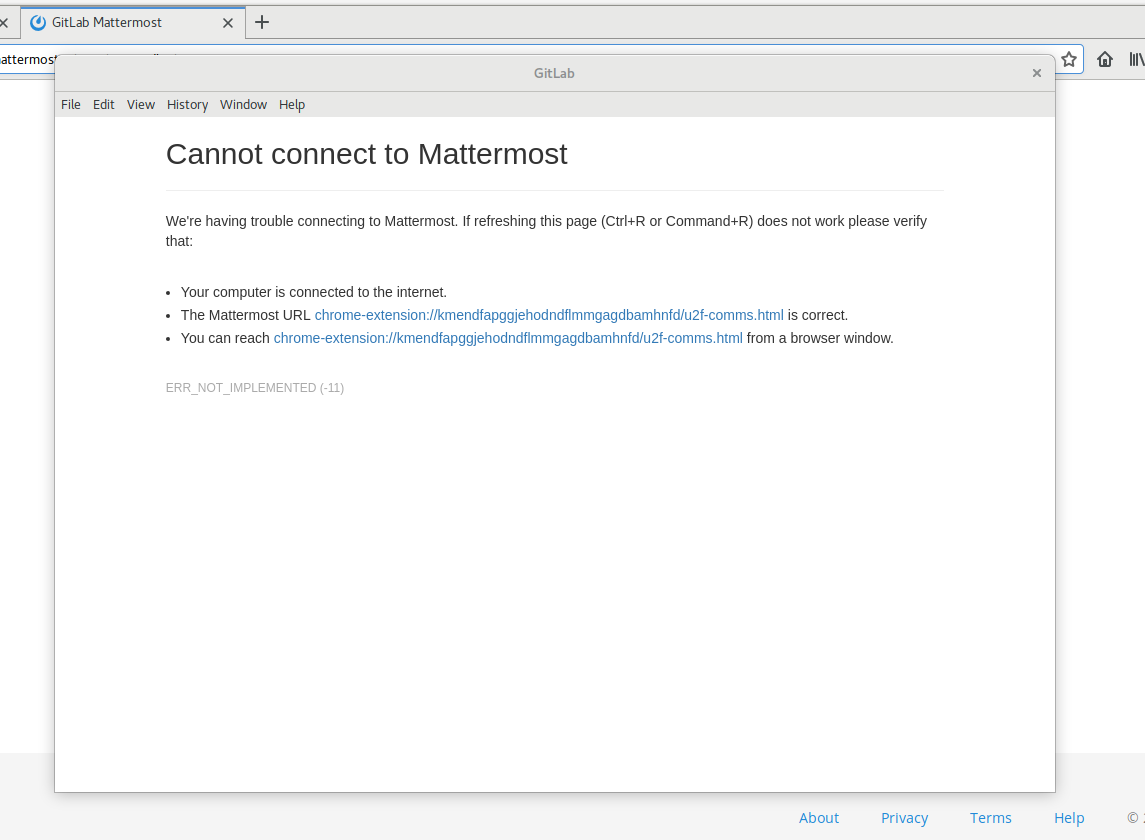
 apollo13
All 16 comments
@apollo13 Does this login method work on the browser, say Chrome?
 jasonblais
on 12 Feb 2018
jasonblais
on 12 Feb 2018
@jasonblais It did work at this point in the browser (I've since disabled it). If you look at the URL referenced in the screenshot it seems as if the binary misses the u2f-comms.html file?
apollo13
on 12 Feb 2018
@yuya-oc Did we ever support u2f? Mattermost doesn't officially support it.
@apollo13 Has this worked for you before, or was it the first time you tried the desktop app?
jasonblais
on 12 Feb 2018
@jasonblais It worked before in the sense that it realized that u2f wouldn't work and it did ask me for the OTP codes from Google authenticator IIRC.
EDIT:// Oh I understand your confusion now, I am logging in via OAUTH and Gitlab where I enabled u2f
apollo13
on 12 Feb 2018
U2F is not implemented in Electron. https://github.com/electron/electron/issues/3226
But recently it seems that Brave web browser adds it via Chromium extension. https://github.com/brave/browser-laptop/pull/10530 Possibly their approach might make sense.
 yuya-oc
on 12 Feb 2018
yuya-oc
on 12 Feb 2018
@apollo13 Does this block your or your team's work? I assume you have U2F requirement standard across your other apps and services?
jasonblais
on 13 Feb 2018
@jasonblais Yes, we have been evaluating U2F but did put the full deployment on hold for now. Note that the main issue here is not that U2F does not work (we'd appreciate if it would though) but rather that you cannot login at all.
apollo13
on 13 Feb 2018
Same problem here: With Mattermost Client 3.x, login via Gitlab and 2FA at Gitlab did work (not with the hardware token, but with keys), now I receive the same ERR_NOT_IMPLEMENTED as in the screenshot.
Android App (Beta) is working fine.
 antondollmaier
on 27 Feb 2018
antondollmaier
on 27 Feb 2018
I could login to gitlab.com with 2FA (6-digit pin code) on v4.0.0. (For now I have no Mattermost instance that login via GitLab is enabled. So I added the gitlab url as a server to the app.)
@antondollmaier Would you explain more about your problem? In my understanding, "hardware token" means U2F device. So "keys" seems to mean pin code of authenticator apps, but I could use it in gitlab.com with v4.0.0 app.
yuya-oc
on 28 Feb 2018
In my understanding, "hardware token" means U2F device.
Correct.
So "keys" seems to mean pin code of authenticator apps, but I could use it in gitlab.com with v4.0.0 app.
U2F Devices allow to login via U2F javascript API, or alternatively (if device is lost or unavailable) via regular authenticator PIN code. Yubikeys generate that PIN/token on request as well, so there's no need to touch the actual recovery keys generated during 2FA setup process.
When using mattermost-desktop 4.0.0, the following happens:
- "Mattermost" login is displayed. Choose "Sign in with [Gitlab]"
- Gitlab login page is displayed. Sign in with username and password.
- now, 2FA device would be requested or the PIN/token is entered after choosing "Sign in with token"
- instead, for a split second, the 2FA form is displayed, but that is replaced immediately by the error message from first screenshot ("ERR_NOT_IMPLEMENTED (-11)", "You can reach chrome-extension:/..../u2f-comms.html from a browser window")
- the actual page seems to be still active in the background, as after ~10 seconds a redirect back to the Gitlab login page happens.
See Gitlab documentation as well: https://docs.gitlab.com/ee/user/profile/account/two_factor_authentication.html#logging-in-with-2fa-enabled
mattermost-desktop 3.7.1 allows the login process without issues, although the U2F device is not usable (which is fine, as login via PIN/token is working as expected)
As I personally have no experience with chromium/electron, I can only suspect that electron has a issue with the U2F communications code. 3.7.1 did work fine, so something changed here with the update to 4.0.0.
antondollmaier
on 28 Feb 2018
I can confirm the bug. 2FA code screen is not popping up anymore if you have a U2F device configured. As stated, instead appears the error page. I think something change in the mattermost electron code on how to deal with the redirection sent by gitlab to enter the 2FA code when U2F is not supported by the browser. It was working on 3.7.x.
Delete the U2F device in Gitlab, and everything working again (without hardware token of course).
 eburghar
on 12 Mar 2018
eburghar
on 12 Mar 2018
Exactly the same problem than @antondollmaier (thanks btw for the detailed reporting).
I'm fine too with falling back to app 2FA.
 toch
on 12 Mar 2018
toch
on 12 Mar 2018
Adding two other reports of potentially related certificate issues
https://pre-release.mattermost.com/core/pl/4jmwur5fr3no9j1nhg6ntgyfzr
https://pre-release.mattermost.com/core/pl/fyfek1upt7g83jxbh4hfwimf9y
cc: @yuya-oc
jasonblais
on 16 Mar 2018
@jasonblais They are different from this issue.
Just I got my Yubikey, so now I can know what is actually happening. After the error, GitLab correctly falls back to PIN code 2FA at background renderer. So we should ignore the error in the error handler.
Unfortunately Brave browser's approach looks like its own extension mechanism (they are using the fork of Electron). So we can't support U2F devices for now, but the original problem would be solved by ignoring the error.
yuya-oc
on 16 Mar 2018
I created a PR for this. Wondering if you could test the latest build with your 2FA flow.
https://circleci.com/gh/yuya-oc/desktop/680#artifacts
yuya-oc
on 16 Mar 2018
Closed via #733
jasonblais
on 26 Mar 2018
Related issues
jasonblais
·
5Comments
 lip-d
·
6Comments
lip-d
·
6Comments
 mcarthur-cpt
·
6Comments
mcarthur-cpt
·
6Comments
 gitfizicist
·
5Comments
gitfizicist
·
5Comments
 NeroBurner
·
4Comments
NeroBurner
·
4Comments
Most helpful comment
Correct.
U2F Devices allow to login via U2F javascript API, or alternatively (if device is lost or unavailable) via regular authenticator PIN code. Yubikeys generate that PIN/token on request as well, so there's no need to touch the actual recovery keys generated during 2FA setup process.
When using mattermost-desktop 4.0.0, the following happens:
See Gitlab documentation as well: https://docs.gitlab.com/ee/user/profile/account/two_factor_authentication.html#logging-in-with-2fa-enabled
mattermost-desktop 3.7.1 allows the login process without issues, although the U2F device is not usable (which is fine, as login via PIN/token is working as expected)
As I personally have no experience with chromium/electron, I can only suspect that electron has a issue with the U2F communications code. 3.7.1 did work fine, so something changed here with the update to 4.0.0.