Depthai: Problem with `face-detection-retail-0004` with openvino_2020.1.023
I would like to use the latest OpenVino, but I have a problem running the face-detection-retail-0004 example. I'm following this tutorial and using this script. I can see the video capture from the camera and the script doesn't report errors, but the inference does't work. When I print out print(str(e['label']) + " " + str(e['conf'])) I get constant values:
1.0 0.04296875
1.0 0.04296875
1.0 0.04296875
1.0 0.04296875
1.0 0.04296875
.
.
.
Can I somehow debug further, or should I just switch to the older OpenVINO release?
 mariusz-r
All 24 comments
Hi @mariusz-r ,
You can run the latest OpenVINO. I’ve been meaning to update this article.
Let me circle back later today with instructions. But in brief, you can use our mdk-10-15 build OpenVINO 2020.1 to convert the model from Intel’s model zoo and then just change the single line in depthai.py to use this .blob instead of what’s default in depthai.py.
 Luxonis-Brandon
on 9 Apr 2020
Luxonis-Brandon
on 9 Apr 2020
So @mariusz-r ,
Here's what I did to quickly get the face detection running.
Also, I didn't checkout any special branch, just master, and then modified depthai.py, this line:
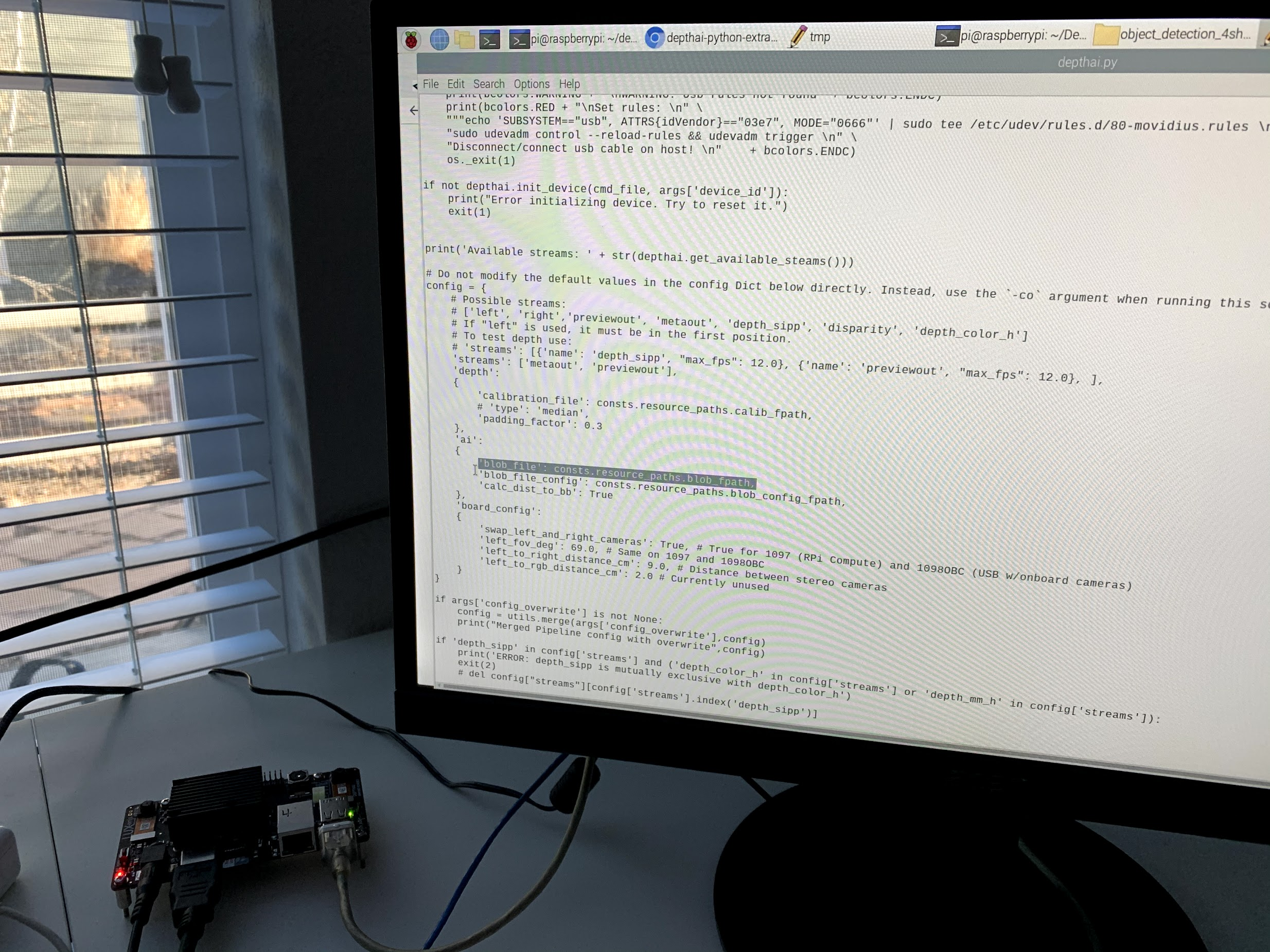
Changed this to:
/home/pi/Desktop/depthai-python-extras/resources/nn/object_detection_4shave/face-detection-retail-0004.blob
As below:
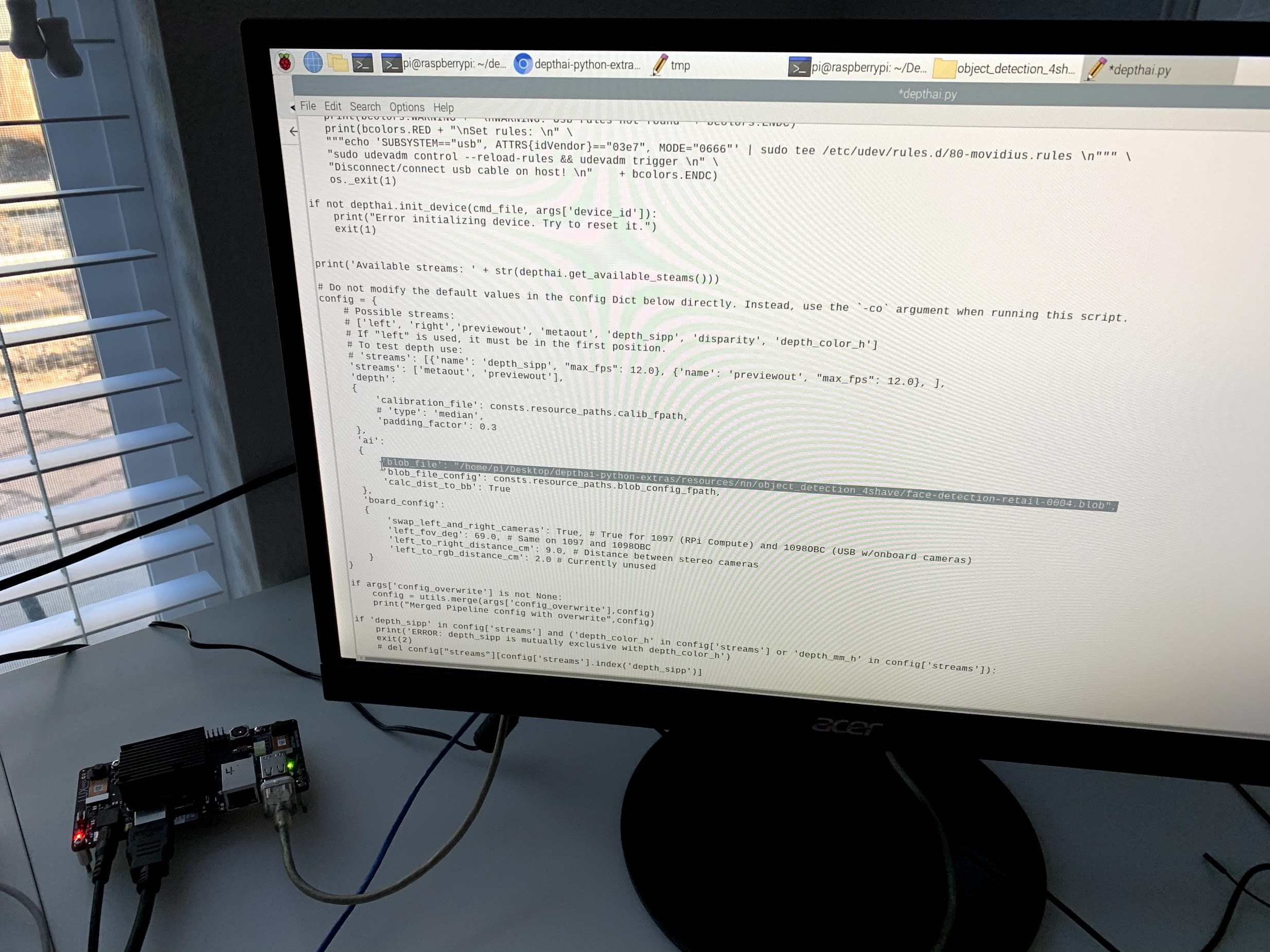
Notice I didn't change the path to where the class names are, so it says 'aeroplane' over my face instead of 'face'. You can change that as you desire. The first class in the path that I left it pointed to is 'aeroplane'. If you change this path (or just change the class in the existing file) than you can properly get the face display.
Sorry about the messy examples. We need to clean them up. Will do so this week.
Thanks,
Brandon
Luxonis-Brandon
on 9 Apr 2020
(Also I'll go through that tutorial today and update it... I meant to do that last week and got distracted. Sorry about potentially some burned time here.)
Luxonis-Brandon
on 9 Apr 2020
Okay, now face detection is working for me. I still however get #33 from time to time. Yesterday I've switched to a unused USB host on my laptop and it seemed to go away. Today however it still occurs after some time. I hear a slight change in the high-pitched sound from the camera and then after a second I start seeing the error.
mariusz-r
on 9 Apr 2020
Thanks for the quick confirmation.
So on issue #33 . Which DepthAI Edition do you have? We've found that some hosts have trouble with USB3 + long cables (2 meter). Others, no problem at all and run for days (tested well over 3 days on some).
So unfortunately we discovered this after we shipped with long USB3 cables (2 meter cables).
So if you have a shorter USB3 cable, this will very likely make the problem disappear. On hosts that exhibit the problem, using a 1 meter cable instead also makes the problem go away completely.
And as a side-note, Ubuntu 16.04 has an independent USB3 issue. On new machines only though, and we think this has to do w/ Ubuntu 16.04 being EOLed prior to these new machines having hit the market.
Thoughts?
Thanks,
Brandon
Luxonis-Brandon
on 9 Apr 2020
Also what host are you using @mariusz-r ?
Luxonis-Brandon
on 9 Apr 2020
And if you don't mind trying it out, we do have an experimental version which digs through through the trenches of the USB PHY which does improve performance on longer cables with the hosts we've found to exhibit this problem.
If you don't mind doing trying this out:
git pull
git checkout https://github.com/luxonis/depthai-python-extras/tree/usb3_stability_phy
https://github.com/luxonis/depthai-python-extras/tree/usb3_stability_phy
Luxonis-Brandon
on 10 Apr 2020
Also updated this comment with more detail in case someone else stumbles upon this and wants to give more data:
https://github.com/luxonis/depthai-python-extras/issues/33
Luxonis-Brandon
on 10 Apr 2020
Thank you @Luxonis-Brandon. I have Linux Mint 19.2 Tina installed natively on a E7450 laptop and yes, I have the long USB 3.0 cable. So far the only thing that seems to help is disconnecting other USB devices (I had for example 7-port USB 3.0 hub connected). I'll try the experimental version and then a shorter cable.
mariusz-r
on 10 Apr 2020
Awesome thanks for the details and help @mariusz-r !
Luxonis-Brandon
on 10 Apr 2020
Okay, I've made some tests. Overall it seems that on usb3_stability_phy the
issue is worse. I see it regardless of the USB cable length, or USB
devices connected to my laptop. The only difference is that previously
the script was exiting, but now the watchdog triggers and tries to reconnect.
I've also switched to another power supply, as the high-pitched noise was
coming from it, but for usb3_stability_phy still no difference.
Now the most stable configuration is master, with this other power supply
and no other USB devices connected. I think I'll stick with this configuration for now.
mariusz-r
on 10 Apr 2020
Thanks @mariusz-r . Very interesting on the power supply. Sounds like that definitely could have been an issue.
So I'm not familiar with Linux Mint. Did you build the API from source for it, or were you able to use the Ubuntu binaries?
And what Ubuntu version does Linux Mint most closely correspond to? We haven't tested at all on Linux Mint, so there could be some driver thing here similar to Ubuntu 16.04 that we saw.
Luxonis-Brandon
on 10 Apr 2020
Another thing to note is that if you don't need USB3 speeds, you could also just plug into a USB2 port (if you have one) or use a USB2 cable (also if you have one).
For troublesome hosts, we've found this to completely eliminate the problem - assuming USB2 speeds are sufficient for your use-case.
Also thanks for the note on the whine from the power supply. We're in the US and the power supplies don't whine here - but we just pinged @szabi-luxonis who is in the EU and indeed it whines for him too.
We'll see about switching to a different power supply that doesn't behave like this.
Luxonis-Brandon
on 10 Apr 2020
Hello @mariusz-r
On the latest master branch you can try :
python3 test.py --force_usb2
to force usb2.0 connection.
 szabi-luxonis
on 10 Apr 2020
szabi-luxonis
on 10 Apr 2020
And so @mariusz-r are you needing USB3 speeds for anything? It's seeming USB3 on Linux variants is a bit of a minefield. Ubuntu 18.04 and Raspbian on Pi 4 seems pretty stable to us now with USB3, but 16.04 is having issues, and then other Linux variants we're not sure as we haven't tried.
So using the -force_usb2 (or -fusb2 for short) should stabilize this for you even with other devices plugged in/etc. if you don't need USB3 speeds.
Thoughts?
Thanks,
Brandon
Luxonis-Brandon
on 10 Apr 2020
Also @mariusz-r could you post a picture of the PSU that had issues? Is it a US-plug variant? If so we have new international variants which we now send to non-US customers. Would like to send this to you to see if it makes a difference.
Luxonis-Brandon
on 11 Apr 2020
Hello @Luxonis-Brandon . Some answers below:
So I'm not familiar with Linux Mint. Did you build the API from source for it, or were you able to use the Ubuntu binaries?
depthai-python-extras I'm installing from source using pip3 install --user -e .. The rest are *.debs from 'original' system APT sources
And what Ubuntu version does Linux Mint most closely correspond to? We haven't tested at all on Linux Mint, so there could be some driver thing here similar to Ubuntu 16.04 that we saw.
I guess roughly 18.04. Uname returns #97-Ubuntu SMP
For troublesome hosts, we've found this to completely eliminate the problem - assuming USB2 speeds are sufficient for your use-case.
Yeah, good suggestion. I don't think speed is a concern for now.
On the latest master branch you can try :
python3 test.py --force_usb2
to force usb2.0 connection.
I've tested it and yes, there is a difference. It works stable even with other USB devices connected (like the USB HUB I've mentioned earlier).
Connecting via HUB however still reproduces the issue.
Also @mariusz-r could you post a picture of the PSU that had issues? Is it a US-plug variant? If so we have new international variants which we now send to non-US customers. Would like to send this to you to see if it makes a difference.
I'll send it to your email.
mariusz-r
on 13 Apr 2020
Thanks for all the details @mariusz-r . So one thing I'm really curious about is whether the pre-compiled *.so is actually fully compatible with Linux Mint.
When you install with pip3 install --user -e on Linux Mint I'm guessing it must be pulling this .so here, which was actually compiled for Ubuntu 18.04 (as noted here).
So there exists a possibility that the libraries/etc. that that .so references aren't actually fully compatible on Linux Mint, but obviously close enough for stuff to still run, but perhaps not well.
So I'd be curious if you recompile the host-side API from source if things are more stable. Instructions for doing so are here:
https://github.com/luxonis/depthai-python-extras#python-modules
This is on my to-do list to install your Linux Mint on a spare Intel NUC I have (assuming it will install on that), but not sure when I'll be able to get to it (and if Linux Mint will even run on my NUC).
Thoughts?
Thanks,
Brandon
Luxonis-Brandon
on 13 Apr 2020
And FWIW, I did build DepthAI from scratch for Mac OS X, see here. I didn't do the submodule approach, but that's only a difference of the git submodule update --init and then slightly different paths.
Luxonis-Brandon
on 13 Apr 2020
So there exists a possibility that the libraries/etc. that that .so references aren't actually fully compatible on Linux Mint, but obviously close enough for stuff to still run, but perhaps not well.
If I run ldd on this library it doesn't report any broken dependencies, everything is probably okay. Still, I'll try to recompile and see.
mariusz-r
on 14 Apr 2020
This is on my to-do list to install your Linux Mint on a spare Intel NUC I have (assuming it will install on that), but not sure when I'll be able to get to it (and if Linux Mint will even run on my NUC).
I think it should work alright.
mariusz-r
on 14 Apr 2020
So I'd be curious if you recompile the host-side API from source if things are more stable.
I've recompiled and it seems to work the same. I'll stay with this config and see if there are differences after longer time of using it. The only thing I've noted so far is that when I press q to exit a script I get a segmentation fault.
mariusz-r
on 14 Apr 2020
@mariusz-r
face-detection-retail-0004.py is outdated, the latest is depthai.py, if you change blob file to /home/pi/Desktop/depthai-python-extras/resources/nn/object_detection_4shave/face-detection-retail-0004.blob it should behave the same.
Then run with python3 test.py, it will quit when pressing q. It will also recover if any unexpected SW error happens.
szabi-luxonis
on 14 Apr 2020
So @mariusz-r I just updated the OpenVINO face-detection post w/ current use of DepthAI.
https://docs.luxonis.com/tutorials/openvino_model_zoo_pretrained_model/
We'll probably be updating a bit more as we go forward, specifically to not have to select the neural .blob, the labels .txt, and the tensor format .json all independently. We're going to move the labels into the .json and have the .blob and the .json live in their own folders so you can just select the folder and the .blob and the .json (which now includes the labels) are used together.
@szabi-luxonis is implementing this change now.
Also closing this issue now but feel free to re-open it if there's anything more on this.
Luxonis-Brandon
on 15 Apr 2020
Related issues
 Zumbalamambo
·
10Comments
Luxonis-Brandon
·
4Comments
Zumbalamambo
·
10Comments
Luxonis-Brandon
·
4Comments
 luiscastro1995
·
4Comments
luiscastro1995
·
4Comments
 ConnorChristie
·
8Comments
luiscastro1995
·
6Comments
ConnorChristie
·
8Comments
luiscastro1995
·
6Comments
Most helpful comment
So @mariusz-r ,
Here's what I did to quickly get the face detection running.
Also, I didn't checkout any special branch, just master, and then modified depthai.py, this line:

Changed this to:
/home/pi/Desktop/depthai-python-extras/resources/nn/object_detection_4shave/face-detection-retail-0004.blobAs below:

Notice I didn't change the path to where the class names are, so it says 'aeroplane' over my face instead of 'face'. You can change that as you desire. The first class in the path that I left it pointed to is 'aeroplane'. If you change this path (or just change the class in the existing file) than you can properly get the face display.
Sorry about the messy examples. We need to clean them up. Will do so this week.
Thanks,
Brandon