Depthai: USB3 Doesn't Work with Raspberry Pi 4
Testing a slew of USB3 cables of various lengths between DepthAI: USB3 [Onboard Camera or FFC Camera] and a Raspberry Pi 4 results in hanging after Successfully initialized XLink! message.
With USB2 cables, it always works.
There is some code in XLink host-side that tries to match the USB port numbers before and after boot (the idea is to connect multiple devices to a host). This code is flawed for some non-standard connection schemes, like it seems to be on RPi4:
USB2 (boot) address: 1-1.1
USB3 (app) address: 2-1
(that code tries to match 1.1 with 1)
On my laptop the USB addresses look like:
USB2 (boot) address: 1-1
USB3 (app) address: 2-1
So the matching works
The failing code is here:
https://github.com/opencv/dldt/blob/2019_R3.1/inference-engine/thirdparty/movidius/XLink/pc/usb_boot.c#L321
We could implement a workaround (better place in XLink itself, but also possible in the host app code) to resolve this. Already tried hardcoding the expected port number, and depthai USB boot works fine
So when referring to the XLink SingleStream example, it looks like new API is used that no longer requires a mapping between USB port addresses (pre and post boot). Using this API in the host app will resolve our issue.
So it seems with this root cause (port-number matching), and the use of the new API (which doesn't do port-number matching, we should be good to solve this problem.
We will just need to switch to the new API and make sure it doesn't break anything else.
 Luxonis-Brandon
All 28 comments
Is there a hotfix? It seems I'm running into this with my RPI4
pi@raspberrypi:~/Desktop/depthai-python-extras $ python3 test.py
No calibration file. Using Calibration Defaults.
Using Arguments= {'config_overwrite': None, 'dev_debug': None}
depthai.__version__ == 0.0.10a
depthai.__dev_version__ == d7b45cbd36182ef417a2b7d01e1846c913e604b1
depthai: before xlink init;
Device Found name 1.1-ma2480
about to boot device with "cmd_file": /home/pi/Desktop/depthai-python-extras/depthai.cmd
Device was booted with "cmd_file"
XLink initialized.
Successfully initialized Xlink!
and then its stuck forever
 timonsku
on 7 Mar 2020
timonsku
on 7 Mar 2020
Hi @PTS93 ,
I think we should be able to get the hot fix out this coming week. (And sorry for the trouble here.)
In the meantime if you happen to have a USBC “charging cable” (which means it’s actually USB2) that will work for now with the Pi4 and DepthAI.
I’ll circle more after discussing with team on Monday (just left a note in slack to escalate getting this out as well).
Thoughts?
Thanks,
Brandon
Luxonis-Brandon
on 7 Mar 2020
Ah if its just that. I plugged it into the USB2 ports of the Pi and that works!
How much does that impact performance?
timonsku
on 7 Mar 2020
So it depends on the use-case. Probably 3 categories:
- Meta-data out (e.g. what object class is there, and where is it in physical space).
- Meta-data out plus a stream.
- All streams at max FPS. So this is 4x streams: color, left grayscale, right grayscale, and depth.
So use-cases 1 and 2 aren’t impacted by USB2/USB3. The ~30MB/s that USB2 is capable of is enough. So the performance is identical (or at least we haven’t been able to measure a difference).
The case where USB 3 could be valuable is if you’re wanting to just record as much data as possible - say for future training. For example, we are using DepthAI in this mode for some internal training work - where we want to record every stream at highest possible resolution and FPS - so as to have this later should it be valuable.
So in this case USB2 just can’t keep up, as all the streams at full FPS sum to well over 30MB/s limit of USB2 - so USB3 is useful there.
That said this is somewhat of a ‘corner-case’ use, as usually you just want meta-data and a stream or two - so that your host isn’t inundated with video data.
And for cases where you want all the streams over USB2, we did just (as of Friday) introduce the capability to specify lower framerate selectively for each stream - to make it all fit over USB2.
Thoughts?
Thanks,
Brandon
Luxonis-Brandon
on 7 Mar 2020
Great! Thanks for the detailed info. Thats totally fair and I don't think that this will pose an issue.
If I were to collect that much data I would certainly use a higher-end machine for that.
Right now the bug would be mostly a "why isn't this working" issue, so maybe a small note in the guide or troubleshooting page would be useful.
timonsku
on 7 Mar 2020
I may have been to quick. While I got an image when running the calibrate.py script, it instantly freezes and the console keep on printing this message. May be an unrelated issue though?
E: [global] [     91639] [python3] XLinkReadDataWithTimeOut:1468        /home/pi/Desktop/depthai/depthai-host/shared/3rdparty/dldt/inference-engine/thirdparty/movidius/XLink/shared/XLink.c:1468
         Assertion Failed: link != NULL
Device get data failed: 7
Agreed on your view on why it doesn’t work with usb3 on pi. I -think- we can fix it soon though.
So I think that one is another bug we’re tracing down.
First I want to double check, have you done a hit pull lately? We have improved a couple stability things recently.
So the known issue right now is that when we open multiple streams (a good example is for calibration), randomly those streams end up getting the same ID. We haven’t been able to trace how/why - and it’s pretty random. About maybe 1 in 20 times. And it crashes when this happens.
So a question on that:
Are you seeing this issue every time, or just every so often?
And does hitting the reset button for the myriad x make it work after ending the host program?
Thanks again, and sorry for the trouble!
Luxonis-Brandon
on 8 Mar 2020
It does happen every time. The calibration is the only one that gives me a picture. The test.py and the examples don't open up a window even.
Reset does not change the behaviour.
I did a git pull before starting to try stuff.
In the docs it says it expect openvino 2019 r2 but it comes pre-installed with r3, is that intentional and the docs are just older?
I also tested on a PI3 just to be sure but same behaviour.
timonsku
on 8 Mar 2020
Docs are just older.
So this is still on RPi4? Does RPi 4 have USB2 ports? Googling now... I was thinking all were USB3.
Luxonis-Brandon
on 8 Mar 2020
Oh ya it totally does have 2x USB2 ports. Will try to replicate this behavior on Monday. Don’t have pi4 with me...
Luxonis-Brandon
on 8 Mar 2020
Oh I missed the Pi3 comment. Very interesting. We’d definitely like to get to the bottom of this. Will circle back more on Monday.
Luxonis-Brandon
on 8 Mar 2020
Question:
On the Pi3, had you added the USB Rules per here?
https://docs.openvinotoolkit.org/latest/_docs_install_guides_installing_openvino_raspbian.html
Thanks,
Brandon
Luxonis-Brandon
on 8 Mar 2020
I just used the same SDcard for the Pi3, they keep Raspbian downwards compatible for a couple generations.
It does seem to connect, otherwise I wouldn't get that one freeze frame with the calibration.py
timonsku
on 8 Mar 2020
Got it. And good idea and agreed on the connection. Not sure what’s going on here yet.
Luxonis-Brandon
on 8 Mar 2020
Thinking more on this. Could you post a picture of what the setup of your device looks like?
I’m wondering if day one of the cameras isn’t getting properly connected and causing the crash.
We’re wanting to build in more diagnostics of such scenarios but we just haven’t had time to do so yet.
Luxonis-Brandon
on 8 Mar 2020
Sure this how it looks like
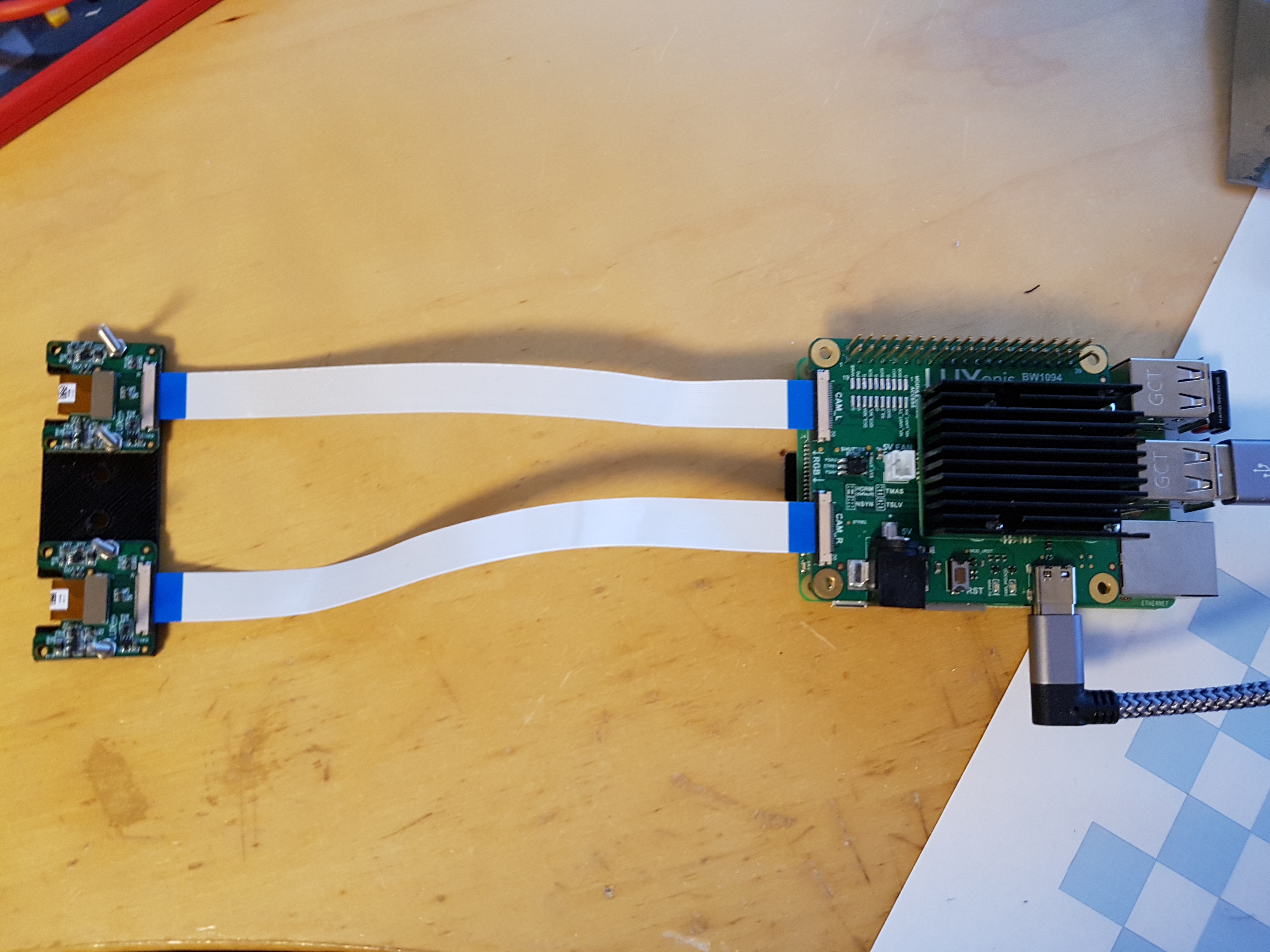
timonsku
on 8 Mar 2020
Thanks!
So we haven’t (to my knowledge) tested the codebase in a while without the color camera. And I don’t think this case is yet covered by our regression-testing scripts.
So the possibility exists that we’ve introduced something that makes the system crash if the color camera isn’t present.
We will test/debug on Monday.
In preparation, for your purposes are you looking for just depth? Or for neural inference in addition?
I ask because we haven’t yet attempted to get neural inference working off the grayscale cameras instead of the color camera.
Luxonis-Brandon
on 8 Mar 2020
Oh ok yes I also want to do interference on them. I was not aware that the color camera is needed for that. I have a Pi camera laying around and an adapter to 0.5mm pitch but it seems the color camera FFC uses a higher pin count?
timonsku
on 8 Mar 2020
Sorry about that - I only now realized that I didn’t make clear anywhere that the color camera (at least for the time being) is needed for inference.
Could you shoot me an email at Brandon at Luxonis dot com with your shipping address? Will get you taken care of.
Thanks,
Brandon
Luxonis-Brandon
on 8 Mar 2020
Oh and phone number as well if you’re not in the US (will be required for shipping).
Luxonis-Brandon
on 8 Mar 2020
Thanks Brandon thats a nice offer! I sent you a mail with the details.
timonsku
on 8 Mar 2020
Got it. Thanks for confirming here as it had actually gone to SPAM. So just fished it out from there and all looks good to get this shipped out this week. :-). Hopefully not too much trouble to remake the camera adapter you made for 3 cameras instead of 2.
Luxonis-Brandon
on 8 Mar 2020
Oh no worries that was like 10 minutes of Fusion 360. I can publish that fixture once tested, probably useful for others.
timonsku
on 8 Mar 2020
Awesome thanks and thanks!
Luxonis-Brandon
on 8 Mar 2020
@PTS93 - might doing a git pull from your local depthai-python-extras copy, then trying USB3 again? #43 seemed to have got things working for us in our test environment.
 itsderek23
on 9 Mar 2020
itsderek23
on 9 Mar 2020
So @itsderek23 - it seems that @PTS93 and I found a separate issue this weekend. And that is that the code hangs if the color camera is not connected. I just documented that here:
https://github.com/luxonis/depthai-python-extras/issues/44
@PTS93 - I'd love to know if this is the sort of hanging/stalling you are seeing (on USB2).
That said, testing USB3 would still be doable... just with the expectation that it should now hang on this separate issue, similar to what happens on USB2 above, instead of getting stuck first on the USB3 issue.
Thoughts?
Thanks,
Brandon
Luxonis-Brandon
on 9 Mar 2020
Yes on the fix_RPi4_USB3 branch it is working now with USB3!
timonsku
on 9 Mar 2020
Great! Closing this issue, which is specific to USB3 on the RPi4.
itsderek23
on 9 Mar 2020
Related issues
 wureka
·
8Comments
Luxonis-Brandon
·
4Comments
wureka
·
8Comments
Luxonis-Brandon
·
4Comments
 rychardeh
·
3Comments
rychardeh
·
3Comments
 marmalodak
·
5Comments
marmalodak
·
5Comments
 LucaBonfiglioli
·
7Comments
LucaBonfiglioli
·
7Comments