Deployer: How to put code into public_html folder and not into releases/{number} folder'
| Q | A
| ----------------- | ---
| Issue Type | Question
| Deployer Version | Deployer 6.1.0
| Local Machine OS | Zorin OS 12.3
| Remote Machine OS | Linux version 3.10.0-714.10.2.lve1.4.75.el7.x86_64 ([email protected]) (gcc version 4.8.5 20150623 (Red Hat 4.8.5-16) (GCC) ) #1 SMP Fri Nov 3 04:25:16 EDT 2017
Description
I want that my uploaded code replace public_html/ content on a shared hosting (preserving files in it).
Steps to reproduce
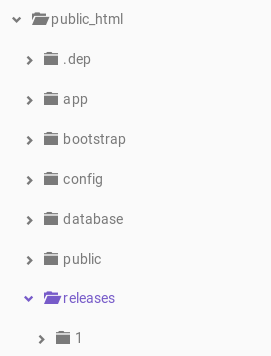
After uploading, the code is in public_html/releases/{number}
Content of deploy.php
<?php
namespace Deployer;

require 'recipe/laravel.php';

// Project name
set('application', 'oberts-server');

// Project repository
set('repository', '[email protected]:ebeducteam/oberts-server.git');

// [Optional] Allocate tty for git clone. Default value is false.
set('git_tty', true);

// Shared files/dirs between deploys
add('shared_files', []);
add('shared_dirs', []);

// Writable dirs by web server
set('writable_mode', 'chmod');
set('writable_chmod_mode', '0757');
// set('writable_use_sudo', false);
add('writable_dirs', []);

// Hosts

host('31.170.161.1')
    ->user('u351189323')
    ->port('65002')
    ->set('deploy_path', '~/public_html')
    ->set('http_user', 'apache');
// ->set('deploy_path', '~/{{application}}');

// Tasks

task('build', function () {
    run('cd {{release_path}} && build');
});

// [Optional] if deploy fails automatically unlock.
after('deploy:failed', 'deploy:unlock');

// Migrate database before symlink new release.

// before('deploy:symlink', 'artisan:migrate');

// after('deploy:update_code', 'artisan:migrate');

task('deploy', [
    'deploy:prepare',
    'deploy:lock',
    'deploy:release',
    'deploy:update_code',
    'deploy:shared',
    'deploy:vendors',
    'deploy:writable',
    // 'upload:env',
    // 'artisan:storage:link',
    'artisan:view:clear',
    'artisan:cache:clear',
    // 'artisan:config:cache',
    'artisan:optimize',
    // 'deploy:symlink',
    'deploy:unlock',
    'cleanup',
]);
Output
 andreshg112
All 5 comments
You should move your deploy_path folder outside public_html and make a symlink like this:
ln -s /your/deploy/path/current /path/to/public_html
Also probably you need create symlink to current/public subfolder instead of current
 vkryukov76
on 14 Mar 2018
vkryukov76
on 14 Mar 2018
@vkryukov76 Not working for me. 403 Forbidden error.
I tried 2 ways with no luck:
ln -s ~/myhost.ru/current/public ~/myhost.ru/public_html
ln -s ~/myhost.ru/releases/1/public ~/myhost.ru/public_html
@antonmedv Any ideas how to make Laravel work with public_html directory?
 Sogl
on 7 Aug 2018
Sogl
on 7 Aug 2018
You can do a symlink from public_html to current. Make sure what your web server configured to follow symlinks.
 antonmedv
on 7 Aug 2018
antonmedv
on 7 Aug 2018
Ok, I found a solution.
First, you need to delete current public_html folder.
Second, add symlik. For my case:
ln -s ~/myhost.ru/current/public ~/myhost.ru/public_html
And it works.
One small thing. I see storage folder here with path ~/myhost.ru/releases/1/storage/app/public
and it contains *.gitignore file only.
Why? In the original public there is no storage folder.
Sogl
on 7 Aug 2018
It's laravel's storage folder. For some files :)
antonmedv
on 7 Aug 2018
Related issues
 brunodevel
·
3Comments
brunodevel
·
3Comments
 khoanguyen96
·
5Comments
khoanguyen96
·
5Comments
 lsv
·
4Comments
lsv
·
4Comments
 flashios09
·
4Comments
flashios09
·
4Comments
 dima-stefantsov
·
5Comments
dima-stefantsov
·
5Comments
Most helpful comment
You should move your
deploy_pathfolder outsidepublic_htmland make a symlink like this:ln -s /your/deploy/path/current /path/to/public_htmlAlso probably you need create symlink to
current/publicsubfolder instead ofcurrent