Deoplete.nvim: g:deoplete_disable_auto_complete=1 does not disable autocomplete
Problems summary
I would like to disable the automatic popup menu when editing, but g:deoplete_disable_auto_complete=1 does not stop the popup menu from appearing.
Expected
When g:deoplete_disable_auto_complete=1 is set, the automatic popup menu should stop appearing.
Environment Information
deoplete version(SHA1): 165e693
OS: macOS
neovim/Vim
:versionoutput:NVIM v0.2.2 Build type: Release LuaJIT 2.0.5 Compilation: /usr/local/Homebrew/Library/Homebrew/shims/super/clang -Wconversion -U_FORTIFY_SOURCE -D_FORTIFY_SOURCE=1 -DNVIM_MSGPACK_HAS_FLOAT32 -DNVIM_UNIBI_HAS_VAR_FROM -DNDEBUG -DMIN_LOG_LEVEL=3 -Wall -Wextra -pedantic -Wno-unused-parameter -Wstrict-prototypes -std=gnu99 -Wimplicit-fallthrough -Wvla -fstack-protector-strong -fdiagnostics-color=auto -DINCLU DE_GENERATED_DECLARATIONS -I/tmp/neovim-20180209-92407-udkzoo/neovim-0.2.2/build/config -I/tmp/neovim-20180209-92407-udkzoo/neovim-0.2.2/src -I/usr/local/include -I/usr/local/includ e -I/usr/local/include -I/usr/local/include -I/usr/local/include -I/usr/local/include -I/usr/local/opt/gettext/include -I/usr/include -I/tmp/neovim-20180209-92407-udkzoo/neovim-0.2. 2/build/src/nvim/auto -I/tmp/neovim-20180209-92407-udkzoo/neovim-0.2.2/build/include Compiled by [email protected] Features: +acl +iconv +jemalloc +tui See ":help feature-compile" system vimrc file: "$VIM/sysinit.vim" fall-back for $VIM: "/usr/local/Cellar/neovim/0.2.2_1/share/nvim":checkhealthor:CheckHealthresult(neovim only):health#deoplete#check ======================================================================== ## deoplete.nvim - OK: has("nvim") was successful - OK: exists("v:t_list") was successful - OK: has("timers") was successful - OK: has("python3") was successful - INFO: If you're still having problems, try the following commands: $ export NVIM_PYTHON_LOG_FILE=/tmp/log $ export NVIM_PYTHON_LOG_LEVEL=DEBUG $ nvim $ cat /tmp/log_{PID} and then create an issue on github health#nvim#check ======================================================================== ## Configuration - OK: no issues found ## Performance - OK: Build type: Release ## Remote Plugins - OK: Up to date ## terminal - INFO: key_backspace (kbs) terminfo entry: key_backspace=^H - INFO: key_dc (kdch1) terminfo entry: key_dc=\E[3~ - INFO: $XTERM_VERSION='' - INFO: $VTE_VERSION='' - INFO: $SSH_TTY='' ## tmux - OK: escape-time: 0ms - INFO: $TERM: screen-256color health#provider#check ======================================================================== ## Clipboard (optional) - OK: Clipboard tool found: pbcopy ## Python 2 provider (optional) - WARNING: No Python interpreter was found with the neovim module. Using the first available for diagnostics. - WARNING: provider/pythonx: Could not load Python 2: /usr/local/bin/python2 does not have the "neovim" module. :help |provider-python| /usr/local/bin/python2.7 does not have the "neovim" module. :help |provider-python| python2.6 not found in search path or not executable. /usr/local/bin/python does not have the "neovim" module. :help |provider-python| - ERROR: Python provider error - ADVICE: - provider/pythonx: Could not load Python 2: /usr/local/bin/python2 does not have the "neovim" module. :help |provider-python| /usr/local/bin/python2.7 does not have the "neovim" module. :help |provider-python| python2.6 not found in search path or not executable. /usr/local/bin/python does not have the "neovim" module. :help |provider-python| - INFO: Executable: Not found ## Python 3 provider (optional) - INFO: `g:python3_host_prog` is not set. Searching for python3 in the environment. - INFO: Executable: /usr/local/bin/python3 - INFO: Python3 version: 3.6.5 - INFO: python3-neovim version: 0.2.6 - OK: Latest python3-neovim is installed: 0.2.6 ## Ruby provider (optional) - INFO: Ruby: ruby 2.5.1p57 (2018-03-29 revision 63029) [x86_64-darwin17] - WARNING: Missing "neovim" gem. - ADVICE: - Run in shell: gem install neovim - Is the gem bin directory in $PATH? Check `gem environment`. - If you are using rvm/rbenv/chruby, try "rehashing". ## Node provider (optional) - WARNING: `node` and `npm` must be in $PATH. - ADVICE: - Install Node.js and verify that `node` and `npm` commands work.
Provide a minimal init.vim/vimrc with less than 50 lines (Required!)
call plug#begin('~/.nvim/plugged')
Plug 'Shougo/deoplete.nvim', { 'do': ':UpdateRemotePlugins' }
let g:deoplete#enable_at_startup = 1
let g:deoplete_disable_auto_complete=1
call plug#end()
The reproduce ways from neovim/Vim starting (Required!)
- nvim -u ~/.nvim/.init.vim
Screen shot (if possible)
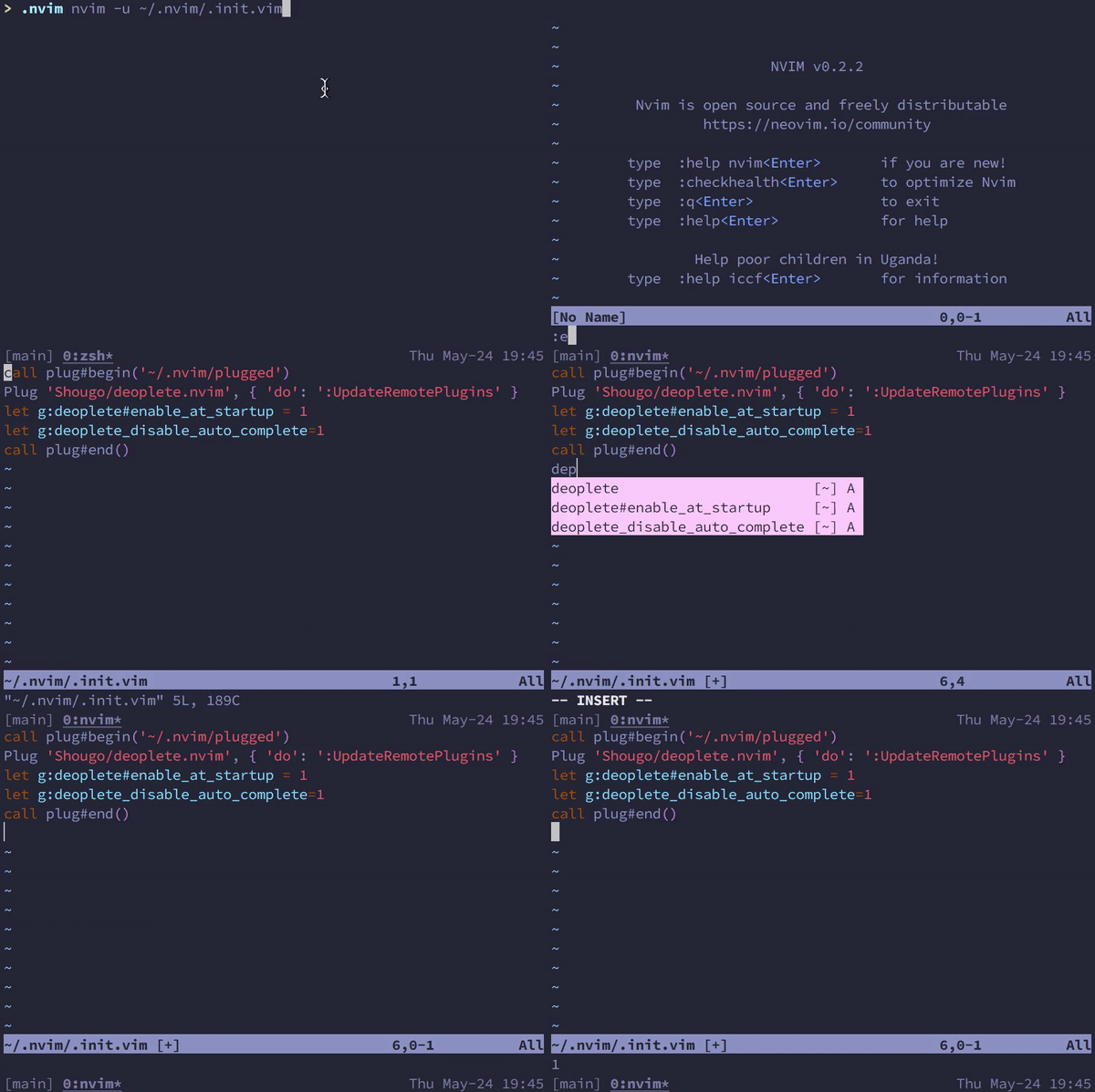
With a bare config and g:deoplete_disable_auto_complete=1 autocomplete still appears
invalid
 bokwoon95
>All comments
g:deoplete#disable_auto_complete is proper name.
But the variable is old.
call deoplete#custom#option('auto_complete', v:false)
is better.
 Shougo
on 31 May 2018
Shougo
on 31 May 2018
👍2
😄1
Was this page helpful?
0 / 5 - 0 ratings
Related issues
 nabn
·
16Comments
nabn
·
16Comments
 jonahx
·
55Comments
jonahx
·
55Comments
 josemarluedke
·
19Comments
josemarluedke
·
19Comments
 iio7
·
23Comments
iio7
·
23Comments
 magicalbanana
·
44Comments
magicalbanana
·
44Comments
Most helpful comment
g:deoplete#disable_auto_completeis proper name.But the variable is old.
is better.