Deoplete.nvim: deoplete screenshots
I want to add the screenshots in README.
If you have good screenshots for deoplete README, can you add it in this issue?
 Shougo
All 67 comments
Here are some screenshots of deoplete in action. Let me know if it is good enough.
File Name Completion

Omni Completion

Neosnippets and neco-ghc integration

 SageEx
on 10 Dec 2015
SageEx
on 10 Dec 2015
I recorded a gif of deoplete + echodoc: https://github.com/archSeer/nvim-elixir/blob/master/autocomplete.gif
 archseer
on 10 Dec 2015
archseer
on 10 Dec 2015
Thank you!
I have added the screenshots!
Shougo
on 11 Dec 2015
let me show you some dark color pic
 wsdjeg
on 11 Dec 2015
wsdjeg
on 11 Dec 2015
@Shougo Using PaperColor theme?
 pickfire
on 23 Jan 2016
pickfire
on 23 Jan 2016
@pickfire Yep, that's PaperColor.
SageEx
on 23 Jan 2016
If you want one for go.
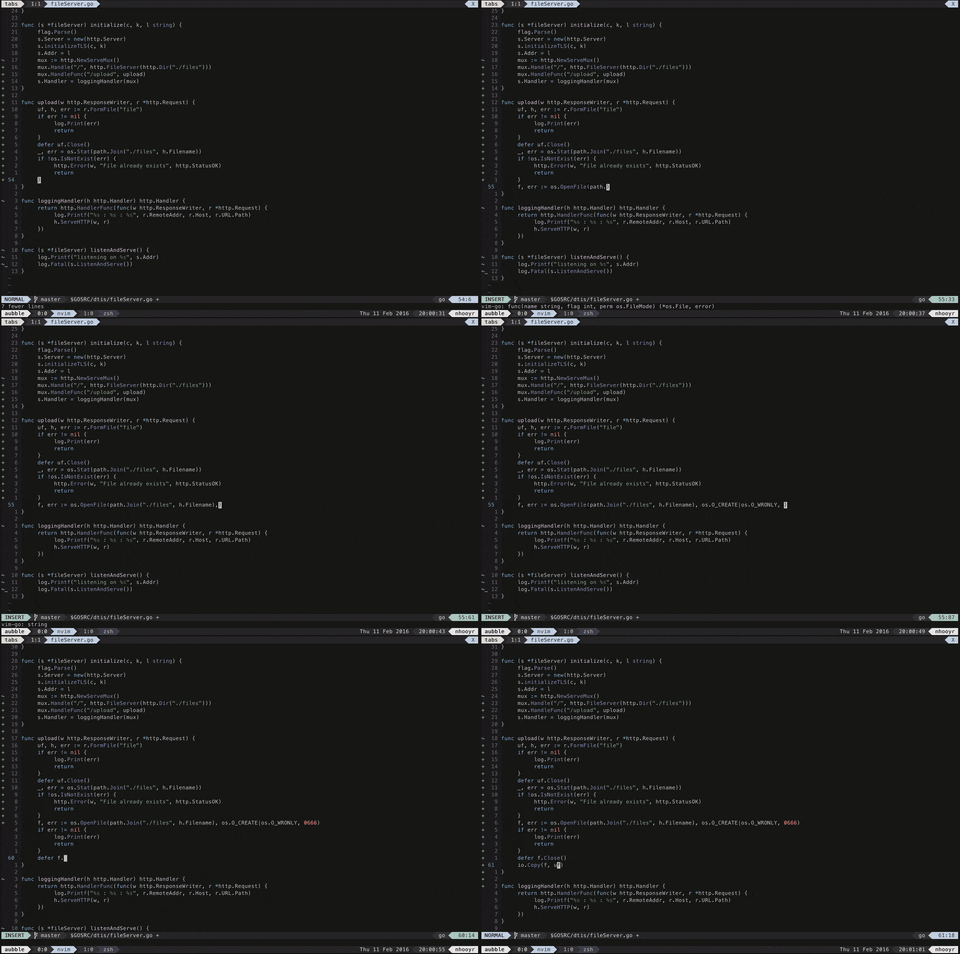
 nhooyr
on 12 Feb 2016
nhooyr
on 12 Feb 2016
Thanks. updated.
Shougo
on 13 Feb 2016
@SageEx what font are you using in those screenshots?
 myhonor16
on 1 Mar 2016
myhonor16
on 1 Mar 2016
@myhonor16 It's Fantasque Sans Mono.
On Wed, Mar 2, 2016 at 12:17 AM, Samuel [email protected] wrote:
@SageEx https://github.com/SageEx what font are you using in those
screenshots?—
Reply to this email directly or view it on GitHub
https://github.com/Shougo/deoplete.nvim/issues/96#issuecomment-190848711
.
SageEx
on 1 Mar 2016
@SageEx Thanks!
myhonor16
on 1 Mar 2016
Does it support c++? I don't see any screenshots of a c++ project.
 bjadamson
on 24 Jul 2016
bjadamson
on 24 Jul 2016
@bjadamson https://github.com/zchee/deoplete-clang
All you need to do for any language is find/create the sources. Deoplete can support anything
nhooyr
on 25 Jul 2016
python completion using deoplete-jedi:

 richox
on 6 Aug 2016
richox
on 6 Aug 2016
c++ completion using clang_complete:

richox
on 6 Aug 2016
java completion using vim-javacomplete2:

richox
on 6 Aug 2016
vimscript completion using neco-vim:

richox
on 7 Aug 2016
Thanks. I will update it later.
Shougo
on 10 Aug 2016
Thanks. I have updated it.
Shougo
on 12 Aug 2016
@nhooyr what colorscheme do you use?
 yevhen-m
on 29 Sep 2016
yevhen-m
on 29 Sep 2016
@yevhen-m https://github.com/nhooyr/elysian.vim
nhooyr
on 29 Sep 2016
@nhooyr thanks. Do you have this colorscheme set up for you terminal as well?
yevhen-m
on 29 Sep 2016
@yevhen-m yes, I use it in iTerm2.
nhooyr
on 29 Sep 2016
@nhooyr How can I set it up in iterm too?
yevhen-m
on 29 Sep 2016
@yevhen-m It isn't really intended for other people to use, at least yet.
If you still want to use it, you can just clone the repo and import elysian.itermcolors into iTerm2. Then install the vim colorscheme with a plugin manager and it should work.
nhooyr
on 29 Sep 2016
@archSeer Hate to be that guy but, do you remember the name of the colorscheme used in the GIF?
https://github.com/archSeer/nvim-elixir/blob/master/autocomplete.gif
 KCreate
on 28 Mar 2017
KCreate
on 28 Mar 2017
looks like a colorscheme just for elixir language 😄
wsdjeg
on 28 Mar 2017
@KCreate @wsdjeg it's just a base16 theme, base16-paraiso: https://chriskempson.github.io/base16/
A derivative of https://github.com/idleberg/atom-paraiso-dark
I've since stopped using it and switched to a custom theme
archseer
on 28 Mar 2017
@archSeer Thanks!
KCreate
on 28 Mar 2017
Can someone record a video demonstrating the benefits of new async-style sources?
 balta2ar
on 28 Apr 2017
balta2ar
on 28 Apr 2017
deoplete-jedi supports the new feature.
I have not the video though.
Shougo
on 28 Apr 2017
C# completion, omnisharp server submodule in repo without need for omnisharp.vim
- Auto starts server, and resurrects if you kill it/it dies.
- Doesn't send errors if server isn't ready yet.
https://github.com/cyansprite/deoplete-omnisharp

 cyansprite
on 6 Nov 2017
cyansprite
on 6 Nov 2017
Thanks.
Shougo
on 7 Nov 2017
Register/Extract list completions

cyansprite
on 11 Nov 2017
I have updated it.
Shougo
on 15 Nov 2017
I really don't understand how you've got Go or TS completion while I'm only able to have Python working. Should I remove vim-go for example ?
 metal3d
on 24 Nov 2017
metal3d
on 24 Nov 2017
Forget my question... I found deoplete-go, and so on... I was surprised to not have to install "plugins" for that. Sorry :)
metal3d
on 24 Nov 2017
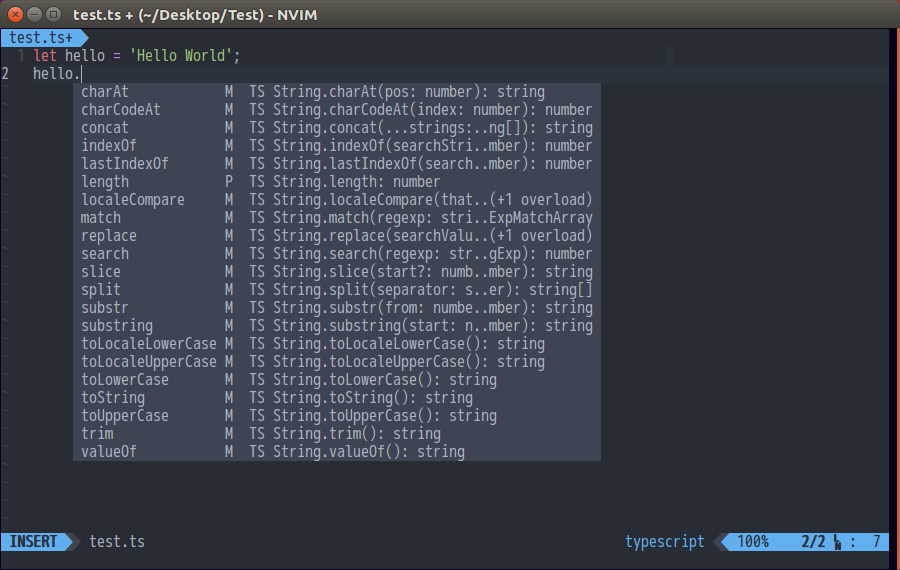
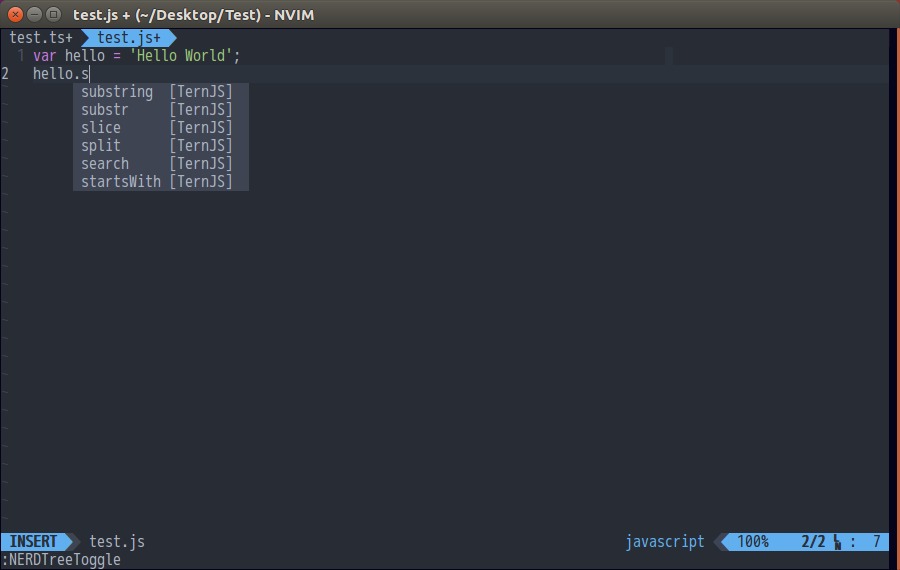
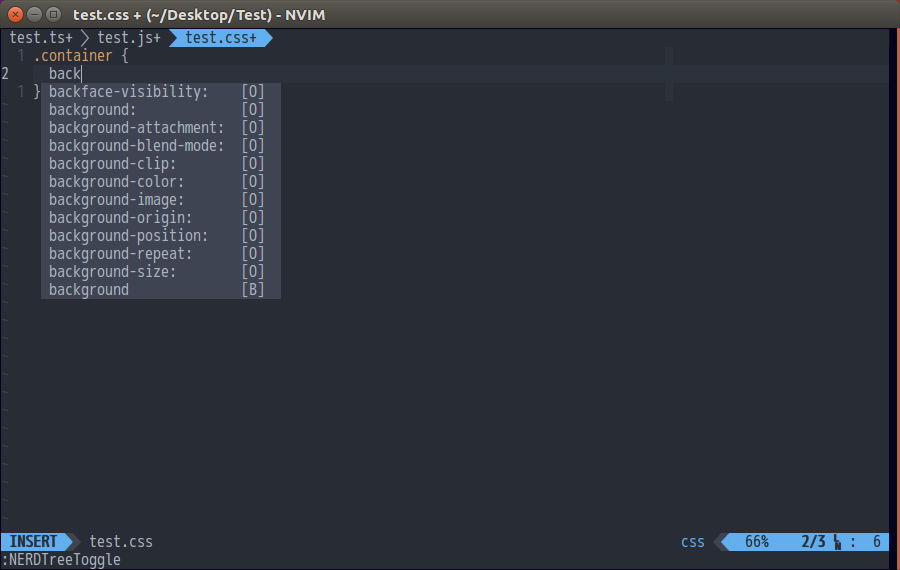
I have some to contribute too :smile:
Typescript
Javascript
Css, scss, sass
Html
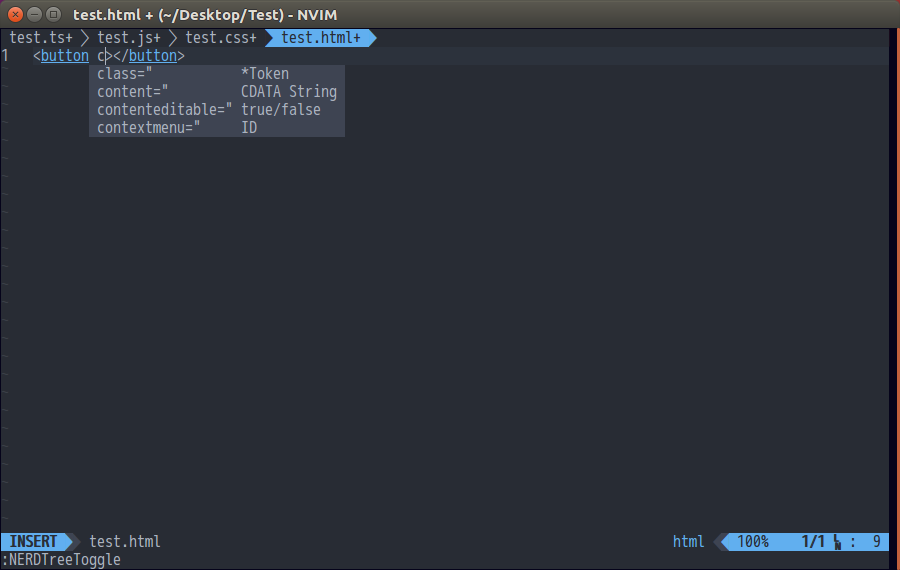
My custom snippets
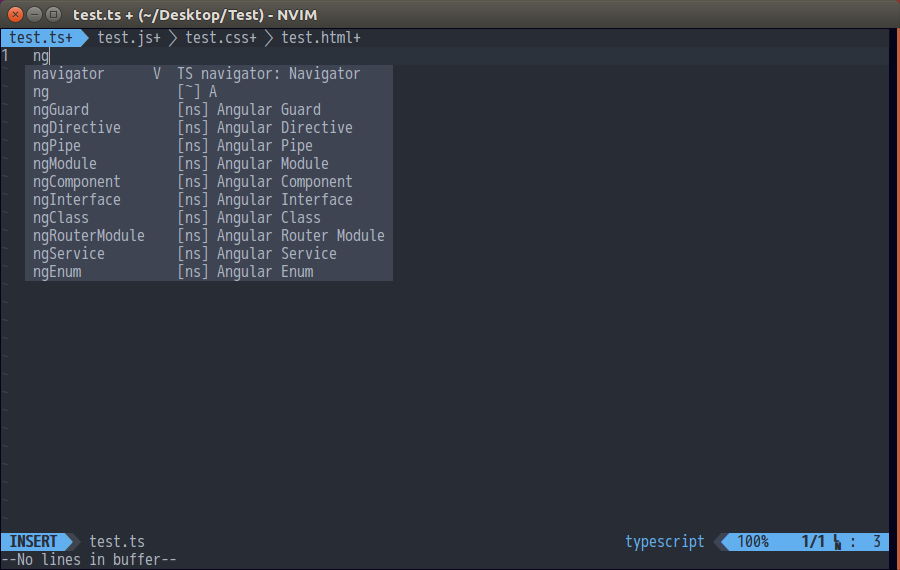
Hope it helped :smile:
 kyoz
on 22 Feb 2018
kyoz
on 22 Feb 2018
Updated.
Shougo
on 22 Feb 2018
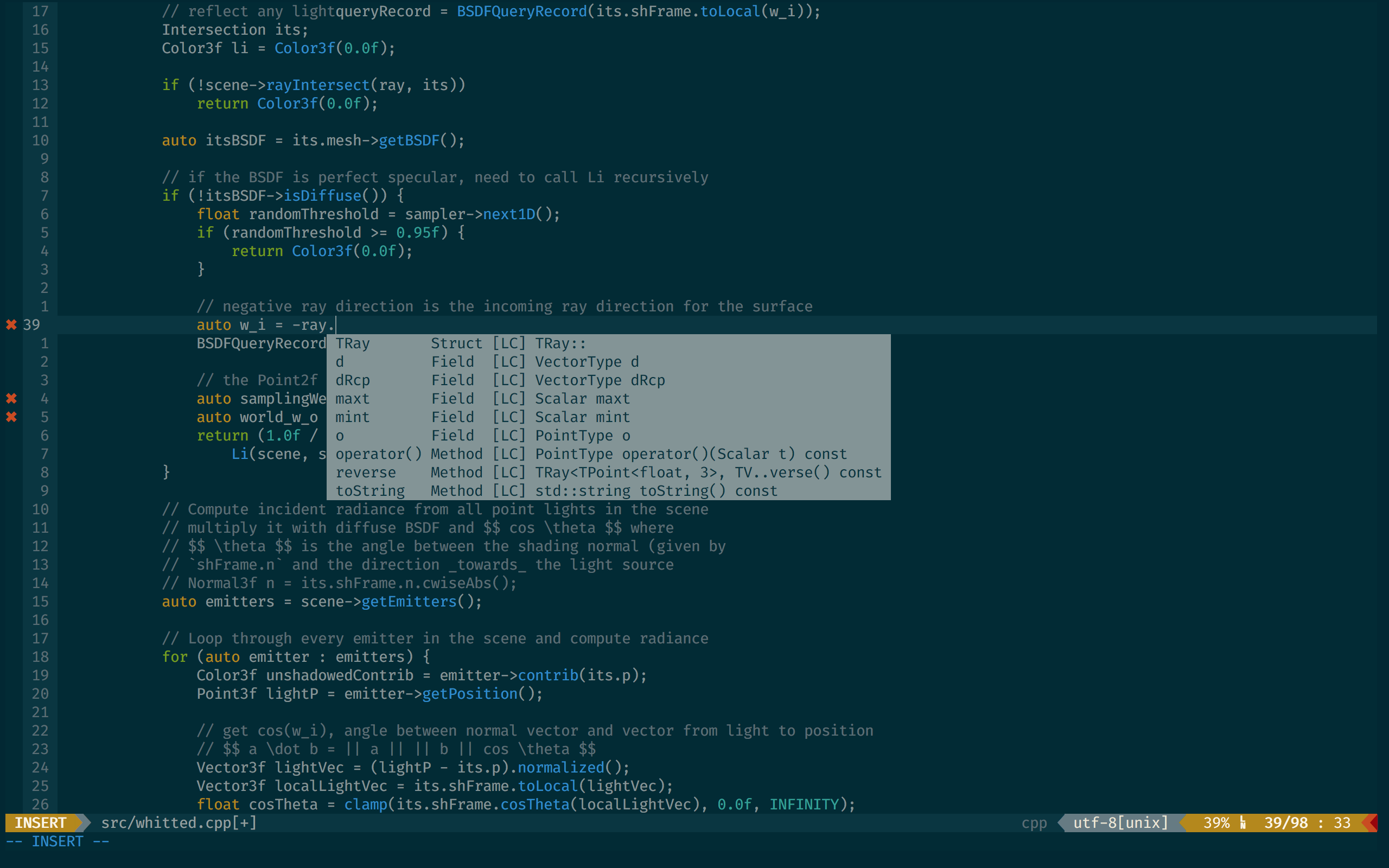
C++ with cquery lang server
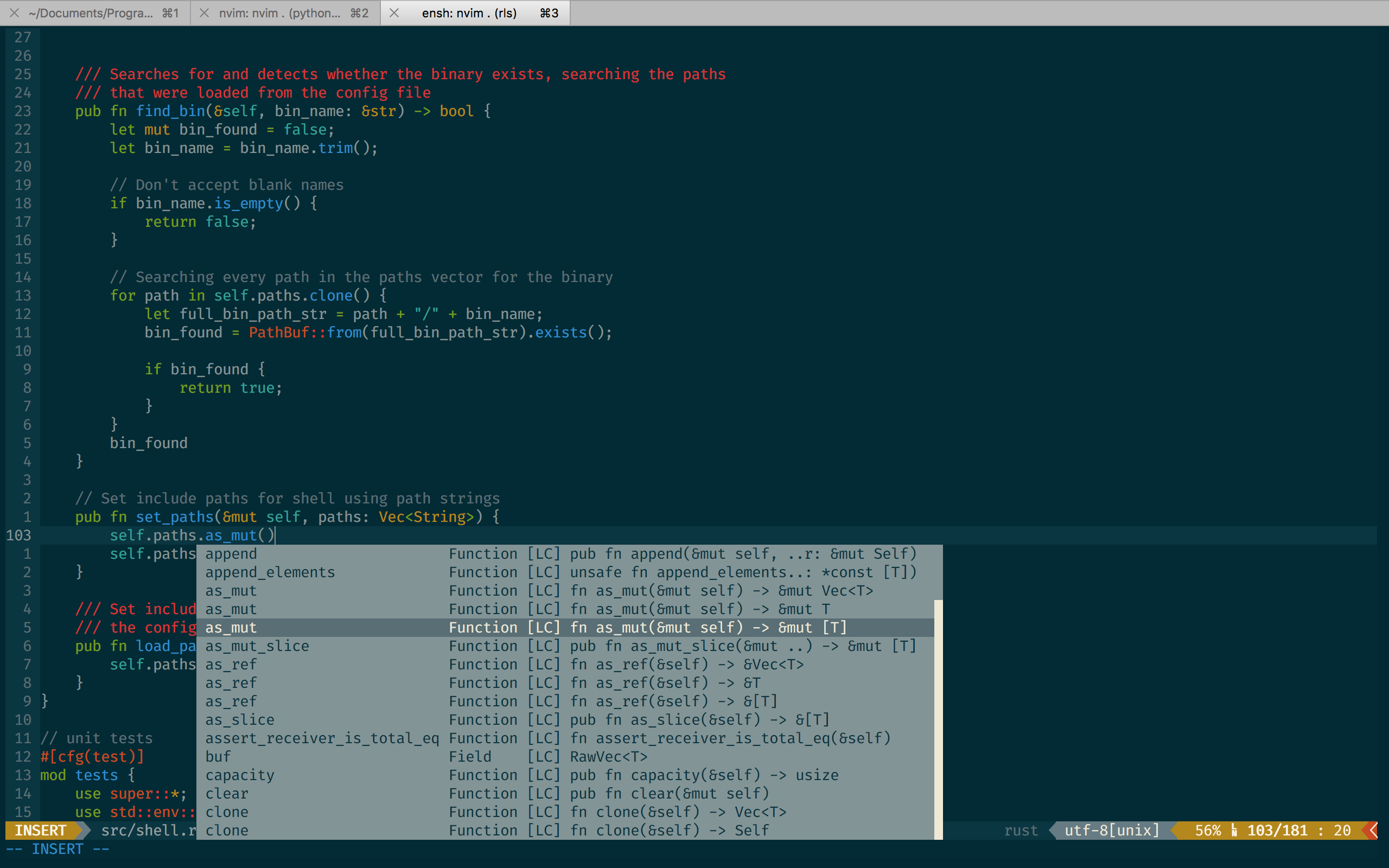
Rust using rls
 afnanenayet
on 15 Apr 2018
afnanenayet
on 15 Apr 2018
Updated.
Shougo
on 16 Apr 2018
It would be nice to have the deoplete configuration for every screenshot showed...
 caneta
on 18 Apr 2018
caneta
on 18 Apr 2018
I'd be happy to post mine, @Shougo would you want to add a section with footnotes containing the config for each screenshot?
afnanenayet
on 18 Apr 2018
I think the link is better than paste the configuration.
If you upload it, I will add it
Shougo
on 19 Apr 2018
Thank you @Shougo and @afnanenayet! That would be great for newbies to have simple snippets as configuration starting point.
caneta
on 19 Apr 2018
Here's a gist with my deoplete settings:
https://gist.github.com/afnanenayet/8c2ee0fdabb8d1e292b788f9723673c5
afnanenayet
on 19 Apr 2018
@afnanenayet Sorry for off topic, but I see that you use python-language-source. How's your experience with it? Is it better than deoplete-jedi + jedi in terms of completion, goto definition, etc?
balta2ar
on 19 Apr 2018
The language server uses Jedi for source code analysis, so using the server just gives me the bonus of having a readily available linter, etc.
afnanenayet
on 20 Apr 2018
I have added the link.
Shougo
on 22 Apr 2018
Hello, sorry for the possibly tedious answer... I was looking at @richox gif using neco-vim and exploring g:deplete variables and I've realized that, although I am able to see all functions after typing call deoplete<TAB>, when I type let g:deoplete<TAB> I only see a few vars from deoplete...
" Code completion & Syntax
" Plugin 'autozimu/LanguageClient-neovim'
Plugin 'Shougo/deoplete.nvim', { 'do': ':UpdateRemotePlugins' }
Plugin 'Shougo/neco-vim'
Plugin 'zchee/deoplete-zsh'
Plugin 'zchee/deoplete-jedi'
Plugin 'wellle/tmux-complete.vim'
Plugin 'JuliaEditorSupport/deoplete-julia'
Plugin 'JuliaEditorSupport/julia-vim'
Plugin 'plasticboy/vim-markdown'
Plugin 'lervag/vimtex.git'
" Plugin 'lionawurscht/deoplete-biblatex'
Plugin 'SirVer/ultisnips'
Plugin 'honza/vim-snippets'
Plugin 'chrisbra/csv.vim'
Plugin 'rstacruz/sparkup', {'rtp': 'vim/'}
Plugin 'chrisbra/vim-zsh'
Plugin 'vim-scripts/Vim-Gromacs'
Plugin 'w0rp/ale'
Plugin 'KeitaNakamura/highlighter.nvim', { 'do': ':UpdateRemotePlugins' }

...

let g:deoplete#enable_at_startup = 1
if !exists('g:deoplete#omni#input_patterns')
    let g:deoplete#omni#input_patterns = {}
endif
let g:deoplete#omni#input_patterns.tex = g:vimtex#re#deoplete
let g:deoplete#max_list = 100000
is it possible that some other external sources are messing up with neco-vim?
thank you! and sorry to bother! I'm quite new to neovim (just made the big step from vim a few days ago) and I still have to get used to @Shougo awesome (but tricky! ;P) plugins!
 rebelot
on 6 Jun 2018
rebelot
on 6 Jun 2018
Hello, sorry for the possibly tedious answer... I was looking at @richox gif using neco-vim and exploring g:deplete variables and I've realized that, although I am able to see all functions after typing call deoplete
, when I type let g:deoplete I only see a few vars from deoplete...
It is feature.
I have removed old variables in deoplete.
Please use deoplete#custom#option() instead.
:help deoplete-options
Shougo
on 6 Jun 2018
@Shougo thank you for your prompt reply! I see, but If I call deoplete#custom#option() I'll have to redefine also default values that I am already ok with... or am I missing something? also... since I am here... is it possible to trigger deoplete completion manually without typing any character? I like to have autocompletion as I type, and I am ok with min_pattern_length = 2 and complete_method = "complete", but I'd like to call deoplete#mappings#manual_complete() (i.e. with imap <expr> <C-Space> deoplete#mappings#manual_complete()) from any point to see top level modules and variables for example
Thank you again!
rebelot
on 6 Jun 2018
I'll have to redefine also default values that I am already ok with... or am I missing something?
You don't have to set all options. Please read the documentation...
is it possible to trigger deoplete completion manually without typing any character?
Possible.
Please use deoplete#manual_complete() like this.
imap <expr><C-Space> deoplete#manual_complete()
thank you @Shougo, I feel bad for this off topic, but what I was aiming for is to be able to press <C-Space> also on a blank line, not after a character.
https://stackoverflow.com/questions/50719034/manually-trigger-deoplete-anywhere-to-explore-top-level-names
rebelot
on 7 Jun 2018
It is bug of neovim.
I will fix it later.
Shougo
on 8 Jun 2018
I have fixed the manual completion error.
No problem.
Shougo
on 9 Jun 2018
this is exactly the behavior I expected! thanks!
but....

The process remains there hanging even after i close neovim. It happens only if I call manual completion after a whitespace, not after or within a word.
Also, the problem seems to arise only on a [New Buffer] type of buffer (i.e. no filetype specified or unsaved?). I am not able to reproduce this consistently though. It might depend on call deoplete#custom#option('max_list', 100000) and wellle/tmux-complete.vim from which the most of the candidates are coming from.
I don't think it is your bug, but advise users to be careful about "unexpected behavior" when using this feature in some circumstances, as it is likely that _literally all available candidates from all sources will try to populate the list!_
Thank you again Shougo
rebelot
on 9 Jun 2018
The process remains there hanging even after i close neovim. It happens only if I call manual completion after a whitespace, not after or within a word.
I don't work for the problem.
Because, you don't create the issue.
Shougo
on 10 Jun 2018
Also, the problem seems to arise only on a [New Buffer] type of buffer (i.e. no filetype specified or unsaved?). I am not able to reproduce this consistently though. It might depend on call deoplete#custom#option('max_list', 100000) and wellle/tmux-complete.vim from which the most of the candidates are coming from.
I think it seems tmux-complete.vim problem.
Shougo
on 10 Jun 2018
You have said I want to get all candidates.
It is your expected behavior.
Shougo
on 10 Jun 2018
The input check should be added.
Shougo
on 10 Jun 2018

 takkii
on 29 Aug 2018
takkii
on 29 Aug 2018
OK. I have updated it.
Shougo
on 30 Aug 2018
hi,
i've just switched to neovim from vs code. i am expecting the auto complete color scheme to be more readable and easy on eye. is it possible??
Please answer to a noob.

 Mesbah214
on 24 Mar 2020
Mesbah214
on 24 Mar 2020
This site is not Q/A site.
And you should read deoplete documentation.
Q: Is there a way to control the colors used for popup menu using highlight
   groups?

A: Like this:
>
    highlight Pmenu ctermbg=8 guibg=#606060
    highlight PmenuSel ctermbg=1 guifg=#dddd00 guibg=#1f82cd
    highlight PmenuSbar ctermbg=0 guibg=#d6d6d6
<

Here's some Rust code with autozimu/LanguageClient-neovim and deoplete. :)
 orangecms
on 16 Jul 2020
orangecms
on 16 Jul 2020
Thanks.
Shougo
on 17 Jul 2020
Related issues
 callmekohei
·
4Comments
callmekohei
·
4Comments
 tcstory
·
5Comments
tcstory
·
5Comments
 tomspeak
·
5Comments
tomspeak
·
5Comments
 nikitavoloboev
·
3Comments
nikitavoloboev
·
3Comments
 monicao
·
3Comments
monicao
·
3Comments
Most helpful comment
It would be nice to have the deoplete configuration for every screenshot showed...