I was confused how my scripts weren't available (even mistakenly blamed $DENO_DIR variable), but turns out my installed scripts aren't available with the exact -n property I give them by doing so:
deno install -n test_script https://gist.github.com/raw/b1d7c6a2617a40d092f6fa5e055ac748/test.ts
Instead, they're only available with .cmd extension:
$ ls /c/Users/Jerry/.deno/bin
deno.exe  file_server.cmd  test_script.cmd

$ test_script
bash: test_script: command not found

$ test_script.cmd
Huh
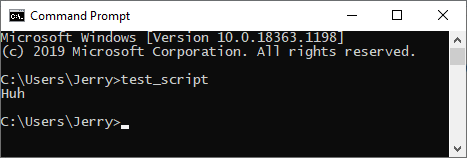
Btw, it's related to git-bash linux-like shell, which comes with git, rather than native Windows "command prompt" shell. In command prompt it works without .cmd extension:
Unfortunately, I hate Command Prompt and I never use it.
 JerryGreen
All 11 comments
I'm not sure what's the expected outcome of this issue. Are you asking for Deno to support Git Bash?
If so, yes, maybe it's possible to create some sort of workaround for Git Bash, but at the same time it should be clear that this is an issue with Git Bash not supporting the PathExt environment variable rather than an issue with Deno.
 MarkTiedemann
on 13 Nov 2020
MarkTiedemann
on 13 Nov 2020
I'm not the one to judge if it's a deeper issue in the stack, maybe you're right, but anyway I expected the unix shell to work the same way it works on macos by using Deno, i.e.:
jerrygreen@jerrygreen ~ % ls ~/.deno/bin
db              test_script

jerrygreen@jerrygreen ~ % test_script
Huh
Are you asking for Deno to support Git Bash?
I'm only stating a problem, not asking, but this sounds pretty good, and would likely resolve the issue once and for all.
Otherwise, if it's only native Command Prompt support (who uses it anyway?), and none support for unix shells for Windows (like cygwin or mingw64 environments, which is base for Git Bash), then it's just _unfortunate_.
P.S. I have just found that there are people were having similar confusion:
https://github.com/denoland/deno/issues/6239
https://github.com/denoland/deno/issues/5330
JerryGreen
on 13 Nov 2020
I expected the unix shell to work the same way it works on macos
It doesn't. If you want an actual unix shell on Windows, I recommend using the subsystem for Linux.
I'm not the one to judge if it's a deeper issue in the stack
In a unix shell you must specify the exact name of an executable file, e.g. if your executable is called foo, you can execute it by running ./foo (or foo if it's in the PATH).
On Windows, there are a couple of executable file formats, such as, .exe, .com, .bat, .cmd specified by PATHEXT. These are associated with programs, e.g. .cmd is associated with cmd.exe. So if you have a file called foo.cmd, it's enough to type foo on the command line to execute foo.cmd with cmd.exe. These file associations (which can be set by the user) are kind of like unix shebangs.
Because Git Bash is a unix-like shell, it requires the exact path of the executable file, e.g. foo.cmd. foo will not work.
deno install may be able to work around this issue by writing an (executable) file foo with a shell shebang that executes the desired Deno commands.
I may have some time later today to download Git Bash and look into this.
I hate Command Prompt and I never use it ... who uses it anyway?
I can recommend using it. It has been working just fine for many years now.
And if Batch is not expressive enough for your command line scripting needs, you can always upgrade to PowerShell.
I wouldn't recommend third-party shells on Windows. Again, if you want a unix shell, WSL is the way to go.
MarkTiedemann
on 13 Nov 2020
deno installmay be able to work around this issue by writing an (executable) file foo with a shell shebang that executes the desired Deno commands.
Currently, deno install https://deno.land/[email protected]/examples/colors.ts generates %userprofile%\.deno\bin\colors.cmd with the following content:
% generated by deno install %
@deno.exe "run" "https://deno.land/[email protected]/examples/colors.ts" %*
If deno install would also generate %userprofile%\.deno\bin\colors with the following content,
#!/bin/sh
# generated by deno install
deno "run" "https://deno.land/[email protected]/examples/colors.ts" "$@"
it would indeed support Git Bash.
MarkTiedemann
on 13 Nov 2020
@MarkTiedemann it definitely would. Unfortunately, it's not generated on Windows
JerryGreen
on 13 Nov 2020
Yes, currently the batch script is generated on Windows and the shell script is generated on *nix systems. The fix would be to also generate the shell script on Windows.
MarkTiedemann
on 13 Nov 2020
The question remains whether Deno should support third-party unix shells on Windows.
Personally, I don't care. I think it's fair to assume that if you run Git Bash, Cygwin, Cmder, ConEmu, Hyper, etc. you know that there may be compat issues and can deal with them. At the same time, I'm in favor of reducing potential errors...
MarkTiedemann
on 13 Nov 2020
The fix would be to also generate the shell script on Windows
Yes, though I'm not sure how "ok" that would be to generate both of them. Since currently by doing ls ~/.deno/bin you may get kinda list of all your scripts, and by generating both versions it'll show duplicates also, which is.... Meh. Unlikely to break anything, more like I _personally_ would prefer to not generate .cmd at all... I don't even believe that Command Prompt is widely used (it's more like Internet Explorer, - an app to download a browser, - and same with cmd).
whether Deno should support third-party unix shells on Windows
To me this Command Prompt is more like some third-party shell, where the third party is some old-version of Microsoft from 1987. While the real _first-party_ shell is GNU shell: it's used on every linux (preinstalled), it's used on macos (preinstalled), it's open source, and it's simply most popular shell.
You're right that's an option to use WSL! It's just... Too big of a burden, with virtualization, etc. Git Bash is a lightweight version of this GNU shell.
I honestly don't know an ideal solution. Maybe generating two versions is fine...
JerryGreen
on 13 Nov 2020
I don't even believe that Command Prompt is widely used
The suggestion is to use PowerShell which runs .cmd. Or if you like Unix, use WSL. Both are widely used _today_, the first party solutions on Windows and supported fine by Deno. These third party solutions have basically been superseded and turn OS detection/support into a multidimensional problem.
You're right that's an option to use WSL! It's just... Too big of a burden, with virtualization, etc. Git Bash is a lightweight version of this GNU shell.
You're trying to run a Unix environment on Windows, it should require that much, and the solution should make things work out-of-the-box or there's no point. Git Bash is clearly not working for you here without special support, it's a bit paradoxical to praise it to justify support that it shouldn't require.
 nayeemrmn
on 13 Nov 2020
nayeemrmn
on 13 Nov 2020
You're trying to run a Unix environment on Windows, it should require that much
It shouldn't.
Git Bash is clearly not working for you here without special support, it's a bit paradoxical to praise it to justify support that it shouldn't require.
It works. .cmd requirement is not such big of a deal, but people still confused why they get "command not found" without .cmd, me including. I don't praise Git Bash particularly, I praise GNU shell though. But you know what? I feel offended so fuck you 🖕
JerryGreen
on 13 Nov 2020
Yes, though I'm not sure how "ok" that would be to generate both of them.
Maybe generating two versions is fine...
I think generating two files is fine.
Since currently by doing
ls ~/.deno/binyou may get kinda list of all your scripts, and by generating both versions it'll show duplicates also, which is.... Meh.
You can use dir %userprofile%\.deno\bin\*.cmd or ls ~/.deno/bin/*.cmd instead if you don't want to have any duplicates.
You're right that's an option to use WSL! It's just... Too big of a burden, with virtualization, etc. Git Bash is a lightweight version of this GNU shell.
That's different from my experience. The startup time of Git Bash and Ubuntu on my Windows are roughly the same, though Ubuntu is a bit faster.
I don't even believe that Command Prompt is widely used
To me this Command Prompt is more like some third-party shell, where the third party is some old-version of Microsoft from 1987. While the real first-party shell is GNU shell
In my experience, most Windows developers use cmd or powershell (or a combination of both) which makes sense given that they are installed by default.
I feel offended so f* you
Please be kind. There's no need to be rude.
I don't know Deno's code of conduct well, but I am fairly certain that you may need to re-consider such statements if you want to continue contributing.
Git Bash is clearly not working for you here without special support
I think deno install can offer this support. But I'm not a core contributor so, in the end, this isn't my decision to make.
@JerryGreen Would you like to create a MR to generate the shell script on Windows? If you need help, feel free to ask.
MarkTiedemann
on 13 Nov 2020
Related issues
 motss
·
3Comments
motss
·
3Comments
 somombo
·
3Comments
somombo
·
3Comments
 CruxCv
·
3Comments
CruxCv
·
3Comments
 kitsonk
·
3Comments
kitsonk
·
3Comments
 metakeule
·
3Comments
metakeule
·
3Comments
Most helpful comment
It doesn't. If you want an actual unix shell on Windows, I recommend using the subsystem for Linux.
In a unix shell you must specify the exact name of an executable file, e.g. if your executable is called
foo, you can execute it by running./foo(orfooif it's in the PATH).On Windows, there are a couple of executable file formats, such as,
.exe,.com,.bat,.cmdspecified by PATHEXT. These are associated with programs, e.g..cmdis associated withcmd.exe. So if you have a file calledfoo.cmd, it's enough to typefooon the command line to executefoo.cmdwithcmd.exe. These file associations (which can be set by the user) are kind of like unix shebangs.Because Git Bash is a unix-like shell, it requires the exact path of the executable file, e.g.
foo.cmd.foowill not work.deno installmay be able to work around this issue by writing an (executable) filefoowith a shell shebang that executes the desired Deno commands.I may have some time later today to download Git Bash and look into this.
I can recommend using it. It has been working just fine for many years now.
And if Batch is not expressive enough for your command line scripting needs, you can always upgrade to PowerShell.
I wouldn't recommend third-party shells on Windows. Again, if you want a unix shell, WSL is the way to go.